Recommended resources
The freely available resources this lesson will direct you to.
Hello! In our last lesson, we explored the "why" behind functions, seeing how they help us organize code, promote reusability, and create abstractions. This conceptual groundwork is crucial as we move from writing small scripts to building robust programs.
Today, we transition from the "why" to the "how." Our focus will be on the C syntax for creating your own functions. Specifically, you will learn how to define a function that accepts input data through parameters and sends a result back using a return value. This is the fundamental skill for making your programs modular and powerful.
1. The Anatomy of a C Function
In the previous lesson, we treated functions like printf as black boxes. Now, we'll learn how to build our own. A function definition has several key parts that tell the compiler what the function does, what kind of data it needs, and what kind of data it produces.
Let's look at the structure of a typical function definition.
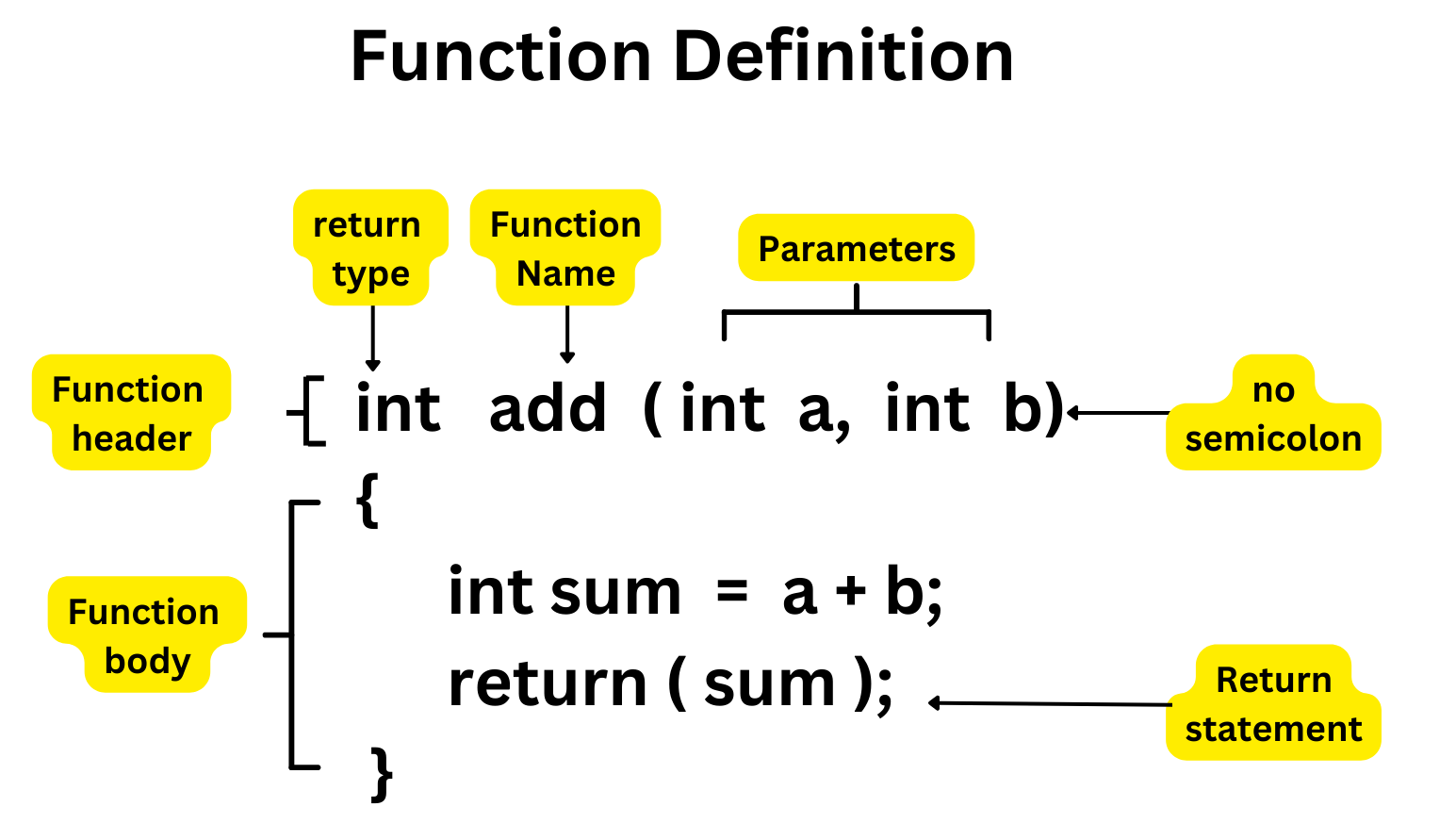
As the diagram shows, a function definition consists of:
- Return Type: The data type of the value the function will send back to the code that called it (e.g.,
int,float,char). If the function doesn't return any value, we use the special typevoid. - Function Name: A unique identifier for the function (e.g.,
add,calculateArea). It follows the same naming rules as variables. - Parameters: A comma-separated list of variable declarations inside the parentheses. These act as "input" variables for the function, allowing you to pass data into it. A function can have zero or more parameters.
- Function Body: The block of code between the curly braces
{ ... }that contains the statements to be executed when the function is called. - Return Statement: The
returnkeyword followed by a value. This statement terminates the function and sends the specified value back to the caller.
Let's watch a video that walks through creating a simple add function, identifying each of these parts.
Function Basics | C Programming Tutorial
This segment from the "Function Basics" video by Portfolio Courses provides a clear, step-by-step walkthrough of defining a function with parameters and a return value.
Please watch the section from Function Definition. The speaker does an excellent job of dissecting the function header and body of an add function, explaining each component.
2. Parameters and Arguments: The "Inputs"
A key aspect of making functions reusable is giving them data to work with. This is done through parameters. It's important to be precise with our terminology here.
- A parameter is the variable listed inside the parentheses in the function definition. It's a placeholder for the value that will be passed in.
- An argument is the actual value that is sent to the function when it is called.

Essentially, when you call a function, the arguments you provide are used to initialize the corresponding parameters.
Let's read a short article that reinforces this concept with clear examples.
This W3Schools page provides concise examples of defining functions with single and multiple parameters.
Read from the beginning down to the section titled "Multiple Parameters". Pay close attention to the examples showing how to define a function that accepts a char name[] and another that accepts both a name and an int age. Note the clear distinction they make between parameters and arguments.
When defining a function with multiple parameters, the order and data types matter. The arguments you provide in the function call must match the parameters in the function definition in both number and type.
3. Return Values: The "Output"
Just as parameters provide input to a function, the return statement provides its output.
- The data type specified before the function name is its return type.
- Inside the function, the
returnkeyword is used to exit the function and send a value back. - The value being returned must be compatible with the function's declared return type.
- A function with a
voidreturn type cannot return a value. Its execution simply ends when the final}is reached, or when areturn;statement (with no value) is encountered.
Let's create a practical example: a function to convert a temperature from Fahrenheit to Celsius. This function will take one float parameter (the temperature in Fahrenheit) and will return a float value (the temperature in Celsius). The formula is .
#include <stdio.h>

// Function definition
float fahrenheitToCelsius(float fahrenheit) {
    float celsius = (fahrenheit - 32.0) * (5.0 / 9.0);
    return celsius;
}

int main(void) {
    float temp_f = 98.6;
    float temp_c;

    // We call the function and store its return value in a variable
    temp_c = fahrenheitToCelsius(temp_f);

    printf("%.1f degrees Fahrenheit is %.1f degrees Celsius.\n", temp_f, temp_c);

    return 0;
}
In this code:
fahrenheitToCelsiusis defined with afloatreturn type and afloat fahrenheitparameter.- Inside
main, we call the function with the argumenttemp_f. - The function executes, calculates the Celsius value, and
returns it. - The returned value is assigned to the
temp_cvariable inmain.
The Programiz video below provides another excellent explanation of parameters and return values, walking through a similar addNumbers example.
#15 C Functions | [2025] C Programming for Beginners
The video "#15 C Functions" by Programiz clearly demonstrates how to add parameters and return values to functions.
Watch the section on function parameters, where the narrator builds a function that accepts multiple inputs. Then, continue through the next section on return values, which shows how to modify the function to return a result instead of printing it.
4. Putting It All Together
So far, we've defined our functions before the main function. This is a common and straightforward practice. The C compiler reads your code from top to bottom. By defining a function before it's used (for example, before main calls it), you ensure the compiler knows about the function's existence, its parameters, and its return type ahead of time.
Let's solidify this with one more complete example. We will write a program that calculates the area of a rectangle.
#include <stdio.h>

/*
 * Function: calculate_area
 * ------------------------
 * Computes the area of a rectangle.
 *
 * width: the width of the rectangle (should be a positive value)
 * height: the height of the rectangle (should be a positive value)
 *
 * returns: the computed area of the rectangle as a double.
 */
double calculate_area(double width, double height) {
    // A simple check to ensure dimensions are valid
    if (width <= 0 || height <= 0) {
        return 0; // Return 0 for invalid dimensions
    }
    double area = width * height;
    return area;
}

int main(void) {
    double w = 10.5;
    double h = 5.0;
    double result;

    // Call the function with arguments w and h
    result = calculate_area(w, h);

    printf("The area of a rectangle with width %.2f and height %.2f is %.2f\n", w, h, result);

    return 0;
}
Your Turn to Experiment:
- Copy the code above into your development environment.
- Compile and run it to see the output.
- Modify the
mainfunction to callcalculate_areawith different values, including a negative number, to see how theifstatement inside the function works. - Try to create a new function,
calculate_perimeter, that takes the same parameters but returns the perimeter (). Call this new function frommainand print its result.
Conclusion
You've now learned the essential syntax for building your own functions in C. This is a huge leap forward in your ability to write clean, organized, and powerful programs.
Key Takeaways:
- A function definition consists of a return type, a name, a list of parameters, and a body.
- Parameters are variables in the function definition that act as placeholders for input.
- Arguments are the actual values you pass to a function when you call it.
- The
returnstatement exits a function and sends a value back to the caller. The type of this value must match the function's return type. - Functions that do not return a value have a return type of
void.
Preview of the Next Lesson:
We briefly saw how to call a function and use its result today. In the next lesson, we will dive deeper into the mechanics of a function call. We'll explore how return values can be used directly in expressions and gain a more formal understanding of how the program's control flows when a function is invoked and when it returns.