Recommended resources
The freely available resources this lesson will direct you to.
In our previous lessons, we explored the world of libraries—reusable bundles of code like Lucide and Framer Motion that you can plug into your project to add specific functionality, much like adding individual parts to a custom build. We established a clear pattern: you find a part you need, install it, and then call upon it in your code whenever you see fit.
Today, we're shifting our focus from the "parts" to the "chassis" that holds them all together. This lesson tackles the crucial distinction between a library and a framework. You'll often see your AI assistant generate projects using tools like Next.js for web or React Native for mobile, and understanding what a framework is will demystify why your project suddenly has a rigid structure and a lot of pre-made files. By the end of this lesson, you will be able to explain what a framework is and how its fundamental relationship with your code differs from that of a library.
The Core Difference: Who Is in Control?
Let's start with an analogy from your world of hobby building.
-
A library is like your personal toolbox and parts bin. Imagine you're building a custom drone from scratch. You decide the overall design. When you need a specific function, like stabilizing the drone, you reach into your parts bin, grab a gyroscope sensor (a library), and write the code to integrate it into your flight controller. You are in control. You call upon the library when you need it.
-
A framework is like a pre-designed drone kit. The kit comes with a carbon fiber frame that has pre-drilled holes and mounting points for the motors, the battery, and the flight controller. The kit's design dictates the overall structure. You still have choices—you can pick your favorite brand of motor—but you must mount it where the frame's blueprint specifies. The framework provides the structure and calls on you to fill in the blanks with your custom pieces (your code).
This fundamental difference is known in software development as Inversion of Control. It's the single most important concept for distinguishing between libraries and frameworks.

The following article offers a great explanation of this idea using a different analogy: buying furniture from IKEA versus building a model home.
The Difference Between a Framework and a Library
This freeCodeCamp article provides a clear, non-technical introduction to the topic before defining the technical difference.
Start by reading the introduction and the house analogy. Then, continue to the section on "The Technical Difference," which formally introduces "inversion of control." Finally, read the section on being "opinionated" and the final summary. The term "opinionated" is key to understanding why frameworks impose certain rules.
As the article explains, the framework is "in charge of the flow." It provides a skeleton for your application and defines where your code should live and how it should be structured.
A Concrete Example: React vs. Next.js
This distinction becomes very clear when you look at two of the most popular tools in modern web development: React and Next.js. You will see your LLM assistant use these constantly.
-
React is a library. Its sole purpose is to help you build user interfaces out of components. It’s a powerful library, but it's only concerned with the UI. It doesn't have an opinion on how you should handle page navigation (routing), how you should get your data, or how you should structure your project files. It's just a tool in your toolbox.
-
Next.js is a framework built on top of React. It takes the React library and builds a complete application structure around it. It makes decisions for you, providing built-in solutions for routing (creating a file in the
pagesfolder automatically creates a new page), data fetching, and image optimization. It's the pre-designed drone kit that uses React components as the "parts."
The official Next.js documentation explains this relationship well.
React Foundations: About React and Next.js | Next.js
This page from the Next.js learning path clearly defines both tools and their relationship.
Read the section "What is React?" to understand its role as an "unopinionated" library. Then, read the section "What is Next.js?" to see how it acts as a framework that provides structure and features for React.
The same concept applies to mobile development. React Native is a framework that lets you use React (the library) to build native iOS and Android apps. It provides the "chassis" for a mobile app, and you fill it in with your React components.
This video provides a great visual and verbal walkthrough of these ideas, again using the React/Next.js example to make the point.
Libraries vs Frameworks: The Ultimate Showdown
This video from The Coding Gopher uses the "toolbox" vs "blueprint" analogy and clearly explains how Next.js turns React into a framework-like experience.
Watch from the beginning to hear the basic definitions. Then, jump to the section that discusses React and Next.js. This part is crucial as it directly explains how a framework like Next.js builds upon a library like React.
The Trade-Off: Flexibility vs. Structure
So, which is better? Neither. They are different tools for different jobs, and the choice involves a trade-off.
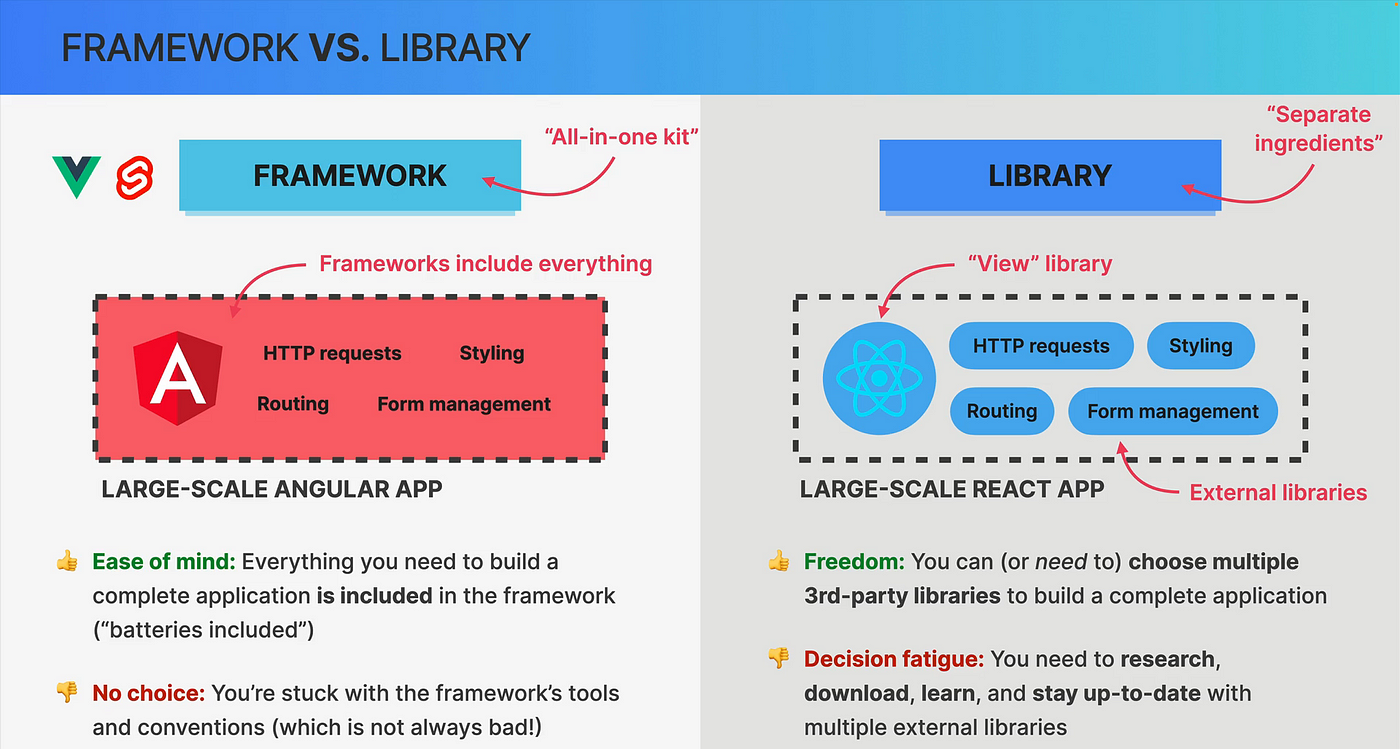
- Libraries give you freedom. You can combine any libraries you want to build a completely custom application. The downside is that you have to make all the decisions, which can be time-consuming and lead to what designers know as "analysis paralysis" or, in this context, "decision fatigue."
- Frameworks give you speed and structure. They provide a ready-made, professional-grade foundation for your application, which is why LLMs love them for complex requests like "build me a blog." The downside is that you lose some freedom. You have to follow the framework's rules and conventions.
This video from Codecademy offers another excellent analogy and summarizes the core concepts we've discussed.
What are libraries and frameworks?
This video uses a house construction analogy that neatly reinforces the concepts of tools (libraries) and foundations (frameworks).
First, watch the section explaining the house building analogy. Then, watch the most important part, which explains inversion of control—the true technical differentiator we've been discussing.
Understanding this trade-off helps you understand why your AI assistant makes certain choices. For a simple, single-page portfolio, it might just use HTML and a few libraries. But for an e-commerce site, a social media app, or anything involving multiple pages and user data, it will almost certainly reach for a framework to get the benefit of that pre-built structure.
Conclusion
You now have a solid mental model for one of the most fundamental concepts in modern software development. You've moved beyond seeing code as just a collection of files and can now recognize the underlying architecture—whether it's a flexible, custom-built structure using libraries or a rigid, efficient one provided by a framework.
Key Takeaways:
- The core difference between a library and a framework is Inversion of Control.
- You call a library: It’s a tool you use when and where you decide.
- A framework calls you: It's a blueprint or structure that dictates where your code fits.
- React is a popular UI library; Next.js and React Native are popular frameworks that use React.
- The choice between them is a trade-off: libraries offer flexibility, while frameworks offer speed and structure.
In this module, we've covered the different kinds of code "parts"—libraries and frameworks—that make up a project. But once you have a project, how do you save your work, share it with others, or roll back to a previous version if something breaks? In the next module, we will dive into Git and GitHub, the essential tools for managing the history of your code.