Recommended resources
The freely available resources this lesson will direct you to.
Welcome! In our last session, we mapped out the typical project folder, learning to distinguish between the source code you create, the configuration files you adjust, and the generated files you leave alone. We established that the node_modules folder is like a massive warehouse, and package.json is your shopping list for filling it.
This lesson zooms in on the items in that warehouse. We'll answer the question: what exactly are these "packages" and "libraries" that Claude is always asking you to install? And more importantly, why do we use them? Why not just build everything from the ground up? Understanding this is key to appreciating the collaborative and efficient nature of modern software development. It's the difference between fabricating every single screw and bolt for a project yourself versus using standardized, reliable, pre-made parts.
Why Not Build Everything from Scratch?
Imagine you're building a custom drone. You'd likely design and 3D print the frame yourself—that's the unique part of your project. But would you also try to manufacture your own flight controller, motors, and GPS module from raw silicon and copper? Probably not. You'd buy those as pre-built components because they are complex, require specialized expertise, and have been tested extensively by others.
Software development follows the exact same logic. Writing code to handle, say, complex date and time calculations across different time zones is surprisingly difficult. Instead of "reinventing the wheel," developers rely on pre-built, battle-tested pieces of code to handle common tasks. This lets them focus their energy on the unique, creative parts of the application—the parts that deliver value to the user.
This video from Coder Coder uses a great car-building analogy to explain this fundamental principle of code reuse.
What is NPM, and why do we need it? | Tutorial for beginners
This video introduces the core idea behind npm and package managers, explaining why we rely on code written by others.
Watch the section from the car analogy. The key idea is that assembling pre-built parts is far more efficient than creating every single component from scratch. This is the central reason for reusing code.
What is a Package? What is a Library?
So, we use pre-built "parts." In the world of JavaScript, these parts are called packages.
A package is the most general term. It's simply a bundled collection of code files that can be easily shared and installed. Think of it as a flat-pack box from IKEA: it contains all the pieces and instructions needed to build something.
Often, the "something" inside the package is a library. A library is a collection of reusable code that provides specific functions or tools. Your code is in charge and "calls" the library to perform a task when needed.
The following article uses a fantastic LEGO analogy that perfectly captures this idea.
Explain like I’m five: package managers - DEV Community
This article from DEV Community explains packages using an analogy that will feel very familiar to anyone who enjoys building things.
Read the section from the beginning. The key takeaway is that a package is like a pre-designed LEGO set (e.g., a magic tree) that you can easily add to your larger creation (the wizardry school castle), saving you the effort of designing it yourself.
So, to summarize:
- A Package is the container, the bundle of files you download (like the LEGO box).
- A Library is often the content inside that package, providing a set of tools for you to use (like the LEGO bricks and instructions).
This image provides a simple visual summary of the key terms, including "Framework," which we'll discuss in a future lesson.
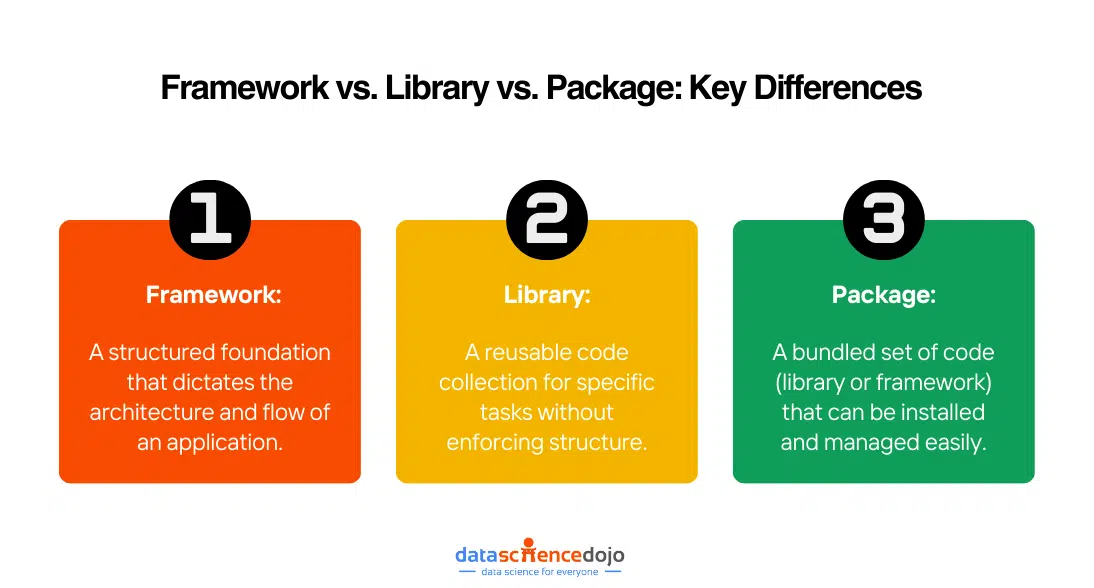
The Power of Libraries in Practice
Let's make this concrete. Imagine your app needs a sign-up form, and you want to make sure users enter a valid email address. You could try to write the logic for this yourself, but it's tricky. Does it have an @ symbol? Does it have a domain like .com? What about more complex domains like .co.uk?
Instead of solving this problem yourself, you can use a library built by experts who have already thought about all the edge cases. The video below gives a brilliant demonstration of this.
What are libraries and frameworks?
This video from Codecademy shows a side-by-side comparison of validating an email from scratch versus using a simple library.
Watch the section from the email validation example. Notice how a long, complicated, and hard-to-read function is replaced by a single, clear line of code after importing the email-validator library. This is the power of libraries in action: they save you time and make your code more readable.
When you see import validator from 'email-validator' in the video, you now know what's happening behind the scenes:
- A developer ran
npm install email-validator. npmdownloaded theemail-validatorpackage and all its own dependencies into thenode_modulesfolder.- The
importstatement in the source code tells JavaScript to find and use that library fromnode_modules.

This is the workflow you'll constantly use when "vibe coding." When Claude suggests npm install framer-motion to add animations, it's telling you to download a powerful animation library so you don't have to write the complex physics and timing logic yourself. You simply import the tools you need from the library and use them to create your vision.
Conclusion
Today we've demystified one of the most fundamental concepts in modern development. You're no longer just blindly running npm install; you now understand the principle of code reuse that drives it.
Key Takeaways:
- Developers reuse code to build applications faster, more reliably, and to focus on the unique aspects of their projects.
- A package is a bundle of reusable code that can be easily installed.
- A library is a collection of functions and tools within a package that your code can call upon to perform specific tasks.
- Using libraries saves you from "reinventing the wheel" for common problems like form validation, animation, or date manipulation.
Now that you understand what packages are and why they are so essential, you might be wondering: "How do I find good ones? How do I know which ones are safe and well-maintained?" That is the perfect question, and it's exactly what we'll cover in our next lesson as we learn how to evaluate and choose the right packages for your projects.