Recommended resources
The freely available resources this lesson will direct you to.
In our previous lesson, we established that modern software development is a lot like building a drone or a piece of furniture: you don't fabricate every screw and circuit yourself. You rely on pre-built, standardized components—packages and libraries—to do the heavy lifting. This frees you up to focus on the unique, creative aspects of your project.
That left us with a crucial question: with millions of "parts" available in the vast warehouse of npm, how do you choose the right ones? Picking a package isn't just a technical step; it's a design decision with long-term consequences. In this lesson, we'll equip you with the skills to find and evaluate these packages, ensuring the components you choose are popular, reliable, and safe. You'll learn to be a discerning builder, not just a blind assembler.
Your First Stop: The npm Registry
The official catalog for all these components is the npm registry, accessible at npmjs.com. When Claude tells you to npm install something, this is the website it's pulling from. Think of it as the central parts depot for the entire JavaScript ecosystem.
When you look up a package, you're immediately presented with a dashboard of vital statistics. Let's look at a popular and well-established library, lodash, as an example.

Here's what these key metrics tell you:
- Weekly Downloads: This is a powerful indicator of a package's popularity and adoption. A package with millions of weekly downloads is being used and tested in countless real-world applications. It's a strong signal of trust from the developer community.
- Version: This tells you the latest release number. We'll dive deeper into versioning later, but for now, a recent version number suggests the project is actively being updated.
- License: This defines the legal terms for using the package. You'll often see "MIT," which is a very permissive license common in open-source software, essentially allowing you to use it freely.
- Unpacked Size: This gives you a rough idea of how "heavy" the package is—how much space it will take up in your project.
The number of weekly downloads is often the first signal developers look for. The following clip gives you a sense of how developers interpret these numbers.
NPM why what and how | Crash Course | Easy way
This clip from a crash course on npm highlights the significance of the "weekly downloads" metric you see on the npm website.
Watch from this short section where the instructor reacts to the download count for a popular package. Notice how a high number is immediately seen as a sign of popularity and relevance.
While the npm website gives you a good starting point, a thorough evaluation requires a bit more detective work.
The Three Pillars of Package Evaluation
Choosing a quality package involves balancing three key factors: its long-term health, its impact on performance, and its security. A great package excels in all three areas. Let's explore how to assess each one.
The following article from DEV Community provides an excellent, detailed framework for this evaluation process. We'll be walking through its main sections.
How to Evaluate NPM Packages - DEV Community
This article is your guide to becoming a package detective. It breaks down the process of evaluating a package into manageable steps, focusing on longevity, performance, and security.
For now, just read the brief introduction, from the beginning, to understand the risks of choosing the wrong package. We will then go through the other sections one by one.
1. Longevity and Maintenance: Is this project alive?
The first pillar is about sustainability. You don't want to build your app on a foundation that's about to be abandoned. An unmaintained package won't get bug fixes, security patches, or updates, leaving your project vulnerable and outdated.
On the npmjs.com page, you'll find a link to the package's "Repository," which usually points to a GitHub page. This is where the source code lives and where the community collaborates. This is your primary source of intelligence.
How to Evaluate NPM Packages - DEV Community
This section of the article we introduced above shows you how to investigate a project's health and maintenance activity.
Read the section titled Longevity. Pay close attention to how the author goes beyond simple "star counts" and looks at: Star History: Is the project's popularity growing, or has it flatlined? Contributor Activity: Is the project supported by a healthy community, or is it a one-person show? The graphs comparing Evergreen and Base Web are a perfect illustration of this. Code Frequency: Are updates consistent, or are there long periods of inactivity?
In short, you're looking for signs of life. A healthy project has recent commits, active discussions in the "Issues" tab, and a community of contributors.
2. Performance: Will this slow my app down?
The second pillar is performance. Some packages, while powerful, are very large and can significantly increase your app's loading time. This is especially critical for websites, where every second counts.
How do you measure this?
How to Evaluate NPM Packages - DEV Community
This section of the article introduces tools and concepts for measuring a package's performance impact.
Now, read the section on Performance. The key takeaways here are: The Moment.js vs. Day.js example: It shows how two libraries can have similar functionality but vastly different sizes. Bundlephobia: This is an essential online tool that analyzes a package and reports its size. Bookmark it! Tree Shakable: This is a crucial concept. A "tree-shakeable" package allows your build process to automatically discard any parts of the library you aren't actually using, drastically reducing the final size of your app.
When you use an LLM to build a web app, it will often set up a build process (using tools like Vite or Next.js). This process includes "tree shaking," so choosing libraries that support it is a huge win for performance.
3. Security: Can I trust this code?
Finally, the most critical pillar: security. When you run npm install, you are downloading and running code written by strangers on your computer. While the vast majority of packages are safe, malicious packages do exist. This is known as a "supply chain risk."
How to Evaluate NPM Packages - DEV Community
This final section covers the basics of assessing a package's security risk.
Read the section on Security. Focus on these points: Dependencies: A package with many dependencies has a larger "attack surface"—a vulnerability in any one of its dependencies becomes a vulnerability for you. npm audit: This is a command you can run in your terminal. It checks all your project's dependencies against a database of known vulnerabilities and alerts you to any risks. The event-stream example: This is a famous case of a popular package being hijacked to include malicious code, highlighting why this matters.
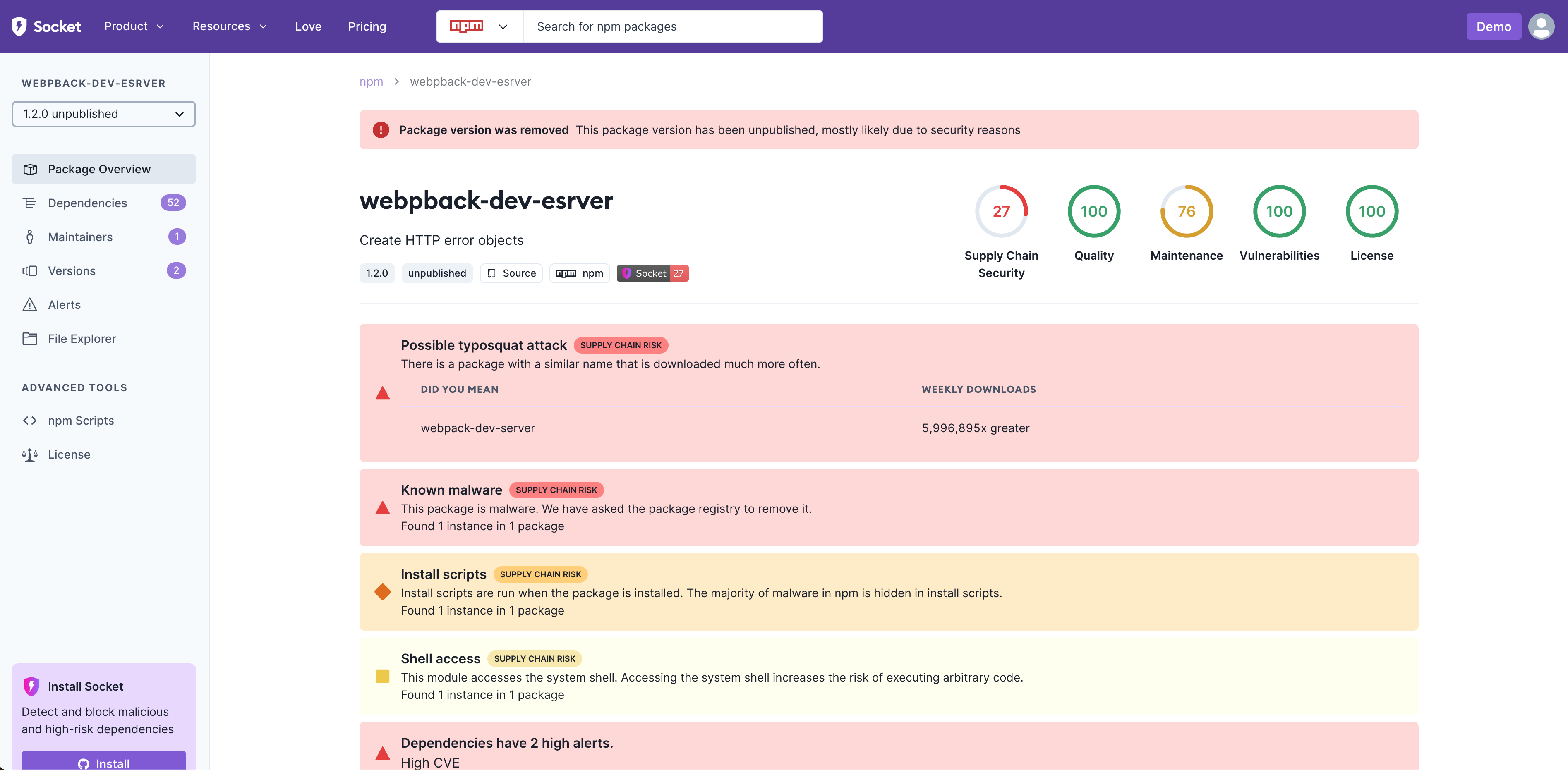
As this is a growing concern, new tools are emerging to help developers assess risk. Services like Socket scan packages for red flags, such as suspicious install scripts or known malware, and provide a comprehensive security report.
Finding Packages: A Better Search Engine
You might have noticed that finding new packages on npmjs.com can be difficult if you don't already know what you're looking for. Its search function is notoriously basic. Fortunately, the community has built better tools.
The Strange World of NPM Site Alternatives | Michael Walter Van Der Velden
This article discusses the shortcomings of the official npm search and highlights better alternatives built by the community.
First, read the section explaining why alternatives exist. This confirms a common frustration among developers. Then, skip down and read the section on npms.io. This is a popular and highly effective alternative search engine. Notice how it gives you a quality score right in the search results, which is based on the very criteria we've just discussed!
Using a tool like npms.io can dramatically speed up your evaluation process by surfacing high-quality, well-maintained packages first.
Conclusion
You now have a robust framework for evaluating any npm package Claude or another LLM suggests. You've moved from being a passive instruction-follower to an active, critical builder who understands how to source quality components.
Key Takeaways:
- Start your evaluation on npmjs.com by checking key stats like weekly downloads and last publish date.
- Dig deeper by investigating the three pillars:
- Longevity & Maintenance: Check the GitHub repository for recent activity, a healthy number of contributors, and open issues.
- Performance: Use Bundlephobia to check the package's size and whether it supports tree shaking.
- Security: Run
npm auditin your project and be aware of tools like Socket that provide deeper security analysis.
- Use a better search engine like npms.io to find high-quality packages more efficiently.
In our next lesson, we'll put this knowledge into practice. We'll explore some of the most popular and useful libraries for designers, including Framer Motion for animations and Lucide for icons, and you'll add one to a sample project.