Recommended resources
The freely available resources this lesson will direct you to.
Hello! Last lesson, you used loops to apply the same logic to several values. A function lets you give that logic a name, supply different inputs each time, and use its result elsewhere. That is how a ticket rule can become a reusable part of a program rather than code copied into every loop.
This lesson focuses on defining and calling functions, passing arguments, returning values, choosing defaults, and keeping temporary variables local. Allow about 40 minutes, including time to run the examples in Node.js.
Define a function, then call it
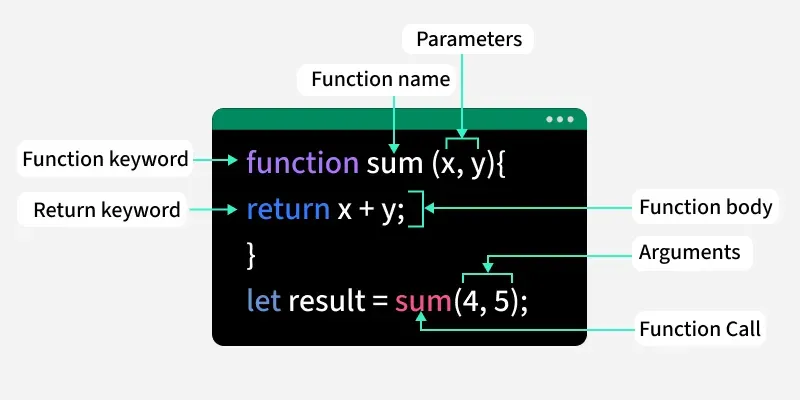
A function declaration names a block of code. The block does not run merely because you define it; it runs when you call the function.
function announceReview() {
  console.log("Review the ticket queue");
}

announceReview();
announceReview();
This prints the message twice. The declaration says what to do; each pair of parentheses in announceReview() says do it now. You have already called functions such as console.log()—here you are defining one yourself.
Watch the declaration, call, and parameter demonstrations in JavaScript Functions Crash Course from freeCodeCamp.org. Focus on the code rather than the extra function terminology introduced elsewhere in the course.
JavaScript Functions Crash Course
The demonstrations show the difference between writing a function and executing it, then show how an input reaches the function body.
Watch the declaration for the keyword, name, parentheses, and body; the call for when the body executes; and the input for parameters and arguments. One clarification: a function name without call parentheses refers to the function; it does not execute it. A developer console may display that reference, but a bare reference in a Node.js file does not automatically print anything.
Give each call its own inputs
Suppose the message should identify a particular ticket:
function announceTicket(id) {
  console.log(`Review ticket ${id}`);
}

announceTicket("T-101");
announceTicket("T-102");
id is a parameter: a name in the function declaration. "T-101" and "T-102" are arguments: actual values supplied by the calls. On the first call, id holds "T-101"; on the second, it holds "T-102". You can list multiple parameters, separated by commas, and supply arguments in the corresponding order.
A default makes an input optional when there is a sensible value to use if it is omitted:
function ticketLabel(id, status = "open") {
  return `${id}: ${status}`;
}

console.log(ticketLabel("T-101", "closed")); // T-101: closed
console.log(ticketLabel("T-102"));           // T-102: open
When the second argument is missing, status receives "open". Passing undefined explicitly also activates the default. Passing another value, including an empty string or null, does not. A default is therefore a fallback for a missing value, not a check that the supplied value is valid.
The next video segment demonstrates both a returned result and a default parameter.
JavaScript Functions Crash Course
The return and default-parameter demonstrations show how to get a result from a function and what happens when a caller leaves out an argument.
Watch returning values, particularly where the caller stores a result. Then watch default parameters and notice how an omitted argument changes the calculation.
Return a result rather than only printing it
In ticketLabel, return sends a string to the calling code. That code can print it, store it, or make a decision with it:
const label = ticketLabel("T-103", "closed");
console.log(label); // T-103: closed
return also ends that call immediately. This lets a function express a decision clearly:
function actionForStatus(status) {
  if (status === "open") {
    return "Review";
  }

  return "Archive";
}

console.log(actionForStatus("open"));   // Review
console.log(actionForStatus("closed")); // Archive
The first call stops at return "Review"; it never reaches return "Archive".
Printing and returning are different jobs. Consider:
function printStatus(status) {
  console.log(status);
}

const result = printStatus("open"); // prints open
console.log(result);                // prints undefined
printStatus produces a visible console message but does not return that message. When a function finishes without returning a value, its call evaluates to undefined. If other code needs the result, return it; let the caller decide whether to log it.
Keep each call’s working values local
You used block scope with let and const earlier. A function gives its parameters and variables declared inside it a scope of their own:
function ticketLabel(id, status = "open") {
  const label = `${id}: ${status}`;
  return label;
}

console.log(ticketLabel("T-104")); // T-104: open
// console.log(label);             // ReferenceError: label is not defined
label, id, and status are available inside the function, but not to the code after it. Each call gets its own parameter values and its own local label. That makes the function easier to reuse: one ticket’s temporary values do not overwrite another’s.
Read the scope examples in JavaScript.info’s Functions. Its examples use browser alert(); concentrate on which variables are visible where rather than running those examples unchanged in Node.js.
JavaScript.info shows how a function’s local variables differ from variables in the surrounding scope.
Under “Local variables,” begin with the sentence “A variable declared inside a function is only visible inside that function.” Read the scope examples through the end of the “Outer variables” example where a same-named local variable leaves the outer value unchanged. Pay attention to the distinction between reading an outer variable, changing it, and declaring a new local variable with the same name.
A function can read a value from the surrounding scope, but relying on changeable outer state can make its output harder to predict. When a value varies by ticket, passing it as an argument usually makes the dependency clearer:
const status = "closed";

function describeStatus(status) {
  return `Status: ${status}`;
}

console.log(describeStatus("open")); // Status: open
console.log(status);                 // closed
The parameter named status is local to describeStatus; it does not change the outer status.
Finally, functions and loops work together. Save the following as functions.js and run node functions.js:
function actionForStatus(status = "open") {
  if (status === "open") {
    return "Review";
  }

  return "Archive";
}

const statuses = ["open", "closed", "open"];

for (const status of statuses) {
  console.log(actionForStatus(status));
}

console.log(actionForStatus()); // Review
The loop decides which value to pass next. The function decides what that value means. Its returned string is what console.log prints.
Takeaways
A declaration defines reusable behavior; a call executes it. Parameters name inputs, arguments supply values, a default handles an omitted input, and return gives the caller a result. Parameters and working variables stay local to the function, helping one call remain independent of the next.
Next, you’ll use functions alongside array operations to transform collections of data without writing every transformation as a manual loop.