Recommended resources
The freely available resources this lesson will direct you to.
- You're typing process.env wrongwww.youtube.com
- NodeJS REST API With MongoDB- JavaScript EP23 - Configure Multiple .ENV Files | Bachina Labs EP59www.youtube.com
- How to Configure Node.js for Production with Environment ...oneuptime.com
- Best Practices for Handling Per-Environment Configuration in ...raulmelo.me
In our last lesson, you masterfully crafted a multi-stage Dockerfile to create a lean, secure, and optimized container image for our Node.js service. That image is a standardized, portable artifact. However, a key principle of modern application development, articulated in the Twelve-Factor App methodology, is to strictly separate configuration from code. Our application will need different settings—database URLs, API keys, port numbers—for different environments like development, staging, and production. Hardcoding these into the Docker image would violate this principle, forcing us to rebuild the image for every environment.
This lesson tackles that exact problem. We will implement a robust and type-safe strategy for managing environment variables. Your goal is to implement environment variable configuration to manage secrets and settings for different deployment stages. By the end of this lesson, you will have a system that not only handles different configurations cleanly but also validates them at startup and provides full type safety and autocompletion in your TypeScript code.
The Twelve-Factor App: Config in the Environment
The core idea is simple yet powerful: any configuration that varies between deployment environments should be stored in environment variables. This makes your application adaptable and prevents sensitive credentials from being committed to your codebase.
How to Configure Node.js for Production with Environment ...
The article from OneUptime provides an excellent introduction to this principle and its practical application in Node.js.
Please read the introductory section and the part on The Twelve-Factor App Approach. The table clearly distinguishes what belongs in environment variables versus what belongs in your code. Also, review the "Basic dotenv Setup" to understand the role of .env files and the importance of adding them to your .gitignore.
As the article highlights, .env files are a convention for managing these variables during local development. They are loaded by the dotenv library at runtime, populating process.env. They should never be committed to your version control system.
Managing Multiple Environments
A single .env file is insufficient when you need to switch between configurations for development, testing, and production. A common and effective pattern is to use environment-specific .env files, such as .env.development, .env.staging, and .env.production. We can then dynamically load the correct file based on the NODE_ENV environment variable.
This approach allows you to maintain separate configurations within your project directory while ensuring the deployed application artifact remains clean and configurable at runtime.
NodeJS REST API With MongoDB- JavaScript EP23 - Configure Multiple .ENV Files | Bachina Labs EP59
The video "Configure Multiple .ENV Files" from the Bachina Labs channel provides a clear, step-by-step walkthrough of this entire process.
Please watch the video from the beginning until the end (full video). The key steps to focus on are: Organizing .env files into a dedicated folder (e.g., environments) and creating files like .env.dev and .env.prod. Dynamically constructing the path to the correct .env file in your application's entry point using process.env.NODE_ENV. Using the cross-env package to set NODE_ENV consistently across different operating systems. Creating npm scripts in package.json (e.g., dev, stage, prod) that use cross-env to launch the application with the desired environment configuration.
Following the video's guidance, you can structure your application to be easily configurable for any environment you need to support locally.
The Problem with process.env in TypeScript
While we now have a way to load environment-specific variables, a significant issue remains, especially in a TypeScript project. By default, TypeScript types any value accessed from process.env as string | undefined.
This has two major downsides:
- Lack of Safety: It forces you to handle the
undefinedcase everywhere, or risk runtime errors if a variable is missing. The compiler offers no protection against typos in variable names (e.g.,process.env.DATABASE_URLSinstead ofprocess.env.DATABASE_URL). - Poor Developer Experience: You get no autocompletion for available environment variables, forcing you to constantly cross-reference your
.envfiles.
Best Practices for Handling Per-Environment Configuration in ...
This article by Raul Melo offers a great explanation of the inherent flaws of using process.env directly.
Read the initial sections of the article, focusing on the flaws described under the headings. Also, pay attention to the author's distinction between NODE_ENV (which often has specific meanings like 'production' or 'development' for build tooling) and a custom APP_ENV for defining your application's specific deployment environments. For our purposes, we will stick to using NODE_ENV but the principle of having a designated variable for this is key.
The Solution: Schema Validation and Type Inference with Zod
We can solve these problems elegantly using Zod, which you've already encountered for defining tool schemas. We will create a schema that defines all our expected environment variables, their types, and any default values. This schema will serve as a single source of truth.
Our strategy will be:
- Define a Zod schema for all environment variables.
- Parse
process.envagainst this schema at application startup. This validates that all required variables are present and correctly formatted, causing the application to "fail fast" if the configuration is invalid. - Infer a TypeScript type from the Zod schema.
- Globally extend the
NodeJS.ProcessEnvinterface to make TypeScript aware of our typed environment variables across the entire project.
This gives us the best of both worlds: runtime safety through validation and compile-time safety with full autocompletion.
You're typing process.env wrong
Matt Pocock's short video, "You're typing process.env wrong," is a masterclass in this exact technique.
Watch the introduction (the problem) and then skip to the core solution explained from the pattern. He demonstrates how Z.infer combined with interface extension creates a single source of truth.
Let's implement this. Create a new file, src/config/env.ts, that will contain and export our validated, type-safe configuration.
// src/config/env.ts

import 'dotenv/config'; // Load .env file
import { z } from 'zod';
import { fileURLToPath } from 'url';
import path from 'path';

// Load environment-specific .env file
const __filename = fileURLToPath(import.meta.url);
const __dirname = path.dirname(__filename);
const envPath = path.resolve(__dirname, `../../environments/.env.${process.env.NODE_ENV || 'development'}`);

import('dotenv').then(dotenv => dotenv.config({ path: envPath }));

const envSchema = z.object({
  NODE_ENV: z.enum(['development', 'test', 'production', 'staging']).default('development'),
  PORT: z.coerce.number().default(3000), // z.coerce attempts to convert a string to a number
  DATABASE_URL: z.string().url(),
  OPENAI_API_KEY: z.string().min(1),
  LOG_LEVEL: z.enum(['error', 'warn', 'info', 'debug']).default('info'),
});

const result = envSchema.safeParse(process.env);

if (!result.success) {
  console.error('❌ Invalid environment variables:', result.error.format());
  process.exit(1);
}

export const env = result.data;

// Augment NodeJS.ProcessEnv to get type-safe access and autocompletion
declare global {
  namespace NodeJS {
    interface ProcessEnv extends z.infer<typeof envSchema> {}
  }
}
Now, at the very top of your main application entry point (src/server.ts), import this configuration.
// src/server.ts (or your main entry file)
import { env } from './config/env';

// ... rest of your application code
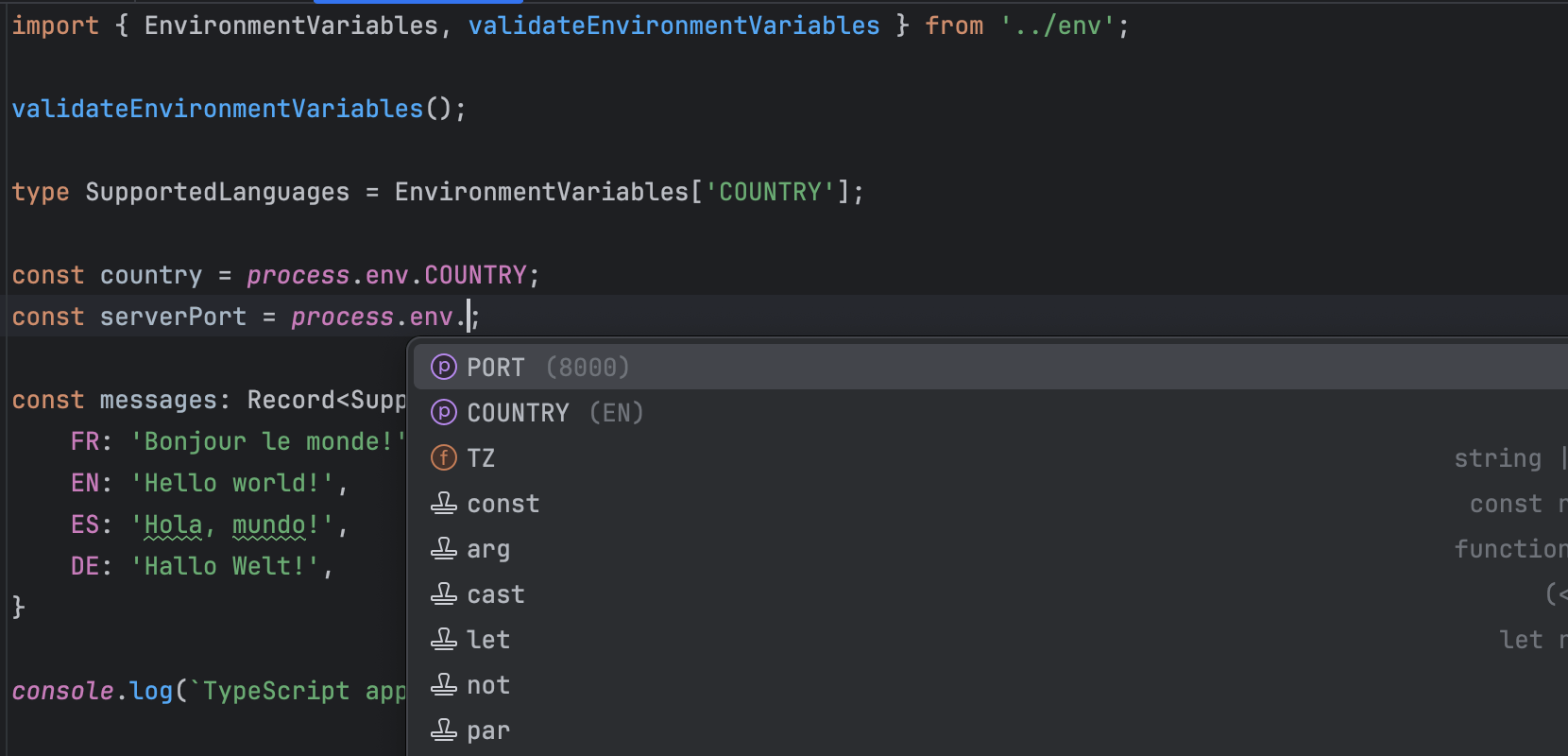
// You can now access process.env with full type safety!
console.log(`Server running in ${env.NODE_ENV} mode on port ${env.PORT}`);

// Example of using process.env directly with autocompletion
const port = process.env.PORT; // This is a number!
const apiKey = process.env.OPENAI_API_KEY; // This is a string!
By importing this module once at startup, you ensure your configuration is validated, and thanks to the global declaration, you get type-safe access to process.env everywhere in your project.
Environment Variables in Docker
It's crucial to understand how this connects to the Dockerfile you built. The .env files and the dotenv library are primarily for local development.
In a production environment running inside a Docker container, you do not copy .env files into the image. Instead, you inject the environment variables into the container at runtime. Container orchestrators like Docker Compose, Kubernetes, or cloud services like AWS ECS provide mechanisms to do this securely.

The application code we've written doesn't need to change. It reads from process.env regardless of whether the variables were loaded from a .env file or injected by Docker. The ENV NODE_ENV=production line in your Dockerfile from the previous lesson is what tells our startup script which set of variables to expect from the runtime environment.
Conclusion
You have now implemented a comprehensive and production-ready strategy for configuration management. This system is not only flexible enough to handle multiple deployment stages but is also robust and safe, thanks to schema validation and static typing.
Key Takeaways:
- Store Configuration in the Environment: Follow the Twelve-Factor App principle by keeping environment-specific settings out of your codebase.
- Use
.envfor Local Development: Employdotenvwith environment-specific files (e.g.,.env.development) andnpmscripts to manage local configurations. - Validate and Type Your Config: Use Zod to define a schema for your environment variables. Parse
process.envat startup to validate the configuration and fail fast on errors. - Achieve Type Safety: Infer a TypeScript type from your Zod schema and extend the global
NodeJS.ProcessEnvinterface to get project-wide autocompletion and type checking. - Separate Local and Production Workflows: Remember that
.envfiles are for local convenience. In production Docker environments, variables are injected at runtime.
In the next lesson, we will put this all together. You will learn how to create a docker-compose.yml file to define and run your multi-container application, orchestrating your Node.js service and its database dependency while injecting the necessary environment variables.