Recommended resources
The freely available resources this lesson will direct you to.
- Effective Context Engineering for AI Agents (why agents still fail in practice)www.youtube.com
- OpenAI Structured Output - All You Need to Knowwww.youtube.com
- Writing effective tools for AI agents—using ...www.anthropic.com
- [PDF] Function-calling Schemas as De Facto Governance - Acta Académicawww.aacademica.org
Hello! Welcome to the next stage of our journey.
In the previous module, we focused on building the agent's "knowledge brain" through Retrieval-Augmented Generation (RAG). We learned how to diagnose and improve the quality of information an agent can access. Now, we transition from knowledge to action. We will equip our agent with "hands" to interact with the world and perform tasks.
This lesson addresses the learning outcome: Define tools (APIs, functions, data lookups) an agent can invoke and write clear tool descriptions that guide correct usage. This is the foundational skill for creating agents that go beyond simply answering questions to actively executing workflows, a critical capability for the solutions you aim to build for your clients. We'll explore the mechanics of how an agent uses a tool, the best practices for defining that tool's interface, and the subtle but crucial art of writing descriptions that ensure the agent uses it correctly and reliably.
1. The Agent-Tool Interaction Model
At its core, giving an agent a tool means bridging the gap between a non-deterministic LLM and a deterministic piece of software. A function or API call is predictable; an LLM's reasoning is not. The "tool use" pattern provides a structured protocol for them to communicate.
Writing effective tools for agents
To start, let's establish a clear definition. This brief section from an Anthropic engineering blog post elegantly frames what a tool is in the context of an agent.
Read the introductory section titled 'What is a tool?'. It clearly contrasts deterministic software with non-deterministic agents and defines a tool as the contract between them.
This "contract" is executed through a specific sequence of interactions. The agent doesn't directly run the code. Instead, it decides to use a tool and formats a request. Your application code then executes that request and returns the result to the agent.
This sequence diagram illustrates the process:
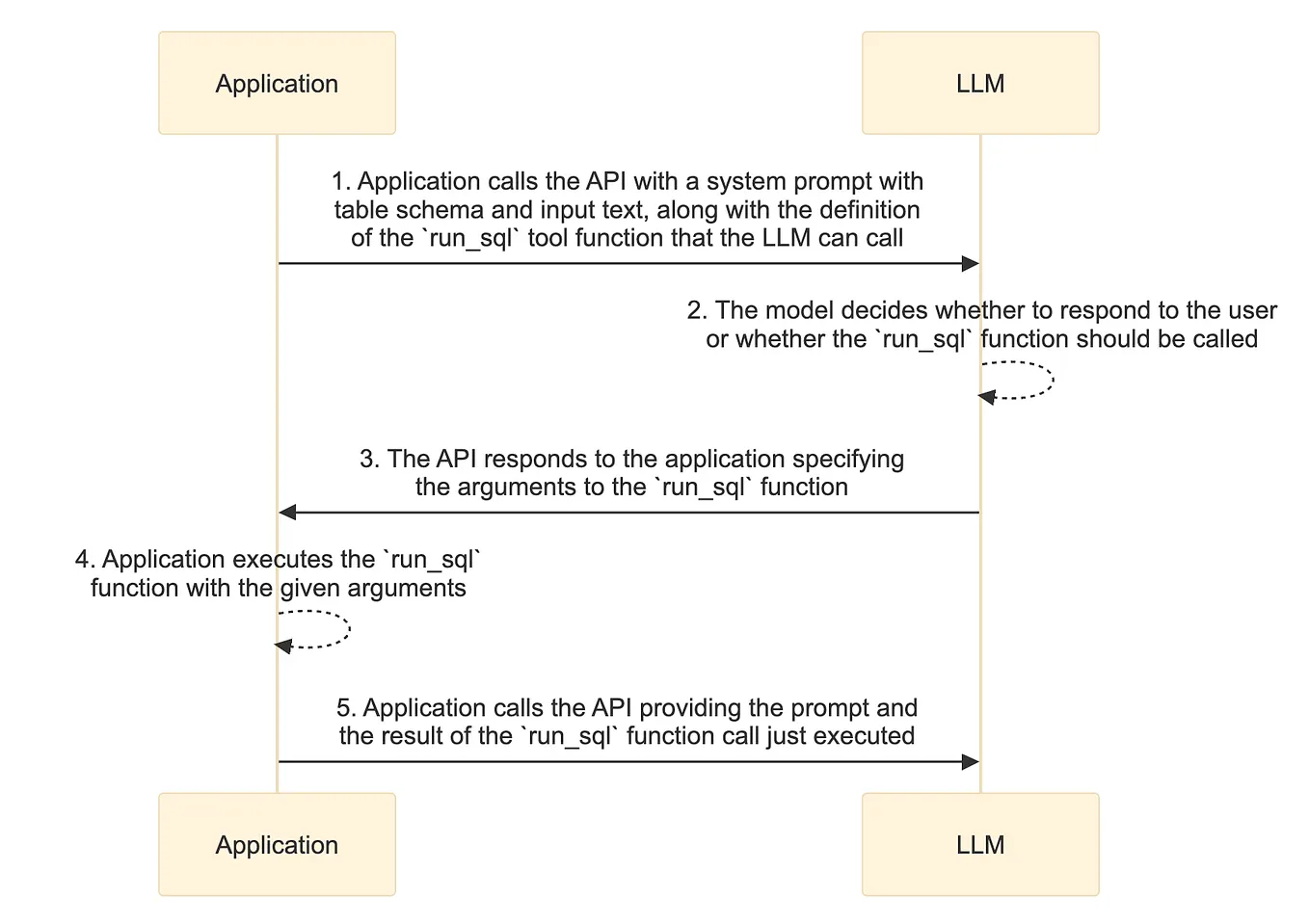
The key steps are:
- Initial Call: Your application calls the LLM with the user's query, system prompt, and a list of available tools, including their detailed definitions (name, purpose, parameters).
- Tool Call Generation: The LLM analyzes the request and, instead of generating a text response, it can output a structured object indicating its intent to call a specific tool with specific arguments.
- Execution: Your application code receives this structured object, parses it, and executes the corresponding function (e.g., calls an external API, runs a database query).
- Second Call: Your application then calls the LLM again, this time including the result of the tool execution in the context.
- Final Response: The LLM uses the tool's output to synthesize the final answer for the user.
This loop is the fundamental mechanism that allows an agent to interact with external systems. Our job as system architects is to define the interface for step 2: the tool definition itself.
2. Defining the "Contract": Schemas and Pydantic
The tool definition, or schema, is the most critical part of the contract. It tells the LLM what a tool is called, what it does, what parameters it accepts, and what format those parameters should be in. A well-defined schema is essential for reliable tool use.
Modern LLM APIs enforce this schema, ensuring the model's output for a tool call is always a valid, parsable data structure, typically JSON. While you can write these JSON schemas by hand, the industry standard and best practice for Python-based systems is to use Pydantic. Pydantic models allow you to define complex data structures using native Python classes, which are then automatically converted to JSON schemas. This approach is more readable, maintainable, and less error-prone.
OpenAI Structured Output - All You Need to Know
This video provides a practical walkthrough of how to define and use structured output schemas with the OpenAI API. It clearly demonstrates the advantage of using Pydantic models over raw JSON schemas.
Please watch from 08:16 to 20:51. This segment covers: The JSON Schema Method (08:16 - 14:36): Understand how a tool is defined using a raw JSON schema. Notice the verbosity and complexity. The Pydantic Method (14:36 - 20:51): See how the same schema is defined using Pydantic models. Pay close attention to how easily the developer adds a new confidence field to the model. This demonstrates the power of this approach for iterative system design.
As you saw, using Pydantic provides several advantages from a system design perspective:
- Clarity and Maintainability: Python classes are far more readable than nested JSON objects.
- Type Safety: You get the benefits of Python's type hinting and validation within your application code.
- Agility: As demonstrated, modifying the schema by adding, removing, or changing a field is trivial. This is crucial for the iterative refinement process of building agentic systems.
From now on, we will assume that tool definitions are created using Pydantic models.
3. Guiding the Agent: The Art of the Tool Description
Defining the schema is only half the battle. The agent also needs to understand when and why to use a tool. This guidance comes from the natural language descriptions you provide for the tool and its parameters. These descriptions are, in effect, a specialized form of prompt engineering.
Poorly written descriptions are a primary cause of tool-use failure. The agent might fail to use a tool when it should, use the wrong tool for the job, or provide malformed arguments.
Writing effective tools for agents
Anthropic's engineering team has compiled an excellent set of principles for designing tools and their descriptions. These are not just tips; they are core design principles for building reliable agentic workflows.
Please read two key sections from this article: 'Choosing the right tools for agents': This section argues for creating fewer, more powerful tools that are 'ergonomic' for an agent, rather than a one-to-one mapping of API endpoints. 'Prompt-engineering your tool descriptions': This section provides direct advice on how to write effective descriptions to avoid ambiguity and steer the agent correctly.
The principles from the article are critical for your work designing client solutions:
- Design for the Agent, Not the API: Don't just wrap every available API endpoint. Consolidate multi-step operations into a single, high-impact tool. For example, instead of separate
get_user_id,get_user_calendar, andfind_free_slottools, create a singleschedule_meetingtool. This reduces the number of inference steps, lowering latency, cost, and the chance of error. - Be Unambiguous: Treat your tool descriptions as a contract with a machine that has no shared context. Ambiguity is your enemy. A parameter named
useris ambiguous;user_idoruser_email_addressis explicit. - Descriptions are Prompts: The descriptions for your tool and its parameters are injected directly into the LLM's context window. They compete for attention with the user's query and other context. As the video on "Effective Context Engineering for AI Agents" noted, tool definitions should be "short, descriptive, focused" to avoid bloating the context and confusing the agent.

4. Advanced Perspective: Tool Schemas as Governance
Given your background, we can elevate this discussion. The schema you define for a tool is more than just a technical interface; it's an instrument of governance. Every choice you make—making a parameter required vs. optional, setting a default value, adding a validator—distributes authority and control between the user, the agent (model), and the tool itself.
This is a powerful concept for designing robust, safe, and predictable systems.
[PDF] Function-calling Schemas as De Facto Governance
This academic paper formalizes the idea of function-calling schemas as 'de facto governance instruments'. It provides a rigorous framework for thinking about the architectural implications of your design choices.
Read the 'Introduction' and 'Conceptual and operational definitions' sections. Don't worry about the mathematical formalism of the 'Agency Reallocation Index' for now. Focus on the core concepts: The schema as a regla compilada (a compiled rule). The 'agency triangle' (operator, model, tool). How artifacts like signatures, validators, and defaults distribute control.
Thinking of your schema as a "compiled rule" has profound implications for system design:
- Required Parameters: Enforce that a certain piece of information must be provided. This removes the model's discretion, shifting agency to the schema designer (you).
- Optional Parameters: Give the model discretion to provide a parameter if it deems it relevant based on the context. This grants more agency to the model.
- Default Values: Pre-commit to a choice, which the model can either accept or override (depending on the implementation). A "hard default" acts as a policy decision, embedding a choice directly into the system's logic.
- Validators: Act as enforcement agents, rejecting or coercing inputs that don't meet specific criteria (e.g., a regex pattern, a numerical range). This is a powerful way to enforce business rules at the interface level.
When you design a tool for a client, you are not just exposing a function; you are creating a miniature legal system that defines what is permissible. This "governance" perspective forces you to explicitly consider safety, constraints, and who—or what—is ultimately in control of an action.
Conclusion
In this lesson, we established the foundations of tool use, moving from the basic mechanics to advanced architectural considerations. You now have a framework for both defining the technical contract of a tool and guiding the agent's behavior to use it effectively and safely.
Key Takeaways:
- Tools as Contracts: A tool is a deterministic function governed by a schema that serves as a contract for a non-deterministic agent. The interaction follows a multi-step
call -> execute -> respondloop. - Pydantic for Schemas: Use Pydantic models to define tool schemas. This approach is cleaner, more robust, and more agile than writing raw JSON.
- Descriptions as Prompts: The name and descriptions of your tool and its parameters are a critical form of prompt engineering. They must be explicit, unambiguous, and designed to be ergonomic for the agent.
- Schemas as Governance: Every aspect of your schema—parameter requirements, defaults, validators—is a design choice that allocates agency and enforces policy. Thinking in these terms is essential for building safe, reliable, and auditable agentic systems.
In our next lesson, we will build directly on this foundation. Now that you can define a single tool well, we will address the next logical challenge: designing tool selection logic so an agent chooses the right tool for a given sub-task from a set of multiple available tools. This will introduce you to patterns for routing and decision-making in more complex agents.