Recommended resources
The freely available resources this lesson will direct you to.
Hello! This course will build on the customer troubleshooting you already do, adding technical tools and a more precise way to communicate what the evidence shows. In this first module, the starting skill is locating a likely fault domain: when a customer reports a symptom, which part of a SaaS product should you investigate first?
Today you’ll use a six-layer support model—client, network, API, application, data, and third party. You do not need to identify the root cause from the first customer message. The aim is to make a defensible initial classification and know what observation might change it.
A map of the system
Consider a customer opening a reports page. Their browser requests the page, receives files needed to display it, and may make further requests for report information. The SaaS product may retrieve stored records or contact another service to fulfill the request. A single complaint—“the report won’t load”—does not tell us which part failed.
The diagram below shows the central distinction: the browser runs on the client side; the web server, web application, and database are on the server side. The browser can also request static files such as JavaScript and images.

Read MDN’s explanation of the client, server, intermediaries, and basic request-and-response flow. Focus on the roles, not the protocol details.
Overview of HTTP - MDN Web Docs
MDN Web Docs provides the request-and-response foundation for our support model.
In “Components of HTTP-based systems,” read from client to proxies, including the subsections “Client: the user-agent,” “The Web server,” and “Proxies.” Notice that an intermediary can affect a request even when neither the browser nor the product application is faulty. Then, in “HTTP flow,” read the four steps. Keep one distinction in mind: failing to obtain a response is different from receiving a response that reports an error.
The diagram is a starting point, not a complete architecture for every SaaS product. Our six layers are support categories, not six machines that every request must pass through. For example, an API is a way software requests information or actions; it may be handled by the same application that serves the website. We separate “API” from “application” because different evidence and teams may be involved in investigating the exposed request versus the product logic behind it.
The six-layer support model
Use the layer to name the most likely place to investigate first, based on what is known now. A symptom can fit more than one layer until further evidence arrives.
| Layer | What it covers | A useful initial clue |
|---|---|---|
| Client | The customer’s browser, device, installed extensions, cached files, or code running in the page. | The issue occurs in one browser but the same action works in another. |
| Network | Connectivity and intermediaries between a client and a service, such as a local connection, corporate VPN, or proxy. | Users on one network cannot reach the product, while users elsewhere can. |
| API | The product’s exposed request interface: its endpoint, authentication, accepted input, and returned response. | An integration receives a specific error when calling a product endpoint. |
| Application | The SaaS product’s own feature and business logic, including processing performed after a request arrives. | A feature fails across accounts even though requests reach the product. |
| Data | Stored records and their state, including missing, incorrect, or stale values. | One account consistently shows an incorrect record while the feature works for others. |
| Third party | A separate provider or integration the product depends on. | The product works internally, but an action involving an external provider fails. |
These clues are not automatic diagnoses. If a page works in another browser, a browser-specific condition is worth investigating, but the difference could expose an application bug. If one account has bad data, the product may have created that bad data through faulty application logic. Classification identifies a promising investigation boundary; root-cause analysis comes later.
Two boundaries deserve particular care:
Network versus API. If the customer’s browser never obtains an HTTP response, connectivity is one possibility. The service might also be unavailable, so “no response” alone does not prove a customer-network problem. If a request receives an HTTP error response, communication got far enough for some server or intermediary to answer. That shifts attention toward the responding component and the request, though it does not settle the cause.
API versus application versus data. Suppose a request for a report returns an error because it lacks required input. The API interface is a sensible first classification. Suppose the request is accepted, but report generation fails during the product’s processing: investigate the application. Suppose processing succeeds, but the report contains a stored value that is wrong only for one account: investigate data first. The eventual fix may cross these boundaries.
Turn a symptom into evidence
Customer wording describes an experience, not an architecture. “It’s broken,” “nothing happens,” and “the integration is down” are starting observations. To classify the issue, ask what has already been observed to work and where the first visible failure appears.
A browser’s Network panel can eventually help you inspect requests, but you do not need to master the tool today. Read just enough to understand what its request rows can—and cannot—tell you. The hands-on Network-panel lesson comes later in the course.
Inspect network activity | Chrome DevTools
Chrome DevTools explains what the Network panel records. Read this as an introduction to evidence, not as a tool procedure to memorize.
Under “When to use the Network panel,” read the common uses. Under “Log network activity,” read from the column descriptions. Concentrate on the distinction between a request row, its response status, and how long it took; leave the later panel features for another lesson.
In the following example, the Status column shows different kinds of evidence. A 200 indicates an HTTP request received a successful response; it does not guarantee the customer saw correct data or that a later product action worked. A connection failure is different from an HTTP error status. A CORS error indicates a browser security restriction was encountered; investigating it may require examining the browser request and the server’s configuration, rather than assuming “the network is down.”
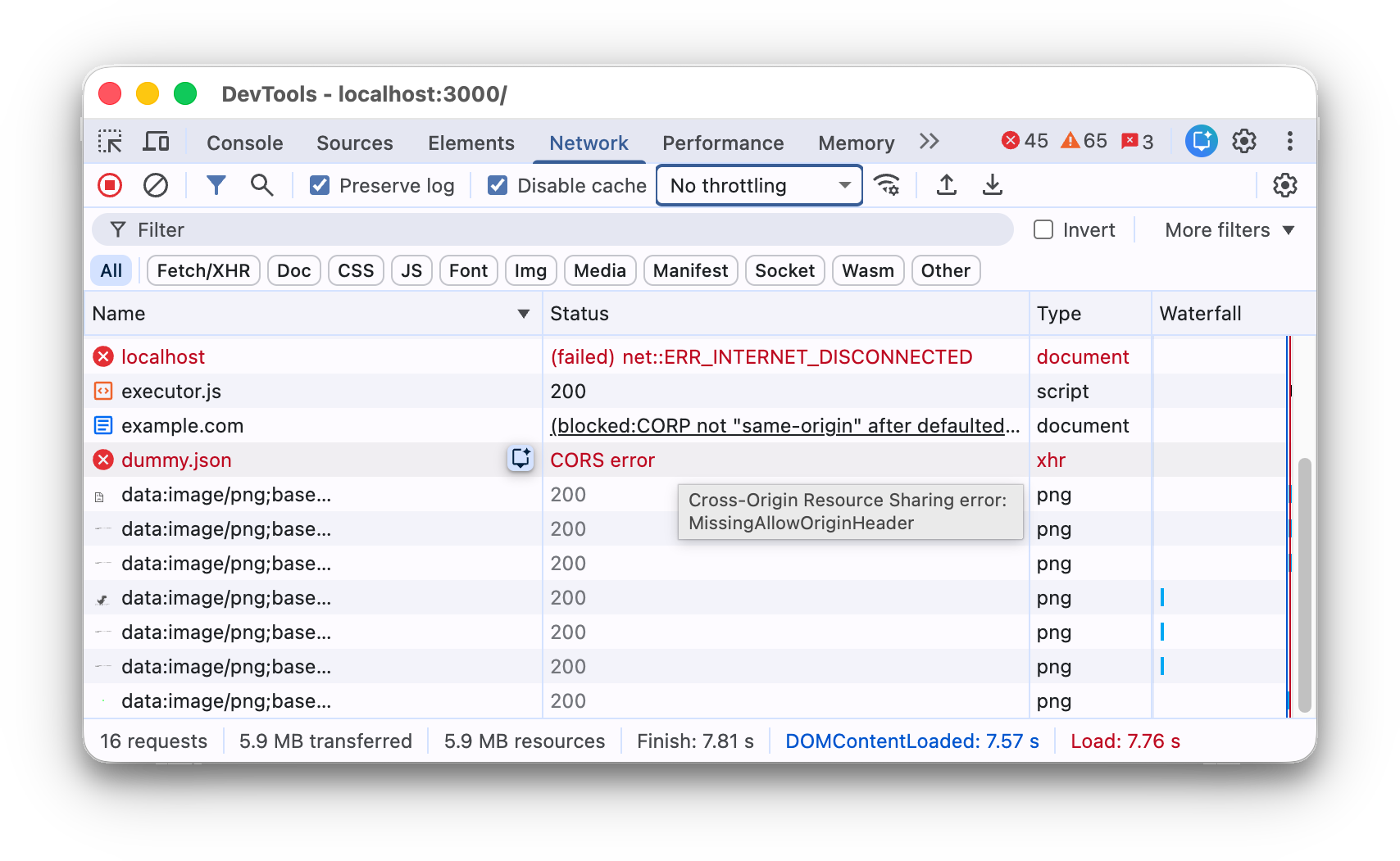
For an initial classification, three questions are especially useful:
- What action fails? Loading the entire site, clicking one feature, requesting one record, or sending something to another provider are different scopes.
- Where does it work? Compare affected and unaffected browsers, networks, accounts, actions, or integrations. A difference gives the report more diagnostic value.
- What answered, if anything? A visible error from the product API, a response containing incorrect data, and no response at all point to different first investigations.
You may not have all three answers when a ticket arrives. State the layer as a working hypothesis rather than filling gaps with assumptions.
Six customer reports, six first classifications
The following reports show how to use the model in realistic support language. Each classification is most likely given the stated evidence, not a claim that every alternative has been eliminated.
Client: “Clicking Export does nothing in my Chrome profile, but it works for me in Safari on the same Mac.” The same account and action work in a different browser, so investigate the client first—perhaps something in that Chrome environment affects the page. Do not conclude that Chrome itself is defective: if both browsers send different requests, the product may be handling one incorrectly.
Network: “Nobody in our office can reach the sign-in page while connected to the company VPN. The same colleagues can reach it from another connection.” The shared VPN is the strongest difference, making the network layer the first investigation. A product access rule affecting that network is still possible; “the VPN is broken” would overstate the evidence.
API: “Our script calls the product’s report endpoint and receives an authentication error. The team can still open reports in the web app.” This report identifies a failing product API request, while a related browser action works. Check the API request’s authentication and expected behavior first. The symptom does not yet show whether the script supplied an invalid credential, a credential lost access, or the product incorrectly rejected it.
Application: “Several customers can open their report pages, but newly generated exports contain empty files.” The site is reachable and the failure follows a particular product action across customers. Report-generation logic is a reasonable application-layer starting point. If investigation later reveals that all affected reports depend on missing source records, reclassify toward data.
Data: “Only one customer account displays last month’s billing address; other fields and accounts look correct. The product’s response also contains the old address.” Because the incorrect value is present in the returned information, a browser display problem is less likely. Investigate that account’s stored or supplied data first. You still do not know why the value became stale.
Third party: “Reports generate correctly inside our product, but sending them to the external messaging provider fails. That provider’s response reports a service error, and its status notice confirms an ongoing disruption.” Here, evidence points beyond the product to the external dependency. Without the provider response or status notice, “sending fails” would also leave the product’s integration logic in contention.
Notice the pattern: each report includes a comparison or a boundary observation, not merely an error word. A customer might call the last case “an API failure” because an API call is involved. In this model, third party is the more useful first label once evidence identifies the external provider as the failing dependency. If our product sent the wrong information to a healthy provider, the first label would likely change.
When the evidence does not choose a single layer
Suppose a customer says, “My dashboard is blank.” With no other information, client, network, API, application, and data are all plausible. Labeling it “application” because the dashboard is a product feature would be guesswork.
Now suppose the page itself loads, but its report area is empty. That makes a total connectivity failure less likely, yet does not distinguish a browser display problem from missing report information. If the product returns an empty report list for that account, data becomes a stronger hypothesis. If the returned list contains reports but the page displays none, investigate client-side behavior or the application’s presentation logic instead. At each point, the classification changes because the evidence changed.
This is the language of a useful support handoff:
“Initial classification: data layer, moderate confidence. The page loads, and the response for the affected account contains an empty report list. Reports are visible for an unaffected account. We have not yet established whether records are missing or whether product logic selected the wrong records.”
It names an investigation target, gives the reason, and preserves uncertainty. In the next lessons, you’ll learn to turn those observations into a precise problem statement and then test competing explanations.
Key takeaways
The six-layer model is a way to prioritize investigation, not a shortcut to root cause. Classify from the strongest available observation: what fails, where it works, and whether a request received a response or returned incorrect information. Treat status codes, browser differences, and customer descriptions as clues rather than verdicts.
Next, you’ll write a technical problem statement that separates expected behavior, actual behavior, scope, environment, and reproduction steps—so the evidence behind your classification is clear to another engineer.