Recommended resources
The freely available resources this lesson will direct you to.
Hello again. In the previous lesson, you used a six-layer model to decide where to investigate a SaaS symptom first. That classification is a working hypothesis. Before anyone can test it well, they need a precise account of what the customer tried, what should have happened, and what actually happened.
Today you’ll turn a customer report into a technical problem statement that another support engineer or developer can understand without guessing. The key is to keep five things distinct: expected behavior, actual behavior, scope, environment, and reproduction steps. This is useful whether you are adding detail to a Freshdesk case or preparing a Jira issue.
From a complaint to a statement someone can investigate
Consider the message, “Exports are broken.” It communicates frustration, but leaves open nearly every useful question. Does the Export button do nothing? Does a file download with incorrect contents? Does the issue affect one report or every report? Was anyone able to repeat it?
A technical problem statement does not need to explain the cause. It needs to describe the observable difference between intended and observed behavior, together with the conditions under which that difference appeared.
Watch the registration-form example in The ultimate guide on how to write a bug report from Software Testing 101. The form marks a checkbox as required, yet appears to accept a submission without it. Focus on the action and visible result, rather than the Jira workflow used elsewhere in the video.
The ultimate guide on how to write a bug report
Watch the registration-form example in “The ultimate guide on how to write a bug report” from Software Testing 101. It provides a concrete action and result to describe.
Watch the form example, from opening the practice registration form through the success message after submission. Notice which details establish the expected behavior and which show what was observed.
The useful statement is not “validation is broken”—that already suggests an implementation problem. It is closer to: “When the registration form is submitted with the required terms checkbox unchecked, a success message appears.” If the form’s requirement is confirmed, the expected result can be stated separately: submission should be blocked and the missing requirement indicated. That wording leaves the cause open.
Keep expected and actual behavior separate
Expected behavior is what the product is supposed to do under the stated conditions. Ground it in a product requirement, documented behavior, or a confirmed explanation from the product team when possible. A customer’s expectation is worth recording, but it may still need confirmation. If you do not know the intended behavior, say so rather than inventing it.
Actual behavior is what someone observed after taking an action. Describe the visible outcome precisely: the message shown, whether a file appeared, or whether displayed data changed. An error message is evidence of an outcome, not a diagnosis of its cause.
For example:
Expected: Selecting “Last 30 days” and clicking Export CSV downloads a CSV containing data for that range, according to the product’s export documentation.
Actual: After Export CSV is clicked, the page displays “Export failed”; no file downloads.
“Expected: the export works” and “Actual: it doesn’t” lose the distinction that makes the report useful. Conversely, “Actual: the server crashed” claims something you cannot establish merely from a message in the browser.
Return to the video for its discussion of these two fields. It also raises an important question: where does the expected result come from?
The ultimate guide on how to write a bug report
Return to the same video for its explanation of actual and expected results, including how intended behavior can be established.
Watch the result fields. Focus on the distinction between an observed success message and the expected response to an unchecked required field. In your own tickets, add specific observations rather than merely copying the title into the actual-result field.
Scope is not the same as environment
A report often says “it happens on Chrome” without clarifying whether anyone tried another browser. That is an environment observation, not evidence that the issue is limited to Chrome.
Scope describes the known extent of the problem: which users, accounts, roles, records, reports, actions, or time ranges are affected—and which have been observed to work. It also records frequency, such as “occurred on three of three attempts.” Scope should distinguish observed limits from untested possibilities. “Observed for one account; other accounts not tested” is more accurate than “affects only one account.”
Environment describes the setup in which the observation was made: production or staging, web or mobile app, browser and version, operating system, and other relevant conditions. Include details that could help someone repeat the observation; mark an important detail as not captured if you do not have it. Do not fill a gap with a guess.
The bug-report template below makes these fields easy to spot.
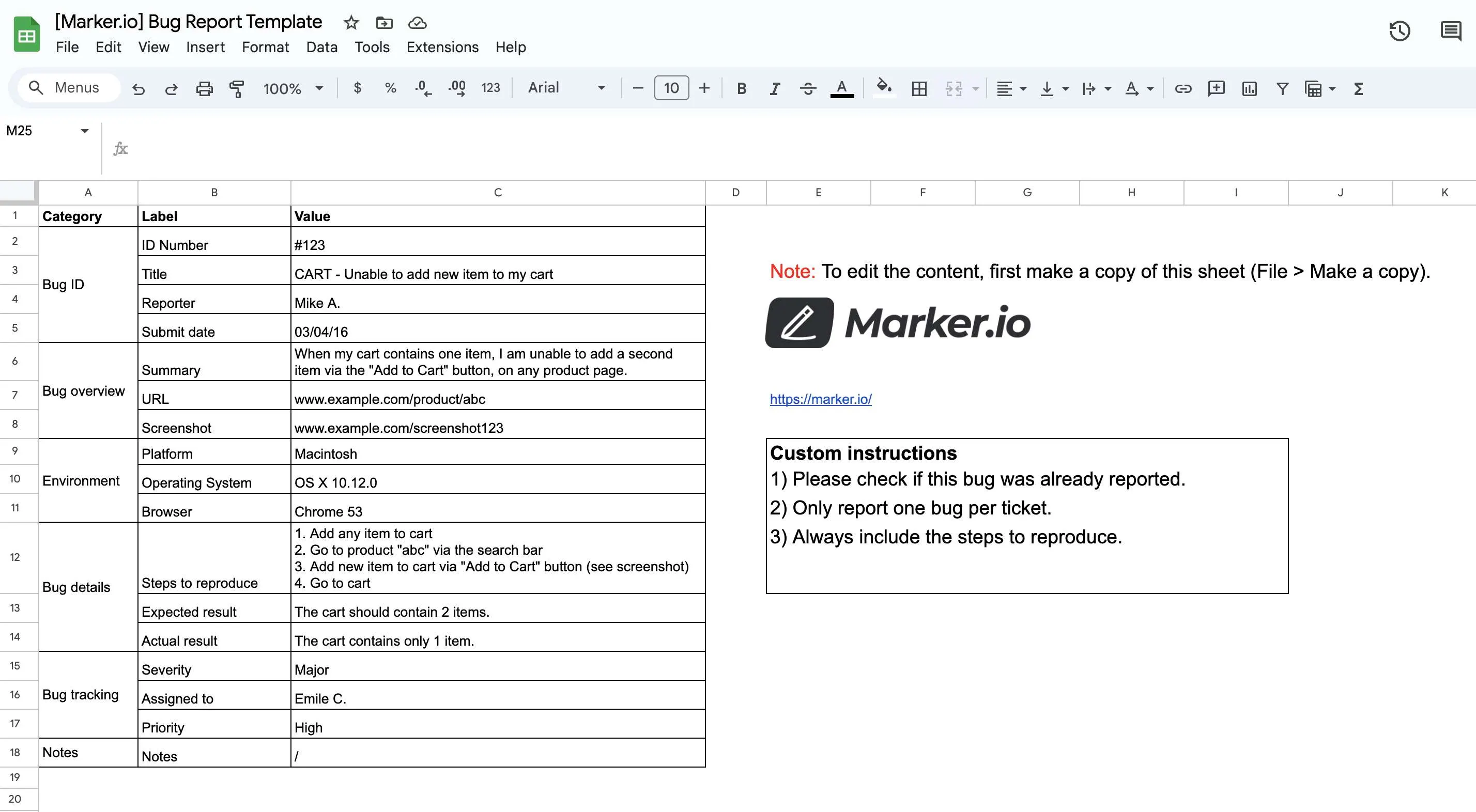
The template separates “Expected result” from “Actual result” and records the browser and operating system. It leaves a useful question open, though: the summary suggests the problem occurs on any product page, while the listed steps use a particular product. Based on those steps alone, we should not claim that every product page is affected. A separate scope note could say, “Observed with the product used in these steps; other products not tested.”
Think of scope as where the evidence says the issue does or does not occur, and environment as the setup used to make those observations. An account can be part of the setup for reproducing an issue and a dimension of its scope. The headings help readers see both purposes.
Reproduction steps describe actions, not conclusions
Reproduction steps give another person a route to the observed result. Start from a known state, then number the actions in order. Include necessary choices—such as report name, date range, and button label—but keep the outcome in the Actual behavior field rather than making “the export fails” a step.
Atlassian’s Bug report template | Jira is especially relevant if you already work with Jira. Read its guidance on titles, numbered steps, results, and environment. The exact Jira fields vary between teams; these distinctions still belong in the issue even if your project stores them all in its Description field.
Read Atlassian’s Jira bug-report guidance to see how a concise title and structured description carry an issue from a symptom to a reproducible report.
Under “How to create a bug report template in Jira,” start in “Write the summary and description.” Read the title guidance. Then find “List the steps to reproduce the bug” and begin at its explanation of why the sequence matters. Read the reporting guidance through “Specify expected and actual results” and “Include environment information.” Focus on what a colleague would need to follow the same actions, rather than on where Jira places each field.
One qualification matters in customer support: steps supplied by a customer are not necessarily steps you have reproduced yourself. Label them accordingly. If the customer says the issue happens every time but support has not tried it, write “Customer-reported steps; not yet reproduced by support.” If you tried twice and saw it once, record that result rather than calling the issue consistently reproducible.
A title can identify the feature and the observed failure—“Report CSV export displays ‘Export failed’ for Last 30 days”—without asserting “API outage” or another unverified cause. The title helps someone find the issue; the separate fields make it investigable.
A complete SaaS support example
Here is a fictional case with enough evidence to write a bounded statement. Product documentation says the “Weekly usage” report can be exported as a CSV for either “Last 7 days” or “Last 30 days.” A support engineer used an authorized example account, A-104, in the production web app. In Safari 17 on macOS 14, “Last 30 days” produced an “Export failed” message and no download on three attempts. In the same session, “Last 7 days” downloaded a file on one attempt. No other account or browser was tested.
A technical problem statement could read:
Title: Weekly usage CSV export shows “Export failed” for Last 30 days
Expected behavior: Per the product’s export documentation, selecting Last 30 days for the Weekly usage report and clicking Export CSV downloads a CSV for that range.
Actual behavior: The page displays “Export failed,” and no file downloads.
Scope: Observed for report Weekly usage in account
A-104on three of three attempts with Last 30 days selected. Last 7 days downloaded a file on one attempt in the same session. Other accounts, reports, and browsers have not been tested.Environment: Production web app; Safari 17 on macOS 14. The application build number was not captured.
Reproduction steps:
- Sign in to the production web app with an authorized admin user for account
A-104.- Open Reports, then Weekly usage.
- Select Last 30 days.
- Click Export CSV.
Reproduction status: Reproduced by support on three of three attempts in the environment above.
This statement gives a colleague a starting point without deciding that the browser, API, report logic, or underlying data is at fault. The successful seven-day export is particularly useful: it narrows the observed difference, but it does not prove why the thirty-day export failed.
Notice also what the statement does not say. It does not claim “all thirty-day exports fail,” because only one report and account were tested. It does not turn the message “Export failed” into a claim about a failed network request. And it does not silently replace an unknown build number with a plausible one. Precision includes being explicit about the edges of your evidence.
When details are missing from a real customer ticket, a usable first version may contain “Expected behavior: pending confirmation,” “Browser version: not supplied,” or “Steps: customer-reported, not yet reproduced.” Those gaps identify what to clarify; they are preferable to a polished but unsupported statement.
Key takeaways
A strong technical problem statement separates what should happen from what was observed, states the tested scope and its limits, identifies the environment, and provides ordered actions that could produce the observation. It describes a failure without pretending to know its cause.
In the next lesson, you’ll use statements like this to form and prioritize testable hypotheses. The clearer your observations and unknowns are now, the easier it will be to choose a useful investigation next.