Recommended resources
The freely available resources this lesson will direct you to.
Hello! Your server now checks its configuration before it starts listening. Once it is running, a different question matters: can it keep answering other requests while one request is still in progress?
In this lesson, you’ll learn to predict the answer from the work a request performs. You’ll distinguish time spent waiting from time spent executing JavaScript, see where Node’s worker pool fits, and observe both behaviors in a small version of your existing HTTP server. Allow about 40 minutes.
One JavaScript thread can serve requests that spend time waiting
A request often alternates between brief periods of JavaScript work and longer waits. For example, a handler might construct a database query, wait for a result, then turn that result into a response. While the query is pending, the main JavaScript thread does not need to sit idle on that request; it can run a callback for another one. This is concurrency: several requests can be in progress even though their JavaScript callbacks do not run simultaneously on the same thread.
Watch Non-blocking I/O and how Node uses it, in friendly terms: blocking vs async IO, CPU vs IO from Studying With Alex. Its request timelines make the distinction between active processing and waiting visible.
Non-blocking I/O and how Node uses it, in friendly terms: blocking vs async IO, CPU vs IO
Watch this explanation of why a thread can make progress on other requests during an asynchronous wait, but not during a long calculation.
Start with request sharing to see how one thread attends to multiple requests. In CPU versus waiting, identify which parts require active computation. Then watch nonblocking I/O and the CPU limitation. Focus on when the thread is free to serve someone else.
The crucial distinction is not “asynchronous code versus synchronous code” as a matter of syntax. It is whether the main JavaScript thread must keep working to make progress. Waiting for a network response need not occupy it. Running a calculation in JavaScript does.
Node’s own guide, Don’t Block the Event Loop (or the Worker Pool), gives a more precise account. Read the opening explanation and the division of work between the event loop and the worker pool.
Don't Block the Event Loop (or the Worker Pool)
Read Node.js’s explanation of which work runs as JavaScript callbacks and which built-in operations can use its worker pool.
In “Why should I avoid blocking the Event Loop and the Worker Pool?”, begin at the explanation that describes both threads; continue through “A quick review of Node” and “What code runs on the Event Loop?”. Then, from the end of “What code runs on the Event Loop?”, read the division of labor through “What code runs on the Worker Pool?” and into “How does Node.js decide what code to run next?”. Notice especially the distinction between network readiness and a queued worker-pool task.
Here is a useful sketch of those components—but it needs two corrections before you use it to predict behavior:
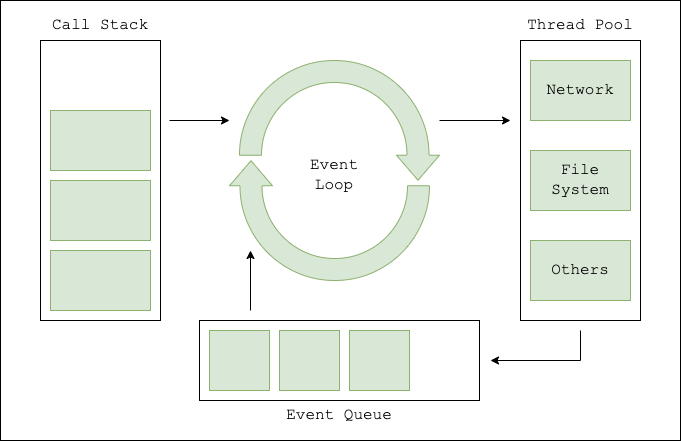
When an operation finishes or becomes ready, its JavaScript continuation still needs a turn on the main thread. A worker can finish a file read, for instance, without being able to run your response-handling JavaScript while that thread is busy elsewhere. Also, the built-in libuv worker pool used by some Node APIs is distinct from the JavaScript worker_threads facility you could use for your own computation.
Predict responsiveness from the work inside each callback
Imagine your server receives request A, followed shortly by request B. If A starts an asynchronous network operation and then returns control, B’s short handler can run while A waits. When A’s result is ready, its continuation will run when the event loop can give it a turn.
Now change A so its handler spends three seconds calculating in a JavaScript loop. B cannot run its handler on that same event-loop thread during those three seconds—even if B only needs to return “OK.” The effect is increased latency for B, not just for A. Under repeated load, lengthy callbacks can also reduce the number of requests the server completes per second.
The word async does not change where a calculation runs:
async function expensiveWork(): Promise<void> {
  await Promise.resolve();

  const end = Date.now() + 3_000;
  while (Date.now() < end) {
    // Deliberate CPU work
  }
}
The await briefly postpones the loop. When the function resumes, that loop still runs on the main JavaScript thread. Likewise, putting heavy work inside .then(...) schedules it for later; it does not move it to a worker.
Read the next part of Node’s guide for a practical way to assess callbacks: consider how their running time changes with input size, not merely whether they appear short in the source file.
Don't Block the Event Loop (or the Worker Pool)
Use this part of the Node.js guide to connect input-dependent computation and common built-in APIs to request latency.
In “Don’t block the Event Loop,” read the callback examples through “How careful should you be?”. Compare the constant-time, linear, and nested-loop examples; then note the advice to bound inputs. Skip the intervening “Blocking the Event Loop: REDOS” material for now. Resume at “Blocking the Event Loop: Node.js core modules” and read concrete blocking cases through “Blocking the Event Loop: JSON DOS”. Focus on synchronous file-system calls and large JSON operations.
You can now make several distinct predictions:
| Work started by request A | Can a short request B get a turn while A’s work is pending? | What may still delay A? |
|---|---|---|
| Asynchronous network I/O | Usually yes | The external system and A’s eventual JavaScript callback |
setTimeout waiting for a timer |
Yes | The timer’s threshold and a busy event loop |
A long JavaScript loop, large JSON.parse, or readFileSync |
No, while that call runs on the main thread | A itself blocks other callbacks |
| An asynchronous file-system or supported crypto operation using libuv’s pool | Usually yes | A busy or saturated worker pool, followed by time for its callback to run |
“Asynchronous” therefore does not mean “instant.” If every worker-pool thread is occupied by long tasks, another task needing that pool can wait. Meanwhile, an unrelated short HTTP callback may still run—provided the main event loop is free. Conversely, an available worker cannot make a blocked main JavaScript thread run a completion callback.
Observe the difference in your HTTP server
You can make these predictions tangible without changing the server from the previous lesson. Add a temporary, local-only file, src/event-loop-demo.ts. It imports your validated configuration, so you must still supply GREETING at startup even though these demonstration routes do not use it.
// src/event-loop-demo.ts
import { createServer } from "node:http";
import { config } from "./config.js";

const server = createServer((request, response) => {
  if (request.url === "/fast") {
    response.end("fast done");
    return;
  }

  if (request.url === "/wait") {
    setTimeout(() => {
      response.end("wait done");
    }, 3_000);
    return;
  }

  if (request.url === "/cpu") {
    // Deliberately blocking: demonstration only, never a request-path design.
    const end = Date.now() + 3_000;
    while (Date.now() < end) {
      // Keep the main JavaScript thread occupied.
    }

    response.end("cpu done");
    return;
  }

  response.writeHead(404);
  response.end("Not found");
});

server.listen(config.port, () => {
  console.log(`Demo listening on http://localhost:${config.port}`);
});
The /wait route represents a pending operation, not actual network or file I/O. Registering its timer takes little time; the handler then finishes. The timer’s callback later runs on the main JavaScript thread. The /cpu route instead holds that thread for roughly three seconds before its handler finishes.
Stop any server already using the configured port. Run npm run build, then start the compiled demo with GREETING and PORT set as you did last lesson. For example, if your build places src/event-loop-demo.ts at dist/event-loop-demo.js, a POSIX-shell command is:
GREETING=Welcome PORT=4100 node dist/event-loop-demo.js
In PowerShell, set $env:GREETING = "Welcome" and $env:PORT = "4100" before running node dist/event-loop-demo.js.
Use two other terminals or browser tabs to make overlapping requests. Start /wait, then promptly request /fast on the same server process. /fast should finish without waiting for the three-second timer. Next, start /cpu and request /fast while the loop is running. This time, /fast cannot be handled until the loop finishes. Timing your manual requests will introduce some variation; the important observation is whether the quick response must wait behind CPU work.
A timer is a good final check on the model. Its three-second setting is a minimum threshold before its callback may run, not an appointment that overrides other JavaScript. If you start /wait and then occupy the loop with /cpu, the timer can become due while the CPU loop runs, yet its callback must wait.
Read Node.js’s precise description of timer timing to explain why a due timer cannot interrupt a long-running handler.
Under “Phases in Detail” → “timers,” read the opening explanation. Stop before the file-reading example and its code. Focus on the distinction between a timer’s threshold and the time its callback actually executes.
Remove the demo file when you are done; the busy loop is intentionally unsuitable for a real request path.
Takeaway
To predict whether a Node.js server stays responsive, ask where the time is spent. Pending asynchronous I/O or a timer can leave the main JavaScript thread free for other requests. A long synchronous callback—including CPU work after an await—keeps other callbacks waiting. Work delegated to the libuv pool leaves the event loop freer, but pool congestion can still delay operations that depend on it.
The next lesson builds on these predictions: you’ll choose an appropriate non-blocking mechanism to replace blocking work in a request path.