Recommended resources
The freely available resources this lesson will direct you to.
Hello! In the previous lesson, you saw why /fast could respond during a timer wait but had to wait behind a CPU-heavy loop. This lesson turns that observation into a design choice: how do you replace work that blocks a request handler without merely moving the blockage to another line of code?
You’ll use two different mechanisms. For file I/O, you’ll replace a synchronous call with Node’s asynchronous API. For CPU-intensive JavaScript, you’ll move the calculation to a worker thread. Plan on about 40–45 minutes, including the short implementation and a responsiveness check.
Choose a mechanism based on what is blocking
Suppose a handler reads a file and then calculates a report. Both operations take time, but they need different remedies. A synchronous file read holds the main thread while it waits for I/O. An intensive JavaScript calculation holds the main thread while it computes. Making the handler async does not, by itself, change either operation.
Node’s guide Don’t Block the Event Loop (or the Worker Pool) describes two options for calculations: partitioning, in which small pieces of work take turns on the event loop, and offloading, in which another execution context performs the work.
Don't Block the Event Loop (or the Worker Pool)
Read the Node.js guide’s treatment of partitioning and offloading to understand why yielding between small steps differs from running a calculation elsewhere.
In “Complex calculations without blocking the Event Loop,” read the two approaches, covering the “Partitioning” example and the opening of “Offloading.” Stop at the paragraph that says to move a complicated task off the event loop. Focus on what executes on the main thread in each approach.
For a backend request path, use this distinction:
| Blocking work | Appropriate first move | Why |
|---|---|---|
| Synchronous file access | Use an asynchronous file-system API | The handler need not hold the main thread while the read is pending. |
| Synchronous CPU-intensive JavaScript | Partition modest work, or use worker_threads for substantial work |
Partitioning allows other callbacks turns; a worker actually runs the computation off the main thread. |
| An external command | Use a child-process API suited to that command | A JavaScript worker is not necessary merely to launch another program. |
Partitioning is useful when each piece can be made predictably small. It does not make the calculation parallel: all its pieces still consume main-thread time. We’ll use a worker for the substantial calculation below, and an asynchronous API for the file read.
Replace a synchronous read with asynchronous I/O
Imagine a route that needs a small, fixed file. Its blocking version might call readFileSync:
import { readFileSync } from "node:fs";

const contents = readFileSync("package.json", "utf8");
response.end(`Read ${Buffer.byteLength(contents)} bytes`);
Until readFileSync returns, this server process cannot run another request’s JavaScript handler on its main thread. The direct replacement uses node:fs/promises:
import { readFile } from "node:fs/promises";

const contents = await readFile("package.json", "utf8");
response.end(`Read ${Buffer.byteLength(contents)} bytes`);
Here, await is useful because readFile is an asynchronous Node API. The handler pauses, leaving the event loop available to handle other requests; when the read completes, its continuation still needs a turn on the main thread. By contrast, await Promise.resolve(readFileSync(...)) would perform the synchronous read before there was anything to await.
This change improves responsiveness, not necessarily the elapsed time of the file read itself. It also has limits: reading a very large file into memory and then performing expensive parsing in the continuation could still create a long main-thread callback. For this demonstration, we’ll read only the project’s small package.json and return its byte count, not its contents.
Move substantial JavaScript computation to a worker
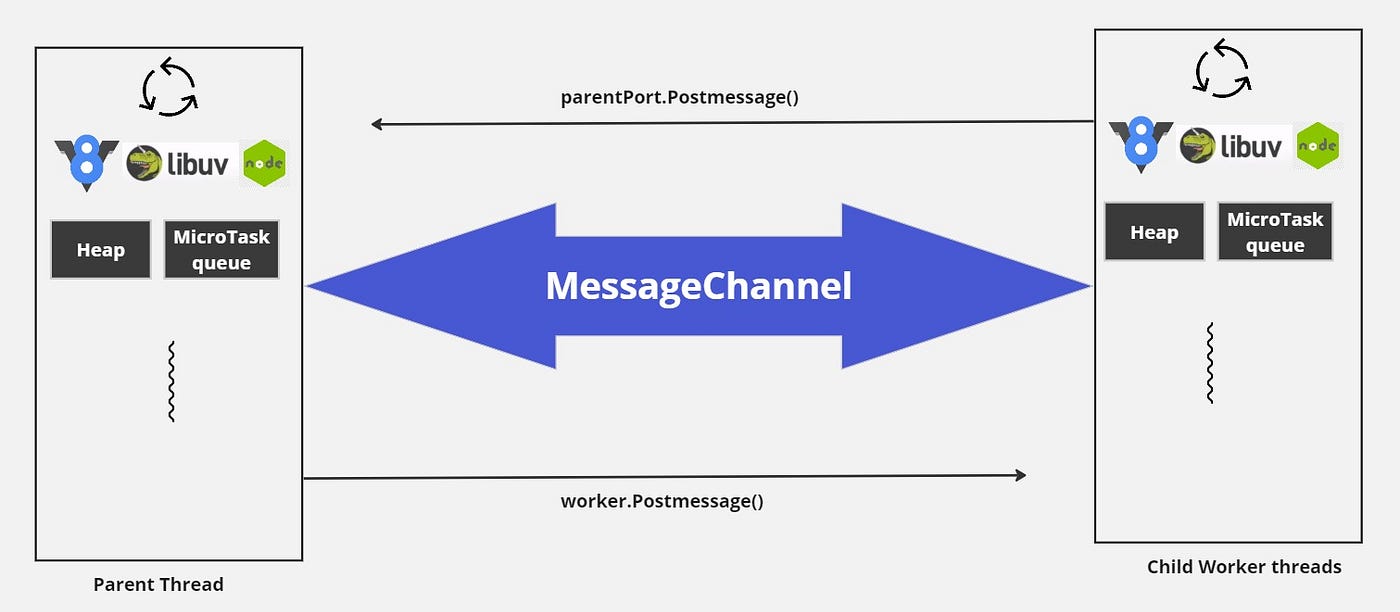
A worker thread can execute JavaScript while the server’s main thread handles other callbacks. The two threads communicate by sending messages; the worker does not simply run inside the handler’s JavaScript call stack.
Watch the worker creation and message exchange in How to use Multithreading with “worker threads” in Node.js? from Software Developer Diaries. Treat its code as a demonstration of messaging, not a production template: creating an unlimited number of workers per request and returning raw errors to clients would both be poor choices for an API.
How to use Multithreading with "worker threads" in Node.js?
Watch the presenter move a calculation into a worker and return its result to the server.
In worker setup, look for parentPort.postMessage in the worker and the server’s message listener. Then watch the responsiveness check: the short route can respond while the calculation is pending. Skip the later multiworker benchmark; our aim is to keep the request path responsive, not to promise a particular speedup.
The image below is a conceptual picture of that exchange. Its central “MessageChannel” label should not be read as an extra setup requirement: a Worker and its parentPort already provide the messaging used in our example.
For an additional comparison, read the “Worker Threads” portion of Node’s Comparing Node.js concurrency models. It explains both why workers suit CPU-bound JavaScript and why starting one has a cost.
Comparing Node.js concurrency models | Node.js Learn
Read Node.js Learn’s “Worker Threads” section to put the video’s example in context before implementing it in TypeScript.
Under “Worker Threads,” read the worker discussion through “Things to watch for.” Start with the paragraph explaining CPU work off the main thread and stop after the warning about creating a worker for every small task. Focus on the distinction between worker startup cost and the benefit of freeing the main thread.
Workers are separate from the built-in libuv worker pool discussed last lesson. Choosing an asynchronous file API does not require you to create a JavaScript worker thread.
Implement both replacements in a small server
Use your TypeScript project from earlier lessons. The following assumes the same ESM build arrangement that lets a TypeScript file import ./config.js and emits its JavaScript into dist/. Remove the previous lesson’s temporary demo file if you have not already done so.
First, add src/prime-worker.ts. Counting primes gives us a CPU-bound operation with a definite result; the worker accepts only the bounded number supplied by the server.
// src/prime-worker.ts
import { parentPort, workerData } from "node:worker_threads";

if (parentPort === null) {
  throw new Error("This file must run as a worker");
}

const limit = workerData as number;
let count = 0;

for (let candidate = 2; candidate <= limit; candidate++) {
  let isPrime = true;

  for (
    let divisor = 2;
    divisor * divisor <= candidate;
    divisor++
  ) {
    if (candidate % divisor === 0) {
      isPrime = false;
      break;
    }
  }

  if (isPrime) count++;
}

parentPort.postMessage(count);
Now add src/nonblocking-demo.ts. It has a quick route, an asynchronous file-read route, and a route that asks a worker to calculate. The server admits at most two simultaneous prime jobs, so incoming requests cannot create an unbounded number of workers.
// src/nonblocking-demo.ts
import { readFile } from "node:fs/promises";
import { createServer } from "node:http";
import { Worker } from "node:worker_threads";
import { config } from "./config.js";

let activePrimeJobs = 0;
const maxPrimeJobs = 2;

function countPrimes(limit: number): Promise<number> {
  return new Promise((resolve, reject) => {
    const worker = new Worker(
      new URL("./prime-worker.js", import.meta.url),
      { workerData: limit },
    );

    let settled = false;

    worker.once("message", (result: unknown) => {
      if (settled) return;
      settled = true;

      if (typeof result === "number") {
        resolve(result);
      } else {
        reject(new Error("Worker returned an invalid result"));
      }
    });

    worker.once("error", (error: Error) => {
      if (settled) return;
      settled = true;
      reject(error);
    });

    worker.once("exit", (code: number) => {
      if (settled) return;
      settled = true;
      reject(new Error(`Worker exited before replying: ${code}`));
    });
  });
}

const server = createServer(async (request, response) => {
  const url = new URL(request.url ?? "/", "http://localhost");

  if (request.method !== "GET") {
    response.writeHead(405);
    response.end("Method not allowed");
    return;
  }

  if (url.pathname === "/fast") {
    response.end("fast done");
    return;
  }

  if (url.pathname === "/file") {
    try {
      // Start this demo from the project root.
      const contents = await readFile("package.json", "utf8");
      response.end(`Read ${Buffer.byteLength(contents)} bytes`);
    } catch {
      response.writeHead(500);
      response.end("File read failed");
    }
    return;
  }

  if (url.pathname === "/prime") {
    const input = url.searchParams.get("limit");
    const limit = input === null ? NaN : Number(input);

    if (
      input === null ||
      !/^[0-9]+$/.test(input) ||
      !Number.isInteger(limit) ||
      limit < 2 ||
      limit > 3_000_000
    ) {
      response.writeHead(400);
      response.end("limit must be an integer from 2 to 3000000");
      return;
    }

    if (activePrimeJobs >= maxPrimeJobs) {
      response.writeHead(503, { "Retry-After": "1" });
      response.end("Prime workers are busy");
      return;
    }

    activePrimeJobs++;

    try {
      const count = await countPrimes(limit);
      response.end(`${count} primes up to ${limit}`);
    } catch {
      response.writeHead(500);
      response.end("Calculation failed");
    } finally {
      activePrimeJobs--;
    }
    return;
  }

  response.writeHead(404);
  response.end("Not found");
});

server.listen(config.port, () => {
  console.log(`Demo listening on http://localhost:${config.port}`);
});
Notice what the await in /prime does not do: it does not make the prime-counting loop asynchronous. The loop is responsive to other requests because it runs in prime-worker.js, not in the server’s handler. The server awaits a message containing the result and handles worker errors or an exit without a result.
The limit on activePrimeJobs protects this single process from an unlimited worker-per-request design. It is a deliberately small demonstration, not a reusable worker pool. A busy response also means that keeping /fast responsive does not imply every prime request will be accepted immediately.
Build with npm run build, then start the compiled demo from the project root with the environment variables your validated configuration requires. For example, in a POSIX shell:
GREETING=Welcome PORT=4100 node dist/nonblocking-demo.js
Try /prime?limit=10; it should report 4 primes. Then start a request to /prime?limit=3000000 and request /fast while the prime request is still pending. The quick request should not have to wait for the calculation to finish, though CPU contention and your machine’s speed can affect exact timings. Visit /file as well: it demonstrates the appropriate asynchronous API, even if a tiny local file is too quick to show a visible difference by hand.
What the replacement does—and does not—guarantee
You have removed two kinds of main-thread blockage, but neither change makes work free. An asynchronous file read can wait for filesystem capacity. Worker threads consume CPU and memory, and messages have transfer costs. If enough CPU jobs run at once, even a short request can become slower through contention; that is why the example bounds both input size and simultaneous jobs.
The response to a failed worker is intentionally generic rather than exposing an internal error object to an HTTP client. Its error handling is local to keep this temporary server readable. The next lesson will show how to route asynchronous Express failures through a centralized error-handling pipeline instead of repeating response logic in every route.
Takeaway
Match the replacement to the blocking work. Use an asynchronous Node API when a handler is synchronously waiting on I/O. For substantial CPU-bound JavaScript, either divide the calculation into genuinely small turns or run it off the main thread in a worker; adding async or await around the calculation is not enough. In either case, bound the work admitted from requests so that improved responsiveness does not become uncontrolled resource use.