Recommended resources
The freely available resources this lesson will direct you to.

Hello! Welcome back to our course on designing DnB leads in Serum.
In our last lesson, we established the critical constraints that Drum and Bass imposes on sound design. We saw how the high tempo and rhythmic density mean that a lead sound must be effective within a very short timeframe. This forces us to think about creating sounds with "front-loaded complexity"—sounds that are instantly interesting and harmonically rich.
Today, we'll begin crafting that initial character by focusing on the very heart of the synthesizer: the oscillator's wavetable. The wavetable is the raw DNA of your sound. Your choice here determines the entire harmonic palette you'll have to work with later. By the end of this lesson, you will be able to select and even create wavetables based on their harmonic content to achieve a specific sonic character, whether it's bright, aggressive, or soft.
Harmonics: The Building Blocks of Timbre
Before we dive into Serum, let's clarify what "harmonic content" actually means. Every musical sound you hear is composed of a fundamental frequency (the pitch you perceive) and a series of overtones called harmonics. These harmonics are sine waves at integer multiples of the fundamental frequency.
The specific combination and relative loudness of these harmonics define a sound's unique character, or timbre.
- A soft sound, like a sine wave, is harmonically simple. It's mostly just the fundamental frequency.
- A bright sound, like a saw wave, is harmonically rich, containing many harmonics that extend high into the frequency spectrum.
- An aggressive sound often has a very complex harmonic structure, sometimes including inharmonic content (frequencies that aren't neat integer multiples).
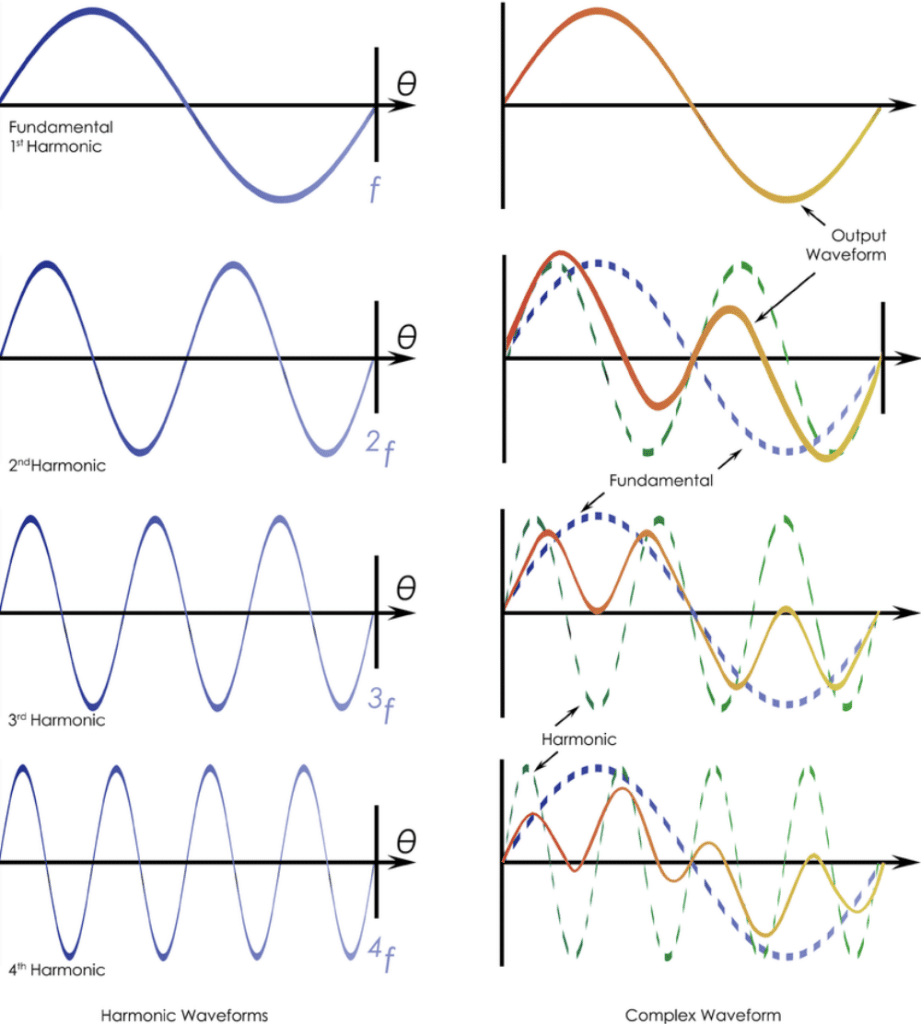
Think of the wavetable as the source code for this harmonic recipe. Your first and most important decision is choosing a wavetable that contains the right raw ingredients for the character you want to build.
Selecting Wavetables: A Strategic Approach
Given your experience with Serum, you're already familiar with browsing wavetables. The key question is not how to browse, but what to look and listen for.
1. Visual Analysis: The shape of the waveform is a direct clue to its harmonic content.
- Simple & Smooth: Waveforms resembling basic sines or triangles (e.g., in the
Analogfolder) will be softer and have fewer harmonics. - Sharp & Jagged: Waveforms with sharp edges, like saws and squares (
Basic Shapes), are rich in harmonics and will sound bright and full. - Complex & Irregular: Waveforms with chaotic or intricate shapes (common in the
DigitalandSpectralfolders) will have complex, often dissonant or metallic timbres, perfect for more aggressive sounds.
2. Aural Audition: The most important step is to listen. Load a wavetable, play a note, and sweep the Wavetable Position (WT Pos) knob.
- Does the timbre evolve from dull to bright?
- Are there interesting textural shifts?
- Does the harmonic character align with the lead sound you have in mind?
For a formal refresher on the structure of wavetables in Serum, the official manual is an excellent resource.
Serum Manual: Wavetable Oscillators
This section of the manual defines what a wavetable is and explains its anatomy, including the concept of frames and interpolation.
Read the subsections "What is a wavetable?" and "Anatomy of a Serum Wavetable" on page 11. Then, quickly review the "Wavetable Menu" description on page 12 to confirm how to navigate the library. Focus on understanding the terminology of frames and interpolation.
Engineering Your Timbre: Creating Custom Wavetables
While Serum's factory library is extensive, the real power of intentional sound design comes from creating your own wavetables. This allows you to craft a precise harmonic signature for your lead. Let's explore two powerful methods.
Method 1: Resampling for Character
Resampling "bakes" a complex sound into a new, single-cycle wavetable. This is an incredibly efficient way to capture a specific character.
Example: The CPU-Efficient Supersaw
You've expressed interest in supersaw leads, which are foundational to dancefloor DnB. Traditionally, these are made by stacking many detuned saw oscillators, which can be CPU-intensive. By resampling, you can capture that wide, rich character in a single oscillator.
How to Make a Supersaw Wavetable in Xfer Serum
This article from ADSR Sounds provides a concise, step-by-step guide to creating a supersaw wavetable.
Follow the steps outlined in the article. The key action is in "Step 2," where you use the Resample to Oscillator function. Pay attention to the "why": this process captures the complex phase and detuning information of a multi-oscillator setup into a single, manageable wavetable.
Example: The Gritty FM Lead
For more aggressive, metallic leads characteristic of Neurofunk or artists like Fox Stevenson, resampling an FM (Frequency Modulation) process is an excellent technique.
How to Create FM Wavetables in Serum – Advanced Sound Design Tutorial by Echo Sound Works
This tutorial from Echo Sound Works demonstrates how to create a custom wavetable from an FM synthesis process inside Serum.
First, watch how to set up the basic FM routing (Osc B modulating Osc A). Next, observe the crucial step where an LFO is used to sweep the modulation amount, and the result is resampled into a new wavetable. This captures the evolving timbre. Finally, see how changing the source waveforms dramatically alters the final result, giving you a huge range of aggressive timbres.
Method 2: Direct Sculpting in the Wavetable Editor
The Wavetable Editor is your surgical tool for timbre. It allows for direct, precise control over the harmonic DNA of your sound. Since you have a technical background, you may find this approach particularly intuitive.

The following video from Icon Collective is a comprehensive tour of the editor. We'll focus on the most powerful features for shaping timbre.
Xfer Serum | Wavetable Editor (12/12)
This video provides an in-depth look at the Wavetable Editor's capabilities.
Start by watching how to import external audio. This is a powerful way to turn any sound into a new oscillator source. Next, understand the difference between Crossfading and Spectral Morphing. Spectral morphing is almost always preferred for smooth timbral shifts. The most direct method for shaping timbre is the harmonic editor. Watch the segment on manipulating harmonic content directly. Pay close attention to how you can draw in the amplitude of each harmonic and use functions like Clear HF to act as a spectral low-pass filter.
Working in the FFT (Harmonic) editor is the ultimate expression of intentional sound design. You are not just choosing a sound; you are building its frequency spectrum from the ground up.
- To make a sound brighter: Add or increase the amplitude of higher harmonics.
- To make a sound softer or warmer: Attenuate or remove higher harmonics. The
Progressive FadeorClear HFfunctions are perfect for this. - To add specific character: Experiment with adding harmonics at specific musical intervals. For example, boosting the 3rd and 5th harmonics can add a "squarish" quality. The
Draw Odd Harmonics Onlyfunction is a shortcut to this.
A Framework for Intentional Selection
Let's tie this all together into a repeatable workflow:
- Define Character: Start by describing the lead you want. e.g., "A bright, wide, energetic dancefloor lead."
- Select Strategy & Source:
- Goal: Bright & Wide: Start with a saw wave from
Basic Shapes. For maximum width, create a custom supersaw wavetable as shown in the ADSR article. - Goal: Soft & Plucky: Look for wavetables in the
Analogfolder likeAnalog_BD_Sin. Or, take a brighter wavetable and use the FFT editor to remove high frequencies. - Goal: Aggressive & Metallic: Look in the
DigitalorSpectralfolders. For ultimate control, create a custom FM wavetable as shown in the Echo Sound Works video.
- Goal: Bright & Wide: Start with a saw wave from
- Audition & Refine: Play the wavetable and sweep the
WT Pos. Does the movement feel right? If the change is too drastic, consider using theMorph -> Spectralfunction in the editor to smooth the transitions. If the order feels random, use theSortmenu to arrange the frames from dull to bright.
Conclusion
Today we've moved from theoretical constraints to the first practical step in synthesis. You now understand that the wavetable is the source of your sound's fundamental character, and that this character is defined by its harmonic content.
Key Takeaways:
- Timbre is Harmonic Content: A sound's character (soft, bright, aggressive) is determined by the presence and amplitude of its harmonics.
- Selection is Strategic: Choosing a wavetable involves analyzing its shape and auditioning its movement to match your sonic goal.
- Creation is Power: Resampling allows you to capture complex characters (like supersaws or FM textures) efficiently.
- Direct Editing is Precision: The Wavetable Editor, especially the FFT view, gives you ultimate control to surgically sculpt the harmonic DNA of your sound.
In our next lesson, we will build directly on this foundation. Now that you know how to select or create a wavetable with rich timbral potential, we will explore how and why to modulate the wavetable position to bring that potential to life and create movement in your DnB lead.