Recommended resources
The freely available resources this lesson will direct you to.

In our last lesson, we explored Frequency Modulation (FM) as a powerful method for generating complex harmonic and inharmonic textures. We saw that in Serum, FM is actually one of several options within the oscillator's Warp section. Today, we will explore the other warp modes, which provide a suite of tools for twisting, stretching, and fundamentally reshaping a waveform's character in real time.
This lesson directly addresses your goal of understanding the "why" behind sound design choices. Instead of just selecting a complex wavetable, you'll learn how to take a basic shape—like a saw or sine wave—and transform it into something unique and dynamic. Mastering these modes is essential for creating the gritty, evolving timbres found in Neurofunk and the characterful, aggressive sounds of modern Dancefloor DnB.
By the end of this lesson, you will be able to utilize Serum's warp modes like Sync, Bend, and Mirror on a basic waveform and explain the resulting timbral transformation.
What are Warp Modes?
Warp modes are real-time algorithms that manipulate the shape of a single-cycle waveform as it's being played. This is fundamentally different from modulating the wavetable position, which crossfades between different, pre-existing waveforms in a table. Warping happens to the current waveform, altering its geometry—and therefore its harmonic content—on the fly.
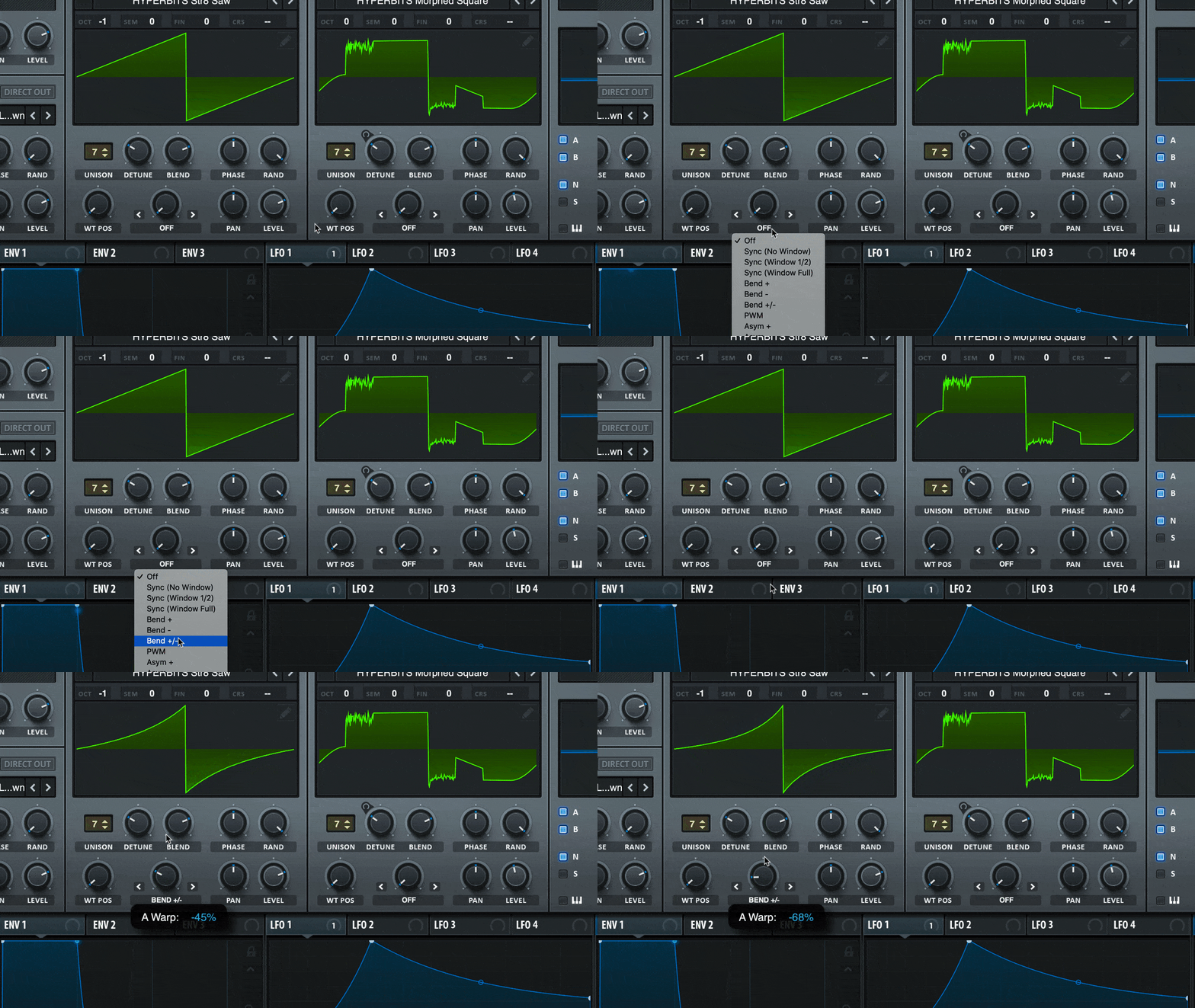
To start, let's get a comprehensive overview of the different warp modes available and what they do.
[PDF] Serum Manual - Amazon S3
The official Serum Manual provides the definitive technical explanation for each warp mode. Understanding the terminology here is key to predicting how a mode will affect your sound.
In the PDF, navigate to the "Warp Menu" section within Chapter 4, "Wavetable Oscillators". You can find it on page 14. Read through the descriptions of each mode from Self Sync to Quantize. Pay close attention to the specific action described (e.g., "pinches," "pulls," "pushes," "mirror-image"). We will explore the FM modes separately.
Now that you have a technical overview, let's see and hear these modes in action. The following video provides excellent demonstrations. We'll focus on the most impactful modes for lead design.
The Complete Guide To Master Serum| Warps
The "Complete Guide To Master Serum | Warps" from Zen World provides clear visual and auditory examples of the most common warp modes.
As you watch these selected clips, focus on connecting the visual change in the waveform to the change in timbre you hear. Sync: Watch the explanation of Sync and its effect. Notice how it adds a bright, "buzzy" quality by effectively restarting the waveform's cycle. Bend: Next, observe the demonstrations of Bend+, Bend-, and Bend +/-. Listen for how Bend- "fattens" the saw wave, making it sound closer to a square wave and adding body. PWM: Now watch the segment on Pulse Width Modulation (PWM). This is a classic synthesis technique, and hearing its effect on a square wave is essential. Mirror: Finally, see how the Mirror mode creates a higher-pitched, more complex sound by duplicating the waveform.
Strategic Applications of Key Warp Modes
Let's break down the "why" for using these modes in the context of DnB lead design.
1. Sync: For Aggression and Analog Character
- What it does: Sync forces the oscillator's waveform to restart its cycle in time with a hidden "master" oscillator. As you increase the
Warpamount, the audible oscillator's frequency increases, but it's constantly being reset. - The Timbral Result: This creates sharp discontinuities in the waveform, adding a wealth of bright, aggressive, and often metallic harmonics. It's a classic sound from analog synthesizers.
- Why use it?
- To add a sharp, cutting edge to a lead, helping it slice through a dense mix.
- To create Neurofunk-style reese basses or leads that have a "tearing" or "ripping" quality when the warp amount is modulated.
- The
Windowed Syncversions apply a tiny fade at the restart point, resulting in a cleaner, less harsh sound. This is a trade-off:Syncis aggressive and raw;Windowed Syncis smoother and more controlled.
2. Bend & Asym: For Shaping and Weight
- What they do: These modes push and pull the waveform.
Bendworks symmetrically from the center, whileAsym(Asymmetrical) pushes the whole waveform left or right.Bend+/Asym+(or left on the knob) generally "thins" the waveform.Bend-/Asym-(or right on the knob) generally "fattens" it.
- The Timbral Result: Fattening a saw wave with
Bend-pushes its shape towards a square wave, adding more body and emphasizing the fundamental and lower odd harmonics. Thinning it withBend+creates a sound closer to a narrow pulse wave, which is brighter and reedier. - Why use it?
- Use
Bend-on a saw wave to create a thicker, more substantial lead, emulating the character of a beefy analog saw. This is a great starting point for a dancefloor supersaw base. - Modulating the
Warpknob with a fast envelope creates a percussive "click" or "snap" at the start of a note. - Modulating with a slow LFO adds subtle, evolving movement to a sustained lead.
- Use
3. Mirror: For Complex Harmonics and an "Octave-Up" Feel
- What it does: Mirror takes the first half of the waveform and reflects it onto the second half.
- The Timbral Result: Because the waveform now has twice the number of "wiggles" within the same cycle period, it sounds like an octave has been added. It creates a bright, harmonically dense, and often digital or metallic texture.
- Why use it?
- To instantly add high-frequency complexity to a simple waveform like a sine or triangle.
- When modulated, it creates fantastic robotic and futuristic textures, perfect for Neurofunk.
- It's a quick way to generate a complex starting point for further processing with filters and effects.
Synergy: The Real Power of Warping
Using a warp mode on its own is powerful, but the true potential is unlocked when you combine them with other synthesis techniques, especially modulation and the FM we covered previously.
Combining Warp and FM
In the last lesson, you learned to use FM (From B) to add texture. What happens when you use FM on a waveform that is already being warped? The two processes multiply, creating exponentially more complex results.
Serum Tutorial - Huge Sounds With FM Warp Mode
This short video from ADSR brilliantly demonstrates the synergy between warp modes and FM.
The presenter starts with a basic saw wave. Watch how applying FM from a second oscillator dramatically changes the sound. Then, pay close attention to the comparison he makes between using FM alone versus using FM with the Bend - warp mode engaged. The difference is immediate and significant.
This is a critical concept: Warp modes are not just an alternative to FM; they are a powerful partner to it. By first using a warp mode like Bend- to add body, you provide a richer, more harmonically interesting signal for the FM to act upon, resulting in a "huge," gritty, and digital sound from just two saw waves.
Rendering Warps to a New Wavetable
Here is an advanced technique that opens up another level of sound design. You can "bake" a warp process into a new wavetable.
25 Essential Serum Sound Design Tips - CFA-Sound
This tip from CFA-Sound explains the "Render OSC Warp" function, a powerful feature for intentional sound design.
Read tip #21 "Resample and Render the Oscillators". Focus on the first part explaining the "Render" function. The example given is rendering a saw wave with PWM.
Why would you do this? Two main reasons:
- Freeing up the Warp Slot: Let's say you love the sound of a PWM'd saw wave, but you also want to apply FM to it. You can't select both
PWMandFMin the same warp menu. The solution:- Set Osc A to a saw wave with the
PWMwarp mode. - From the oscillator's menu (click the wavetable name), choose
Render OSC A Warp to OSC B. - Now, Osc B contains a full wavetable of the PWM process. You can turn off Osc A.
- On Osc B, the warp slot is now free! You can select
FM (From A)and use Osc A as a modulator.
- Set Osc A to a saw wave with the
- New Modulation Possibilities: Once you render a warp, you now have a wavetable where the
WT Posknob scrubs through the warp process. Modulating this creates a different character of movement than modulating the originalWarpknob. It gives you another creative option for adding motion.
Conclusion
You have now expanded your core timbre-generation toolkit significantly. Warp modes are not just effects; they are fundamental waveform-shaping tools that allow you to create a vast range of sounds from the simplest starting points.
Key Takeaways:
- Warp modes manipulate a waveform in real-time, altering its shape and harmonic content.
- Sync adds aggressive, bright harmonics, ideal for cutting leads.
- Bend and Asym are for shaping the waveform's body, making it fatter (
Bend-) or thinner (Bend+). - Mirror creates complex, higher-pitched textures by reflecting the waveform.
- The true power of warp modes is revealed when you modulate the Warp knob with envelopes and LFOs.
- Combining Warp modes with FM creates exponentially more complex and powerful timbres.
- You can render a warped waveform to a new wavetable to free up the warp slot for further processing or to create new modulation opportunities.
In our next lesson, we will address a topic you've expressed specific interest in: creating wide, powerful leads. We'll dive into Serum's Unison engine, exploring the trade-offs between voice count, detune, and stereo width to build the foundation for massive dancefloor supersaws.