Recommended resources
The freely available resources this lesson will direct you to.
Hello! Welcome to the first lesson in our new module, "Building Systems Incrementally."
In the last module, we honed your skills in analyzing advanced algorithmic patterns, culminating in a deep dive into the performance trade-offs between heap-based solutions, sorting, and QuickSelect. That kind of analytical thinking is crucial for making sound engineering decisions. Now, we'll apply that mindset as we shift from standalone algorithms to building small, practical systems—a format that closely mirrors the interview style at companies like Anthropic.
Today, we're starting with a foundational component of many distributed systems: an in-memory key-value store. You'll implement the three core operations—GET, SET, and DELETE. This task, while seemingly simple, is a classic interview starting point that tests your grasp of basic data structures and clean API design before layering on more complexity.
By the end of this lesson, you will be able to implement the core GET, SET, and DELETE operations for a basic in-memory key-value store in Python.
1. The Key-Value Model: A Universal Primitive
At its core, a key-value store is one of the simplest data models. It functions like a dictionary where you store some data (the "value") and associate it with a unique identifier (the "key"). This pattern is ubiquitous in software engineering, forming the backbone of caches (like Redis), configuration services, and even parts of the complex infrastructure you've built at AWS.
The interface is defined by three fundamental operations:
SET(key, value): Inserts a new key-value pair or updates the value if the key already exists.GET(key): Retrieves the value associated with a given key.DELETE(key): Removes a key-value pair from the store.
To see these operations in action, let's watch a very brief segment from a talk on building a high-performance key-value store.
GopherCon 2017: Building a High-Performance Key/Value Store in Go - Marty Schoch
This clip from a GopherCon talk provides a crisp, clear definition of a key-value store and its fundamental API: GET, SET, and DELETE.
Watch the segment from 00:53 to 01:38. It perfectly illustrates the three core operations we'll be implementing.
2. The Engine Room: Choosing the Right Data Structure
For an in-memory store, our primary goal is speed. We need a data structure that provides near-instantaneous lookups, insertions, and deletions. The ideal candidate for this is the hash map.
As a Rust developer, you're already very familiar with std::collections::HashMap. Python's built-in dict type is its direct equivalent and is also implemented as a hash map, giving us the performance characteristics we need.
To achieve its impressive average-case time complexity, a hash map uses a hashing function to convert a key into an index in an underlying array. Of course, sometimes different keys can hash to the same index, an event known as a collision. The most common strategy to resolve this is chaining, where a linked list (or similar structure) is used at each array index to store all the key-value pairs that collide.
Let's watch a short video that explains these core mechanics. This will be a valuable refresher, as we'll be implementing a hash map from scratch in the next module.
Design Hashmap - Leetcode 706 - Python
This NeetCode video gives a great visual explanation of how a hash map uses a hashing function and resolves collisions with chaining.
Please watch from 01:17 to 05:13. Focus on understanding how the modulo operator is used to create an index and how chaining with linked lists handles collisions. You don't need to worry about the specific code for now, just the concept.
The key takeaway is that by using a hash map (dict in our case), we can expect our GET, SET, and DELETE operations to perform in constant time on average.
3. From Theory to Production-Quality Python
Now, let's translate this into a Python class. We will create a KeyValueStore that encapsulates a dictionary for storage and exposes our three main methods.
Here's a skeleton of the class you will complete:
class KeyValueStore:
    """
    An in-memory key-value store.
    """
    def __init__(self):
        """
        Initializes the key-value store.
        """
        self._data = {}

    def set(self, key: str, value: any):
        """
        Sets the value for a given key. Overwrites the existing value if the key is already present.

        Args:
            key: The key to set.
            value: The value to associate with the key.
        """


        # Your implementation here
        pass

    def get(self, key: str) -> any:
        """
        Gets the value for a given key.

        Args:
            key: The key to retrieve.

        Returns:
            The value associated with the key, or None if the key is not found.
        """


        # Your implementation here
        pass

    def delete(self, key: str) -> bool:
        """
        Deletes a key-value pair.

        Args:
            key: The key to delete.

        Returns:
            True if the key was found and deleted, False otherwise.
        """


        # Your implementation here
        pass
Your Task: Implement the set, get, and delete methods.
Here are some guidelines based on Python best practices:
set(key, value): This is the most straightforward. You can simply assign the value to the key in the_datadictionary.get(key): A key might not exist. A robust implementation should not crash. Instead of usingself._data[key], which would raise aKeyError, it's better to use thedict.get()method. It allows you to safely retrieve a value and returnsNone(or a specified default) if the key is not found.delete(key): Similar toget, attempting to delete a non-existent key withdel self._data[key]will raise aKeyError. A clean way to handle this is to check for the key's existence first (if key in self._data) or use atry...except KeyErrorblock. The method should return a boolean indicating if the deletion was successful.
This exercise is not just about functionality but also about writing clean, predictable code—a key aspect of production readiness.
4. A Glimpse of a Production System
Our KeyValueStore class is a great start, but it has two major limitations for a real-world service like the ones you build:
- It's not durable: If the process restarts, all data is lost.
- It's not thread-safe: If multiple threads try to write data simultaneously, the internal state can become corrupted.
In a production system, durability is often achieved by writing operations to a Write-Ahead Log (WAL) on disk before updating the in-memory hash map. Concurrency is managed with locking mechanisms.
This diagram illustrates that common architecture. Our implementation today constitutes the "In-Memory Hashmap" component.
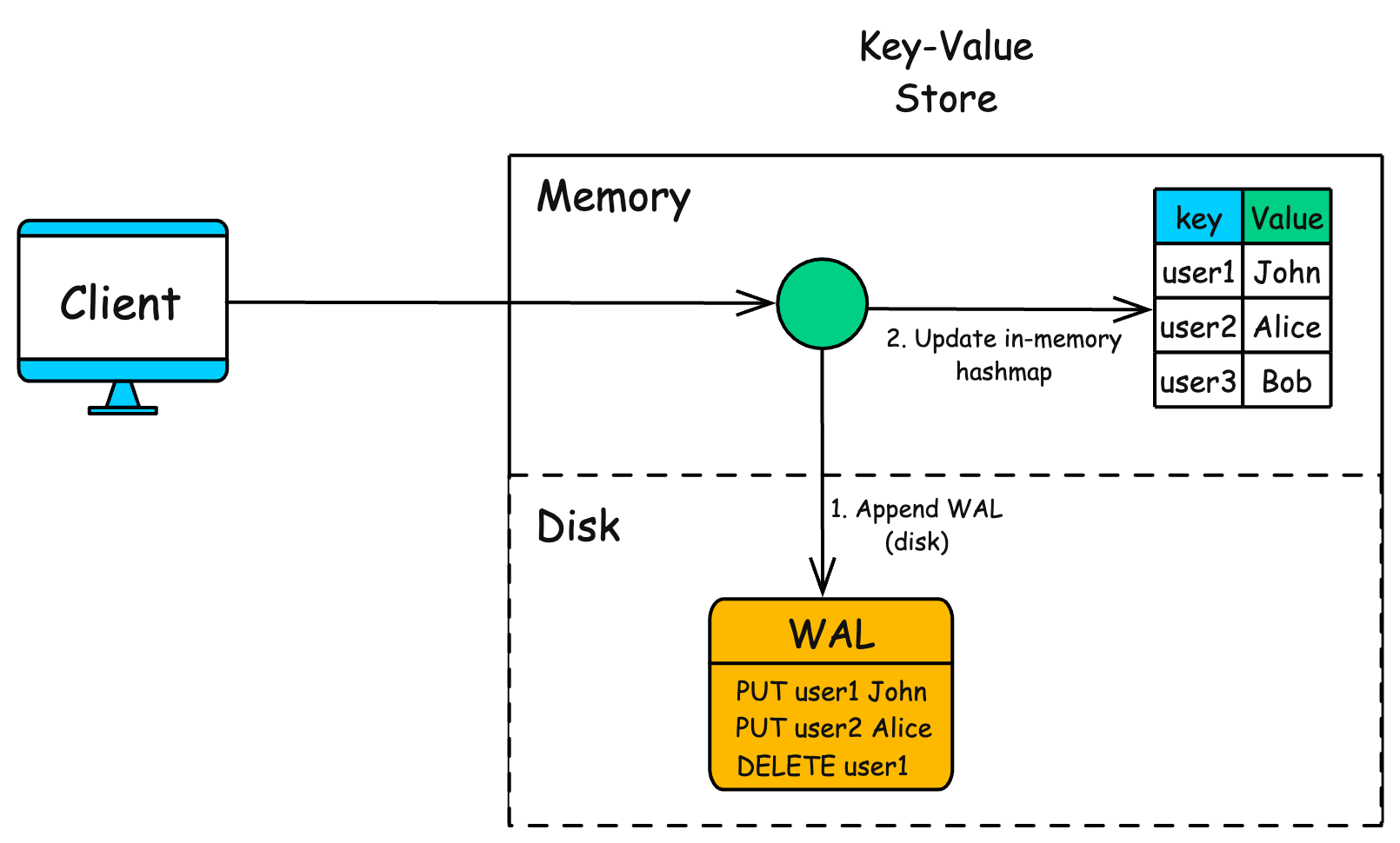
As we move through this module, we will incrementally add features like thread-safety, moving closer to a production-ready component.
Conclusion
In this lesson, we laid the groundwork for our system-building module. You've implemented the essential API for an in-memory key-value store, a fundamental building block in modern software architecture.
Key Takeaways:
- A key-value store provides a simple data model with three core operations:
GET,SET, andDELETE. - For an in-memory implementation, the hash map (Python's
dict) is the optimal data structure, offering average time complexity for its core operations. - Writing robust methods involves gracefully handling edge cases, such as requests for non-existent keys.
- A simple in-memory store is the first step. Production systems build on this with features for durability (like WALs) and concurrency.
Next Lesson Preview
Now that we have a working key-value store, we'll add our first feature. In the next lesson, you will extend the key-value store to support Time-To-Live (TTL), a common requirement for caches, where keys automatically expire after a set duration. This will require us to think about how we manage and evict stale data efficiently.