Recommended resources
The freely available resources this lesson will direct you to.
Hello! Welcome to the first lesson in your journey into C programming and algorithms. Today, we'll begin by exploring a fundamental question: how does the code you write in C, which looks a bit like English, get transformed into a program that a computer's processor can actually understand and execute?
This lesson addresses the first learning outcome of our course: to explain the role of a compiler and the process of turning C source code into an executable program. We will demystify what happens "under the hood" by breaking the process down into four distinct stages. Understanding this journey from source code to executable is a crucial first step for any C programmer.
The Bridge Between Human and Machine
At its core, a computer's Central Processing Unit (CPU) only understands one language: machine code, which consists of sequences of 1s and 0s. Writing programs directly in machine code is incredibly tedious and error-prone. To solve this, we use high-level programming languages like C, which are designed to be readable and manageable for humans.
So, how do we bridge this gap? We use a special program called a compiler. The compiler's job is to translate the human-readable C code, called source code, into the machine-executable code that the CPU can run.
For a great overview of this concept, please read the introductory sections of the following article.
Compilation In C: Detail Explanation Using Diagram & ...
This article from Unstop provides a clear definition of compilation and why it's a necessary step in programming.
Read the sections "What Is Compilation In C?" and "Why Do We Need A Compilation Process In C?". Focus on the core idea of translation from a high-level language to low-level machine code.
The Journey from Source Code to Executable
The translation process isn't a single monolithic step. Instead, it's a four-stage pipeline. Your C source code file (e.g., my_program.c) goes through each of these stages in order to become a runnable program.
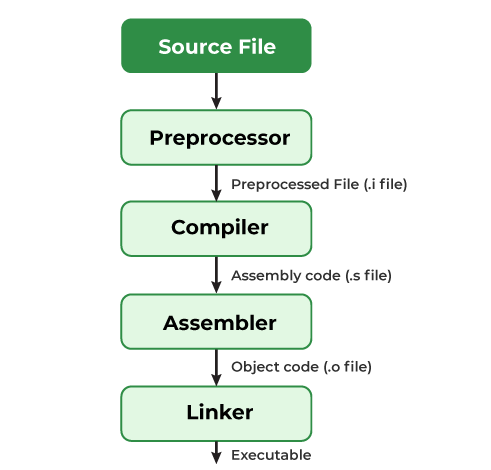
The following video provides an excellent and detailed walkthrough of this entire process. As you watch, pay close attention to the role of each component and the type of file it produces.
C_06 Execution Process of a C Program | C Programming Tutorials
This video from Jenny's Lectures CS IT breaks down the execution process of a C program from start to finish. It clearly explains the function of the preprocessor, compiler, assembler, linker, and loader.
Please watch the following segments: The Preprocessor: Notice how it handles lines starting with #, like including header files and expanding macros. Compiler and Assembler: Understand that the compiler first creates assembly code and checks for syntax errors, before the assembler converts it to object code. Linker and Loader: Focus on how the linker resolves references to functions (like printf) by pulling in code from libraries to create the final executable, which is then loaded into memory to run.
Let's summarize those four stages:
-
Preprocessing: The preprocessor is the first program to handle your source code. It doesn't know anything about C syntax. Its job is to obey "preprocessor directives"—lines that begin with a
#symbol. Its main tasks are:- Removing comments: All comments are stripped from the code.
- Expanding macros: If you use
#defineto create a macro, the preprocessor replaces every instance of the macro with its corresponding value. - Including header files: When it sees
#include <stdio.h>, it replaces that line with the entire content of thestdio.hfile.
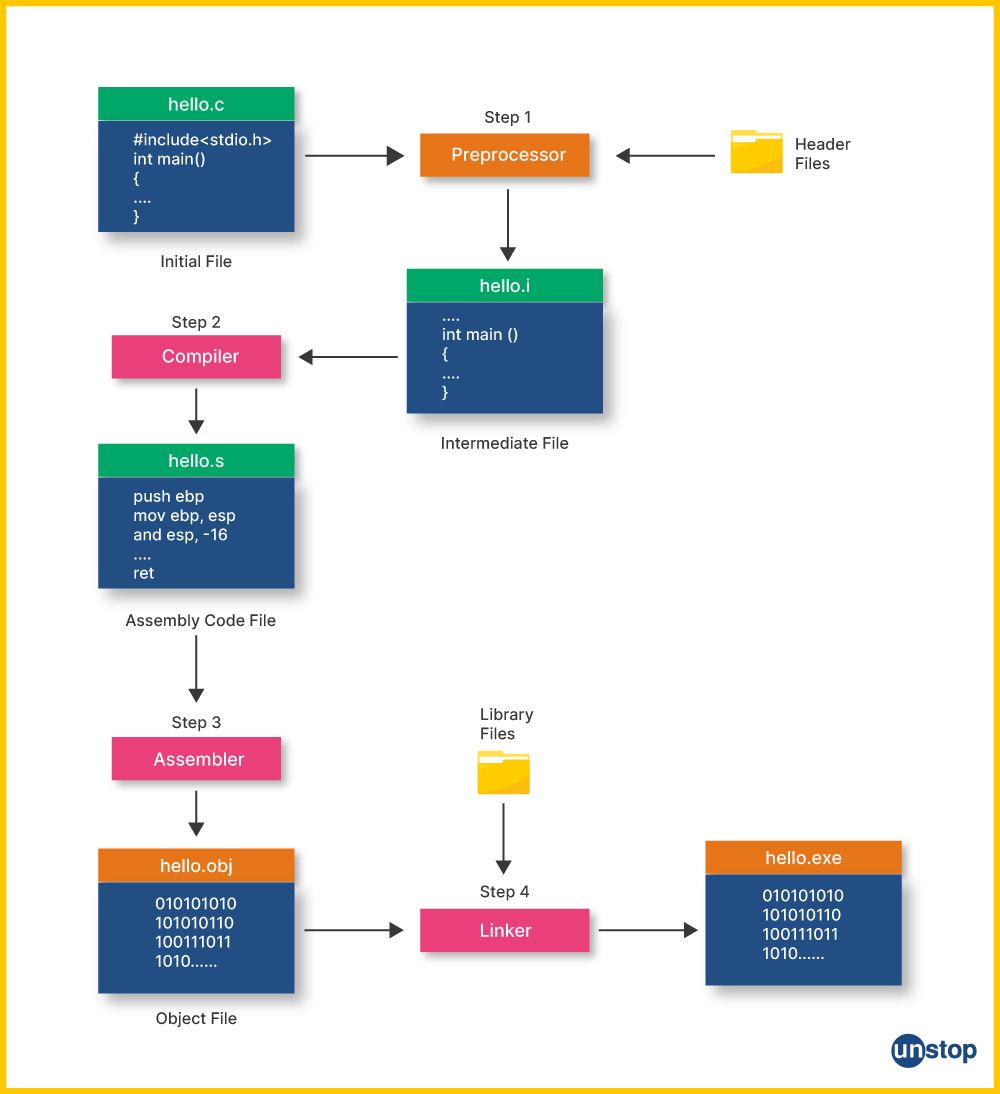
The output is an expanded source code file, often with a.iextension.
-
Compilation: The expanded source code is fed to the compiler. The compiler translates the C code into a lower-level language called assembly language. Assembly language is specific to the target CPU architecture but is still somewhat human-readable. This is also the stage where the compiler checks for syntax errors. If you forgot a semicolon or misspelled a variable name, the process will stop here with an error message. The output is an assembly code file, typically with a
.sextension. -
Assembly: The assembler takes the assembly code and translates it into pure machine code, also known as object code. This file consists of 0s and 1s that the CPU can understand. However, if your program uses functions from libraries (like
printf), the object code contains placeholders or references to them, but not their actual machine code. The output is an object file, with a.o(on Linux/macOS) or.obj(on Windows) extension. -
Linking: The linker is the final stage. It takes the object file created by the assembler and links it with the object code for any library functions your program uses. For example, the actual machine code for the
printffunction lives in the C standard library. The linker finds this code and combines it with your object code to produce a single, complete executable file. This is the file you can run. On Windows, this file will have a.exeextension. On Linux or macOS, it might have no extension.
This diagram helps visualize the files produced at each stage:
Seeing the Process in Action
Theory is great, but seeing is believing. While we won't be writing code ourselves just yet, the following video demonstrates how a developer can use the GCC (GNU Compiler Collection), a very common C compiler, to stop the compilation process at each of the four stages and inspect the intermediate files.
Understanding how GCC carries out compilation
This video from Engineer Man provides a quick and practical demonstration of the compilation steps using the GCC compiler on the command line.
Watch the entire video. Notice the command-line flags used to control the process: -E for Preprocessing -S for Compilation (to assembly) -c for Assembly (to object code) The final step that links the object file to create the executable.
To reinforce this, you can read through a textual explanation that shows what the contents of these intermediate files look like.
Compiling a C Program: Behind the Scenes
This article from GeeksforGeeks provides a detailed walkthrough of the four phases, including screenshots of the intermediate files.
Read the section "What goes inside the compilation process?", which covers the four phases: Pre-processing, Compiling, Assembling, and Linking. Pay attention to the sample outputs for the .i, .s, and .o files to get a feel for how the code is transformed at each step.
Conclusion
In this lesson, we've unpacked the seemingly magical process of turning C source code into a runnable program. You now have a solid conceptual map of the journey your code takes.
Here are the key takeaways:
- Compiler: A translator that converts high-level source code into low-level machine code.
- Four Stages: The process is a pipeline with four main stages:
- Preprocessing: Handles directives (e.g.,
#include) and removes comments. - Compilation: Translates C code into assembly language and checks for syntax errors.
- Assembly: Converts assembly language into machine-readable object code.
- Linking: Combines your object code with library code to create a final executable file.
- Preprocessing: Handles directives (e.g.,
Now that you understand the theory behind building a C program, we're ready to get our hands dirty. In the next lesson, you will set up your own C development environment, write your very first "Hello, World!" program, and use a compiler to build and run it from the command line.