Recommended resources
The freely available resources this lesson will direct you to.
Welcome to your fourth lesson! In our last session, we mastered printf, learning how to display text, variables, and create neatly formatted output on the console. You now have the tools to make your program communicate its results.
Today, we'll shift our focus from displaying data to storing it. Any non-trivial program needs to hold information in memory to work with it—user input, calculation results, configuration settings, and so on. We'll explore how C achieves this through variables. This lesson is dedicated to our next learning outcome: to declare, initialize, and use variables of basic data types (int, float, double, char). By the end, you'll be able to create storage for different kinds of data in your C programs.
Part 1: What Is a Variable?
In programming, a variable is simply a named location in the computer's memory that you can use to store a value. To create a variable in C, you must do two things:
- Declaration: Tell the compiler the variable's type and name. This reserves a space in memory for it.
- Initialization: Assign an initial value to that variable.
The following video provides a concise and clear explanation of these two fundamental steps.
The video "C variables" from the Bro Code channel is excellent for understanding these core concepts.
Please watch the first two parts of the video: Declaration and Initialization: This section clearly defines what a variable is and breaks down the two-step process of creating one. Basic Data Types: Here, you'll get a first look at int, float, and char in action.
As the video explains, you can perform declaration and initialization in two separate lines or combine them into one, which is the most common practice.
Declaration:int score;
Initialization:score = 100;
Combined:int score = 100;
The general syntax is type name = value;. This structure is fundamental to C programming.
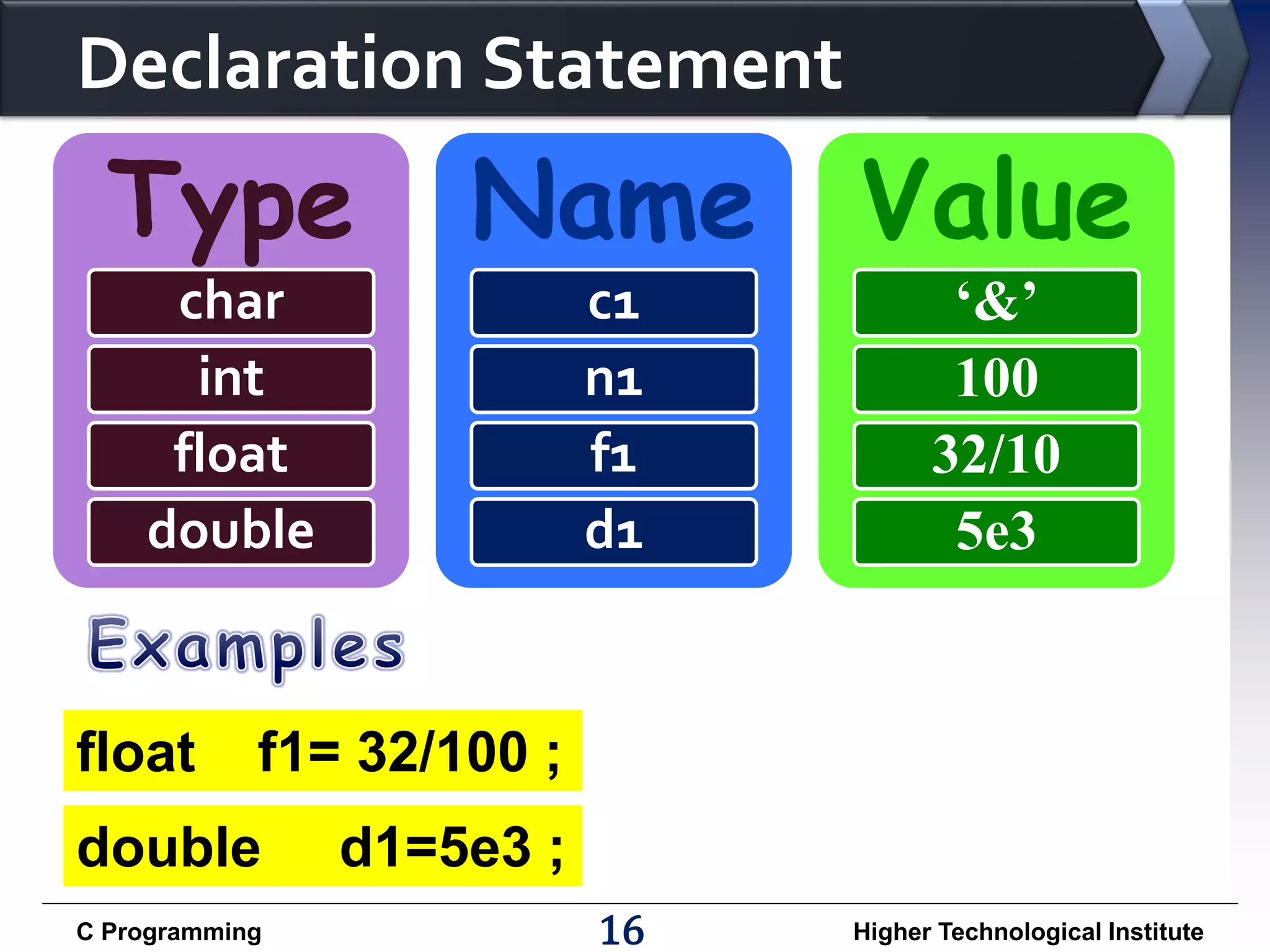
It is very important to initialize your variables. If you only declare a variable but don't initialize it, its memory location will contain a random or "garbage" value left over from whatever was in that memory location before. Using an uninitialized variable can lead to unpredictable behavior and bugs.
2.2. Data types and representation — Snefru
The article from "Snefru: Learning Programming with C" explains this risk in more detail.
Read the section titled Declaring Vs. Initializing Variables. Focus on understanding why an uninitialized variable contains a "garbage" value and why it's considered best practice to always initialize variables when you declare them.
Part 2: The Four Basic Data Types
Now that we know how to create a variable, let's explore what we can store in it. C requires you to be explicit about the type of data a variable will hold. This allows the compiler to allocate the correct amount of memory and to ensure you're using the variable correctly. We will focus on the four most common basic types: int, float, double, and char.
The next video walks through each of these types, showing how to declare them and print them using the format specifiers we learned in the previous lesson.
#3: Data Types in C Programming | [2025] C Programming for Beginners
The video "#3: Data Types in C Programming" by Programiz provides a systematic overview of these types.
Watch the following segments carefully: Integer Type (int): This covers variables for whole numbers (e.g., -5, 0, 100). It demonstrates declaration, initialization, and printing with %d. Floating-Point Types (float and double): This part introduces types for numbers with decimal points (e.g., 3.14, -0.01). Pay close attention to the difference in precision between float and double and the format specifiers %f and %lf. Character Type (char): This section explains how to store a single character (e.g., 'A', '$', '7'). Note the use of single quotes (' ') for character values and the %c format specifier. It also introduces the interesting idea that characters are stored internally as numbers.
Here is a summary of the types covered in the video. The W3Schools page also provides a handy reference table.
This resource from W3Schools offers a quick reference for the basic types and their corresponding format specifiers.
Review the tables under the headings Basic Data Types and Basic Format Specifiers. This will reinforce what you saw in the video.
| Data Type | Purpose | Example Declaration | Format Specifier |
|---|---|---|---|
int |
Stores whole numbers (integers), both positive and negative. | int userAge = 30; |
%d |
float |
Stores floating-point numbers (numbers with a decimal). Single-precision. | float price = 19.99f; |
%f |
double |
Stores floating-point numbers with much greater precision than float. |
double pi = 3.1415926535; |
%lf |
char |
Stores a single character, enclosed in single quotes. | char initial = 'J'; |
%c |
A quick note on float vs. double: double can store about twice as many significant digits as float. Because of this higher precision, it's generally recommended to use double for floating-point calculations unless you have a specific reason to conserve memory.
Part 3: Practical Application
Let's bring everything together in a single program. The code below declares one variable of each basic type, initializes it with a value, and then uses printf to display the information.
Action: Create a new file named variables.c, type the following code, then compile and run it.
#include <stdio.h>

int main(void) {
    // Declare and initialize variables of different types
    int numberOfStudents = 25;
    double itemPrice = 99.95;
    float taxRate = 0.08f; // The 'f' suffix is good practice for float literals
    char productGrade = 'A';

    // Use the variables by printing their values
    printf("--- School & Store Report ---\n");
    printf("Number of students: %d\n", numberOfStudents);
    printf("Product Grade: %c\n", productGrade);

    // For floating-point numbers, we can control precision
    printf("Item Price: $%.2lf\n", itemPrice); // Display with 2 decimal places
    printf("Tax Rate: %.3f\n", taxRate);       // Display with 3 decimal places

    return 0;
}
Challenge:
After running the code successfully, try modifying it:
- Declare a new
intvariable namedinventoryCountand initialize it to500. - Declare a new
doublevariable namedshippingCostand initialize it to5.50. - Add
printfstatements to display the values of your new variables.
Part 4: How Much Memory? The sizeof Operator
A data type doesn't just define what kind of data a variable can hold; it also determines how much memory the variable occupies. C provides a useful operator called sizeof that tells you the size of a data type or variable in bytes.
#3: Data Types in C Programming | [2025] C Programming for Beginners
The final part of the Programiz video demonstrates the sizeof operator.
Watch from the sizeof operator. This will show you how to check the memory footprint of each data type we've discussed.
While you don't need to memorize these sizes (as they can sometimes vary slightly between different systems), it's a key concept that helps explain why double is more precise than float—it simply uses more memory (typically 8 bytes vs. 4 bytes) to store the number.
Conclusion
In this lesson, we established a critical foundation for C programming. You now understand that variables are named containers for data, and that every variable must have a specific type.
Key takeaways from today:
- Variables are created through declaration (specifying a type and name) and initialization (assigning a value).
- It's crucial to initialize variables to avoid using "garbage" data.
- The four basic data types are
int(whole numbers),float/double(decimal numbers), andchar(single characters). - Each data type has a corresponding format specifier (
%d,%lf,%f,%c) used withprintfto display its value. - The
sizeofoperator can be used to find the memory size of a data type.
Now that we know how to store numbers in variables, the logical next step is to learn how to perform calculations with them. In the next lesson, we will explore C's arithmetic operators (+, -, *, /, %) to manipulate the data you've stored.