Recommended resources
The freely available resources this lesson will direct you to.
Hello again! Welcome to our final lesson in the module on deepening your understanding.
In our previous lessons, we've established why interleaving is so effective for building durable, flexible knowledge and, crucially, when to use it—after you've built a foundational understanding with blocked practice. You now have the strategic knowledge to choose the right tool for the job.
Today, we transition from strategy to execution. Our goal is to design a practice session that mixes different types of problems or concepts. This lesson is all about the practical "how-to." We will construct a reusable template that you can apply directly to your learning goals, whether in UX design, coding, or data analysis. Mastering this will give you a concrete method to move knowledge from a state of passive understanding to one of active, applicable skill.
A Quick Recap: The "Why" Behind the "How"
Before we build our session, let's quickly remember what we're aiming for.
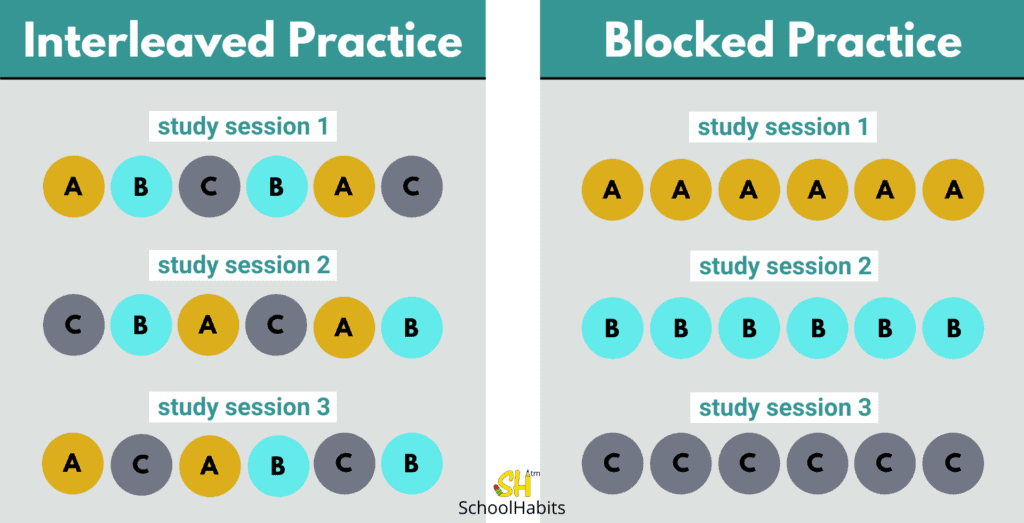
The purpose of interleaving isn't just to review multiple topics; it's to train your brain in the art of discrimination—the ability to look at a problem and correctly identify which strategy or concept is needed. This is the skill that separates academic knowledge from real-world expertise.
The Anatomy of an Interleaved Practice Session
Designing an effective interleaved session involves three key decisions. Let's think of them as the ingredients for our practice recipe.
- Choosing the Concepts: You need to select 2-4 related but distinct concepts. The ideal candidates are topics that are often confused with one another. For example, in UX, you might mix practice on different types of user maps that serve different purposes.
- Structuring the Mix: You need a plan for how you will alternate between the concepts. This could be a simple rotation, a timed interval for each topic, or a random shuffling of practice problems.
- Designing the Prompts: The practice problems themselves must be designed to force discrimination. Instead of telling you which concept to use, the prompt should describe a situation, requiring you to first choose the correct tool and then apply it.
To explore these principles in more detail, the following resources provide excellent, practical guidance.
Interleaving: A Teacher's Guide
The article 'Interleaving: A Teacher's Guide' provides a fantastic, concise section on how to structure these practice sessions. It introduces the idea of the 'discriminative contrast mechanism,' which is exactly what we're trying to build.
Please read the section titled 'How Do You Design Interleaved Practice Sets?'. Focus on the three core components it outlines: selecting related concepts, structuring sessions with time cycles, and creating mixed practice homework.
Blocked vs Interleaved Practice: What Actually Works for Musicians?
This video, focused on musicians, offers two very simple and practical ways to structure the timing of your session. These methods are easily transferable to any other skill.
Please watch the clip from 13:47 to 14:38. The speaker outlines two methods: bouncing between longer sections (3-5 minutes each) or randomly cycling through a list of very short skills within a set timer (e.g., 10 minutes).
A Step-by-Step Guide: Designing a UX Research Practice Session
Let's apply these principles to a concrete example from your field. We will design a 60-minute practice session for UX research methods.
Step 1: Define a Specific Learning Goal
- Goal: To become proficient at choosing the appropriate evaluative research method during the execution and assessment phases of product development.
Step 2: Select 2-4 Related Concepts to Interleave
To do this, we can use a tool you might already be familiar with—a map of UX research methods. Looking at the chart below, we can pick three methods from the "Execution" and "Assessment" phases that serve different purposes.
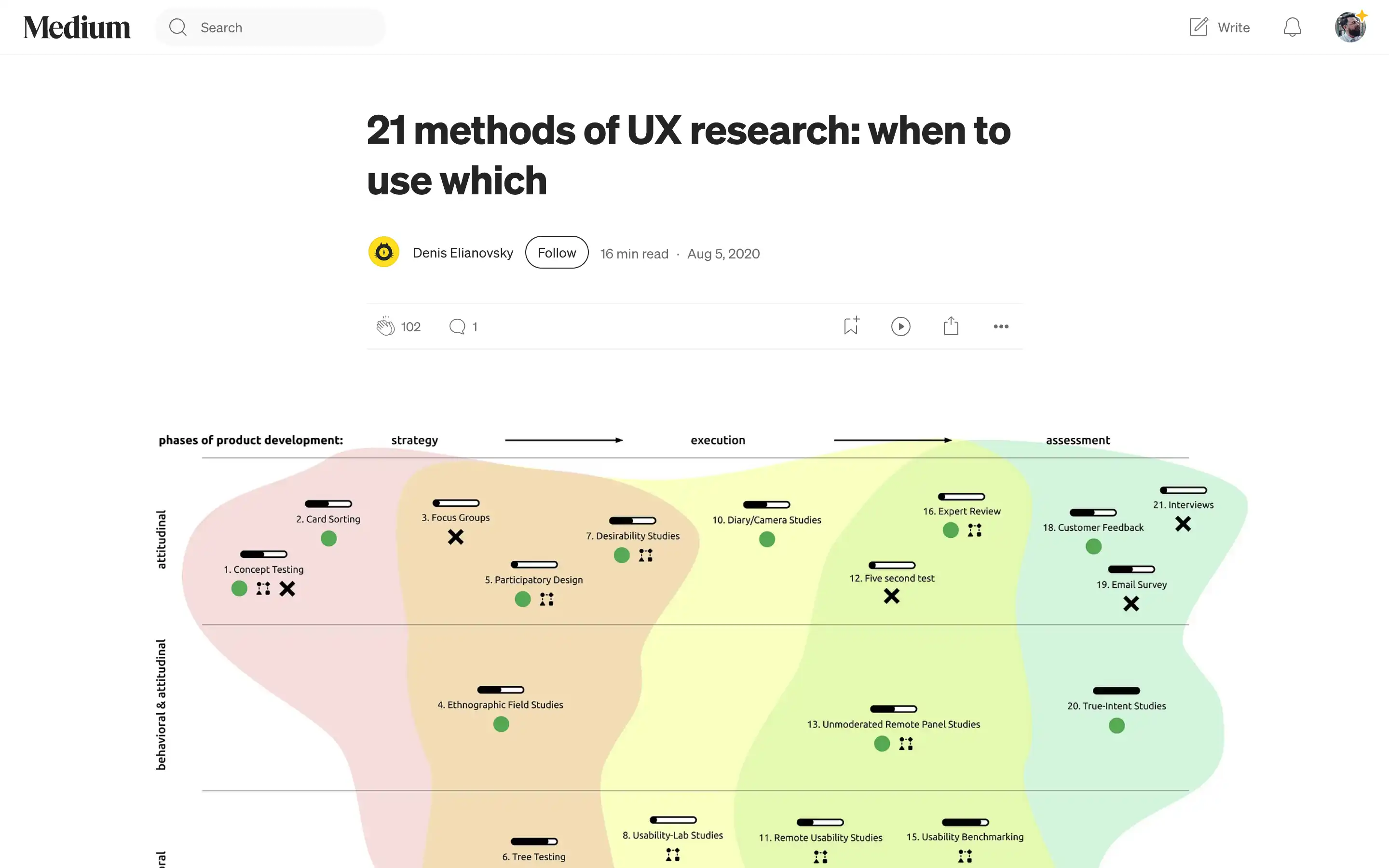
Let's choose three methods that are sometimes confused or used interchangeably:
- Concept A: Usability-Lab Studies (Execution, Behavioral)
- Concept B: A/B Testing (Assessment, Behavioral)
- Concept C: Analytics & KPIs (Assessment, Behavioral)
These are all evaluative and deal with user behavior, but they answer very different questions. Usability studies answer "Why are users having trouble?"; A/B testing answers "Which of these two designs performs better on a specific metric?"; and Analytics answers "What are users doing at a large scale?".
Step 3: Choose an Interleaving Structure
For a 60-minute session with fairly involved tasks, a timed rotation works well. We can adapt the advice from the resources we just reviewed.
- Structure: We will use three 15-minute cycles. In each cycle, we'll tackle one problem prompt related to one of the concepts. We will add a 5-minute buffer at the start of each cycle for a quick review and a buffer at the end.
0-5 min: Review concepts A, B, C.5-20 min: Tackle Prompt 1 (e.g., Concept B).20-35 min: Tackle Prompt 2 (e.g., Concept A).35-50 min: Tackle Prompt 3 (e.g., Concept C).50-60 min: Final review and self-correction.
For more granular options on structuring your time, the Coursera article below offers some clear patterns.
How to Use Interleaving for Deeper Learning - Coursera
The article 'How to Use Interleaving for Deeper Learning' provides clear, systematic patterns for structuring your practice.
Read the short section 'How does interleaving work: Choosing an interleaving pattern'. Note the different patterns like ABCABC, AABBCC, and how they relate to the amount of time you want to spend on each item before switching.
Step 4: Create Mixed Practice Prompts
This is the most important step. The prompts must describe a scenario without naming the method. Your task is to first identify the method, justify your choice, and then outline the next steps.
-
Prompt 1 (15 mins): "The product team has designed a new, simpler navigation menu for the mobile app. They are risk-averse and want to launch it only if it proves to be more effective than the current menu at helping users find the 'Account Settings' page. Which method would you propose? Briefly outline the study plan."
- (This points to A/B Testing because it's a direct comparison of two versions against a specific metric.)
-
Prompt 2 (15 mins): "Analytics data shows that 40% of users are dropping off during the new multi-step sign-up process, but the data doesn't explain why. Stakeholders are worried users find the process confusing or untrustworthy. Which method would you use to understand the user's thought process and identify specific pain points? What are 3-5 tasks you would ask them to perform?"
- (This points to a Usability-Lab Study because the goal is to uncover the 'why' behind observed behaviors.)
-
Prompt 3 (15 mins): "You've been asked to create a quarterly report on the overall health of the product's user engagement. The leadership team wants to see trends over time related to user retention, feature adoption, and task success rates. Which method and tools would you use to gather and present this information? List 3 key metrics you would include."
- (This points to Analytics & KPIs as it requires a high-level, quantitative view of user behavior over time.)
Your Reusable Practice Session Template
Here is a simple template you can copy and use to design your own sessions.
Interleaved Practice Session Plan
- Learning Goal: (Be specific. What do you want to be able to do?)
- Interleaved Concepts (2-4):
- Concept A:
- Concept B:
- Concept C:
- Session Structure & Timing: (e.g., 60 mins total; 3 x 15-min problem blocks; ABCABC pattern)
- Mixed Practice Prompts:
- Prompt 1: (A scenario-based problem that forces you to choose a concept.)
- Prompt 2: (Another scenario, ideally pointing to a different concept.)
- Prompt 3: (A third scenario...)
Test your understanding!
You want to improve your ability to apply different UI design principles. You've recently studied Hierarchy, Contrast, and Consistency.
Using the template above, outline a 45-minute interleaved practice session. State your goal, concepts, structure, and create one sample prompt that would force you to discriminate between at least two of the principles.
Show answer
Here's one possible answer:
-
Learning Goal: To be able to identify and fix violations of core UI principles in an existing design.
-
Interleaved Concepts (3):
- Hierarchy
- Contrast
- Consistency
-
Session Structure & Timing: 45 mins total. 3 x 10-minute problem blocks, with 15 mins for review.
-
Sample Mixed Practice Prompt:
- Prompt: "You've been given a screenshot of a mobile app's settings page. The page feels 'messy' and hard to read. Some interactive elements are blue, while others are green. The 'Save Changes' button is a light grey on a white background, and its text size is the same as the help text below it. Identify at least three design principle violations. For each violation, name the principle and describe how you would fix it."
(This prompt forces discrimination: the color issue relates to Consistency, the button color to Contrast, and the button text size to Hierarchy.)
Conclusion
You now have a practical, step-by-step method for designing practice sessions that build robust, applicable skills. By consciously selecting related concepts, structuring your time, and creating prompts that demand discrimination, you are moving beyond simple memorization and actively training for real-world performance. This is one of the most powerful tools for "debugging" the application phase of your learning process.
Key Takeaways:
- Effective interleaved practice requires careful design.
- Select 2-4 related concepts that are easily confused.
- Structure your session by choosing a pattern for alternating between them (e.g., timed blocks like
AABBCCor rapid switching likeABCABC). - Design scenario-based prompts that force you to first identify the right concept before applying it.
- Use the provided template to build your own practice sessions for any topic.
What's Next?
Designing practice sessions like this is a powerful way to promote the transfer of knowledge—applying what you've learned in one context to another. In our next module, "From Theory to Practice: Knowledge Transfer," we will formally explore this idea. Our first lesson will focus on explaining the difference between 'near transfer' (what we practiced today) and 'far transfer' (applying your skills in much more novel situations).