Recommended resources
The freely available resources this lesson will direct you to.
Hello! Last time, you created an isolated Python environment and recorded your project’s dependencies. Now you’ll put code beside that environment: first in a reusable module, then in a small package. This is a foundation for the data-processing and AI code you’ll write later. Allow about 40 minutes, including time to create and run the files.
Start with functions that return useful results
A function gives a piece of work a name and lets you supply different inputs each time you call it. For reusable code, it is often better to return a result than to print it inside the function. A caller can print a returned value, but could also use it in another calculation.
Watch the relevant parts of Programming with Mosh’s Python Functions | Python Tutorial for Absolute Beginners #1 before writing your own functions.
Python Functions | Python Tutorial for Absolute Beginners #1
Programming with Mosh demonstrates function definitions, inputs, and the difference between printing and returning a value. Watch for the point where a function's result becomes available to other code.
Watch defining a function, then passing inputs. Continue with returning values; focus on why the caller has more options when a function returns a value instead of printing it.
Return to the ai-workflows directory from the previous lesson. Keep your Python files alongside .venv, not inside it. If you want to activate .venv again, use the activation command for your system from the previous lesson; the code below needs no additional packages.
Create text_utils.py in ai-workflows:
def normalize_text(text):
    """Remove surrounding whitespace and make text lowercase."""
    return text.strip().lower()


def count_words(text):
    """Count whitespace-separated words in normalized text."""
    cleaned = normalize_text(text)
    return len(cleaned.split())
Here, text is a parameter: the name used inside the function definition. In a call such as normalize_text(" Hello AI "), the string is an argument: the actual value supplied for that parameter. The first function returns "hello ai"; it does not display anything by itself.
Notice that count_words() calls normalize_text() rather than duplicating its cleanup logic. Both functions can be called with new text, and neither depends on a particular message stored elsewhere in the project. For now, “word” means a chunk separated by whitespace; this is a small reusable utility, not a full text tokenizer.
Import the module from another file
A .py file containing definitions is a module. Importing text_utils lets another file use its functions without copying their definitions. Dave Gray demonstrates this with a custom module in Python Modules for Beginners.
Dave Gray shows a custom Python file being imported and then explains how to keep code from running unexpectedly on import. His example prints from inside a function; compare that choice with our functions, which return values to their caller.
Watch a custom module to see one file use names defined in another. Then watch the main guard, focusing on the difference between importing a file and running it directly.
Create a second file, run_demo.py, beside text_utils.py:
import text_utils


def main():
    sample = "  Python for AI  "
    print(text_utils.normalize_text(sample))
    print(text_utils.count_words(sample))


if __name__ == "__main__":
    main()
From a terminal in ai-workflows, run:
python run_demo.py
You should see:
python for ai
3
import text_utils makes the module name available in run_demo.py. The functions retain their own names inside that module, so you call text_utils.count_words(sample). This prefix makes the function’s origin clear. You can also import one function directly—for example, from text_utils import count_words—and then call count_words(sample) without the prefix. Prefer either explicit form over from text_utils import *, which makes it harder to see where names came from.
The last two lines of run_demo.py separate using the file as a program from importing it. When you run it directly, __name__ is "__main__", so main() runs. When another file imports run_demo, its main() function is defined but not automatically called. That matters because Python executes top-level statements during import: an unguarded print() or API call could surprise every file that imports your module.
You can check the two behaviors from the project directory:
python -c "import text_utils; print(text_utils.count_words('  Hello AI  '))"
python -c "import run_demo"
The first command prints 2. The second should print nothing. These are quick checks of importability and behavior; you’ll learn a more systematic testing approach with pytest later.
Give related modules a package home
One utility file needs little organization. As related files accumulate, a package provides a named directory for them. Read the package introduction in the official Python Tutorial to connect directory structure with dotted import names.
6. Modules — Python 3.14.0 documentation
Read the Python documentation's introduction to packages to see how a directory gives related modules a shared name. Focus on the relationship between folders, files, and dotted imports; you do not need to work through its sound-processing example in detail.
In Section 6.4, “Packages,” begin with the paragraph that describes packages as a way to structure module names. Read the package explanation, stopping just after the first sound.effects.echo import example. Pay particular attention to the discussion of __init__.py and to which parts of the dotted name identify directories versus a module file.
The following image shows a larger version of that directory idea. For example, mod1.py sits inside sub_pkg1, which sits inside pkg.
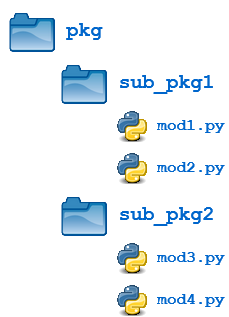
Your project needs only one package directory for now. Restructure its files like this:
ai-workflows/
    .venv/
    .gitignore
    requirements.txt
    run_demo.py
    ai_workflows/
        __init__.py
        text_utils.py
Move your existing text_utils.py into the new ai_workflows directory. Create an empty file there named __init__.py—with two underscores on each side of init. It marks this directory as a conventional Python package. Python also supports some packages without this file, but an empty __init__.py keeps this example explicit. The outer project directory uses a hyphen; the inner package uses an underscore so it can appear in a Python import name.
Now change only the import line in run_demo.py:
from ai_workflows import text_utils
Leave the calls to text_utils.normalize_text(...) and text_utils.count_words(...) unchanged. Run python run_demo.py again from the outer ai-workflows directory; the output should still be python for ai and 3. You can also import a function through its full module location:
python -c "from ai_workflows.text_utils import count_words; print(count_words('Three short words'))"
That command prints 3. In ai_workflows.text_utils, ai_workflows identifies the package directory and text_utils identifies text_utils.py. Running from the project directory matters here because it allows Python to find the package directory alongside run_demo.py. If you encounter ModuleNotFoundError, first check your terminal’s current directory, the spelling of ai_workflows, and the location of __init__.py; there is no need to copy the module into .venv.
Takeaways
You defined functions that accept inputs and return values, reused one function inside another, imported a module from a separate script, and moved that module into a package without changing what the program does. The organizing principle is to keep reusable work in importable files and put deliberate program execution behind if __name__ == "__main__":.
Next, you’ll use NumPy arrays for numerical operations. Those operations will fit naturally into the same kind of reusable functions and modules you built today.