Recommended resources
The freely available resources this lesson will direct you to.
Good to see you again. Your last script accepted text and numeric input, then displayed a formatted agent profile. You also saw that typing many where int() expected a number makes Python stop with an error message. This lesson turns that intimidating-looking output into useful evidence.
You will learn to read a Python traceback, locate the relevant file and line, and correct three foundational problems:
- Syntax errors: Python cannot understand the code’s structure.
- Name errors: code uses a name that Python cannot find.
- Type errors: code combines or uses values in incompatible ways.
This is a core developer habit. Later, an automation or agent may involve several files, tools, and external services, but the basic loop remains the same: read the error, identify the failing code, make a small justified change, and rerun.
A traceback is an error report, not a verdict
When a running Python program encounters an unexpected problem, it usually stops and prints a traceback. A traceback records where Python was when the problem happened and finishes with an explanation of the exception.
Here is a small example:
builder_name = "Maya"
print(f"Builder: {builder_nam}")
The variable was defined as builder_name, but the print() line uses builder_nam, missing the final e. Running the file produces output similar to this:
Traceback (most recent call last):
  File "/Users/your-name/agent_builder/first_script/example.py", line 2, in <module>
    print(f"Builder: {builder_nam}")
                      ^^^^^^^^^^^^
NameError: name 'builder_nam' is not defined. Did you mean: 'builder_name'?
The exact file path and whether Python offers a suggestion can differ, but the essential information is stable.
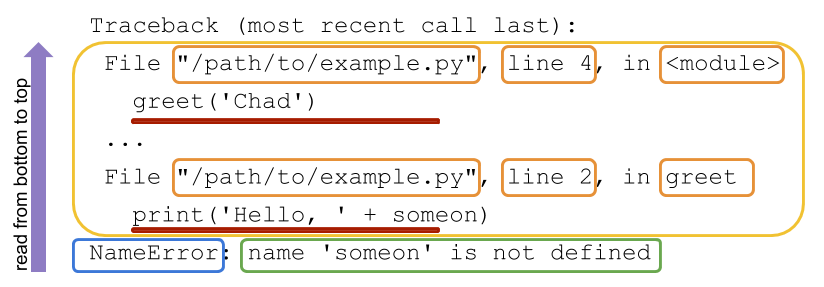
Read a normal traceback from the bottom upward:
- Start with the final line. It gives the exception type, such as
NameError, and a specific message. - Move upward to the nearest code line. This is the statement Python was executing when the error occurred.
- Use the file name and line number immediately above that code to find it in VS Code.
- Check earlier traceback entries only when needed. They show how Python reached the failing line, which becomes especially useful once your programs call functions in other files.
For the example above, the bottom line says:
NameError: name 'builder_nam' is not defined
The immediate repair is not to invent a new variable called builder_nam. Instead, compare it with the variable defined earlier and correct the typo:
builder_name = "Maya"
print(f"Builder: {builder_name}")
A traceback is therefore a diagnostic report. It does not mean you are “bad at coding”; it means Python found a precise point where the program’s instructions and its current data do not fit together.
How Do You Read a Python Traceback?
Watch Real Python’s “How Do You Read a Python Traceback?” for a compact visual explanation of traceback anatomy and the bottom-up reading strategy.
Watch traceback anatomy. Notice the distinction between the final exception message, the file and line information, and the source-code line that ran. The main habit to retain is to begin with the final line rather than trying to decode the entire output from the top.
Understanding the Python Traceback – Real Python
Read Real Python’s “Understanding the Python Traceback” to reinforce the structure of an error report, then focus on the beginner-relevant NameError, SyntaxError, and TypeError examples.
In “What Is a Python Traceback?”, read the opening explanation and its misspelled-name example. Then, in “How Do You Read a Python Traceback?” under “Python Traceback Overview,” read the overview setup and continue through the four numbered parts of the traceback diagram. Finally, in “What Are Some Common Tracebacks in Python?”, read only the subsections titled “NameError,” “SyntaxError,” and “TypeError”; skip the other exception types for now. Focus on what each final error message tells you to inspect.
Syntax errors: Python cannot begin running the program
A syntax error means that Python cannot parse the file as valid Python code. It is like a sentence whose punctuation or grammar makes its structure incomplete.
For example, this line has an opening parenthesis but no closing one:
print("Starting local automation"
A version of Python may report this with output similar to:
  File "/Users/your-name/agent_builder/first_script/example.py", line 1
    print("Starting local automation"
         ^
SyntaxError: '(' was never closed
A syntax error often differs from a runtime traceback:
- It may not begin with
Traceback (most recent call last):. - Python has not run your program’s statements yet.
- It commonly shows a caret (
^) near the place where Python noticed the invalid structure.
The caret is a strong clue, but do not treat it as infallible. With an unclosed quote or parenthesis, Python may only realize there is a problem on a later line. Inspect the reported line and the line immediately before it.
At this stage, the most common syntax mistakes are mechanical:
| Mistake | Broken code | Correct code |
|---|---|---|
| Missing closing quote | automation_name = "Research helper |
automation_name = "Research helper" |
| Missing closing parenthesis | print("Ready" |
print("Ready") |
| Missing colon after a block header | if enabled |
if enabled: |
| Unmatched bracket or parenthesis | print(agent_names[0) |
print(agent_names[0]) |
You have not yet learned if statements, but you will soon. When they arrive, remember that a colon and indentation are part of Python’s grammar, not cosmetic choices.
A syntax-error repair method
When Python reports SyntaxError:
- Read the final line for the clue, such as
invalid syntax,unterminated string literal, orwas never closed. - Go to the reported file and line number in VS Code.
- Check pairs: quotes, parentheses, square brackets, and braces.
- Check whether the previous line is incomplete.
- Make one small correction, save, and run the file again.
Fix syntax errors before investigating possible name or type errors. Until the file is syntactically valid, Python cannot execute it and reveal the next issue.
Name errors: Python does not know that name
A name is an identifier that refers to something: a variable, function, class, or module. In your current programs, names are mostly variable names such as builder_name and max_tool_calls.
A NameError tells you that Python reached a name but cannot find a definition for it.
automation_name = "Local research helper"

print(f"Automation: {automation_name}")
print(f"Owner: {builder_name}")
Python can print the automation name, but then it reaches builder_name. No earlier line created a variable with that name.
NameError: name 'builder_name' is not defined
There are three beginner causes to check first.
1. A misspelling
builder_name = "Maya"
print(builder_nam)
The fix is to use the exact same spelling:
builder_name = "Maya"
print(builder_name)
Python is exact. It does not assume two almost-identical names mean the same thing.
2. Different capitalization
Python is case-sensitive:
agent_name = "Research Helper"
print(Agent_Name)
agent_name and Agent_Name are completely different names. Use consistent lowercase names with underscores:
agent_name = "Research Helper"
print(agent_name)
3. Using a variable before assigning it
Python runs a basic script from top to bottom:
print(max_tool_calls)
max_tool_calls = 4
At the first line, max_tool_calls does not exist yet. Put the assignment first:
max_tool_calls = 4
print(max_tool_calls)
This ordering rule will matter for agent systems too. A program cannot use configuration, tool results, or approval decisions until it has actually obtained and stored them.
When a NameError occurs, do not merely add a value at random to silence it. Ask: What was this name supposed to represent, where should it be created, and what exact spelling should be used throughout the script?
Type errors: the values do not fit the operation
A type describes the kind of value Python is handling. You have already used several:
strfor text, such as"Maya"intfor whole numbers, such as4floatfor decimal numbers, such as0.8boolforTrueandFalse
A TypeError occurs when an operation does not make sense for the supplied types.
The previous lesson introduced a particularly important example:
max_tool_calls = input("Maximum tool calls: ")
recommended_limit = max_tool_calls + 1
If someone enters 4, then max_tool_calls contains the text "4", not the number 4. Python cannot add the integer 1 to a string.
The traceback’s last line may look like this:
TypeError: can only concatenate str (not "int") to str
The line that fails is:
recommended_limit = max_tool_calls + 1
But the cause begins earlier: input() always returned a string. The correct repair depends on your intended meaning. Here, the value is a numeric limit, so convert it as soon as you collect it:
max_tool_calls = int(input("Maximum tool calls: "))
recommended_limit = max_tool_calls + 1
Now, both sides of + are integers.
A different type error can happen while displaying a value:
max_tool_calls = 4
print("Maximum tool calls: " + max_tool_calls)
Here, the left side is text and the right side is an integer. Rather than converting values manually just for display, use the f-string form you learned previously:
max_tool_calls = 4
print(f"Maximum tool calls: {max_tool_calls}")
The distinction is important:
| Goal | Appropriate correction |
|---|---|
| Calculate with user-entered numeric text | Convert it with int() or float() |
| Include a number in output text | Use an f-string |
| Combine two text values | Keep both as strings |
| Diagnose an unexpected type | Print the value and type(value) temporarily |
For example, if you are unsure what a variable holds, add temporary diagnostic output:
max_tool_calls = input("Maximum tool calls: ")

print("Value:", max_tool_calls)
print("Type:", type(max_tool_calls))
If you enter 4, the second line reports:
Type: <class 'str'>
Remove these temporary print() calls after you understand the issue. Later in the course, you will use a debugger and structured logging for more capable inspection, but this simple technique is enough for small scripts.
A related error from the previous lesson is worth recognizing:
max_tool_calls = int(input("Maximum tool calls: "))
If the user enters many, Python raises a ValueError, not a TypeError. The input is still text — a valid type for int() to receive — but its content cannot be converted to a whole number. You will learn to handle anticipated bad input gracefully later. For now, read the final line and identify the failed conversion.
A repeatable debugging loop
Use this process whenever a small Python script stops unexpectedly:
- Read the last line first. Identify the exception name and its message.
- Locate the relevant code. Use the file name and line number immediately above the error message.
- Classify the problem.
SyntaxError: malformed Python structureNameError: missing, misspelled, differently capitalized, or not-yet-defined nameTypeError: an operation received incompatible value types
- Trace the values and intent. For a type issue, find where each value came from. For a name issue, find where it should have been defined.
- Make the smallest correct change. Do not rewrite unrelated code.
- Save and rerun the program. A different error after the first repair is normal; Python can now proceed farther through the script.
- Confirm the intended output. “No error” is necessary, but your script should also produce the result you expected.
Avoid treating an error message as a command to copy blindly into an AI assistant or search engine. The traceback gives evidence, but you still need to compare it with the program’s intended behavior. In agentic automation, this habit helps distinguish a genuine code defect from a bad user input, a missing configuration value, or an external service failure.
Guided terminal lab: create, break, read, repair
Create a new file in your existing project folder:
traceback_lab.py
Begin with this working version:
builder_name = input("Your name: ")
max_tool_calls = int(input("Maximum tool calls: "))

print(f"Builder: {builder_name}")
print(f"Maximum tool calls: {max_tool_calls}")
Run it:
python3 traceback_lab.py
Enter a name and a whole number. Confirm that it prints the profile summary.
Now make the following deliberate changes one at a time. Each time, save the file, run it in the terminal, read the output from the bottom, repair the code, and rerun before moving on.
First: create a syntax error
Remove the closing parenthesis from the final line:
print(f"Maximum tool calls: {max_tool_calls}"
Python should stop before displaying any input prompt because it cannot parse the file. Use the syntax message and caret to identify the missing parenthesis, then restore:
print(f"Maximum tool calls: {max_tool_calls}")
Second: create a name error
Change only the variable inside the first output f-string:
print(f"Builder: {builder_nam}")
Run the script and enter valid responses. This time, Python reaches the output line and reports that builder_nam is not defined. Compare it with the assignment at the top of the file, then restore builder_name.
Third: create a type error
Replace the numeric input line and add a calculation:
max_tool_calls = input("Maximum tool calls: ")
recommended_limit = max_tool_calls + 1

print(f"Builder: {builder_name}")
print(f"Recommended limit: {recommended_limit}")
Enter 4 when prompted. The reported failure is on the calculation line, but the underlying cause is that input() created a string. Restore numeric conversion:
max_tool_calls = int(input("Maximum tool calls: "))
recommended_limit = max_tool_calls + 1
Then keep the improved report:
print(f"Builder: {builder_name}")
print(f"Recommended limit: {recommended_limit}")
Your final script should accept a numeric limit and calculate one more than the entered value. That final successful run is evidence that you did more than suppress an error: you restored the intended behavior.
Key takeaways
A Python error message is actionable information:
- A traceback shows where a runtime problem occurred; read it from the bottom upward.
- The final line gives the exception type and a useful explanation.
- File paths and line numbers tell you where to look in VS Code.
- A
SyntaxErrormeans Python cannot parse the code. Check punctuation, quotes, parentheses, and block structure. - A
NameErrormeans Python cannot find a referenced identifier. Check spelling, capitalization, assignment order, and intended scope. - A
TypeErrormeans an operation received incompatible kinds of values. Check both values and their origins rather than converting blindly. - Fix one issue at a time, rerun, and verify the behavior you intended.
Next, you will use Boolean expressions and conditional statements so your scripts can make controlled decisions — for example, whether an operation should proceed in dry-run mode or require approval.