Recommended resources
The freely available resources this lesson will direct you to.
- Python Tutorial for Beginners 6: Conditionals and Booleans - If, Else, and Elif Statementswww.youtube.com
- Python Booleans and Conditionals - Visually Explainedwww.youtube.com
- 2 if-else and flow controlautomatetheboringstuff.com
- Conditional statements - Python Programming MOOC 2024programming-24.mooc.fi
Good to see you again. In the previous lesson, you learned to treat Python errors as evidence: read a traceback from the bottom, locate the reported line, identify whether the problem is syntax, a missing name, or incompatible types, then make a small correction and rerun.
Now you will give your scripts the ability to choose what happens next. This is essential for automation and agent systems: a program may proceed only when a request is approved, refuse an action when a limit is reached, or choose a safe fallback when required information is missing.
By the end of this lesson, you will be able to write Boolean expressions that evaluate to True or False, combine conditions with and, or, and not, and use if, elif, and else to control which block of code runs.
Decisions begin with Boolean values
A Boolean is a value that can be only one of two possibilities:
True
False
Notice the capital letters and the absence of quotation marks. These are Boolean values, not text.
is_approved = True
is_dry_run = False

print(is_approved)
print(is_dry_run)
A Boolean is Python’s way of representing a yes-or-no decision. For example:
- Is this action approved?
- Has the tool-call limit been reached?
- Is the input valid?
- Should an automation run in safe preview mode?
Usually, you will not type True or False manually. Instead, Python calculates a Boolean result by comparing values.
tool_calls_used = 2
max_tool_calls = 5

within_limit = tool_calls_used < max_tool_calls

print(within_limit)
This prints:
True
Python evaluates 2 < 5, gets True, and stores that result in within_limit.
Comparison operators
Use comparison operators to ask questions about values.
| Operator | Meaning | Example | Result |
|---|---|---|---|
== |
equal to | status == "approved" |
True when both values match |
!= |
not equal to | status != "approved" |
True when values differ |
> |
greater than | calls_used > 5 |
True when left is larger |
< |
less than | calls_used < 5 |
True when left is smaller |
>= |
greater than or equal to | calls_used >= 5 |
True at 5 or above |
<= |
less than or equal to | calls_used <= 5 |
True at 5 or below |
The distinction between = and == is critical:
max_tool_calls = 5
A single equals sign assigns a value to a variable.
max_tool_calls == 5
A double equals sign compares values and produces True or False.
If you accidentally write this:
if max_tool_calls = 5:
    print("Limit is five")
Python raises a SyntaxError. Its message may suggest ==, which is often exactly the correction you need.
Python Tutorial for Beginners 6: Conditionals and Booleans - If, Else, and Elif Statements
Watch Corey Schafer’s “Python Tutorial for Beginners 6: Conditionals and Booleans.” It gives a practical visual introduction to conditions, comparisons, alternative paths, multiple choices, and combined conditions.
Watch the core idea for the relationship between a condition and a Boolean result. Continue with comparisons, paying particular attention to why == tests equality while = assigns a value. Then watch if, else, and elif to see how Python selects one code block. Finish with combined conditions for and, or, and not.
Combining conditions: and, or, and not
Real decisions often require more than one check. Python provides three Boolean operators for this.
and: every required condition must be true
is_approved = True
within_limit = True

can_execute = is_approved and within_limit

print(can_execute)
This prints True only because both conditions are true.
is_approved |
within_limit |
is_approved and within_limit |
|---|---|---|
True |
True |
True |
True |
False |
False |
False |
True |
False |
False |
False |
False |
Use and when every requirement is necessary. A local automation should execute an action only if it has both explicit approval and remaining capacity.
if is_approved and within_limit:
    print("Action may proceed.")
or: at least one condition must be true
is_admin = False
is_owner = True

can_view_audit_log = is_admin or is_owner

print(can_view_audit_log)
This prints True because being the owner is sufficient even though the user is not an admin.
| First condition | Second condition | or result |
|---|---|---|
True |
True |
True |
True |
False |
True |
False |
True |
True |
False |
False |
False |
Use or when there are multiple acceptable routes to the same decision.
not: reverse a Boolean result
is_dry_run = False

if not is_dry_run:
    print("Live action is allowed.")
not flips the result:
| Expression | Result |
|---|---|
not True |
False |
not False |
True |
A readable use of not is checking whether a blocking condition is absent:
if not is_dry_run:
    print("Sending the request.")
For beginning code, favor conditions that read clearly in English. This is easier to review and safer to maintain:
if is_approved and within_limit:
    print("Action may proceed.")
rather than a confusing expression with several nested not operators.
You can also place comparisons directly inside a combined condition:
tool_calls_used = 2
max_tool_calls = 5
approved_by_human = True

if approved_by_human and tool_calls_used < max_tool_calls:
    print("Safe to run one more tool call.")
Python evaluates each comparison to a Boolean value, then evaluates the and.
if: run code only when a condition is true
An if statement says: if this condition is true, run this indented block.
is_approved = True

if is_approved:
    print("Approval recorded.")
Because is_approved is True, Python prints:
Approval recorded.
If it were False, Python would skip the indented line entirely.
Every if statement has four structural parts:
if condition:
    indented_code()
- The keyword
if - A condition that results in
TrueorFalse - A colon (
:) - An indented block on the next line
Indentation is not merely visual formatting in Python. It defines which statements belong to the conditional block. In VS Code, pressing Enter after a line ending in : normally gives you the correct indentation automatically. Use four spaces per indentation level; avoid mixing tabs and spaces.
Consider this script:
tool_calls_used = 5
max_tool_calls = 5

if tool_calls_used >= max_tool_calls:
    print("Tool-call limit reached.")

print("Run complete.")
Output:
Tool-call limit reached.
Run complete.
The first print() is indented, so it is part of the if block. The second print() is not indented, so it runs regardless of the condition.
If you change tool_calls_used to 2, the output becomes:
Run complete.
The condition is false, so Python skips only the indented block and then continues with the rest of the program.
else: choose a fallback action
Sometimes a script must do something in either case: take one action when a condition is true and another when it is false. Add else for the alternative.
is_approved = False

if is_approved:
    print("Action approved. Preparing execution.")
else:
    print("Action not approved. No changes were made.")
Only one of these blocks runs:
- When
is_approvedisTrue, Python runs theifblock. - When
is_approvedisFalse, Python runs theelseblock.
else has no condition of its own. It means: “otherwise.”
This pattern is important for safe automation. A request that is not approved should not quietly proceed or leave the user wondering what happened. Instead, the program should state the safe outcome explicitly.
has_human_approval = True
is_dry_run = False

if has_human_approval and not is_dry_run:
    print("Executing approved action.")
else:
    print("Action was not executed.")
At this stage, print() stands in for a real side effect, such as sending a message or updating a record. Later, when you build tools for agents, you will place real actions behind checks like these and require a human approval gate before consequential work is performed.
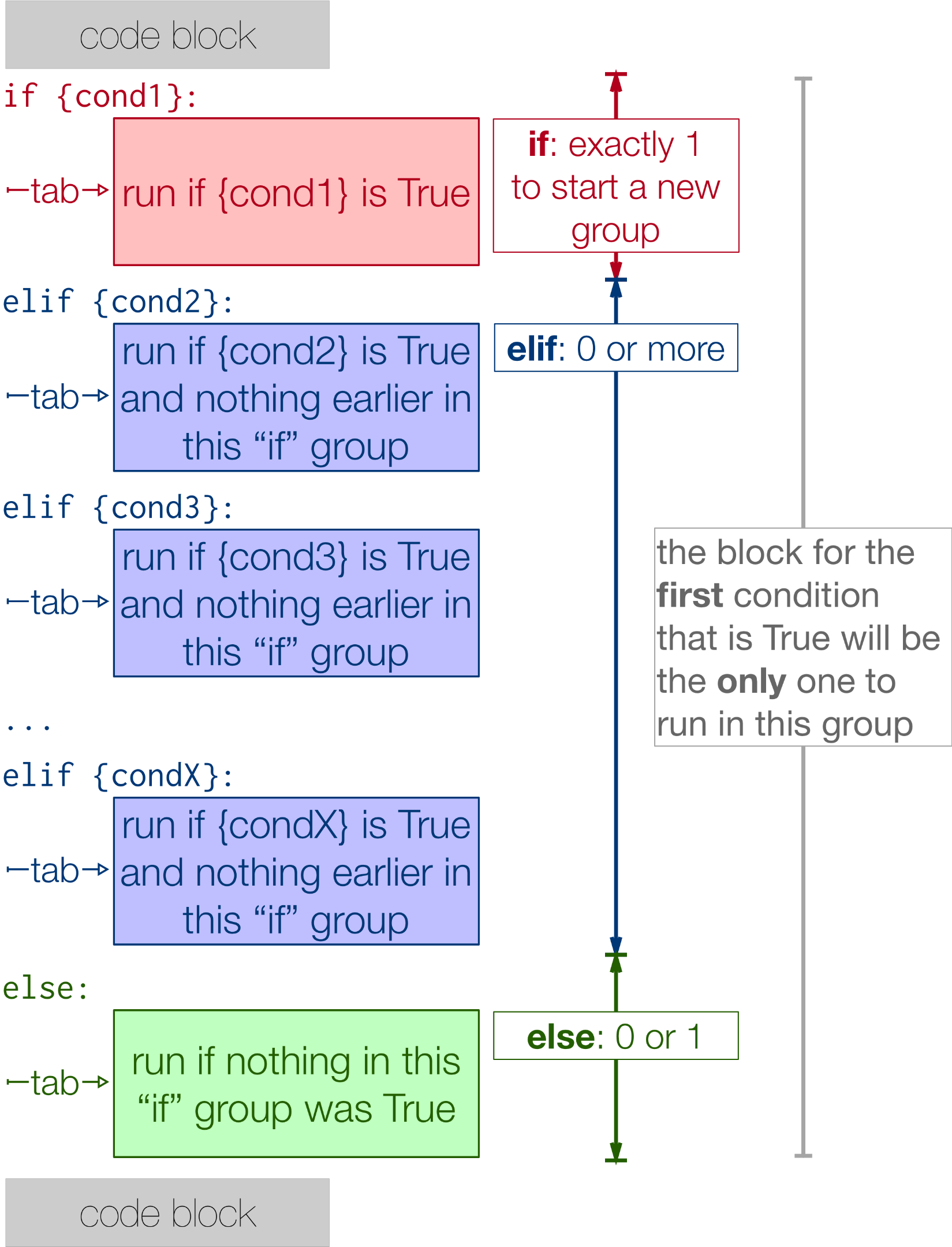
elif: choose among several possibilities
Use elif, short for “else if,” when there are several mutually exclusive outcomes.
tool_calls_used = 3
max_tool_calls = 5

if tool_calls_used >= max_tool_calls:
    print("No calls remain.")
elif tool_calls_used == max_tool_calls - 1:
    print("Warning: only one call remains.")
else:
    print("Calls remain.")
Python checks the conditions from top to bottom:
- It checks
tool_calls_used >= max_tool_calls. - If that is false, it checks the
elifcondition. - If that is also false, it runs the
elseblock. - Once it finds a true
iforelifcondition, it runs that block and skips every remaining branch in the group.
An if/elif/else structure has:
- Exactly one
if - Zero or more
elifblocks - Zero or one final
else
The order of conditions matters. Put more specific or stricter checks before broader ones.
Here is a mistake:
tool_calls_used = 5
max_tool_calls = 5

if tool_calls_used >= max_tool_calls - 1:
    print("Warning: one or fewer calls remain.")
elif tool_calls_used >= max_tool_calls:
    print("No calls remain.")
When both values are 5, the first condition is already true because . Python prints the warning and never reaches the “No calls remain” branch.
Put the more urgent condition first:
if tool_calls_used >= max_tool_calls:
    print("No calls remain.")
elif tool_calls_used >= max_tool_calls - 1:
    print("Warning: only one call remains.")
else:
    print("Calls remain.")
This is not a cosmetic preference. In agentic systems, incorrect condition order can mean a system performs a normal action where it should have stopped, asked for approval, or reported an error.
Guided build: an approval-aware command-line decision
Create a new file in your project folder:
approval_gate.py
Enter this version:
request_name = input("What action do you want to run? ")
approval = input("Has a human approved it? Type yes or no: ")
tool_calls_used = int(input("Tool calls already used: "))
max_tool_calls = int(input("Maximum allowed tool calls: "))

within_limit = tool_calls_used < max_tool_calls
is_approved = approval == "yes"

print(f"\nRequest: {request_name}")
print(f"Approved: {is_approved}")
print(f"Within limit: {within_limit}")

if is_approved and within_limit:
    print("Decision: action may proceed.")
elif not is_approved:
    print("Decision: action blocked because approval is missing.")
else:
    print("Decision: action blocked because the tool-call limit was reached.")
Run it in the terminal:
python3 approval_gate.py
Try these three cases, rerunning the script each time:
| Approval input | Calls used | Maximum | Expected decision |
|---|---|---|---|
yes |
1 |
3 |
action may proceed |
no |
1 |
3 |
blocked because approval is missing |
yes |
3 |
3 |
blocked because limit was reached |
Notice how the script makes its decision in stages:
approval == "yes"createsis_approved.tool_calls_used < max_tool_callscreateswithin_limit.- The
if/elif/elsegroup chooses one clear outcome.
The program expects lowercase yes or no for now. If you enter YES, it does not match "yes" exactly. Later, when you learn string operations and input validation, you will make user input more flexible and robust. For this lesson, the goal is to make the Boolean logic visible and predictable.
Common conditional mistakes
The debugging process from the previous lesson applies directly here.
| Mistake | What happens | Correction |
|---|---|---|
if approved = "yes": |
SyntaxError |
Use == for comparison |
Forgetting : |
SyntaxError |
End every if, elif, and else header with : |
No indentation after if |
IndentationError |
Indent the block consistently |
Indenting else too far |
SyntaxError |
Align else with its matching if |
| Checking broad condition first | Wrong branch runs | Put specific or urgent cases first |
| Comparing text to numbers | Usually false or an error in ordered comparisons | Convert numeric input with int() before comparing |
When behavior surprises you, temporarily print the values and Boolean results immediately before the conditional:
print(f"is_approved: {is_approved}")
print(f"within_limit: {within_limit}")
This is a simple way to inspect what Python actually knows before it chooses a branch.
Key takeaways
Program decisions rely on conditions that evaluate to True or False.
- Comparison operators such as
==,!=,<, and>=produce Boolean results. =assigns a value;==compares two values.- Use
andwhen all conditions must hold,orwhen any condition is sufficient, andnotto reverse a Boolean result. - An
ifblock runs only when its condition is true. elseprovides the fallback when anifcondition is false.eliflets you choose among several possibilities; Python runs only the first true branch in anif/elif/elsegroup.- Colons and indentation are required Python syntax, not optional styling.
- Conditions should make safety decisions explicit: for example, require both approval and a remaining limit before an automation proceeds.
Next, you will use for loops to repeat work across sequence data and numeric ranges — the foundation for processing multiple tasks, files, or candidate tool inputs efficiently.