Recommended resources
The freely available resources this lesson will direct you to.
Hello Alex,
Welcome back. In our previous lesson, you mastered the use of the High-Pass and Low-Pass Filter, the workhorse of the Sound Color FX section, to create smooth, dynamic transitions. You learned how to use it as a subtractive tool to carve out space in the frequency spectrum.
Today, we'll complete our tour of this section by exploring the other three effects. This lesson addresses the learning outcome: Describe the function of the other 'Sound Color FX' (Space, Dub Echo, Noise) and apply one to add texture during a mix.
Unlike the filter, which is often integral to the structure of a transition, these effects are more like spices. They are used to add momentary flair, create atmosphere, and build tension. If the filter is a primary architectural tool, think of these as the decorative elements that give a mix its unique character.
1. The Echo-Based Effects: Dub Echo and Space
Two of the effects, Dub Echo and Space, are based on creating repetitions or reverberations of the sound. They are fantastic for adding a sense of depth and atmosphere.
First, let's get a clear definition of what an echo effect is and why it's so fundamental in music and DJing.
How To Use The Echo Effect When DJing
The article 'How To Use The Echo Effect When DJing' from Digital DJ Tips provides an excellent foundation, explaining what echo is and its historical roots in dub music.
Please read the sections 'What is echo?' and 'Why use echo?'. Pay close attention to the distinction between echo and reverb, and the mention of 'dub' echo, which directly relates to the effect on the mixer.
Now let's look at the specific controls on the DJM-900NXS2.
Dub Echo
As the article you just read explains, this effect has its roots in Jamaican sound system culture. It creates distinct, rhythmic copies of the audio that decay over time.

- Function: When you turn the 'COLOR' knob clockwise from the 12 o'clock position, you introduce an echo. The further you turn it, the louder (or "wetter") the echo becomes, and its feedback may increase, leading to more repetitions.
- Application: Dub Echo is incredibly versatile. It can be used to:
- Add rhythmic interest to sparse breakdowns.
- Emphasize a specific word in a vocal.
- Create an "echo out" transition, where you let the echo of the outgoing track fade out over the intro of the new track.
Space
While also creating a sense of environment, Space is different from Dub Echo. It's a reverb effect. Instead of creating distinct, audible repeats, it simulates the sound reflecting off surfaces in a room, "smearing" the audio to make it sound like it's in a large hall or cavern.
- Function: Turning the 'COLOR' knob clockwise adds the reverb effect. The further you turn it, the larger the perceived "space" and the longer the reverb tail.
- Application: Space is best used for adding atmosphere.
- Apply it gently during a breakdown with pads or ambient sounds to make them feel vast and epic.
- Briefly add it to a single snare hit to make it explode into the mix.
The following reading gives some excellent, concrete ideas for applying these two effects.
This article from DJ Gym, '5 Ways To Use Echo', offers practical techniques that apply directly to both Dub Echo and Space.
Please read the sections 'Echo in a Breakdown' and 'Chopping & Cutting with Echo'. Notice how it specifically suggests using the 'Dub or Space echo in the sound colour FX section'.
2. The Additive Effect: Noise
The final Sound Color FX, Noise, is fundamentally different from the others. It doesn't modify the existing audio; it adds a new sound into the mix: synthesized white noise.
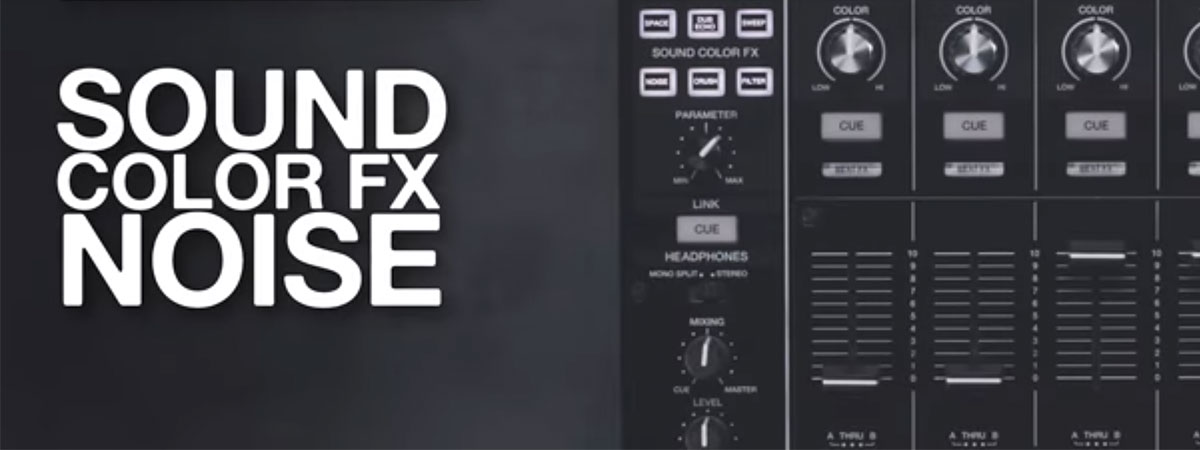
- Function: When you select 'NOISE' and turn the 'COLOR' knob, the mixer generates white noise and layers it over your track. On the DJM-900NXS2, turning the knob also sweeps a filter over the noise, making it rise or fall in pitch. This creates a classic "riser" or "swoosh" sound.
- Application: The primary use for Noise is to build tension and energy, especially before a drop.
- During a build-up, you can slowly introduce noise, increasing its volume and sweeping its pitch upwards.
- Cutting the noise abruptly right at the drop makes the drop feel more impactful by contrast.
- It can also be used in transitions as a "wash" of sound to cover the blend between two tracks.
3. Practical Exercise: Adding Texture with Dub Echo (30 minutes)
Now it's time to apply one of these effects. Dub Echo is one of the most useful and musical effects for DnB, so we'll focus on that.
Goal: Use the Dub Echo to add flair to a breakdown and to perform a simple "echo out" transition.
Setup:
- Load two DnB tracks you are familiar with onto Decks 1 and 2.
- On the mixer, press the 'DUB ECHO' button in the Sound Color FX section to select it.
Part A: Breakdown Flair (10 mins)
- Find a track with a relatively sparse breakdown section—perhaps just some atmospheric pads and a few drum hits or a vocal sample.
- Play the track through this section.
- Identify a specific sound you want to emphasize, for example, the last word of a vocal phrase or a single snare hit.
- Just as that sound plays, quickly turn the 'COLOR' knob for that channel to about the 2 o'clock position and immediately snap it back to 12 o'clock.
- Listen to the result. You should hear the sound you "caught" repeat a few times, fading into the background. This adds a dynamic element to a static part of the track.
- Practice this "catch and release" motion. The key is quick, decisive timing. Try it on different sounds to see what works.
Part B: The Echo Out Transition (20 mins)
This is a classic technique to smoothly exit a track.
- Play Track A. In your headphones, cue and beatmatch Track B.
- Identify the point where you want to transition out of Track A, typically at the end of a 16 or 32-beat phrase.
- Just before this point (e.g., on the last beat of the bar), perform the following two actions simultaneously:
- Turn the 'COLOR' knob for Track A to the 3 o'clock position.
- Cut the bass of Track A by turning its Low EQ knob all the way to the left.
- Immediately press play on Track B and bring its channel fader up.
- The main body of Track A is now gone, but a filtered, rhythmic echo of its last moments will be washing over the intro of Track B.
- Let the echo fade out naturally. You can now slowly bring the channel fader for Track A down. The transition is complete.
- Practice this transition multiple times. Focus on the timing of activating the echo and cutting the bass. The goal is a seamless handover where the echo of the old track provides a bridge to the new one.
4. Conclusion
You have now explored the full range of the Sound Color FX on the DJM-900NXS2. You've seen how the Filter is a foundational tool for transitions, and how Space, Dub Echo, and Noise serve as creative flourishes to add texture and energy.
Key Takeaways:
- Dub Echo creates rhythmic, decaying repeats of the sound, ideal for adding flair or performing "echo out" transitions.
- Space is a reverb effect that adds atmospheric ambience, best used on breakdowns or individual sounds.
- Noise is an additive effect that generates white noise, perfect for building tension before a drop.
- Unlike the smooth, gradual application of a filter during a transition, these effects are often applied quickly and rhythmically to punctuate the music.
This lesson concludes our module on crafting transitions. You now have a solid toolkit for blending tracks, from precise EQ adjustments to sweeping filters and textural effects.
In our next lesson, we will begin a new module and shift our focus away from the hardware and onto the crucial preparation phase. We'll dive into Rekordbox, the software used to organize your music library, analyze tracks, and set them up for flawless performance on the CDJs.