Recommended resources
The freely available resources this lesson will direct you to.
Welcome to the next module of your networking journey! In our last lesson, we diagnosed common IP addressing issues, and you saw how mapping an IP address to a MAC address is a crucial step in tracking down a misbehaving device. That process relies entirely on the intelligence of a network switch.
Today, we will pull back the curtain on that intelligence. This lesson focuses on the core function of a Layer 2 switch: how it learns where devices are on the network and uses that information to forward traffic efficiently. We'll explore the three fundamental operations of a switch—learning, forwarding, and flooding—that transform it from a simple repeater into the smart foundation of modern local area networks.
The Switch's Brain: The MAC Address Table
Before a switch can make intelligent decisions, it needs a directory that maps physical device addresses (MAC addresses) to the switch ports they are connected to. This directory is called the MAC address table, or sometimes the Content-Addressable Memory (CAM) table.
Unlike a hub, which blindly repeats electrical signals out all of its ports, a switch aims to send data only where it needs to go. This reduces unnecessary traffic and creates separate collision domains for each port, vastly improving network performance.
To start, let's read a brief overview from a Cisco Press guide that introduces this concept.
The MAC Address Table - Switch Fundamentals
This reading from the Introduction to Networks Companion Guide (CCNAv7) introduces the purpose of a switch and its MAC address table.
Please read the section titled "Switch Fundamentals (7.3.1)". As you read, focus on these key points: The fundamental difference between how a Layer 2 switch operates compared to an older legacy hub. The exclusive role of Layer 2 MAC addresses in a switch's forwarding decision-making process. The state of the MAC address table when a switch is first powered on (i.e., it's empty).
The Three Core Operations of a Switch
As the reading explained, a switch starts with a blank slate. It builds its MAC address table dynamically by listening to the traffic that flows through it. This process can be broken down into three simple but powerful steps:
- Learn: The switch examines the source MAC address of every frame that enters it. It adds this MAC address to its table, associating it with the port on which the frame was received.
- Decide: The switch then looks at the destination MAC address of the frame and checks its table. This leads to one of two actions:
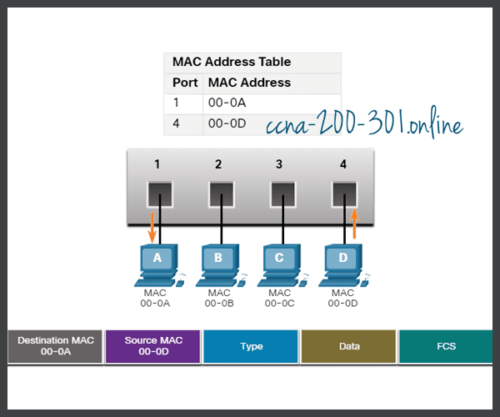
- Forward: If the destination MAC address is found in the table, the switch sends the frame only out of the corresponding port. This is also called filtering, as it filters the traffic from going to unnecessary ports.
- Flood: If the destination MAC address is not in the table (an "unknown unicast"), the switch has no choice but to send a copy of the frame out of every active port except the one it came in on. It does the same for broadcast frames (destination MAC
FF:FF:FF:FF:FF:FF).
Let's watch a video that animates this entire process.
How switches learn MAC addresses - CCNA 200-301
This video from Network Engineer Pro provides a clear, step-by-step animation of how a switch populates its MAC address table and makes forwarding decisions.
Watch the first part of the video to see these three core operations in action: First, see how a switch learns from the source MAC address of incoming frames. Next, observe what happens when the destination is unknown in the section on frame flooding. Finally, watch the efficient forwarding process that occurs once the MAC address table is populated.
Once the switch has learned the MAC addresses of devices on its ports, it can forward frames with precision, as illustrated below.
Keeping the Table Fresh: MAC Address Aging
What happens if you move a PC from one switch port to another? The MAC address table would become incorrect. To prevent this, switches use an aging timer.
- Dynamically learned entries in the MAC address table are not permanent.
- By default, an entry is removed if the switch does not receive any frames from that MAC address within a certain period (typically 300 seconds, or 5 minutes).
- This aging timer is reset every time a new frame arrives from that source address.
This ensures the table remains a current and accurate map of the network. If a device is moved, its old entry will eventually time out, and the switch will learn its new location when it sends its next frame.
Test Your Understanding
Let's put these concepts together. The following video segment presents four scenarios based on whether the source and destination MAC addresses are known to the switch. This is a great way to test your understanding of the logic.
How switches learn MAC addresses - CCNA 200-301
Now, it's time to apply what you've learned. The video presents four quiz-like scenarios that cover every combination of known and unknown addresses.
Watch the section with the practice questions. Before the narrator reveals the answer for each of the four scenarios, pause the video and decide for yourself whether the switch will primarily learn, flood, or forward.
From Theory to Practice: The Switch CLI
As a network engineer, you will frequently need to inspect the MAC address table on a live switch for troubleshooting and verification. The primary command for this on Cisco IOS switches is show mac address-table.
Let's return to our video for a practical demonstration of how to use this command and its variations.
How switches learn MAC addresses - CCNA 200-301
This final segment demonstrates the essential commands for managing the MAC address table on a Cisco switch.
Watch the hands-on portion of the video from the CLI demonstration. Pay close attention to: The output of the show mac address table command. How generating traffic (like a ping) causes the table to be populated. Useful command variations like show mac address table count and filtering by VLAN or a specific address. How to configure a static MAC address entry and why you might (or might not) want to. How to view and change the aging-time.
Conclusion
In this lesson, you've unpacked the fundamental logic that makes a network switch an intelligent device. By understanding the cycle of learning, forwarding, and flooding, you can now visualize how traffic flows efficiently through a local area network.
Key Takeaways:
- Learning: Switches build their MAC address table by inspecting the source MAC address of incoming frames and associating it with the ingress port.
- Forwarding: For a known destination, the switch looks up the destination MAC address in its table and forwards the frame only to the specified port.
- Flooding: For an unknown destination (or a broadcast), the switch sends the frame out all ports except the one it came from.
- Aging: MAC table entries are dynamic and are removed after a default timeout (usually 5 minutes) to ensure the table stays current.
- Verification: The
show mac address-tablecommand is the essential tool for inspecting this process on a live switch.
Now that you understand the fundamental logic of how a switch operates, our next lesson will move into the practical steps of performing the initial configuration on a switch, such as setting its hostname and configuring a management IP address for remote access.