Recommended resources
The freely available resources this lesson will direct you to.
Hello! Last time, you used issue fields to distinguish what Jira records from what those records actually prove. That distinction matters especially when an issue appears to be “done.” This lesson takes about 30–40 minutes: you will read an issue’s status and resolution together, recognize combinations worth investigating, and understand why they matter to an SQA review.
Two fields, two questions
Status tells you where an issue currently sits in its workflow. A Bug might move through To Do, In Progress, Ready for Test, and Closed. Those names describe process stages, and your organization may use different ones.
Resolution records the outcome assigned when work on an issue is considered complete. Examples include Fixed, Duplicate, and Cannot Reproduce. Jira also commonly displays Unresolved when the Resolution field has no value. That display does not necessarily mean someone selected a resolution called “Unresolved.”
Atlassian’s Working with workflows gives the underlying distinction. Read only the field explanation; you do not need its workflow-configuration instructions.
Working with workflows | Administering Jira applications Data Center 11.3 | Atlassian Documentation
Read Atlassian’s explanation of Status and Resolution to see why a closed-looking status alone does not determine whether Jira treats an issue as resolved. The page is labeled Data Center 11.3; focus on the field concepts, which are relevant to Server/Data Center 8.x–9.x.
Find “Set the resolution field.” Read the field explanation, beginning with the paragraph about finishing an issue and ending just before the two configuration methods. Focus on the definitions and the rule about an unset versus a set Resolution field; skip the administrator instructions that follow.
The important technical rule is: Jira treats an issue with an unset Resolution field as unresolved, and an issue with any Resolution value as resolved—regardless of its status name. “Resolved” in that rule describes Jira’s field state. It does not, by itself, prove that a fix was tested, accepted, or released.
This Jira Server screenshot shows a consistent in-progress example: the issue’s status is IN PROGRESS, while its displayed resolution is Unresolved.
.png)
When status and resolution disagree
For an SQA review, first decide which statuses your team regards as active and which it regards as finished. Then compare that expectation with the Resolution field.
| Status indicates… | Resolution field… | Initial interpretation |
|---|---|---|
| Active work, such as To Do or In Progress | Is unset; Jira displays Unresolved | Usually consistent |
| Finished work, such as Done or Closed | Has a value, such as Fixed or Duplicate | Usually consistent |
| Finished work | Is unset | Possible inconsistency: looks finished but remains unresolved to Jira |
| Active work | Has a value | Possible inconsistency: looks active but is resolved to Jira |
“Possible” matters. A project may have unusual status names or agreed practices. Establish what the status is intended to mean before calling a particular issue an exception.
Atlassian’s support article describes these same four broad states and some symptoms of a mismatch. It covers multiple Jira platforms, so use its diagnosis here, not its platform-specific repair instructions.
Read Atlassian’s four-state description as a checklist for spotting inconsistent records. The article also shows why a mismatch can affect what users see in boards and reports; you do not need to carry out any of its administrator fixes.
Under “Solution,” start with the symptoms, ending at the numbered item about reports. Then read the four states, from the introductory sentence through the explanation of reopened issues. Focus on “Should be Resolved” and “Should be Unresolved”; skim the intervening configuration suggestions.
Consider a Bug with Status: Closed and a displayed Resolution: Unresolved. Someone scanning statuses may count it as finished, while Jira’s resolution-based interpretation says it remains unresolved. That is worth checking, not silently treating as a completed fix.
Now consider a Bug reopened for further testing with Status: In Progress and Resolution: Fixed still set. Its workflow says work is active again, but the retained resolution says Jira considers it resolved. The issue may need its resolution cleared as part of the reopening process. As a power user, your role is to identify and document the discrepancy, then raise it through the appropriate team channel—not to assume you can change the workflow yourself.
The subtle case: “Unresolved” can be a value
This issue list shows why the word on screen is not always enough. In the To Do rows, Unresolved is italicized to indicate an empty Resolution field. In the Closed rows, a user-added resolution named “Unresolved” is not italicized. Despite its name, that custom value means the field is set—so Jira treats those issues as resolved.
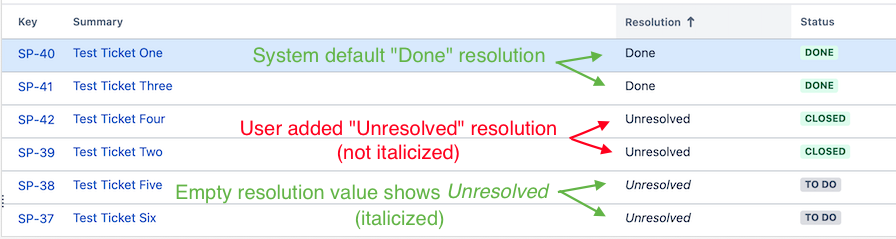
The screenshot’s typography helps illustrate the trap, but do not rely on italics as a universal test across Jira screens and versions. The durable question is whether Resolution is empty or contains a stored value. If your team has created a resolution option literally called “Unresolved,” flag that ambiguity for investigation: its name suggests one state while Jira interprets the populated field as the other.
A resolution value also answers why an issue was concluded, not necessarily whether the reported defect was repaired. Closed with Duplicate may be consistent closure without a fix on that particular issue. Closed with Fixed records a different outcome. Neither combination, on its own, supplies test evidence.
If you have access to Jira, spend 5 minutes looking at one active and one finished issue without changing them. Find both fields and compare their combination with the team’s intended workflow. If something looks inconsistent, record the issue key, the two displayed values, and what you would need to verify before drawing a conclusion. If you cannot access Jira, use the two screenshots above for the same read-only observation.
Key takeaways
Status is an issue’s workflow position; Resolution is its recorded completion outcome. Jira considers Resolution unset to be unresolved and set to any value to be resolved, regardless of status. A finished status with no resolution, or an active status with a retained resolution, is a useful SQA signal—but check local workflow expectations before declaring an exception. Be especially careful when a custom resolution is named “Unresolved.”
Next, you will use components and versions to examine ownership and release scope. The same discipline applies: a recorded field is a starting point for review, not proof that the underlying work was completed.