Recommended resources
The freely available resources this lesson will direct you to.
Introduction
In our previous lesson, we designed a high-level architecture for a multi-tier web application, creating a blueprint of communicating services, databases, and client applications. Now that we have the "what" and "where" of our system, we must address the critical questions of "who" and "what they're allowed to do." Securing the interactions between these components is a non-negotiable aspect of senior-level development.
This lesson will equip you with the foundational knowledge to secure modern distributed systems. We will first establish the crucial difference between authentication and authorization. Then, we will dive into OAuth 2.0, the industry-standard protocol for delegated authorization, and describe the most common and secure flow for web applications. By the end, you'll understand how to secure your APIs and protect user data effectively.
1. Authentication vs. Authorization: A Critical Distinction
In everyday language, "authentication" and "authorization" are often used interchangeably, but in system security, they represent two distinct and sequential steps.
- Authentication is the process of verifying a user's identity. It answers the question, "Who are you?"
- Authorization is the process of verifying what an authenticated user is allowed to do. It answers the question, "What are you permitted to do?"
You cannot authorize someone before you know who they are. Therefore, authentication always precedes authorization.
The image below provides a clear, side-by-side comparison of these two concepts.

Let's break this down in a context you're familiar with: GitHub.
- When you log in with your username and password (or a security key), GitHub is authenticating you. It's confirming that you are the owner of that account.
- Once you are logged in, you might try to push code to a repository. If you have write access, the push succeeds. If you only have read access, it fails. This is authorization. GitHub's system checked your permissions for that specific repository and either granted or denied your request.
2. The Problem: Delegated Authorization
Why do we need complex protocols like OAuth 2.0? The problem arose with the growth of interconnected web services. Imagine a third-party application wants to access your data from another service (e.g., a photo printing app wanting to access your Google Photos). How can you grant this access securely?
In the early days of the web, the solution was dangerously simple and insecure: you gave the third-party app your username and password for the other service. This is known as the "password anti-pattern."
OAuth 2.0 and OpenID Connect (in plain English)
The video "OAuth 2.0 and OpenID Connect (in plain English)" by OktaDev provides an excellent historical context for why OAuth was created.
Watch the segment from the beginning of this section, which uses the infamous Yelp example to illustrate the security risks of sharing credentials directly and introduces the core problem that OAuth was designed to solve.
This practice gives the third-party app the "keys to the kingdom," allowing it to do anything you can do, and requires you to trust it with your most sensitive credentials. OAuth 2.0 was created to solve this problem by introducing a mechanism for delegated authorization, where a user can grant limited, revocable access to a third-party application without sharing their password.
3. The Solution: The OAuth 2.0 Authorization Code Flow
OAuth 2.0 provides several "grant types" or flows to handle different scenarios. For web applications with a backend, like a React app with a Spring Boot API, the Authorization Code Grant is the most common and secure method.
Before we walk through the flow, let's define the four key roles involved.
OAuth 2.0 and OpenID Connect overview
This document from Okta provides clear, standard definitions for the roles in an OAuth 2.0 flow.
Please read the section titled OAuth 2.0. Focus on understanding the four roles: Client, Resource Server, Resource Owner, and Authorization Server.
Now, let's visualize the entire process using the diagram below and walk through the steps. This diagram illustrates the "Authorization Code Grant" flow, which is the cornerstone of secure web application authorization.
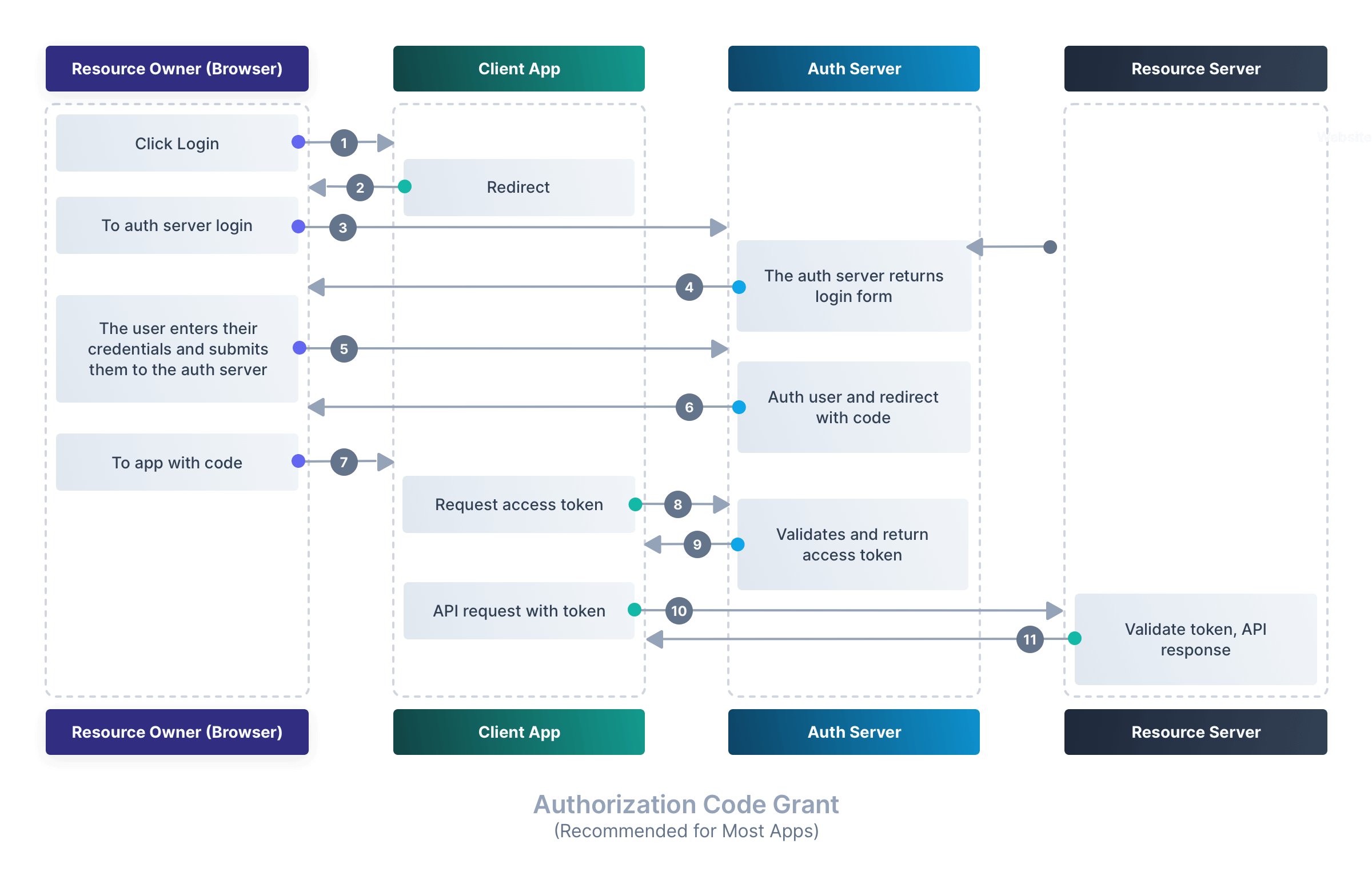
Here's a breakdown of what happens in the flow depicted in the "Authorization Code Grant" diagram, connecting it to a real-world scenario with your React/Spring Boot stack:
-
Steps 1-3: User Initiates Login:
- The user (Resource Owner) clicks "Login with Google" on your React app (Client App).
- The React app redirects the user's browser to the Google sign-in page (Authorization Server). This redirect includes parameters like the
client_id(identifying your app),redirect_uri(where to send the user back),response_type=code(we want an authorization code), andscope(what permissions we're asking for, e.g.,profileoremail).
-
Steps 4-5: User Authenticates and Consents:
- The user enters their Google credentials directly on Google's domain. Your application never sees their password.
- Google presents a consent screen saying, "This App would like to access your profile information. Allow?" The user agrees.
-
Steps 6-7: Redirect with Authorization Code:
- The Authorization Server redirects the browser back to the
redirect_uriyou specified (a specific endpoint on your Spring Boot backend). - Crucially, the redirect URL now contains a temporary, one-time-use Authorization Code as a query parameter (e.g.,
https://yourapi.com/callback?code=XYZ123).
- The Authorization Server redirects the browser back to the
-
Steps 8-9: Code-for-Token Exchange (The Back-Channel):
- This is the most critical security step. Your Spring Boot backend (Client App) receives the
code. - It then makes a direct, secure, server-to-server request to the Authorization Server's token endpoint. This is called a back-channel request because it doesn't go through the user's browser.
- This request includes the Authorization Code, its
client_id, and itsclient_secret(a secret password known only to your backend and the auth server). - The Authorization Server validates everything and, if correct, returns an Access Token.
- This is the most critical security step. Your Spring Boot backend (Client App) receives the
-
Steps 10-11: Accessing Protected Resources:
- Your backend now has the Access Token. It can use this token to make requests to the Resource Server (e.g., the Google Calendar API) on behalf of the user.
- The request includes the Access Token in the
Authorization: Bearer <token>header. The Resource Server validates the token and, if valid, returns the requested data (e.g., the user's calendar events).
The separation of the front-channel (browser redirects) and back-channel (server-to-server) is what makes this flow secure. Even if the temporary authorization code were intercepted in the browser, it's useless without the client_secret, which is safely stored on your backend.
OAuth 2.0 and OpenID Connect (in plain English)
To fully grasp the security implications, it's vital to understand the difference between the front channel and the back channel.
Please watch the segment from this video, where the speaker clearly explains why the flow is designed this way, with the token exchange happening on a secure back channel.
4. Adding Authentication: OpenID Connect (OIDC)
You may have noticed that OAuth 2.0 is strictly about authorization. The access token allows the client to access resources, but it doesn't inherently contain information about the user's identity. So, how does your application know who logged in?
This is where OpenID Connect (OIDC) comes in. OIDC is a thin identity layer built on top of OAuth 2.0.
OAuth 2.0 and OIDC: A Guide to Secure Authorization & ...
This article from Scalekit clearly explains the role of OIDC.
Read the section OpenID Connect. Pay attention to the concept of the ID Token.
When you use an OIDC-compliant flow, you simply add openid to the list of scopes in your initial request. The result is that in addition to the Access Token, the Authorization Server also returns an ID Token.
- Access Token: An opaque string meant for the Resource Server. It grants access.
- ID Token: A JSON Web Token (JWT) that contains claims about the user (e.g., their user ID, email, name, and when they authenticated). Your application can decode this JWT to securely identify and log in the user.
By using OAuth 2.0 for authorization and OIDC for authentication, you are using the modern, industry-standard approach to securing your applications.
Conclusion
In this lesson, we demystified two of the most fundamental concepts in application security and explored the protocol that underpins modern digital identity. As you advance into senior roles, being able to design, discuss, and implement these patterns is essential.
Key Takeaways:
- Authentication is about verifying identity ("Who are you?"), while Authorization is about granting permissions ("What can you do?").
- OAuth 2.0 is the standard for delegated authorization, allowing third-party applications to access resources on behalf of a user without them having to share their credentials.
- The Authorization Code Flow is a highly secure OAuth 2.0 grant type that uses a combination of front-channel browser redirects and a secure back-channel exchange to obtain an Access Token.
- OpenID Connect (OIDC) is an identity layer on top of OAuth 2.0 that provides an ID Token (JWT), which allows your application to perform authentication and get information about the logged-in user.
In our next lesson, we will shift our focus from security to another critical aspect of distributed systems: data management under pressure. We will explore the CAP Theorem, a fundamental principle that governs the trade-offs between consistency, availability, and partition tolerance in any distributed database or microservice architecture.