Recommended resources
The freely available resources this lesson will direct you to.
- Web Application Architecture: Full Request-Response Lifecyclewww.youtube.com
- Visualising software architecture with the C4 model - Simon Brown, Agile on the Beach 2019www.youtube.com
- Architecture Diagram Best Practices: A Complete Guide | InfraSketch ...infrasketch.net
- Web application architecture: what it is and how to make a good onesyndicode.com
Introduction
In our last lesson, you learned how to propose a high-level architectural approach by analyzing business requirements and evaluating the trade-offs between different architectural patterns like monoliths and microservices. Making that choice is the first crucial step. The second is communicating that decision clearly and unambiguously to everyone involved, from fellow developers to product managers.
This lesson focuses on that vital communication skill. We will move from the abstract architectural pattern you've chosen to a concrete visual representation. Your goal is to learn how to design a high-level system architecture diagram for a multi-tier web application. We'll use a structured approach called the C4 model to avoid the common trap of creating confusing "boxes-and-lines" diagrams, ensuring your designs are clear, informative, and useful for technical decision-making.
1. Why Most Architecture Diagrams Fail
Before we learn how to create good diagrams, it's important to understand why so many are ineffective. Too often, diagrams created on a whiteboard or with general-purpose tools end up as a jumble of ambiguous boxes, inconsistent notation, and crisscrossing lines. They lack context, a clear purpose, and often require the original author to be present to explain them, defeating their purpose as a communication tool.
To build your career as a senior developer and architect, you need to create diagrams that are engineering artifacts, not just abstract art. They must be precise, easy to understand, and able to stand on their own.
Simon Brown, the creator of the C4 model, gives an excellent and often humorous overview of this problem and why a more structured approach is needed.
Visualising software architecture with the C4 model - Simon Brown, Agile on the Beach 2019
This video, "Visualising software architecture with the C4 model," is a foundational talk in the software architecture community. It sets the stage perfectly for why we need a better way to diagram our systems.
Watch the introductory segment from the beginning. Pay attention to the examples of confusing diagrams and Simon's argument that we need to be more like engineers and less like artists when communicating architecture.
The core issue Simon identifies is the lack of a shared set of abstractions and a consistent way to visualize them. This is the problem the C4 model is designed to solve.
2. The C4 Model: A Set of Maps for Your Code
The C4 model isn't a rigid, formal notation like UML. Instead, it's a simple, hierarchical way to think about and visualize a software system at different levels of detail, much like using a mapping application to zoom in from a world map to a street map. It provides four core diagram types. For our purposes in high-level design, we'll focus on the first two.
Architecture Diagram Best Practices: A Complete Guide | InfraSketch ...
This article from InfraSketch provides a concise written summary of the C4 model, which will complement the video presentation.
Read the section titled The C4 Model. This will give you a quick overview of the four levels: Context, Containers, Components, and Code.
The key idea is that each level tells a different story to a different audience.
- Level 1: System Context Diagram: Shows the big picture. Your system is a single box, surrounded by its users and the other systems it interacts with. This view is perfect for non-technical stakeholders.
- Level 2: Container Diagram: Zooms into your system to show the high-level technical building blocks. This is the primary diagram for developers and architects to understand the overall structure.
Let's see how this works in practice, using Simon Brown's clear walkthrough.
3. Level 1 & 2 in Action: Context and Container Diagrams
We'll now dive into creating the first two levels of the C4 model. Level 1 (Context) sets the scene, while Level 2 (Container) reveals the architecture. The Container diagram is the most important artifact for this lesson's goal.
A crucial point of vocabulary: in the C4 model, a "Container" is not a Docker container. It is a deployable and runnable unit, such as:
- A server-side web application (e.g., your Spring Boot application).
- A client-side web application (e.g., your React single-page app running in a browser).
- A mobile app.
- A database (e.g., a PostgreSQL schema).
- A file system, a message broker, etc.
Visualising software architecture with the C4 model - Simon Brown, Agile on the Beach 2019
Let's continue with Simon Brown's talk. He will now build a System Context and a Container diagram for an example internet banking system.
Please watch these two key sections: First, watch the walkthrough for the System Context Diagram. Notice how it identifies users and external system dependencies. Next, watch the detailed construction of the Container Diagram. This is the core of high-level architectural diagramming. Pay close attention to how he breaks the system into separate runnable/deployable parts (the SPA, the API, the database) and shows their interactions.
The Container diagram is the blueprint of your system. It shows the technology choices for each major part and how they communicate. The example below shows a typical high-level architecture, which is effectively a Container diagram.
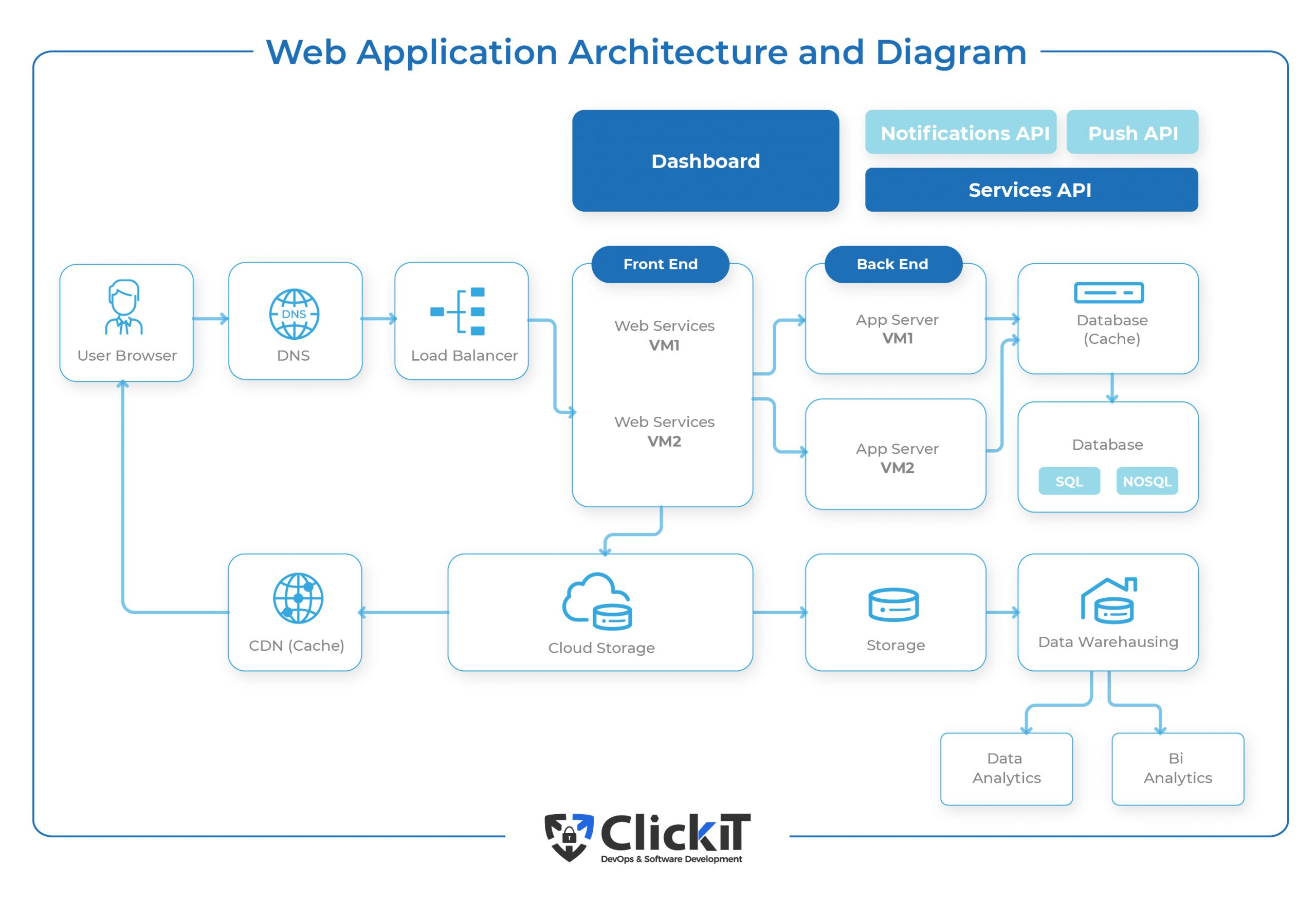
This diagram is clear because it separates concerns into distinct technological blocks, much like the C4 Container diagram you just learned about.
4. Best Practices for Creating Great Diagrams
Knowing the C4 levels is the first step. The next is to execute them well. A good diagram is self-explanatory. It doesn't need a presenter to be understood.
Simon Brown's talk and the infrasketch.net guide offer a wealth of practical tips to ensure your diagrams are clear and professional.
Architecture Diagram Best Practices: A Complete Guide | InfraSketch ...
This article provides an excellent checklist of best practices and common mistakes.
Please read the sections on Best Practices and Common Mistakes. Focus on the principles of knowing your audience, using consistent notation, and labeling everything clearly.
Here are the most critical takeaways, which you should treat as a checklist for every diagram you create:
- Title It: State the diagram type and scope (e.g., "Container Diagram for eCommerce System").
- Include a Legend: Explain your notation (shapes, colors, line styles). Don't make people guess.
- Use Text in Boxes: Every box should have a Name, the Technology choice, and a brief Description of its responsibility. This is the single most effective way to make a diagram stand on its own.
- Label the Lines: Lines represent relationships. Label them with a description of the interaction (e.g., "Makes API calls to," "Reads/writes data from"). The arrow indicates the direction of initiation.
- Be Consistent: Use the same shapes and colors for the same types of components across all your diagrams.
- One Diagram, One Purpose: Don't try to create a "God Diagram" that shows everything. Use the C4 levels to separate concerns. The diagram below, for example, shows a much more detailed deployment view, which is a different purpose than a high-level logical view.

5. Practical Application: Diagramming an eCommerce Application
Let's apply these principles to design a high-level architecture diagram for a multi-tier web application. We'll use the eCommerce platform from the previous lesson's RFP.
First, to identify the components (containers) we need to draw, it's helpful to trace the path of a single user request through a typical system.
Web Application Architecture: Full Request-Response Lifecycle
The video "Web Application Architecture: Full Request-Response Lifecycle" by ByteMonk provides an excellent animated walkthrough of how all the pieces of a modern web architecture fit together.
Watch the entire video. As you watch, make a list of the components mentioned (e.g., DNS, CDN, WAF, Load Balancer, API Gateway, Backend Service, Database, Cache). These are the "containers" we will place on our diagram.
Now, let's create a C4-style Container Diagram for our eCommerce application. Based on your background (React, Spring Boot) and the requirements from the last lesson, here are the key containers and their interactions:
- User: The person using the application.
- Web Browser: Runs the Single-Page Application (SPA), our user interface. [Technology: React.js]
- Content Delivery Network (CDN): Serves the static assets of our SPA (HTML, CSS, JS) quickly. [Technology: e.g., Amazon CloudFront]
- API Gateway: The single entry point for all client requests. It handles routing, authentication, and rate limiting. [Technology: e.g., Spring Cloud Gateway or Amazon API Gateway]
- Microservices: Your Spring Boot applications, each handling a specific business domain.
- User Service: Manages user registration, login, and profiles. Talks to the User DB. [Technology: Java/Spring Boot]
- Product Service: Manages the product catalog. Talks to the Product DB. [Technology: Java/Spring Boot]
- Order Service: Manages shopping carts and order processing. Talks to the Order DB and publishes events. [Technology: Java/Spring Boot]
- Message Broker: Enables asynchronous communication. For example, the Order Service publishes an
OrderPlacedevent. [Technology: e.g., RabbitMQ or Kafka] - Notification Service: A separate microservice that listens for events (like
OrderPlaced) and sends emails to users. [Technology: Java/Spring Boot] - Databases:
- User & Order DB: A relational database for transactional data. [Technology: SQL, e.g., PostgreSQL]
- Product DB: A NoSQL database, good for flexible product schemas. [Technology: NoSQL, e.g., MongoDB]
- Cache: An in-memory data store to speed up frequent queries, like fetching product details. [Technology: Redis]
Your task is to draw this diagram. Use a tool like Draw.io, Lucidchart, or even just pen and paper. Follow the best practices:
- Title: "Container Diagram for eCommerce Platform"
- Layout: Place the User on the far left. Flow the request from left to right: Browser -> CDN/API Gateway -> Services -> Databases.
- Boxes: For each of the 9 components above, draw a box. Inside each, write its Name, Technology, and a one-line Description.
- Lines: Draw directed arrows for the interactions. For example:
- An arrow from the SPA to the API Gateway, labeled: "Makes API calls [JSON/HTTPS]".
- An arrow from the Order Service to the Message Broker, labeled: "Publishes
OrderPlacedevents". - An arrow from the Product Service to the Cache, labeled: "Reads/writes product data".
- Legend: Create a key that explains your shapes (e.g., rectangle for a service, cylinder for a database) and line styles if you use them.
Compare your final drawing to the "Web Application Architecture and Diagram" image shown earlier. Your diagram will have more specific details but should follow a similar logical structure.
Conclusion
In this lesson, you have learned not just how to draw boxes and lines, but how to create meaningful architectural diagrams that serve as powerful communication tools. This skill is fundamental to translating your technical vision into a shared reality for your team and stakeholders.
Key Takeaways:
- Effective architecture diagrams are engineering documents, not just pictures. They must be clear, precise, and self-explanatory.
- The C4 model provides a simple, structured approach to diagramming by using different levels of abstraction (Context, Containers) for different audiences.
- A high-level Container diagram for a multi-tier web app should show the key applications, data stores, and other technological components, along with their interactions.
- Adhering to best practices—like adding a title, legend, and descriptive text—is what separates a confusing sketch from a professional architectural blueprint.
In our next module, "Advanced Code Quality and Refactoring," we will zoom in from this high-level architectural view. Now that you can design systems with clear boundaries between containers, we'll focus on what happens inside them. Our first lesson will be on identifying code smells and anti-patterns, ensuring the internal quality of your code lives up to the clean design of your architecture.