Recommended resources
The freely available resources this lesson will direct you to.
- Optimizing Workspace for Productivity, Focus & Creativity | Huberman Lab Essentialswww.youtube.com
- Avoiding Distractions & Doing Deep Work | Dr. Cal Newport & Dr. Andrew Hubermanwww.youtube.com
- Distraction-Free Work Environment: Setup Guide (2026)super-productivity.com
- [PDF] Designing for Focus In A Distracted World - DSpace@MITdspace.mit.edu
Introduction
Welcome to our fifth lesson. In the last session, we built a crucial architectural blueprint for your week by applying timeboxing and calendar blocking. You learned to proactively schedule your priorities, creating a "fortress" to protect your time for deep work.
Today, we will reinforce the walls of that fortress. The most well-designed schedule is vulnerable to attack from distractions. This lesson is dedicated to the learning outcome: to design your physical and digital environments to minimize stimulus-driven distractions.
This isn't about a constant battle of willpower. Drawing on your interests in design and neuroscience, we will approach this as a systems-design problem. The goal is to create an environment where focus is the default state, not something you have to fight for. The cost of failing to do so is high.

1. The Problem: An Environment Designed for Distraction
Before we jump into solutions, it's essential to understand the nature of the problem. We live and work in an "attention-extractive economy," where many of our tools are engineered to capture and monetize our focus. Your struggle to maintain focus is not a personal failing; it's a predictable response to a meticulously designed system.
To understand this landscape and the underlying cognitive science, let's turn to a research paper from MIT.
[PDF] Designing for Focus In A Distracted World - DSpace@MIT
This paper, 'Designing for Focus In A Distracted World', provides a comprehensive background on the 'Attention Revolution' and the cognitive mechanics of distraction. It will give you the 'why' behind the strategies we'll discuss.
Please read the 'BACKGROUND' section. You can find it starting on page 3. Focus on these key parts within the section: Introduction to the 'Attention Revolution': Understand the economic incentives for distraction. Section 3: What are the mechanics of distraction?: Pay close attention to the description of the filtering circuit (the TRN) and the concept of cognitive load. Section 4: What is the impact of being distracted?: Note the smartphone study on the 'mere presence' of a smartphone and its effect on cognitive capacity.
This reading establishes three critical ideas:
- Economic Incentives: Many digital products are not neutral tools; they are designed with a business model that profits from interrupting you.
- Neurological Mechanics: Your brain's ability to focus relies on an active, energy-intensive process of inhibiting distractions. When the cognitive load of filtering becomes too high, you get distracted.
- The "Mere Presence" Effect: A smartphone's presence alone, even when off, can consume cognitive resources, effectively creating a "brain drain."
With this theoretical foundation, we can now shift to practical environmental design.
2. Engineering Your Physical Environment
Your physical space sends constant signals to your brain. By carefully curating these signals, you can either support or sabotage your ability to focus.
Light and Vision: The Master Regulators
Neuroscientist Andrew Huberman provides an excellent overview of how light and your field of vision directly control your brain's alertness systems.
Optimizing Workspace for Productivity, Focus & Creativity | Huberman Lab Essentials
In this video, 'Optimizing Workspace for Productivity, Focus & Creativity', Dr. Huberman explains the neurobiological effects of our physical environment. We'll focus on how to use light, vision, and sound to your advantage.
Watch two segments: Vision and Light: Focus on the principles of using bright light for alertness, the ideal position for your screen (at or above eye level), and the 45/5 rule for visual breaks (panoramic vision). Auditory Environment: Pay attention to the types of noise to avoid (incessant HVAC) and the potential benefits of 40Hz binaural beats for enhancing focus.
Key takeaways for your physical workspace:
- Lighting: Use bright, ideally overhead light in the first half of the day to maximize alertness. Position your monitor at or slightly above eye level to leverage the neurological link between upward gaze and alertness.
- Sound: Avoid persistent, annoying background noises. If you use sound to focus, consider 40Hz binaural beats, which studies suggest can enhance focus by influencing brain rhythms and dopamine release.
- Visual Breaks: For every 45 minutes of focused work, take 5 minutes to engage your panoramic vision (e.g., by looking out a window at a distant horizon). This relaxes the visual system and aids in recovery.
Clutter and Organization: Reducing Cognitive Load
Every object in your visual field competes for neural resources. A cluttered desk creates a high-load environment that constantly saps your focus.
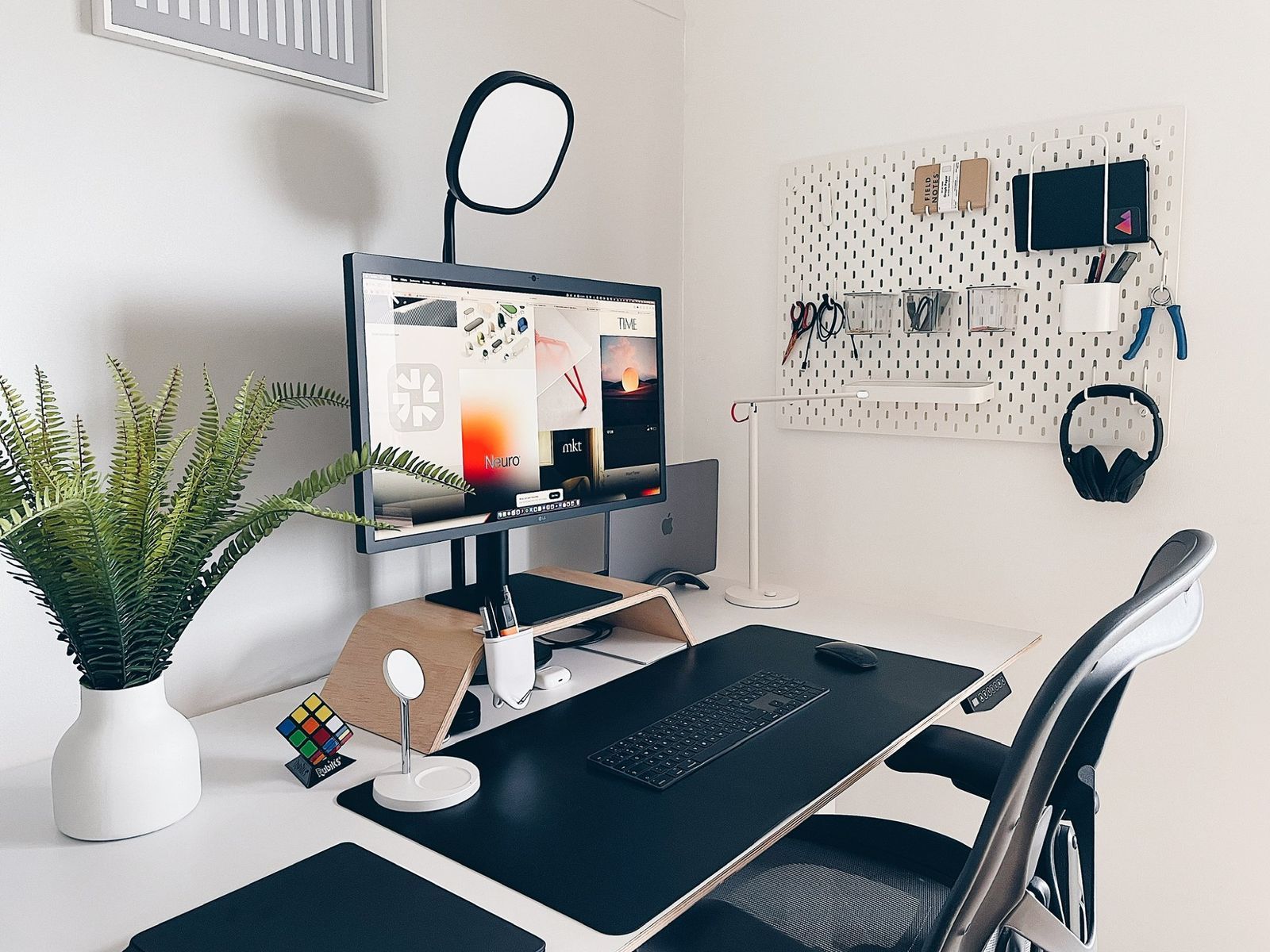
Here are two evidence-based principles from the field of environmental psychology, as detailed in the "Distraction-Free Work Environment" guide (resource LINK):
- The "Arms-Reach Rule": Keep only the items essential for your immediate task within arm's reach. Everything else should be stored away.
- Biophilic Design: Incorporating natural elements, like the plant in the image above, has been shown to improve cognitive performance and aid in attention restoration.
3. Architecting Your Digital Environment
Your digital environment is often more challenging to control because it has been explicitly engineered to be distracting. As Cal Newport explains, the problem isn't the internet itself, but specific products designed to create behavioral addiction.
Avoiding Distractions & Doing Deep Work | Dr. Cal Newport & Dr. Andrew Huberman
In this discussion with Dr. Huberman, Cal Newport unpacks the psychology behind digital distraction and why willpower is often not enough.
Watch the following clips: Early on, Newport explains that the issue is not the internet, but specific, engineered products. About four minutes in, the speakers discuss the phone as a behavioral addiction and the dopamine loops that drive it. Around the eight-minute mark, Dr. Huberman gives a powerful personal example of precommitment—a strategy to make distraction physically impossible.
To counter these engineered distractions, you need to architect a digital workspace based on intentional friction and control, rather than relying on self-control alone.
Distraction-Free Work Environment: Setup Guide (2026)
This guide, 'Distraction-Free Work Environment: Setup Guide', provides a tactical playbook for structuring your digital space. It builds on the principles we've just discussed.
Please locate Section 3, 'Architecting Your Digital Environment', and read the mitigation strategies. It offers specific, actionable strategies for the four main sources of digital distraction: your smartphone, notifications, tool proliferation, and tempting websites.
A practical digital design strategy:
- Quarantine Your Phone: During deep work blocks, move your phone to another room. This is the single most effective way to combat the "mere presence" effect.
- Re-architect Notifications: Disable all non-essential notifications on your computer and phone. Instead of letting your tools interrupt you, schedule 2-3 specific "communication blocks" (as you learned in the previous lesson) to check email and messages on your own terms.
- Consolidate Tools: Every app you use adds cognitive overhead. Audit your software and consolidate where possible. Use virtual desktops to create separate environments for different work contexts (e.g., a "Deep Work" desktop with only your code editor and a "Comms" desktop with Slack and email).
- Use Precommitment, Not Willpower: Install a website blocker (like Freedom or Cold Turkey). Proactively block distracting sites during your scheduled deep work blocks. This is a form of precommitment, just like Dr. Huberman's strategy of giving his phone away.
4. Application: Your Environmental Design Audit
Knowledge becomes power when it is applied. Your task is to audit and redesign your primary workspace using a set of formal design principles.
The MIT paper you read earlier identified 10 "focus-oriented design heuristics" from interviews with designers. These heuristics provide an excellent framework for your audit.
[PDF] Designing for Focus In A Distracted World - DSpace@MIT
Let's return to the MIT thesis to find a practical framework for our audit. This section presents 10 design principles that are perfect for evaluating your own environment.
Go to the section 'Identifying New Heuristics' (it starts on page 12). Review the 10 proposed heuristics and the examples provided for each.
Your Task:
Take 15 minutes to review your physical and digital workspace. For each of the 10 heuristics, identify one concrete change you can make. Here are two examples to get you started:
- Heuristic #4: Remove environmental stimuli that competes with or obstructs the purpose of the product.
- Audit: "My work machine has Slack notifications enabled. These compete for my attention when I'm trying to code."
- Action: "I will disable all Slack notifications and only open the app during my scheduled communication blocks."
- Heuristic #6: Eliminate cues that initiate undesired patterns/behaviors/habits.
- Audit: "I keep my phone on my desk. The visual cue makes me want to check it."
- Action: "I will purchase a small box to keep on a shelf across the room. During deep work, my phone will go in the box."
Document your findings. This audit is the blueprint for your newly designed, high-focus environment.
Conclusion
Today you've moved from being a passive victim of distraction to an active architect of your attention. You've learned how to systematically design your physical and digital environments to make focus the path of least resistance.
Key Takeaways:
- Focus is a Design Problem: Your environment is not neutral. It is either designed (by you or by others) for focus or for distraction.
- Control Your Senses: Proactively manage your physical space by optimizing light, sound, and visual clutter to reduce cognitive load and promote alertness.
- Introduce Intentional Friction: Counter engineered digital distractions by making them harder to access. Quarantine your phone, kill notifications, and use precommitment tools like website blockers.
- Audit Your Workspace: Use formal principles, like the 10 focus-oriented heuristics, to systematically identify and eliminate sources of distraction.
Preview of the Next Lesson:
We've now built the fortress (your schedule) and reinforced its walls (your environment). But what happens when you need to move between different fortresses—for instance, switching from a deep work project to an important client call? Even in a perfectly designed environment, the act of context switching leaves behind a cognitive fog called "attention residue." In our next lesson, we will tackle this internal source of distraction and learn to explain the concept of attention residue and develop 'shutdown' and 'startup' rituals to minimize its impact on performance.