Recommended resources
The freely available resources this lesson will direct you to.
Introduction
In our previous lessons, we have developed a solid understanding of matrices as mathematical objects. We've explored their properties through determinants, which tell us how they scale space, and norms, which measure their "size" or amplification factor. Now, we will connect these abstract concepts directly to one of their most powerful and visual applications: 3D computer graphics. Your interest in low-level engineering and graphics will find a strong anchor here, as these principles form the very foundation of every modern 3D rendering pipeline.
This lesson addresses the final outcome of our first module: Relate matrix transformations (rotation, scale, shear) to their application in 3D computer graphics. We will see how a handful of numbers in a matrix can precisely describe the position, orientation, and size of an object in a virtual world. We will also uncover a clever mathematical "trick" that unifies all these operations into a single, elegant framework, which is essential for performance in graphics systems.
What is a Linear Transformation?
At its core, a 3D transformation is a function that takes a point (a vector) in 3D space and moves it to a new location. A special and very important class of these are linear transformations. They have two key properties: lines remain lines after the transformation, and the origin remains fixed in place.
The renowned 3Blue1Brown channel offers a superb visualization of what this means in three dimensions.
Three-dimensional linear transformations | Chapter 5, Essence of linear algebra
This video provides the geometric intuition behind 3D linear transformations.
Watch the segments from the beginning up to this point. Pay close attention to two key ideas: A linear transformation "smooshes" space while keeping grid lines parallel and evenly spaced. The entire transformation is completely determined by where the three basis vectors—\mathbf{\hat{i}}, \mathbf{\hat{j}}, and \mathbf{\hat{k}}—land. The new coordinates of these transformed basis vectors become the columns of the transformation matrix.
This second point is the fundamental bridge between the geometry and the algebra. A 3x3 matrix is not just a grid of nine numbers; it is a compact description of a new coordinate system.
A Geometric Interpretation of Matrices
Let's formalize this crucial insight. The text 3D Math Primer for Graphics and Game Development provides an excellent breakdown of how to interpret a matrix geometrically.
This section explains how to visualize a matrix by understanding its effect on the basis vectors.
Please read the entire section "Geometric Interpretation of Matrix". As you read, note the convention being used. This text uses row vectors, where a vector \mathbf{v} is transformed by a matrix \mathbf{M} via post-multiplication: \mathbf{v'} = \mathbf{vM}. In this convention, the rows of the matrix are the transformed basis vectors. This is different from the 3Blue1Brown videos, which use column vectors, where transformation happens via pre-multiplication: \mathbf{v'} = \mathbf{Mv}. In that convention, the columns of the matrix are the transformed basis vectors. Both conventions are valid and widely used (DirectX often uses row vectors, while OpenGL and many academic texts use column vectors). The underlying principle is the same; what matters is consistency. For the rest of this lesson, we will adopt the column vector convention (\mathbf{v'} = \mathbf{Mv}). The key takeaway is that to construct a matrix for a desired linear transformation, you only need to answer one question: "Where do my basis vectors end up?" Let's build a few examples: Scaling: To scale an object by a factor of 2 along the Y-axis and 0.5 along the Z-axis, we find where the basis vectors land: \mathbf{\hat{i}} = (1, 0, 0) remains unchanged: (1, 0, 0). \mathbf{\hat{j}} = (0, 1, 0) is scaled by 2: (0, 2, 0). \mathbf{\hat{k}} = (0, 0, 1) is scaled by 0.5: (0, 0, 0.5). Placing these new vectors as columns in our matrix gives us the scaling matrix \mathbf{S}: \mathbf{S} = \begin{pmatrix} 1 & 0 & 0 \\ 0 & 2 & 0 \\ 0 & 0 & 0.5 \end{pmatrix} Rotation: Let's find the matrix for a 90-degree counter-clockwise rotation around the Y-axis. \mathbf{\hat{i}} = (1, 0, 0) rotates to the Z-axis: (0, 0, 1). \mathbf{\hat{j}} = (0, 1, 0) is on the axis of rotation, so it's unchanged: (0, 1, 0). \mathbf{\hat{k}} = (0, 0, 1) rotates to the negative X-axis: (-1, 0, 0). The rotation matrix \mathbf{R} is: \mathbf{R} = \begin{pmatrix} 0 & 0 & -1 \\ 0 & 1 & 0 \\ 1 & 0 & 0 \end{pmatrix} Other linear transformations like shear (which skews an object) can be constructed in the same way. The Problem with Translation We now have matrices for scaling and rotation. What about translation—moving an object in space? Let's try to build a translation matrix \mathbf{T} that moves every point by a vector (t_x, t_y, t_z). A point at the origin \mathbf{v} = (0,0,0) should move to (t_x, t_y, t_z). However, with a 3x3 matrix \mathbf{M}, what is \mathbf{Mv} when \mathbf{v} is the zero vector? \mathbf{Mv} = \begin{pmatrix} m_{11} & m_{12} & m_{13} \\ m_{21} & m_{22} & m_{23} \\ m_{31} & m_{32} & m_{33} \end{pmatrix} \begin{pmatrix} 0 \\ 0 \\ 0 \end{pmatrix} = \begin{pmatrix} 0 \\ 0 \\ 0 \end{pmatrix} The origin always maps to the origin. This means a 3x3 matrix, representing a linear transformation, cannot perform translation. Translation is an example of an affine transformation, which is a linear transformation followed by a translation. This poses a problem for graphics pipelines. We want to represent all our transformations as matrices so we can combine them easily through multiplication. How can we include translation in this framework? The Solution: Homogeneous Coordinates The solution is a beautifully clever mathematical construction. We embed our 3D world into 4D space. A 3D point \mathbf{p} = (x, y, z) is represented by a 4D vector \mathbf{p'} = (x, y, z, 1). This is called using homogeneous coordinates. By adding this fourth component, we gain the ability to perform translation via matrix multiplication. The video below explains both the mathematical mechanics and the profound geometric intuition behind this idea.
This is different from the 3Blue1Brown videos, which use column vectors, where transformation happens via pre-multiplication: . In that convention, the columns of the matrix are the transformed basis vectors. Both conventions are valid and widely used (DirectX often uses row vectors, while OpenGL and many academic texts use column vectors). The underlying principle is the same; what matters is consistency. For the rest of this lesson, we will adopt the column vector convention ().
The key takeaway is that to construct a matrix for a desired linear transformation, you only need to answer one question: "Where do my basis vectors end up?"
Let's build a few examples:
-
Scaling: To scale an object by a factor of 2 along the Y-axis and 0.5 along the Z-axis, we find where the basis vectors land:
- remains unchanged: .
- is scaled by 2: .
- is scaled by 0.5: .
Placing these new vectors as columns in our matrix gives us the scaling matrix :
-
Rotation: Let's find the matrix for a 90-degree counter-clockwise rotation around the Y-axis.
- rotates to the Z-axis: .
- is on the axis of rotation, so it's unchanged: .
- rotates to the negative X-axis: .
The rotation matrix is:
Other linear transformations like shear (which skews an object) can be constructed in the same way.
The Problem with Translation
We now have matrices for scaling and rotation. What about translation—moving an object in space?
Let's try to build a translation matrix that moves every point by a vector . A point at the origin should move to . However, with a 3x3 matrix , what is when is the zero vector?
The origin always maps to the origin. This means a 3x3 matrix, representing a linear transformation, cannot perform translation. Translation is an example of an affine transformation, which is a linear transformation followed by a translation.
This poses a problem for graphics pipelines. We want to represent all our transformations as matrices so we can combine them easily through multiplication. How can we include translation in this framework?
The Solution: Homogeneous Coordinates
The solution is a beautifully clever mathematical construction. We embed our 3D world into 4D space. A 3D point is represented by a 4D vector . This is called using homogeneous coordinates.
By adding this fourth component, we gain the ability to perform translation via matrix multiplication. The video below explains both the mathematical mechanics and the profound geometric intuition behind this idea.
Math for Game Developers: Why do we use 4x4 Matrices in 3D Graphics?
This video from the pikuma channel explains exactly why 4x4 matrices are necessary for 3D graphics.
This is a critical segment. Please watch from this point. The video covers three key points: The Mathematical Reason (Part 1): It shows how matrix-vector multiplication with a 3x3 matrix can only scale and add existing components. By adding a 4th "w" component (set to 1) to our vector, we can use the 4th column of a 4x4 matrix to add a constant value—which is exactly what translation is. The Geometric Reason (Part 2): It reinforces that translation is not a linear transformation because it moves the origin. The "Smart Trick" (Part 3): This is the deepest insight. A translation in a 3D space can be mathematically represented as a shear transformation in a 4D space. This is the "first principles" reason why homogeneous coordinates work so elegantly.
With this, we can now define a 4x4 translation matrix that moves a point by :
When we multiply this by our homogeneous point , we get:
The result is our translated point, still in homogeneous form! Our linear transformation matrices (scale, rotation) can be easily expanded to 4x4 matrices by embedding the 3x3 part and filling the rest with elements of the identity matrix.
Composing Transformations
The real power of this unified 4x4 matrix framework is composition. If we want to scale an object, then rotate it, then translate it, we can apply the matrices in sequence:
Because matrix multiplication is associative, this is the same as:
We can pre-multiply our transformation matrices to create one single matrix, , that performs all the operations at once. This is a massive performance win, as every vertex of a complex 3D model can be transformed with a single matrix-vector multiplication.
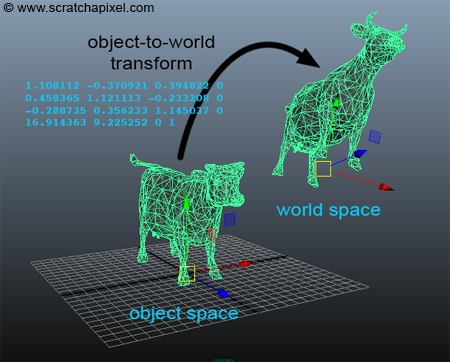
A single 4x4 matrix transforms a model from its own "object space" (centered at its origin) to its final position and orientation in "world space".
Critically, matrix multiplication is not commutative. The order of operations matters immensely. Scaling then translating is not the same as translating then scaling.
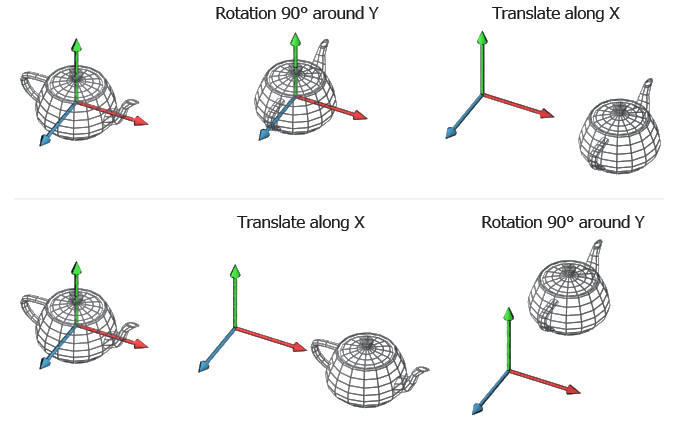
This image shows the result of applying a rotation and a translation in different orders. Top: Rotate 90° then translate along X. Bottom: Translate along X then rotate 90°.
Question: Imagine a model of a car is defined around the origin. You want to place it at position and then have it rotate around its own center. Should you apply the rotation matrix first or the translation matrix first? What would happen if you did it in the opposite order?
Answer
You should apply the rotation first, then the translation ($\mathbf{M} = \mathbf{TR}$). This rotates the car around the origin (its center) and then moves the already-rotated car to position $(10, 0, 0)$.If you were to translate first, the car would move to . The subsequent rotation would then happen around the world origin, causing the car to orbit the point at a distance of 10 units, rather than spinning in place. This corresponds to the bottom half of the "Order Dependency" image.
Conclusion
This lesson bridged the gap from abstract linear algebra to the practical foundations of computer graphics. We have seen that matrices are not just arrays of numbers, but the language of geometric transformations.
Key Takeaways:
- Linear Transformations (3x3): Rotation, scaling, and shearing are linear transformations that can be represented by 3x3 matrices. The columns of the matrix are simply the new positions of the standard basis vectors.
- Affine Transformations: Translation is not linear because it moves the origin.
- Homogeneous Coordinates (4x4): By adding a 4th dimension, we can represent 3D translation as a 4x4 matrix multiplication. This unifies all standard geometric operations into a single framework.
- Composition and Order: Multiple transformations can be combined into a single matrix by multiplying their individual matrices. The order of multiplication is critical, as transformations are not commutative. The final transformation matrix () is applied to vertices in the reverse order of multiplication (scale, then rotate, then translate).
You now have the complete mathematical toolkit to understand how any rigid object is placed and oriented in a 3D scene. This is the first and most fundamental step in the rendering pipeline.
In the next module, we will reverse our thinking. Instead of building matrices to create transformations, we will learn how to decompose an existing matrix to understand the transformation it represents. Our first topic will be eigenvalues and eigenvectors, which reveal the intrinsic "axes" of a linear transformation and form the bedrock of many advanced techniques in both graphics and machine learning.