Recommended resources
The freely available resources this lesson will direct you to.
Hello! In the previous lesson, you imported modules and called functions they provide. When a call fails, Python usually gives you more than a message saying something went wrong: it shows where execution was when the error occurred. This final lesson in the Python foundations module will help you read that report, called a traceback, and identify the line to inspect first.
Allow about 40 minutes: a short video and reading, followed by time to run and examine the examples in a notebook. The skill will carry into the next module, where you begin working with NumPy arrays and tabular data.
Read the error, then locate the line
A traceback for an error that occurs while code is running has two especially useful parts. Its final line names the error and usually adds an explanation. Above that, each frame identifies a location in the code: a file or notebook cell, a line number, and sometimes a function name. The frames show how Python reached the failure.
Watch Traceback (most recent call last): Python’s tracebacks explained from Python Morsels for a visual account of why the frames appear in that order.
Traceback (most recent call last): Python's tracebacks explained
This short video demonstrates how to read an exception message and trace a failure through function calls.
Watch the walkthrough. Focus on why the final message is read first, why the lowest frame is closest to the failure, and why the line that needs changing might be in an earlier frame.
The labels in this example make those parts easier to spot:
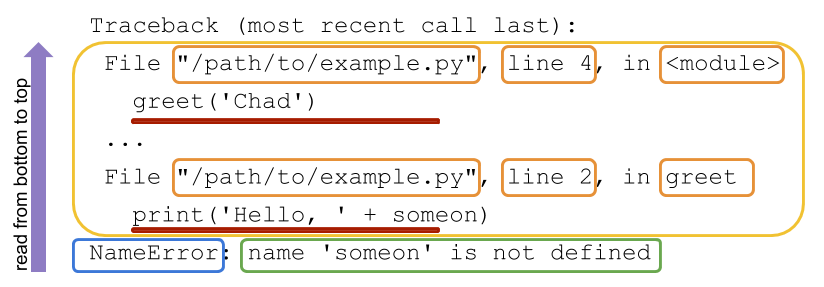
Start at NameError: name 'someone' is not defined. Moving upward, the nearest frame points to line 2, inside greet, where someone is used. The earlier frame, line 4, shows the call to greet that led there. Line 2 is where Python encountered the error; line 4 tells you how it got there.
The Python tutorial makes one further distinction worth keeping in mind: an error during execution produces an exception traceback, while invalid Python syntax is detected before that code can run.
Read the relevant parts of the Python Tutorial to distinguish syntax errors from execution-time exceptions and to see what the final line of a traceback means.
In “8.1. Syntax Errors,” look at the while True print(...) example, then read the parser explanation. In “8.2. Exceptions,” begin at “Even if a statement or expression is syntactically correct” and read the exception examples and explanation. Notice the error type on the last line of each example and the source-code context above it; stop after the paragraph explaining the stack traceback.
Follow a failure through your own function
Use a fresh notebook, or restart its kernel before running the following cell. That prevents names left over from earlier work from obscuring the example.
def mean_batch(values):
    return sum(value_list) / len(value_list)

batch_scores = [2, 4, 6]
print(mean_batch(batch_scores))
This code defines a function, creates a list, and calls the function. The traceback will vary in appearance across notebooks, but its essential information should resemble this:
Traceback (most recent call last):
  File "demo.py", line 5, in <module>
    print(mean_batch(batch_scores))
  File "demo.py", line 2, in mean_batch
    return sum(value_list) / len(value_list)
NameError: name 'value_list' is not defined
A notebook will typically say something like Cell In[...] rather than File "demo.py". The reading method is the same:
- The final line says Python could not find the name
value_list. - The lowest frame points to line 2, inside
mean_batch, where that name is used. - The frame above points to line 5, where the function was called.
Compare line 2 with the function definition: its parameter is named values, not value_list. The mismatch explains the error. Change line 2 to use the parameter consistently, then rerun the cell:
def mean_batch(values):
    return sum(values) / len(values)

batch_scores = [2, 4, 6]
print(mean_batch(batch_scores))
The expected output is 4.0. Notice that the traceback identified where execution failed; comparing that line with its surrounding code revealed why.
The failing line may not be the line to change
Now keep the corrected function and run a new cell:
batch_scores = [2, "4", 6]
print(mean_batch(batch_scores))
This time the final line should report a TypeError: adding an integer and a string is not supported. The lowest frame in your code points to the line containing sum(values) inside mean_batch. That is the line where the operation failed.
But should you change the function? If batch scores are meant to be numbers, its calculation is reasonable. Inspect the earlier frame showing the call, then the value supplied to it: "4" is text, unlike the other scores. In this example, correcting the input to [2, 4, 6] preserves the intended calculation.
This is why a traceback is evidence, not a complete diagnosis. The lowest frame usually locates the immediate failure. An earlier caller may reveal an unsuitable input; if the lowest frame belongs to a library, an earlier frame in your own code may be the most useful place to investigate. Read upward until you can explain the mismatch before editing anything.
In a notebook, also check whether a cell that creates a needed name has run. A traceback can correctly report that a name is undefined even when its definition is visible in a different, unexecuted cell.
When Python cannot parse the code
Run this in a separate cell:
if True
    print("ready")
Python cannot interpret the if statement without a colon. Expect a SyntaxError pointing near the first line, often with a caret. Unlike the earlier examples, this cell cannot begin executing, so you may not see the usual multi-frame Traceback (most recent call last): display.
A caret marks where Python noticed a syntax problem, not necessarily the exact character that needs changing. Here, the missing colon belongs at the end of if True. With longer statements, it can help to inspect nearby lines as well—for example, an unclosed quote or bracket may make a later line appear to be at fault. Fix syntax first; only then can Python run the code and reveal any execution-time errors.
Takeaways
For an execution-time error, read the traceback from the bottom upward: identify the error type and message, find the lowest relevant file or cell and line number, then inspect earlier frames if you need to understand how the failing value arrived there. The line where Python fails is your starting point, not always the line you should change. A SyntaxError is different: Python could not parse the code, and its pointer marks where to begin looking.
That completes the Python foundations module. Next, you will use NumPy arrays for element-wise numerical operations—and use the same traceback-reading habit whenever an operation fails.