Recommended resources
The freely available resources this lesson will direct you to.
Welcome to the final lesson of our "Python Essentials for Data Science" module. So far, you have learned to set up your environment, manage data with pandas, and create insightful visualizations. You're now equipped to load, clean, and explore a dataset. Today, we add the last, and perhaps most important, tool to your foundational toolkit: NumPy.
This lesson focuses on the learning outcome: Use NumPy for array creation, indexing, and basic arithmetic relevant to machine learning. While pandas provides the convenient DataFrame structure for data analysis, NumPy provides the high-performance engine for the numerical computations that underpin almost all machine learning algorithms. Understanding NumPy is not just about learning another library; it's about understanding the language in which machine learning in Python is written.
Why NumPy? The Engine of Scientific Python
You might wonder, "Python already has lists. Why do we need another data structure for arrays?" The answer comes down to two factors that are critical in data science and should resonate with your engineering and business background: performance and functionality.
NumPy arrays are faster and more memory-efficient than Python lists. This is because they are stored in a continuous block of memory and all elements must be of the same data type. This design allows for highly optimized, pre-compiled C code to perform operations on the entire array at once, a process called vectorization.
To get a clear intuition for why this matters, please watch this excellent explanation.
Python NumPy Tutorial for Beginners
This video from freeCodeCamp.org provides a fantastic conceptual overview of why NumPy is more efficient than standard Python lists, covering both memory usage and the benefits of contiguous memory.
Watch from the beginning to the end of the section on contiguous memory. Focus on the core ideas of fixed types and memory layout, which are the sources of NumPy's speed.
Now that you understand the "why," let's dive into the "what" and "how."
The NumPy ndarray Object
The core of the NumPy library is the ndarray, which stands for n-dimensional array. It's a grid of values, all of the same type. For anyone with an engineering background, it's helpful to think of a 1D array as a vector and a 2D array as a matrix. NumPy provides the tools to perform mathematical operations on these objects with high efficiency.
Let's begin by setting up our environment. As usual, open your Google Colab notebook and import NumPy. The standard convention is to import it with the alias np.
import numpy as np
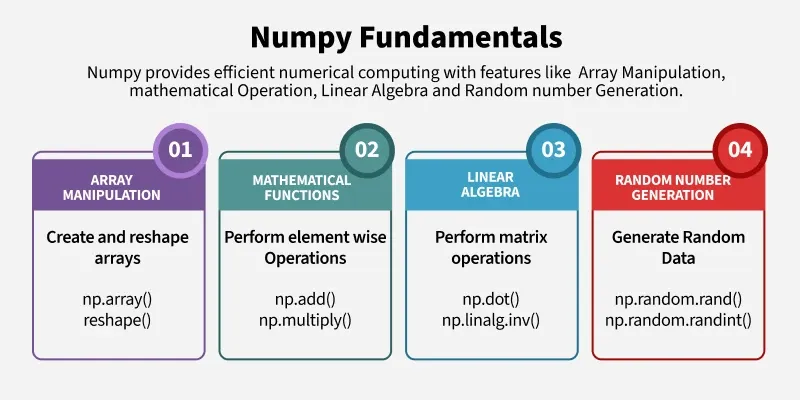
This chart gives a high-level overview of the fundamental capabilities of NumPy, all of which we will touch on today.
Array Creation
The first step is to create a NumPy array. You can create one from a standard Python list, or by using one of NumPy's many built-in creation functions.
Python Numpy Tutorial (with Jupyter and Colab)
This classic tutorial from Stanford's CS231n course provides a concise and clear introduction to creating NumPy arrays.
Read the initial section on Arrays. This will show you how to create arrays from lists and using functions like np.array(), np.zeros(), np.ones(), np.full(), and np.random.random().
Here are some of those creation methods in action. Try running these in your notebook.
# From a Python list (1D array or vector)
my_list = [1, 2, 3, 4]
vec = np.array(my_list)
print(f"Vector:\n{vec}\n")


# From a nested list (2D array or matrix)
my_nested_list = [[1, 2, 3], [4, 5, 6]]
mat = np.array(my_nested_list)
print(f"Matrix:\n{mat}\n")


# An array of zeros
zeros_mat = np.zeros((2, 3)) # Shape is passed as a tuple (rows, columns)
print(f"Zeros Matrix:\n{zeros_mat}\n")


# An array of ones with a specified data type
ones_mat = np.ones((3, 2), dtype=np.int16)
print(f"Ones Matrix:\n{ones_mat}\n")
Every ndarray has important attributes that describe it. The three most important are:
.ndim: The number of dimensions (or axes) of the array. A vector has 1, a matrix has 2..shape: A tuple of integers indicating the size of the array in each dimension. For a matrix, this is(rows, columns)..dtype: An object describing the data type of the elements in the array (e.g.,int64,float64).
# Let's inspect our matrix 'mat' from before
print(f"Matrix:\n{mat}")
print(f"Number of dimensions: {mat.ndim}")
print(f"Shape of the matrix: {mat.shape}")
print(f"Data type of elements: {mat.dtype}")
Array Indexing and Slicing
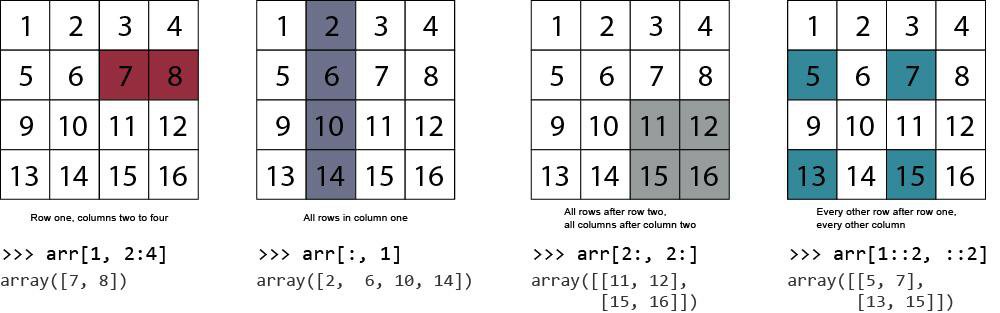
Once you have an array, you need to be able to access its elements. This is where NumPy's powerful indexing and slicing capabilities come in. For 1D arrays, it works just like Python lists. For 2D arrays (matrices), you can think of it as accessing elements by [row, column].
This image provides an excellent visual summary of common slicing techniques.
To master these techniques, let's turn back to the tutorial.
Python Numpy Tutorial (with Jupyter and Colab)
This section details the most important ways to access data within a NumPy array. Pay close attention to the difference between slicing and boolean indexing.
Read the section on Array indexing. Focus on understanding the three main types: Slicing: Using colons (:) to select ranges of elements, like a[0:2, 1:3]. Integer Array Indexing: Using lists of indices to pick out arbitrary elements. Boolean Array Indexing: Using an array of True/False values to select elements that meet a certain condition. This is an extremely common pattern in data analysis.
Let's practice this. Create this array and try to predict the output of each indexing operation before you run the code.
# Create a sample 3x4 matrix
a = np.array([[1, 2, 3, 4],
              [5, 6, 7, 8],
              [9, 10, 11, 12]])


# 1. Get a single element (second row, third column)
element = a[1, 2]
print(f"Element at [1, 2]: {element}\n") # Should be 7


# 2. Get an entire row (the first row)
first_row = a[0, :]
print(f"First row: {first_row}\n")


# 3. Get an entire column (the second column)
second_col = a[:, 1]
print(f"Second column: {second_col}\n")


# 4. Get a sub-matrix (top-left 2x2)
sub_matrix = a[0:2, 0:2]
print(f"Top-left 2x2 sub-matrix:\n{sub_matrix}\n")


# 5. Boolean indexing: get all elements greater than 7
large_elements = a[a > 7]
print(f"Elements > 7: {large_elements}")
Array Arithmetic and Operations
NumPy's true power shines when you perform mathematical operations. Basic math functions operate element-wise. This is a key feature and a significant departure from how Python lists behave.
x = np.array([[1, 2], [3, 4]])
y = np.array([[5, 6], [7, 8]])


# Element-wise addition
print(f"x + y:\n{x + y}\n")


# Element-wise multiplication
print(f"x * y:\n{x * y}\n")
Element-wise vs. Matrix Multiplication
This is a critical distinction. In NumPy, the * operator performs element-wise multiplication, not the matrix multiplication (dot product) you know from linear algebra.
To perform a dot product, you use the np.dot() function or the @ operator (in Python 3.5+). This is fundamental for machine learning, as it's the core operation in linear models, neural networks, and many other algorithms.
Python Numpy Tutorial (with Jupyter and Colab)
This part of the tutorial explains how mathematical functions work in NumPy and crucially distinguishes between element-wise and matrix multiplication.
Read the section on Array math. Make sure you understand the difference in output between x * y and x.dot(y).
Here is a practical example. Notice the shapes of the matrices and the resulting product.
# Matrix A has shape (2, 3)
A = np.array([[1, 2, 3], [4, 5, 6]])


# Matrix B has shape (3, 2)
B = np.array([[7, 8], [9, 10], [11, 12]])


# To multiply them, the inner dimensions must match: (2, 3) and (3, 2) -> match is 3
# The resulting matrix will have shape (2, 2)


# Perform matrix multiplication
C = np.dot(A, B)


# Or using the @ operator: C = A @ B

print(f"Shape of A: {A.shape}")
print(f"Shape of B: {B.shape}")
print(f"Result of A dot B:\n{C}")
print(f"Shape of C: {C.shape}")
Operations along an Axis
Often, you'll want to perform an operation (like sum or mean) along a specific dimension of the array (e.g., across rows or down columns). You control this with the axis parameter.
axis=0: Operates down the columns.axis=1: Operates across the rows.
This can be counter-intuitive at first. Think of axis=0 as "collapsing the rows" and axis=1 as "collapsing the columns".
Learn NumPy in 40 Minutes - Python NumPy Tutorial
This video by Tech With Tim provides a very clear visual explanation of how the axis parameter works for operations like sum.
Watch the segment from "Understanding dimensions and axis". The presenter does an excellent job of showing how axis=0 and axis=1 correspond to column-wise and row-wise sums, respectively.
Let's see it in code:
matrix = np.array([[1, 2, 3], [4, 5, 6]])


# Sum of all elements
print(f"Total sum: {np.sum(matrix)}\n")


# Sum down the columns (axis=0)
print(f"Column sums (axis=0): {np.sum(matrix, axis=0)}\n") # Result: [1+4, 2+5, 3+6] -> [5, 7, 9]


# Sum across the rows (axis=1)
print(f"Row sums (axis=1): {np.sum(matrix, axis=1)}\n")   # Result: [1+2+3, 4+5+6] -> [6, 15]
This ability to aggregate data along different axes is central to data analysis and feature engineering.
Conclusion
In this lesson, you've been introduced to NumPy, the computational workhorse of the Python data science stack. You've covered the essential skills required to start using it effectively in a machine learning context.
Here are the key takeaways:
- NumPy
ndarray: A powerful, efficient n-dimensional array that is the foundation for numerical computing in Python. It's faster and more memory-efficient than Python lists. - Array Creation: You can create arrays from lists (
np.array) or using helper functions likenp.zerosandnp.ones. - Indexing: You can access and manipulate parts of an array using slicing (
:), integer indexing, and powerful boolean masking. - Arithmetic: Operations can be element-wise (
*), scalar (+ 5), or full matrix multiplications (@ornp.dot). - Axis Operations: Functions like
sum()andmean()can be performed along specific axes (axis=0for columns,axis=1for rows) to aggregate data.
With NumPy, you've completed the foundational module of this course. You can now load data with pandas, visualize it with Seaborn, and perform numerical computations with NumPy.
In our next module, we will leave the world of individual tools and enter the world of machine learning workflows. You will learn how to use scikit-learn, a library that ties all these concepts together, to preprocess data and prepare it for building your first predictive models. You'll see that scikit-learn uses NumPy arrays as its primary data format, making today's lesson a direct prerequisite for everything that follows.