Recommended resources
The freely available resources this lesson will direct you to.
Hello! In our last lesson, we drew a clear line between the frontend (the visible user interface, like a restaurant's dining room) and the backend (the hidden logic and data, like the kitchen). This separation is key to modern app development, but it raises an important question: if the frontend and backend are separate, how do they communicate? How does the dining room place an order with the kitchen?
This lesson will introduce the crucial "bridge" that connects these two worlds. We will explore what an API is and how it functions as a standardized messenger, allowing your beautiful frontend designs to request data and trigger actions from the powerful backend services your LLM assistant helps you build. By the end of this lesson, you'll understand why APIs are the engine of almost every app you use.
The Waiter in the Machine
Let's return to our restaurant analogy. You, the user, are in the dining room (the frontend) and you want to order a meal. The chefs are in the kitchen (the backend), ready to cook. You don't just walk into the kitchen and tell them what you want. Instead, you interact with a waiter.
The waiter gives you a menu (a list of what's possible), takes your specific order, communicates it to the kitchen in a way they understand, and then brings the finished meal back to you.
In the world of software, the API (Application Programming Interface) is the waiter.
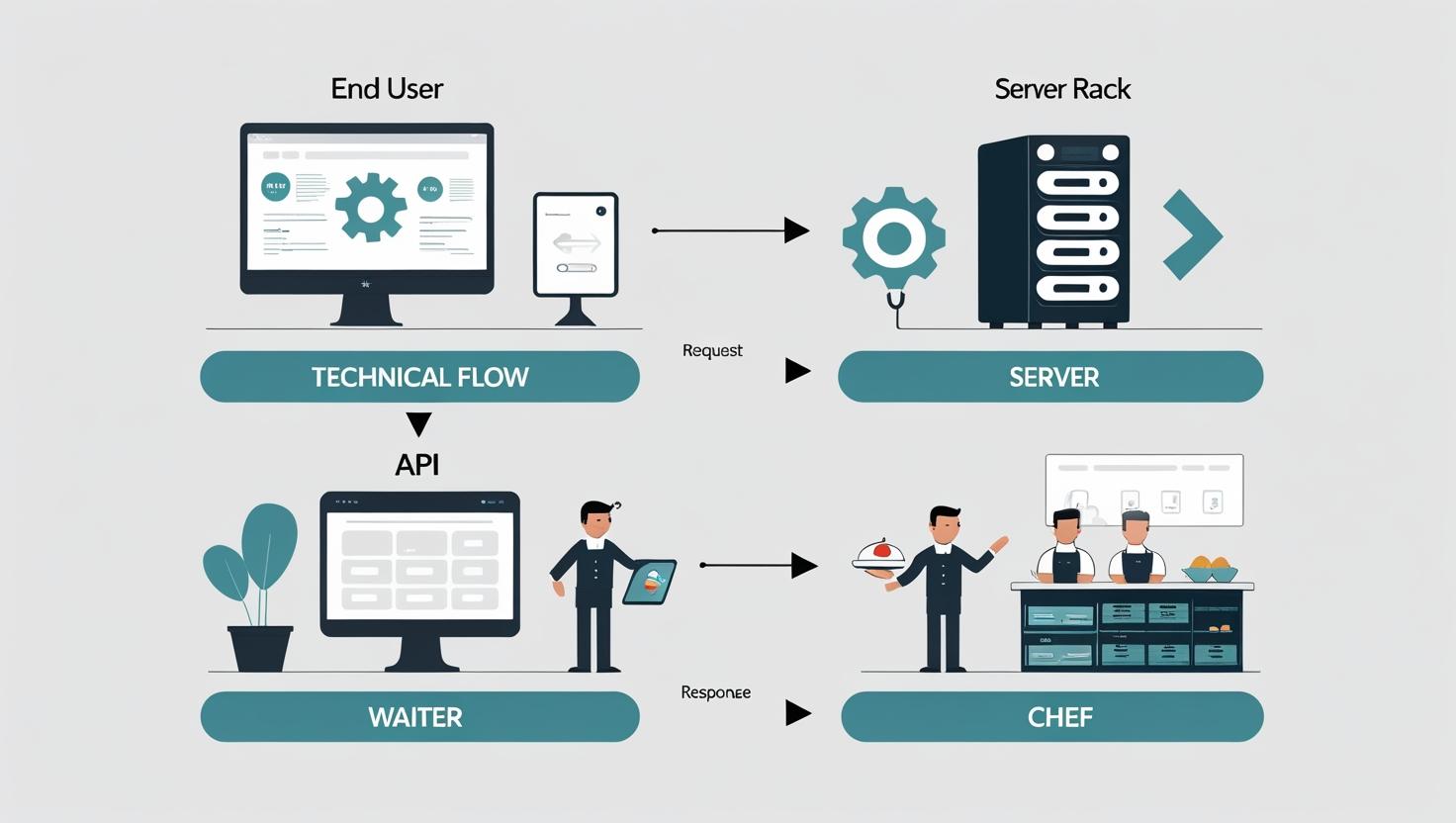
The term "Application Programming Interface" might sound intimidating, but the concept is straightforward. It's a set of rules and protocols that allows one piece of software (like your frontend app) to talk to another (like a backend server).
Let's solidify this analogy with a quick read.
Understanding API-Based Platforms: A Guide For Product Managers
This section from an article on Smashing Magazine clearly defines the API using the restaurant analogy, breaking down each component's role.
Read the section "What The API Actually Is Without The Tech Lingo". Pay close attention to the bulleted list that maps the kitchen, waiter, customer, menu, and order to their technical counterparts.
The Anatomy of a Request and Response
So, the API is the waiter. But what does an "order" actually look like? When your app needs something from the backend, it sends a request. The backend then processes this request and sends back a response. This cycle is the heartbeat of your application.
This process involves a few key ingredients:
- Client: The application making the request (e.g., your web app running in a browser).
- Server: The application receiving the request and holding the data/logic (the backend).
- URL/Endpoint: A specific web address the client sends the request to. Think of it as the kitchen's specific order window for "main courses" versus "desserts."
- HTTP Methods: These are the verbs of the request. The most common is
GET, which asks to retrieve data. Others includePOST(to send new data),PUT(to update existing data), andDELETE(to remove data). - JSON: A lightweight, human-readable data format that is the most common language used for API responses.
The image below illustrates this flow. The client sends a request specifying a method (GET) and a URL (/comments/123), and the server sends back the corresponding data in JSON format.

To see this entire cycle in action, let's revisit the Airbnb example from our previous lesson, but this time focusing specifically on the API's role.
Frontend, API, Backend and Database explained
This video by Tamara Jost gives a clear, practical walkthrough of how the frontend, backend, and API work together when a user performs a search.
Watch the segment from the moment Tina hits search. Notice how the video introduces the API as the "high-speed tube" that carries the request from the frontend to the backend. This visualizes the API as the dedicated communication channel.
APIs Are Everywhere
The most powerful aspect of APIs is that they are a universal standard. This means an API doesn't just connect your frontend to your backend. It can connect any application to any other service that offers an API.
This is fundamental to how you'll "vibe code." You won't build a mapping service from scratch; you'll use the Google Maps API. You won't build a payment processor; you'll use the Stripe API. And most relevant to your goal, you won't build a large language model; you'll connect to the OpenAI or Anthropic API.
Your app acts as a "customer" at another service's "restaurant." The video below explains this concept perfectly.
What is an API? (explained in 3 minutes)
This short video from Postman (a popular tool for working with APIs) explains why developers use third-party APIs to add powerful features to their apps without reinventing the wheel.
Watch the section from where the video discusses adding features. It gives clear examples, like using the Google Translate API instead of building your own dictionary, which is exactly how you'll approach integrating AI into your projects.
By leveraging APIs, you can assemble complex applications by plugging together powerful, pre-built services. As a designer, this allows you to focus on the user experience and unique value of your app, while outsourcing heavy-duty computation and data management to specialized services.
Conclusion
You now have the conceptual framework for one of the most important components of modern software. The idea of a "waiter" handling communication between different systems is a mental model that will serve you throughout your development journey.
Key Takeaways:
- API stands for Application Programming Interface. It's a set of rules that allows different software applications to communicate.
- The waiter analogy is a powerful way to understand an API's role: it's an intermediary that takes requests from a client (frontend) and delivers responses from a server (backend).
- APIs are not just for your own app's internal communication. They are the key to integrating powerful third-party services like Google Maps, Stripe, or AI models into your projects.
- An API interaction consists of a request (the "order") sent to a specific URL and a response (the "meal") sent back, usually in a data format called JSON.
In our next lesson, we'll take a closer look at that response. You'll learn how to read and interpret JSON, the common language that APIs use to structure the data they send back to your app. This will be the next step in demystifying the code your LLM assistant generates.