Recommended resources
The freely available resources this lesson will direct you to.
Welcome back! In our last lesson, we established that an API acts like a waiter, taking your app's "order" (a request) to the backend "kitchen" and returning the "meal" (a response). This is how your frontend UI gets the data it needs to display things like user profiles, product lists, or search results.
But what does that "meal" actually look like when it arrives at the table? It's not just a jumble of information. It's served on a structured plate, and in the digital world, that plate is most often JSON. This lesson will teach you how to read and interpret JSON, the universal language for data communication on the web. Understanding JSON is like learning to read the menu at any restaurant in the world—it unlocks your ability to understand the data your app is working with.
The Anatomy of a Digital Meal: What is JSON?
JSON stands for JavaScript Object Notation. While it has "JavaScript" in the name, its real power is that it's a simple, text-based format that virtually every programming language can understand. This makes it the perfect choice for APIs to send data between a server (backend) and a client (your app).
Think of it like a universal specification sheet. If you're designing a physical product, you create a spec sheet with clear labels and measurements (Height: 10cm, Material: Aluminum, Weight: 50g). Anyone, anywhere, can read that sheet and understand the product's properties. JSON does the same for data.
Let's watch a short video that provides an excellent overview of what JSON is and its basic building blocks.
This video from Web Dev Simplified provides a concise and clear introduction to JSON, explaining what it is, why it's used, and the data types it supports.
Watch the first two sections of the video. Pay attention to the six main data types it covers: Strings and Numbers Booleans and Null Arrays and Objects These are the fundamental ingredients of any JSON structure.
Deconstructing JSON: Keys, Values, Objects, and Arrays
As the video explained, JSON is built on a few simple but powerful concepts. Let's break them down using a visual example. Imagine an API returned data about a book. It might look something like this:
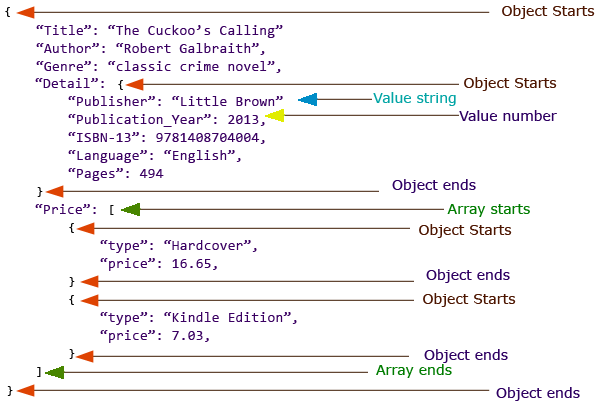
This structure is built from two primary components:
- Objects (
{ }): An object is a collection ofkey-valuepairs enclosed in curly braces{}. It represents a single "thing," like a book, a user, or a product. In the image above, the entire structure is one large object, and theDetailblock is also a nested object. - Arrays (
[ ]): An array is an ordered list of values enclosed in square brackets[]. It's used to represent a collection of items, like a list of hobbies, product prices, or search results. In the image, thePricefield contains an array of different pricing options.
Within an object, the data is organized into key-value pairs:
- A key is always a string in double quotes (e.g.,
"Title"). It acts as a label. - A value is the data associated with that key. It can be a string, number, boolean (
true/false),null(meaning "no value"), another object, or an array.
Let's trace the example in the image:
"Title": "The Cuckoo's Calling"is a simple key-value pair with a string value."Publication_Year": 2013is a key-value pair with a number value. Notice the number doesn't have quotes."Detail": { ... }is a key whose value is another object. This is called nesting and is how you create hierarchy. To get the publisher, you'd look for theDetailobject, then thePublisherkey inside it."Price": [ ... ]is a key whose value is an array. Inside this array are two separate objects, one for the "Hardcover" edition and one for the "Kindle Edition". This pattern—an array of objects—is extremely common for lists of items.
The ability to nest objects and arrays is what makes JSON so flexible for representing complex, real-world data.
This video from Nova Designs gives a great explanation of why nesting is so powerful and how it helps organize related information.
Watch the section on nesting data. The video uses a user profile with a nested address object as an example, which clearly illustrates how to group related data together.
JSON in Your World: From APIs to Design Tokens
Now that you can read a JSON structure, where will you actually encounter it?
1. API Responses (The Main Event)
As we've discussed, this is the primary use case. When your app makes a request to a backend service, the data comes back as a single, long string of text formatted as JSON. Your app's code then needs to "parse" this string to turn it back into a usable object.
This diagram perfectly illustrates the flow:
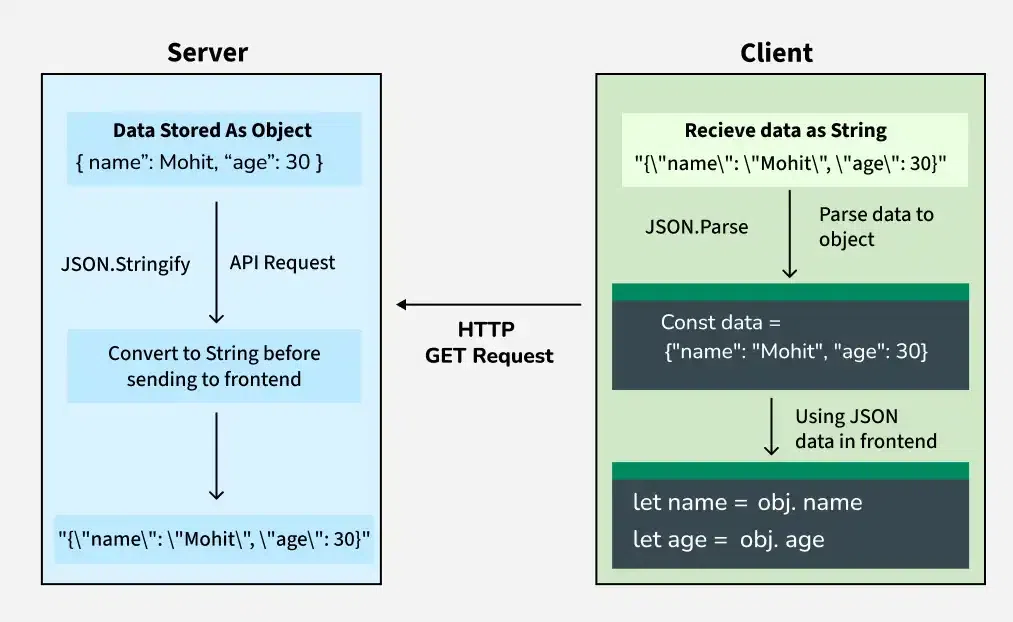
You won't typically write the JSON.parse() code yourself when vibe-coding—your LLM assistant or the framework you're using will handle it—but now you know why it's happening. The data must be converted from a text string into a structured object that your code can navigate.
2. Design Tokens
Here’s where it gets really interesting for you as a designer. Many modern design systems use JSON to store design tokens—your foundational design decisions like colors, fonts, spacing, and corner radii.
By storing these tokens in a structured JSON file, they become a single source of truth that can be used by both design tools (like Figma or Penpot) and by developers in the codebase. This automates away the painful process of manually translating design specs into code.
Let's look at how Penpot uses JSON for design tokens.
A practical guide to the design tokens JSON format
This article from the Penpot blog is a perfect example of how JSON is used directly in a design workflow. It shows how to define and structure design tokens using JSON.
First, read the introduction, "The design tokens format," to understand why JSON is a good fit. Next, examine the breakdown of a single token in the section "Design token properties". Notice it's just a simple JSON object with keys like "$value" and "$type". Then, look at the example of a complete, basic tokens file. You can see it's just two objects side-by-side. Finally, review the section on "Syntax errors". The strict rules of JSON (commas, brackets, quotes) are what make it machine-readable, and a single missing character can cause an error.
3. Configuring LLM Prompts
When you're "vibe coding" with models like GPT-4o, you can get much more consistent and controlled results by providing your instructions in a structured format. For complex requests, especially in image generation, a JSON object can serve as a highly detailed "style guide" or prompt. This is a power-user technique that moves beyond simple natural language.
🎨JSON Style Guides for Controlled Image Generation with GPT-4o and GPT-Image-1 - DEV Community
This article from DEV Community demonstrates how to use JSON to structure prompts for an AI image generator, giving you more precise control over the output.
Skim through the sections "How to Use a JSON Style Guide" and "Parameter Reference". You don't need to memorize the keys, but notice how they use JSON to define everything from subjects and style to camera angles and lighting. Then look at one of the "Example Use Cases". This shows how all the different key-value pairs come together to form a detailed, unambiguous creative brief for the AI.
Conclusion
You've now demystified the most common data format you'll encounter when building apps. While it might have seemed like cryptic code at first, you can now see that JSON is just a logical system for organizing information using a few simple rules.
Key Takeaways:
- JSON is a human-readable, text-based format for structuring and exchanging data.
- It is built on two main structures: Objects (
{}), which hold key-value pairs, and Arrays ([]), which hold ordered lists. - Nesting objects and arrays inside each other allows you to represent complex, hierarchical data.
- You will see JSON everywhere: as the response from APIs, in configuration files, as a portable format for design tokens, and even as a way to write sophisticated LLM prompts.
In our next lessons, we'll continue our journey into APIs. Now that you can read the data they send back, we'll explore what API keys are and why they need to be kept secret. We'll also get our hands dirty and make our first test API request to see this entire process in action.