Recommended resources
The freely available resources this lesson will direct you to.
Hello! Welcome back to our course on AI Engineering.
In our last lesson, we took a crucial first step into the Hugging Face ecosystem. You learned how to load pre-trained models and their corresponding tokenizers using the Auto classes. This gave you the fundamental building blocks for using state-of-the-art Transformer models. We saw how a model (AutoModelFor...) and a tokenizer (AutoTokenizer) are distinct but essential partners in any NLP task.
Today, we'll build on that knowledge by using an even more powerful and convenient tool: the Hugging Face pipeline. This function wraps the entire process—tokenization, model inference, and post-processing—into a single, simple interface. Our goal for this lesson is to perform text classification using a pre-trained model with Hugging Face pipelines, allowing you to get meaningful results from raw text in just a few lines of code.
The pipeline Function: NLP Made Easy
The pipeline is the highest-level API in the transformers library. Its purpose is to make inference as simple as possible. It intelligently bundles together the three main steps we saw in the diagram from our last lesson:
- Pre-processing: The pipeline automatically applies the correct tokenizer to convert your raw text into numerical inputs the model can understand.
- Model Inference: It feeds these inputs through the model.
- Post-processing: It takes the model's raw output (the logits) and converts them into human-readable predictions, such as labels and confidence scores.
Let's start with a short, official video from Hugging Face that explains this concept.
This video provides a high-level overview of the pipeline function and its role in abstracting away the complexities of the inference process.
Watch the first 40 seconds of this video (00:05 - 00:40). It effectively summarizes how a pipeline combines pre-processing, the model, and post-processing into one seamless tool.
Sentiment Analysis: A Classic Text Classification Task
One of the most common text classification tasks is sentiment analysis—determining if a piece of text is positive, negative, or neutral. With pipeline, performing this task is incredibly straightforward.
This next video provides a clear, hands-on demonstration of the sentiment analysis pipeline.
Getting Started With Hugging Face in 15 Minutes | Transformers, Pipeline, Tokenizer, Models
Let's see the sentiment analysis pipeline in action. This demonstration will show you how to instantiate the pipeline and get predictions.
Watch from 00:59 to 02:39. Notice how the pipeline is created with just the task name (sentiment-analysis) and then called like a regular Python function on the input text. Pay close attention to the structure of the output.
As you saw, all you need to do is specify the task. The library handles the rest, including downloading and caching a default pre-trained model and tokenizer for that task.
Let's try this in code. First, ensure you have the transformers library installed (you can run pip install transformers[torch]).
from transformers import pipeline


# 1. Create a sentiment-analysis pipeline.
# On the first run, this will download and cache a default model.
classifier = pipeline("sentiment-analysis")


# 2. Use the pipeline on a single sentence.
result = classifier("I've been waiting for a Hugging Face course my whole life.")
print(result)


# Expected output: [{'label': 'POSITIVE', 'score': 0.95...}]


# 3. Use the pipeline on a list of sentences for batch processing.
results = classifier([
    "The movie was incredible, a must-see!",
    "I was really disappointed with the service."
])
print(results)


# Expected output: [{'label': 'POSITIVE', ...}, {'label': 'NEGATIVE', ...}]
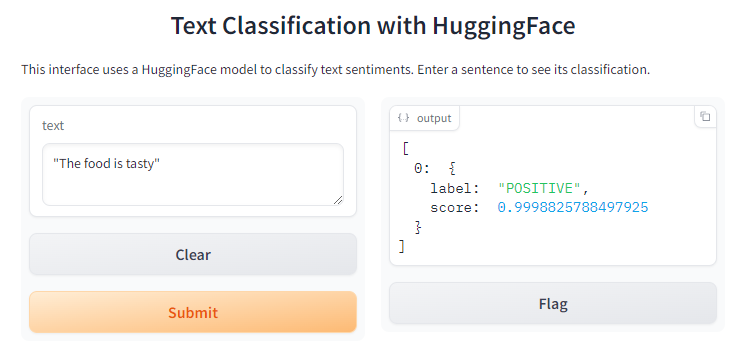
The output for each text is a dictionary containing the predicted label and the model's confidence score.
Going Beyond the Default: Specific Models and Zero-Shot Classification
The pipeline function is highly flexible. While it uses a default model for each task, you can easily specify any other compatible model from the Hugging Face Hub. This is where your knowledge from the last lesson comes in handy!
The Hugging Face documentation provides a great example of instantiating a pipeline with a custom model.
Text classification - Hugging Face
This documentation page shows how to use the pipeline function for inference with a specific, fine-tuned model.
Read the 'Inference' section. Focus on the code block that creates the pipeline, especially the model argument. This demonstrates how you can point the pipeline to any compatible model on the Hub, not just the default one.
Zero-Shot Classification: Classifying with Custom Labels
One of the most powerful features of modern Transformers is their ability to generalize. The zero-shot classification pipeline is a prime example. It allows you to classify text using labels that the model was never explicitly trained on. You provide the text and a list of candidate labels, and the model determines which label fits best.
Let's watch a quick demonstration of this "magic."
Beyond simple positive/negative sentiment, pipelines can perform more advanced classification. This clip introduces the 'zero-shot classification' pipeline.
Watch from 01:18 to 01:41. Notice how custom labels ('education', 'politics', 'business') are passed directly into the pipeline along with the text.
Here's how you can use it in code. Note that for this task, it's good practice to specify a model that is known to perform well on zero-shot tasks, such as facebook/bart-large-mnli.
from transformers import pipeline


# It's best to use a model specifically trained for Natural Language Inference (NLI)
# for zero-shot classification.
zero_shot_classifier = pipeline("zero-shot-classification",
                                model="facebook/bart-large-mnli")

sequence_to_classify = "The James Webb telescope is capturing stunning images of distant galaxies."
candidate_labels = ['technology', 'space exploration', 'politics', 'cooking']

result = zero_shot_classifier(sequence_to_classify, candidate_labels)
print(result)
The output will be a dictionary containing the original sequence, the labels, and a corresponding list of scores, sorted from highest to lowest. This is incredibly useful for dynamic classification tasks where the set of labels isn't fixed.
Your Turn to Practice
Now it's time to apply what you've learned. Below is a list of customer reviews. Your task is to use pipelines to classify them in two different ways.
Instructions:
- Use the standard
sentiment-analysispipeline to classify each review as 'POSITIVE' or 'NEGATIVE'. - Use the
zero-shot-classificationpipeline to classify the same reviews into more specific categories:product quality,customer service, andshipping time. - Print the results for both tasks and observe the differences.
from transformers import pipeline

reviews = [
    "The screen resolution is amazing, but the battery life is a bit short.",
    "My package arrived three days earlier than expected!",
    "I had an issue with my order and the support team was incredibly helpful and solved it within minutes."
]


# Task 1: Sentiment Analysis
print("--- Sentiment Analysis ---")
sentiment_pipeline = pipeline("sentiment-analysis")
sentiment_results = sentiment_pipeline(reviews)
for i, review in enumerate(reviews):
    print(f"Review: {review}")
    print(f"Sentiment: {sentiment_results[i]['label']} (Score: {sentiment_results[i]['score']:.4f})\n")


# Task 2: Zero-Shot Classification
print("\n--- Zero-Shot Classification ---")
zero_shot_pipeline = pipeline("zero-shot-classification")
candidate_labels = ['product quality', 'customer service', 'shipping time']
zero_shot_results = zero_shot_pipeline(reviews, candidate_labels)

for result in zero_shot_results:
    print(f"Review: {result['sequence']}")


    # zip pairs the labels and scores together for easy printing
    for label, score in zip(result['labels'], result['scores']):
        print(f"  - {label}: {score:.4f}")
    print()
Hint: When you run the code, examine how the zero-shot-classification pipeline assigns scores to all categories, giving you a more nuanced understanding of each review's topic.
Conclusion
In this lesson, you've learned how to use the Hugging Face pipeline function, one of the most efficient tools for applying pre-trained models. This high-level abstraction allows you to move from raw text to insightful predictions with minimal code.
Key Takeaways:
- The
pipelinefunction is the simplest way to use a pre-trained model for inference, handling pre-processing, model prediction, and post-processing automatically. - You instantiate a pipeline by providing a task name, such as
"sentiment-analysis"or"zero-shot-classification". - You can either rely on the default model for a task or specify a custom model from the Hub using the
modelargument. - Zero-shot classification is a powerful technique that allows for dynamic text classification with custom labels, showcasing the generalization capabilities of Transformer models.
Preview of the Next Lesson
Using a pre-trained model via a pipeline is perfect when the model already performs well on your general task. But what happens when you have a unique dataset or a niche problem that the off-the-shelf model doesn't handle perfectly?
In our next lesson, we will explore the concepts of transfer learning and fine-tuning. You will learn how to take a powerful pre-trained model and adapt it to excel on your specific data, a cornerstone technique in modern AI development.