Recommended resources
The freely available resources this lesson will direct you to.
Hello! Welcome back to the course.
In our last lesson, you wrote and compiled your very first smart contract, SimpleStorage.sol. We established the basic structure of a Solidity file, including the pragma directive and the contract block. This was a huge step in moving from theory to practice.
Today, we're going to zoom in on a critical line from that contract: uint256 public storedData;. This lesson is dedicated to understanding what this line does. Our learning outcome is to declare and use primitive data types (uint, bool, address) and state variables. This knowledge is the foundation for storing any kind of data on the blockchain, from a simple number to the complex balances of your future cryptocurrency token.
What Are State Variables?
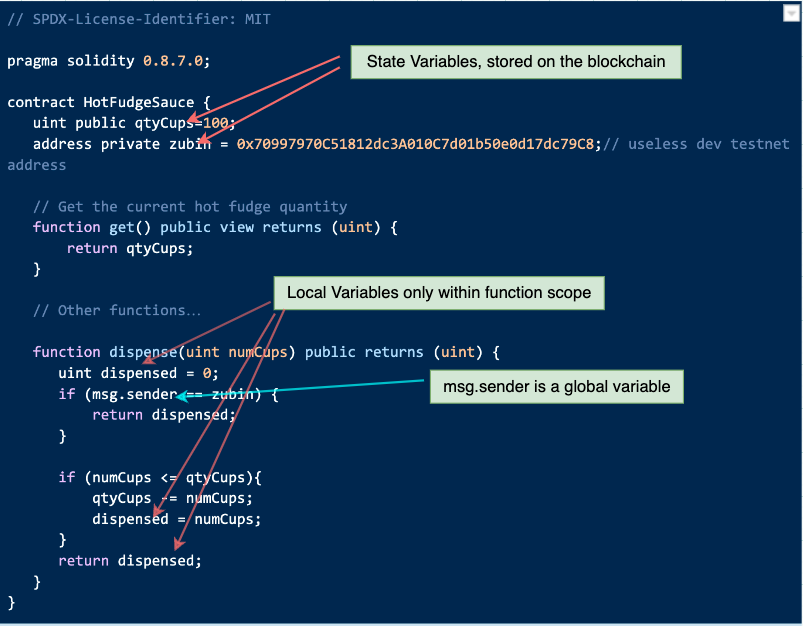
In programming, variables are containers for storing data. In Solidity, variables that are declared directly inside a contract (but not inside a function) are called state variables. The "state" part is key: their values are permanently stored on the Ethereum blockchain in the contract's own storage.
Given your background in backend development, you can think of state variables as being analogous to member variables or attributes in a class (like in Java or Python), or columns in a database table. They define the data structure of your contract and persist across different function calls and transactions.
To start, let's get a formal definition of state variables and understand their role. This article from GeeksForGeeks provides a clear explanation.
Read the introductory section, up to but not including 'Important Points'. Focus on the concept of state variables being stored permanently on the blockchain and the mention of gas costs.
As the article mentions, every write operation to a state variable costs gas. This is a fundamental concept in Ethereum: you pay for the storage you use. This is why understanding data types is so important—choosing the right one can have real financial implications.
The basic syntax for declaring a state variable is:
<data-type> <visibility> <variable-name>;
Let's look at uint256 public storedData; again:
uint256is the data type.publicis the visibility.storedDatais the name.
State Variable Visibility
The public keyword is a visibility modifier. It controls who can access the variable. When you declare a state variable as public, the Solidity compiler automatically generates a "getter" function for it. This function allows anyone (users or other contracts) to read the value of the variable without you having to write any extra code.
This is a powerful feature for transparency. Let's see it in action.
02. Solidity Variables and Types (Smart Contract Tutorial)
This video clip visually demonstrates what happens when you declare a variable as public. You'll see how it creates a button in the Remix IDE, representing the automatically generated getter function.
Watch from 08:17 to 09:11. The presenter adds the public keyword to two variables and then shows how they become readable after deployment.
Besides public, there are other visibility modifiers like private and internal, which we will discuss in more detail when we cover functions in the next lesson. For now, we will primarily use public for easy access and testing.
State vs. Local Variables
It's also important to distinguish state variables from local variables. Local variables are declared inside a function and only exist during that function's execution. They are stored in memory, not permanent blockchain storage, and therefore do not have the same gas costs associated with them.
Primitive Data Types in Solidity
Now let's focus on the data type itself. Solidity is a statically-typed language, which should feel familiar from your experience with TypeScript and Java. This means you must explicitly declare the type of each variable before you use it.
For building our token, we need to master three fundamental primitive types.
What are Data Types in Solidity? (Values and References)
The following video from EatTheBlocks provides an excellent overview of the most common value types in Solidity. Pay close attention to the explanations for boolean, unsigned integers, and address types.
Watch the following segments: Boolean (bool): from 00:38 to 01:07. Unsigned Integer (uint): from 01:07 to 02:11. Address: from 03:24 to 03:54. Focus on how each type is declared and what kind of data it's meant to hold.
Let's review and expand on what you just saw.
1. Unsigned Integers (uint)
- Purpose: Used for whole numbers that cannot be negative. This is perfect for things like token balances, total supply, or counters.
- Declaration:
uintis an alias foruint256, a 256-bit unsigned integer. This is the most common size. - Example:
uint public totalSupply; - Details: Solidity provides smaller sizes like
uint8,uint16,uint32, etc., in steps of 8. Using a smaller size can save gas if you are certain the value will never exceed the smaller type's limit, especially when multiple small variables are packed together in storage.
2. Booleans (bool)
- Purpose: Used for binary states (true/false). Ideal for flags or conditions.
- Declaration:
bool - Example:
bool public isTradingActive = false;(You can initialize a value at declaration).
3. Address
- Purpose: This is one of the most important types in Solidity. It holds a 20-byte Ethereum account address. Every user and every contract on Ethereum has an address.
- Declaration:
address - Example:
address public owner; - Usage: This type is essential for tracking ownership, sending funds, and identifying who is interacting with your contract.
Let's combine these into a new example contract that would be more representative of a token.
// SPDX-License-Identifier: MIT
pragma solidity ^0.8.24;

contract TokenData {
    // The total number of tokens in existence.
    uint public totalSupply = 1000000;

    // The address that deployed the contract and has special privileges.
    address public owner;

    // A flag to enable or disable token transfers.
    bool public transfersEnabled = true;

    // NOTE: The 'owner' variable is not yet set. We will learn how to
    // set it automatically on deployment in a future lesson on constructors.
}
This simple structure already uses the three core data types to define the essential state of a future token contract.
Test your understanding!
You are tasked with creating a contract to manage a whitelist for a token sale. This contract needs to store two pieces of information for each user:
- Their Ethereum address.
- Whether or not they are on the whitelist (a true/false value).
How would you declare the two state variables needed for this? Let's assume for now you are only storing data for a single user. Make them both public.
Show answer
You would use an address type for the user's address and a bool type for the whitelist status.
contract Whitelist {
    address public whitelistedUser;
    bool public isWhitelisted;
}
In a later lesson, we will learn how to store this information for many users using a data structure called a mapping.
Putting It All Together
Now, let's apply this in your Hardhat project.
- In VS Code, open your
contractsfolder. - Create a new file named
ContractData.sol. - In this new file, create a contract that declares the following three public state variables:
- An
addressnamedcontractOwner. - A
uintnamedversion. - A
boolnamedisPaused.
- An
- Initialize the
versionto1andisPausedtofalsedirectly in their declarations. - Add the correct license identifier and pragma at the top of the file.
- Compile your new contract by running
npx hardhat compilein your terminal to ensure there are no errors.
Your final code should look something like this:
// SPDX-License-Identifier: MIT
pragma solidity ^0.8.24;

contract ContractData {
    address public contractOwner;
    uint public version = 1;
    bool public isPaused = false;
}
Conclusion
In this lesson, we broke down one of the most important concepts in Solidity: storing data on the blockchain. You now have a solid grasp of what state variables are and how to use the three most common primitive data types.
Key Takeaways:
- State variables store data permanently on the blockchain within a contract's storage.
- Writing to state variables costs gas.
- Solidity is a statically-typed language, requiring you to declare the type of every variable.
- The three primitive types you'll use constantly are:
uint: For non-negative numbers like balances and counts.bool: For true/false flags and conditions.address: For storing user and contract accounts.
- Declaring a state variable as
publicautomatically creates a getter function to read its value.
Preview of the Next Lesson:
We've learned how to declare the data for our contract. In the next lesson, we'll learn how to create the behavior. We will explore how to define and call functions with different visibility modifiers (public, private, external, internal). This will allow us to build logic that can read and, more importantly, change the state variables we defined today.