Recommended resources
The freely available resources this lesson will direct you to.
- Solidity Tutorial - A Full Course on Ethereum, Blockchain Development, Smart Contracts, and the EVMwww.youtube.com
- Create a Smart Contract in under 15 mins: Step-by-Step Tutorial 🔥www.youtube.com
- Contracts — Solidity 0.8.31 documentationdocs.soliditylang.org
- Solidity Smart Contract Templatevelvetshark.com
Hello! Welcome back.
In our last session, we put the finishing touches on our professional development environment by configuring the hardhat.config.js file. We specified the Solidity compiler version and, most importantly, set up a secure way to manage our network credentials and private keys using a .env file.
Today, we transition from setup to creation. The learning outcome for this lesson is to write a basic smart contract using the correct Solidity pragma and structure. You'll write your first lines of Solidity code, understand the fundamental building blocks of a contract file, and see how it fits into the Hardhat project we've so carefully prepared.
What is a Smart Contract?
Before we write one, let's formally define what a smart contract is. Given your backend development experience, you can think of a smart contract as being similar to a class in an object-oriented language like Java or Python. It's a self-contained unit that bundles data (its state) and the functions that can modify that data (its behavior). Once deployed to the blockchain, it exists at a specific address and its functions can be called by anyone (or by other contracts), subject to the rules you define.
Contracts — Solidity documentation
The official Solidity documentation provides a concise and accurate definition of a contract. Read the introductory paragraph to solidify your understanding.
Read just the first paragraph of the main content, which starts with 'Contracts in Solidity are similar to classes...'.
The Anatomy of a Solidity File
Every Solidity source file (.sol) has a specific structure. Let's start by looking at the two most fundamental lines you'll find at the top of almost every file.
To get a practical feel for this, we'll use the Remix IDE. Remix is a powerful, browser-based IDE that's perfect for quickly writing, compiling, and testing simple contracts without needing a local setup. It's an excellent tool for learning and prototyping.
Create a Smart Contract in under 15 mins: Step-by-Step Tutorial 🔥
This video provides a great hands-on introduction to the Remix IDE and the first few lines of a Solidity contract. It will walk you through creating a file and writing the initial declarations.
Watch from 00:31 to 02:56. The presenter will introduce Remix and then cover the two essential first lines of a contract: the license identifier and the pragma directive.
As you saw in the video, the two essential elements are:
-
SPDX License Identifier: This is a comment that specifies how others can use your source code. It's a best practice that makes your code more trustworthy and transparent. You'll typically see
// SPDX-License-Identifier: MITfor open-source projects. If you don't include this, the compiler will issue a warning. -
Pragma Directive: This line declares the version of the Solidity compiler the source file should be compiled with. It's crucial for ensuring your code doesn't break with future compiler versions.
pragma solidity ^0.8.24;
This tells the compiler that your code is compatible with version0.8.24and any later patch releases in the0.8.xseries (e.g.,0.8.25,0.8.26), but not with version0.9.0or higher. This matches the version we set in ourhardhat.config.jsin the previous lesson.
Defining the Contract Structure
After the pragma, you define the contract itself using the contract keyword, followed by the contract's name and a set of curly braces {}. All of your contract's state variables and functions will be written inside these braces.
// SPDX-License-Identifier: MIT
pragma solidity ^0.8.24;

contract MyFirstContract {
    // Contract content goes here...
}
This is the basic skeleton of any smart contract.
Your First Smart Contract: SimpleStorage
Now, let's write a complete, albeit simple, smart contract. We will create a contract called SimpleStorage that allows us to store a number on the blockchain and retrieve it later.
Here is what the full code looks like. Don't worry about understanding every detail inside the contract yet; we'll cover state variables and functions in the next lessons. For now, focus on the overall structure.
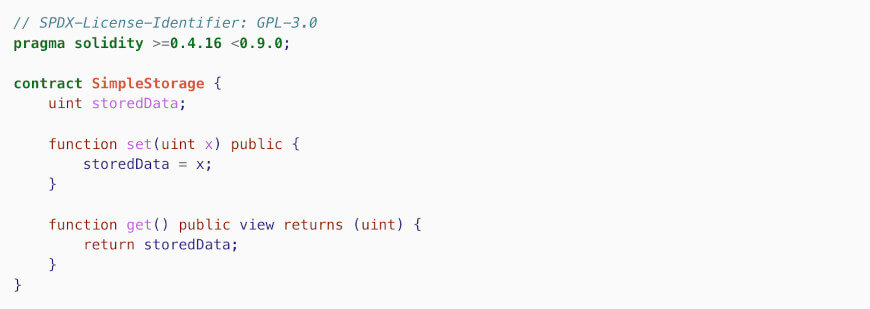
Let's break down its structure:
// SPDX-License-Identifier: MIT
pragma solidity ^0.8.24;

contract SimpleStorage {
    // 1. State Variable: Data stored on the blockchain.
    uint256 public storedData;

    // 2. Function to modify the state variable.
    function set(uint256 x) public {
        storedData = x;
    }

    // 3. Function to read the state variable.
    function get() public view returns (uint256) {
        return storedData;
    }
}
- State Variable (
storedData): This is where we store our data. Think of it as a variable in a class or a field in a database table. It persists on the blockchain. setFunction: This function takes a number as input and updates the value ofstoredData. This is a "write" operation that modifies the blockchain's state.getFunction: This function simply returns the current value ofstoredData. This is a "read" operation that does not modify the state.
Best Practices for Contract Layout
As contracts grow, having a consistent structure becomes vital for readability, security, and maintainability. Just like there are style guides for Python (PEP 8) or TypeScript, there are community-accepted conventions for ordering the elements inside a Solidity contract.
Solidity Smart Contract Template
This article from VelvetShark explains why a proper layout is important and provides an excellent template.
First, read the section 'Importance of a proper contract layout' to understand the benefits. Then, scroll down to the code block under 'Solidity smart contract template with explanations' and look at the recommended order of elements within a contract (Type declarations, State variables, Events, etc.). You don't need to understand what each element does yet, just observe the recommended ordering.
Based on community best practices, the recommended order for elements inside a contract is:
- Type declarations (
struct,enum) - State variables
- Events
- Errors
- Modifiers
- Constructor
- Functions (ordered by visibility:
external,public,internal,private)
Our SimpleStorage contract is too simple to have all these elements, but as we build our token, we will follow this structure to keep our code clean and professional.
Integrating with Your Hardhat Project
Now it's time to bring your first contract into the Hardhat project we configured.
- In your VS Code project, navigate to the
contractsfolder. - Delete the sample
Lock.solfile that Hardhat created. - Create a new file named
SimpleStorage.solinside thecontractsfolder. - Copy and paste the
SimpleStoragecode from above into this new file. - Save the file.
Finally, let's use Hardhat to compile our new contract. Open your terminal in the project's root directory and run:
npx hardhat compile
If everything is set up correctly, you should see a message like Compiled 1 Solidity file successfully. This confirms that your contract's syntax is valid and your Hardhat environment is working as expected!
Test your understanding!
Imagine you are creating a simple contract to just store a user's name. Based on what you've learned, what would be the first two essential lines of code in your new UserName.sol file? And how would you begin the contract definition itself?
Show answer
The first two lines would be the license and the pragma:
// SPDX-License-Identifier: MIT
pragma solidity ^0.8.24;
The contract definition would start like this:
contract UserName {
    // The logic for storing the name would go here.
}
Conclusion
Congratulations on writing and compiling your first smart contract! You've taken a crucial first step from being a blockchain enthusiast to becoming a blockchain developer.
Key Takeaways:
- A smart contract is like a class that bundles data (state) and behavior (functions).
- Every Solidity file should start with a SPDX license identifier and a
pragma solidityversion directive. - The
contractkeyword is used to define the main body of your smart contract. - Following a standard layout for your contract's elements is a professional best practice that improves readability and maintainability.
Preview of the Next Lesson:
In this lesson, we created the skeleton of the SimpleStorage contract. In the next lesson, we'll start adding the flesh. We will dive deep into that uint256 public storedData; line as we learn how to declare and use primitive data types (uint, bool, address) and state variables.