Recommended resources
The freely available resources this lesson will direct you to.
- Day 18/40 - Kubernetes Health Probes Explained | Liveness vs Readiness Probeswww.youtube.com
- Kubernetes Probes- livenessProbe, readinessProbe, startupProbe |How to use kubernetes probes-part 14www.youtube.com
- vLLM Model-Aware Readiness Probes - llm-dllm-d.ai
- vLLM Production Deployment: Complete 2026 Guide - SitePointwww.sitepoint.com
Hello! In our last lesson, you learned how to define and configure SLOs to set clear, measurable reliability targets for an LLM service. A key SLO is availability, which promises that your service is up and ready to accept requests. Today, we'll dive into a core Kubernetes mechanism that helps you deliver on that promise.
This lesson focuses on implementing liveness and readiness probes for LLM serving pods, accounting for their long model-loading times. Your deep experience with Kubernetes and SRE means you're already very familiar with health checks. Our goal is to adapt this fundamental pattern to the unique lifecycle of an LLM server, where "started" and "ready" are two very different states. We will see how a naive configuration can lead to cascading failures and how to build a robust three-probe strategy to ensure stability.
1. A Refresher on Kubernetes Probes
Before we tackle the specifics of LLMs, let's quickly review the roles of the three main Kubernetes probes. While you've likely configured these many times, their distinct functions are crucial for the strategy we're about to build.
Kubernetes Probes- livenessProbe, readinessProbe, startupProbe |How to use kubernetes probes-part 14
The video "Kubernetes Probes" by Rahul Wagh provides a clear and concise overview of the three probe types and their parameters.
Please watch the first seven minutes to refresh your understanding of their purpose and configuration: Liveness Probe: Understand its role in restarting a container. Readiness Probe: See how it controls traffic flow by managing a pod's inclusion in a Service. Startup Probe: Pay close attention to this probe's purpose, which is to handle applications with long start-up times by disabling the other two probes during initialization. Configuration Parameters: Note the key parameters like periodSeconds and failureThreshold.
To visualize how these probes interact, consider the following flowchart:
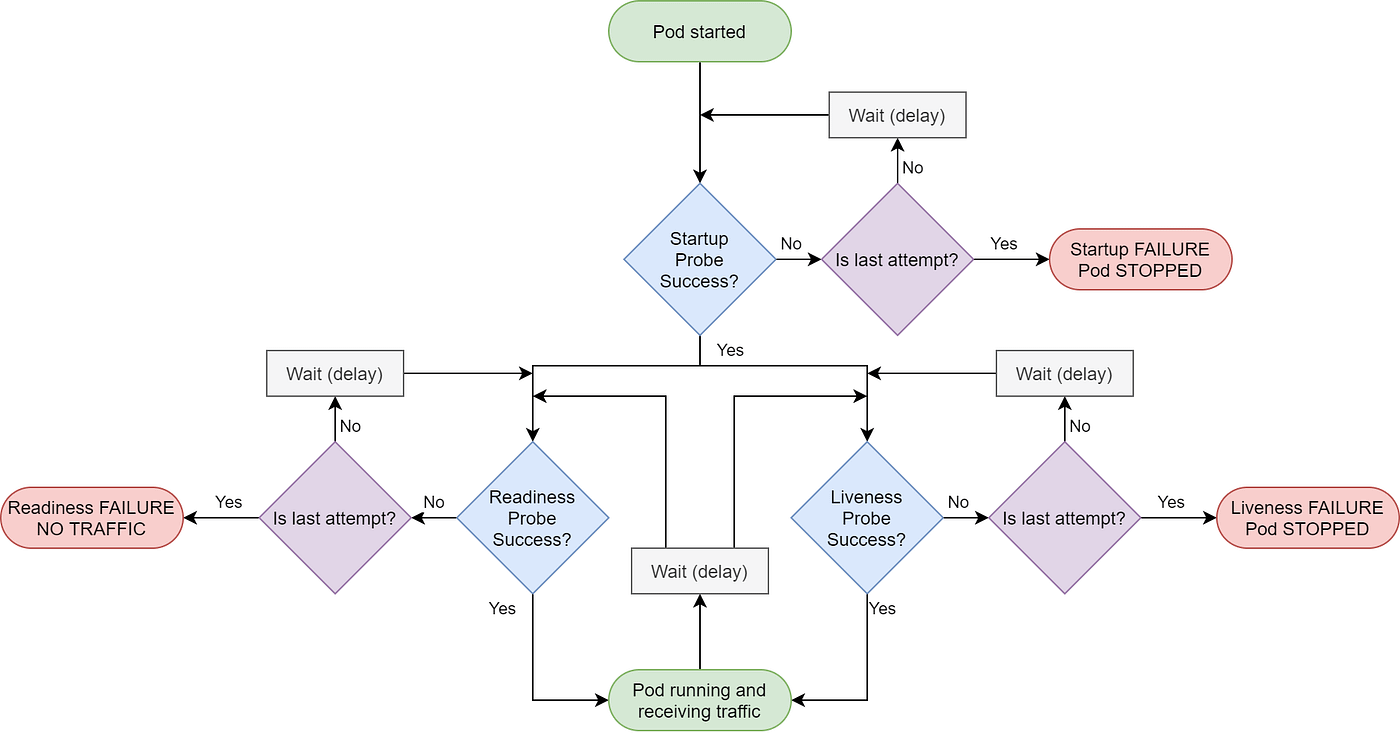
In summary:
- Liveness Probe: Answers "Is the application process alive?" If it fails,
kubeletkills and restarts the container. - Readiness Probe: Answers "Is the application ready to serve traffic?" If it fails, the Endpoints controller removes the pod's IP address from the corresponding Service, effectively taking it out of the load balancer rotation.
- Startup Probe: Answers "Is the application still initializing?" It runs before the other two. As long as it's running, the liveness and readiness probes are disabled. Once it succeeds, they take over.
2. The Challenge: Long Model-Loading Times
For a typical stateless microservice, the container starting is nearly synonymous with the application being ready. For an LLM inference server, this is not the case. The server process (like vLLM or TGI) might start in seconds, but loading a large model (e.g., 10-100+ GB) from storage into GPU VRAM can take several minutes.
This significant gap between process start and model readiness creates a major problem for standard probe configurations:
- The pod starts, and
kubeletimmediately begins thereadinessProbe. - The probe checks a health endpoint. The HTTP server is running, but the model isn't loaded, so the application is not truly "ready." A simple health endpoint might return
200 OK, while a model-aware endpoint would return503 Service Unavailable. - Assuming a model-aware check, the
readinessProbefails. It retriesfailureThresholdtimes and then gives up. The pod is marked as notReady. - Worse, if the
livenessProbealso starts early and fails,kubeletmight assume the application is deadlocked and restart the container, triggering another long model load and leading to aCrashLoopBackOffstate.
The key is to prevent the readiness and liveness probes from evaluating the pod's health until the long-running initialization (model loading) is complete. This is precisely what the startupProbe is designed for.
3. The Three-Probe Strategy for LLM Servers
The robust solution is to use all three probes together, each with a distinct purpose and target endpoint. Most modern LLM serving frameworks, like vLLM, expose multiple health endpoints for this reason.
vLLM Model-Aware Readiness Probes - llm-d
This guide from the llm-d documentation provides an excellent, production-focused walkthrough of the exact problem we are solving. It details a best-practice configuration for vLLM.
Please read the Overview, Problem Statement, Solution, and How It Works sections. Focus on: The distinction between the /health and /v1/models endpoints. The recommended probe configuration and the logic behind it. The probe lifecycle diagram which clearly shows the handoff from the startup probe to the others.
Let's break down the strategy from the article:
-
startupProbe: Protects the pod during initialization.- Target: A "deep" health endpoint that confirms the model is loaded, like vLLM's
/v1/models. This endpoint only returns a200 OKafter the model is in memory and ready. - Goal: To give the model enough time to load. You configure a long timeout by setting a high
failureThreshold. For example,periodSeconds: 30andfailureThreshold: 60gives the pod up to 30 minutes (30s * 60) to start.
- Target: A "deep" health endpoint that confirms the model is loaded, like vLLM's
-
readinessProbe: Manages traffic routing after startup.- Target: The same "deep" endpoint,
/v1/models. - Goal: To quickly remove the pod from service if the model becomes unavailable for any reason after a successful startup. It's configured with a short
periodSecondsfor fast reaction and recovery.
- Target: The same "deep" endpoint,
-
livenessProbe: Acts as a last-resort recovery mechanism.- Target: A "shallow" health endpoint, like vLLM's
/health. This endpoint typically just confirms the web server process is running and responsive. - Goal: To restart the container only if the entire server process has crashed or deadlocked. You don't want a transient model issue to trigger a full container restart, so this probe does not check the model state.
- Target: A "shallow" health endpoint, like vLLM's
This combination ensures the pod isn't declared dead while loading, only receives traffic when truly ready, and can recover from both process crashes and temporary model unreadiness.
4. Practical Configuration Examples
Here is the recommended Kubernetes configuration from the llm-d guide, which brings the three-probe strategy to life.
Kubernetes Deployment
# In your container spec:
containers:
- name: vllm-inference


  # ... other container settings ...
  ports:
  - containerPort: 8000
    protocol: TCP


  # Startup Probe: Wait up to 30 minutes for model to load.
  # (30 seconds per check * 60 failures = 1800s = 30 minutes)
  startupProbe:
    httpGet:
      path: /v1/models  # Deep check: Is the model loaded?
      port: 8000
    initialDelaySeconds: 15 # Give the server a few seconds to start up before the first probe.
    periodSeconds: 30
    failureThreshold: 60
    timeoutSeconds: 5


  # Liveness Probe: Check if the server process is alive.
  livenessProbe:
    httpGet:
      path: /health      # Shallow check: Is the server process running?
      port: 8000
    periodSeconds: 10
    failureThreshold: 3
    timeoutSeconds: 5


  # Readiness Probe: Check if the model is ready for traffic.
  readinessProbe:
    httpGet:
      path: /v1/models  # Deep check: Is the model loaded?
      port: 8000
    periodSeconds: 5
    failureThreshold: 3
    timeoutSeconds: 2
The key is the interplay between the probes and the endpoints. The startupProbe and readinessProbe use the model-aware /v1/models endpoint, while the livenessProbe uses the simple /health endpoint.
Docker Compose Equivalent
This pattern isn't limited to Kubernetes. Docker Compose has a similar concept using the healthcheck property with a start_period.
vLLM Production Deployment: Complete 2026 Guide - SitePoint
The article "vLLM Production Deployment: Complete 2026 Guide" shows how to apply a similar principle in Docker.
Read the section "Production Docker Compose Configuration". Focus on the healthcheck block within the vllm service definition.
Notice the start_period: 120s in the Docker Compose example. This tells Docker to ignore health check failures for the first 120 seconds after the container starts, serving the same purpose as the Kubernetes startupProbe.
5. Verification and Troubleshooting
Once you've applied your configuration, you need to verify it's working as expected.
You can watch the pod's status change:
# The -w flag will "watch" for changes
kubectl get pods -w


# Expected output progression:
# NAME                   READY   STATUS              RESTARTS   AGE
# vllm-inference-xxxx    0/1     ContainerCreating   0          2s
# vllm-inference-xxxx    0/1     Running             0          5s   <-- startupProbe is running
# ... a few minutes later ...
# vllm-inference-xxxx    1/1     Running             0          3m5s <-- startupProbe succeeded, readinessProbe succeeded
To inspect the probe status and events, use kubectl describe:
# Replace <pod-name> with your pod's actual name
kubectl describe pod <pod-name>
In the Events section at the bottom, you may see messages like Startup probe failed during the model loading phase. This is normal and expected. The probe will only be marked as succeeded once the model is loaded. If it continues to fail past your configured timeout, the troubleshooting guide from the llm-d resource provides excellent next steps.
Conclusion
In this lesson, you've adapted a fundamental SRE pattern to the specific needs of LLM serving. By understanding the distinct lifecycle stages of an LLM pod, you can now implement a robust three-probe health checking strategy that prevents premature restarts and ensures traffic is only routed to fully operational models.
Key Takeaways:
- Long model-loading times make standard health checks unsafe for LLM pods.
- The
startupProbeis essential to shield the pod from liveness and readiness checks during its lengthy initialization. - A robust strategy uses a "deep" model-aware endpoint (e.g.,
/v1/models) for thestartupProbeandreadinessProbe. - A "shallow" process-level endpoint (e.g.,
/health) is best for thelivenessProbeto avoid unnecessary restarts for transient model issues. - Always tune your
failureThresholdandperiodSecondsto provide a generous time budget based on your model size and hardware.
In our next lesson, we will expand our focus from the reliability of a single pod to the reliability of interconnected services. We will explore how to implement the circuit breaker pattern to gracefully handle failures in downstream services, another critical pattern for building resilient AI systems.