Recommended resources
The freely available resources this lesson will direct you to.
Hello! Welcome to the final lesson in our module on observability for LLM systems.
So far, you've learned to instrument your services to collect key metrics, build an operational dashboard to visualize system health, and configure alerts to be notified proactively of performance issues. You've established the "what" and "when" of system behavior. Today, we'll focus on the "how much," a critical question for any production service.
Our goal is to build a cost analytics dashboard to track dollars-per-token and dollars-per-request over time. This moves beyond simple operational monitoring into the domain of FinOps, providing the visibility needed to manage budgets, optimize spending, and make data-driven decisions. Your extensive background in SRE and infrastructure automation provides the perfect foundation for this task, as we'll be applying familiar tools like Prometheus and Grafana to this new and crucial area of LLM operations.
1. The Anatomy of LLM Costs
Before we can build a dashboard, we must understand the fundamental unit of cost in the LLM world: the token. Unlike traditional services billed by CPU hours or data transfer, most LLM APIs use a consumption-based pricing model centered on tokens.
To get a clear picture of how this works, let's start with a video that breaks down the concepts of input tokens, output tokens, and how they translate into a final bill.
LLM Pricing Explained (OpenAI API Pricing)
This video from Tommy Eberle, "LLM Pricing Explained," clearly introduces the metered, API-based pricing model common to providers like OpenAI and Anthropic.
Please watch the following segments: Pricing Models: This introduces the two main ways of paying for LLM access: subscription vs. API usage. We are focused on the latter. Tokens and Costs: Pay close attention to the distinction between input tokens and output tokens, and how they are priced differently. The video also uses OpenAI's tokenizer to visualize what a token represents. Calculating Cost: This section demonstrates the exact calculation for a single API call and shows how the cost is derived from the usage information returned by the API.
The core principle is straightforward: every request has a cost determined by the number of tokens you send to the model and the number of tokens the model generates in response. Each of these can have a different price, which also varies by the model you use.
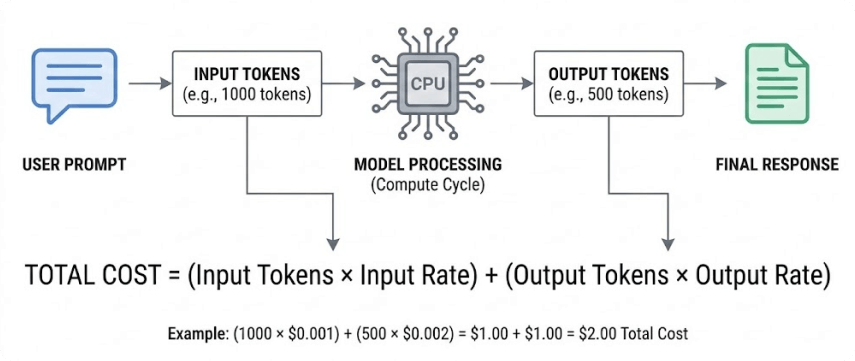
The fundamental formula is:
To track this, our observability system must capture three key pieces of information for every single request:
- The count of input tokens.
- The count of output tokens.
- The specific model used (e.g.,
gpt-4o,claude-3-sonnet), which determines the input and output rates.
2. Collecting Cost-Related Metrics
With a clear understanding of what we need to measure, the next step is to ensure this data is collected. In a production environment, an LLM Gateway is often the ideal place to centralize this logic. A gateway acts as a reverse proxy, intercepting all requests to various LLM providers. This gives you a single point of control to enforce policies, manage caching, and, most importantly for us, emit standardized observability data.
Your experience with infrastructure automation and distributed systems will highlight the benefits of this approach—it decouples metric collection from application code, ensuring consistency.
Beginner's Guide to Tracking Token Usage
This article from Maxim AI provides a great overview of why token tracking is essential and compares different architectural approaches for implementing it.
Please read the following sections: Start with the Introduction and What Are Tokens and Why They Matter. This will reinforce the concepts from the video. Read The Hidden Costs of Not Tracking Tokens to understand the business case for building our dashboard. Finally, read How to Track Token Usage: Different Approaches, paying special attention to the LLM Gateway Approach, which is the pattern we will focus on.
A gateway can parse the response from any backend (OpenAI, Anthropic, a self-hosted model), extract the usage information, and expose it as standardized Prometheus metrics. This is exactly the kind of robust, scalable solution you'd implement as an LLM Ops engineer.
3. From Tokens to Dollars in Prometheus
Once the gateway exposes token counts, we need to convert them into a dollar amount. The best practice is to have the gateway perform this calculation, as it can maintain an internal, up-to-date price list for different models. The gateway can then expose a direct cost metric, like llm_request_cost_dollars.
The article below shows a practical example of configuring a gateway to generate and expose these crucial cost metrics.
Observability Stack: Monitoring Your AI Gateway - Sebastian Maniak
This guide by Sebastian Maniak details how to configure an enterprise AI gateway to emit detailed observability data, including cost metrics.
Focus on these two YAML configuration snippets: Under "Configure AgentGateway for Observability", look at the logging.fields section. Notice how it's configured to extract fields like llm.tokens.input, llm.tokens.output, and importantly, llm.cost.total. This shows how a gateway can be configured to compute cost. Under "Advanced Monitoring Configuration", examine the customMetrics section. It shows how to create a Prometheus histogram metric named token_cost_dollars directly from the llm.totalCost value. This is the key step that makes cost a first-class metric in our system.
By exporting a metric like agentgateway_token_cost_dollars (a counter or histogram), we now have the raw data needed to build our dashboard. We can query this data using PromQL to analyze costs from different angles. The bifrost_cost_total metric mentioned in the "Beginner's Guide to Tracking Token Usage" article is another example of this same concept.
4. Building the Cost Analytics Dashboard
Now we have all the ingredients: an understanding of the cost formula, a stream of cost-per-request metrics in Prometheus, and Grafana for visualization. Let's design the dashboard. Your experience with Grafana will make this straightforward; the main task is crafting the right PromQL queries for each panel.

Here are the essential panels for your cost analytics dashboard, along with the PromQL queries to power them. Let's assume our cost metric is named llm_request_cost_dollars_total and has labels like model and team.
Panel 1: Total Cost (USD)
- Goal: Show the cumulative cost over the selected time range.
- Visualization: Stat or Time series graph.
- PromQL Query: This query calculates the total increase in cost over the dashboard's time range.
sum(increase(llm_request_cost_dollars_total[$__range]))
Panel 2: Cost Over Time (USD per hour)
- Goal: Track the cost burn rate to spot trends and spikes.
- Visualization: Time series graph.
- PromQL Query: This calculates the per-second rate of cost and scales it to an hourly rate.
sum(rate(llm_request_cost_dollars_total[5m])) * 3600
Panel 3: Average Cost per Request
- Goal: Understand the typical cost of a single transaction.
- Visualization: Stat or Gauge.
- PromQL Query: This divides the total cost rate by the total request rate.
sum(rate(llm_request_cost_dollars_total[5m])) / sum(rate(llm_requests_total[5m]))
Panel 4: Cost Breakdown by Model
- Goal: Identify which models are contributing the most to the total cost.
- Visualization: Pie chart or Bar chart.
- PromQL Query: This calculates the cost rate, broken down by the
modellabel.
sum by (model) (rate(llm_request_cost_dollars_total[5m]))
Panel 5: Average Tokens per Request (Input vs. Output)
- Goal: See if costs are driven by long prompts (input) or verbose responses (output).
- Visualization: Time series graph with two series.
- PromQL Queries:
- Input:
sum(rate(llm_input_tokens_total[5m])) / sum(rate(llm_requests_total[5m])) - Output:
sum(rate(llm_output_tokens_total[5m])) / sum(rate(llm_requests_total[5m]))
- Input:
By combining these panels, you create a powerful command center that provides an immediate, actionable view of your LLM-related spending. You can see your total cost, identify which models are most expensive, and drill down into whether input or output tokens are the primary cost driver.
Conclusion
Congratulations on completing the observability module! You have now covered the full spectrum of monitoring for LLM services, from operational health to financial oversight. Building a cost analytics dashboard is a vital skill for an LLM Ops Engineer, enabling you to translate system usage directly into business impact.
Key Takeaways:
- LLM Cost is Token-Based: The fundamental cost drivers are the number of input and output tokens, with prices varying by model.
- Centralized Collection is Key: Using an LLM Gateway to intercept requests is the most robust way to collect standardized token and cost metrics across multiple providers and models.
- Convert Tokens to Dollars Early: The gateway should be responsible for calculating the cost in dollars for each request and exposing it as a dedicated Prometheus metric.
- A Good Dashboard Answers Key Questions: Your dashboard should quickly tell you the total cost, cost over time, cost per request, and the primary drivers of that cost (e.g., specific models or verbose outputs).
In this module, we focused on observing our system. In the next module, "Reliability Patterns for LLM Services," we will shift our focus to actively improving its resilience. We'll begin by formalizing the reliability targets we discussed when setting up alerts, learning how to define and configure SLOs for latency, availability, and error rates, and using them to manage an error budget for your service.