Recommended resources
The freely available resources this lesson will direct you to.
Hello! Welcome back to your advanced Claude Code course.
In our previous lessons, you mastered building a custom MCP server for PostgreSQL and integrating third-party servers like GitHub and Sentry. You've seen how MCP acts as a powerful bridge between Claude and external systems. Today, we'll combine those skills to tackle one of the most exciting applications of this technology.
This lesson's learning outcome is to apply MCP integration to query and explore a RAG pipeline's vector data store directly from Claude Code. This is a cornerstone of building sophisticated AI agents, as it allows Claude to directly access and reason over its long-term knowledge base. For someone with your experience in RAG implementation, this will connect your existing knowledge to your Claude Code workflows.
The Big Picture: Connecting Claude to a RAG Pipeline
A Retrieval-Augmented Generation (RAG) pipeline's effectiveness hinges on its ability to retrieve relevant context for the LLM. By exposing the vector store through an MCP server, we give Claude the ability to perform this retrieval itself, enabling more dynamic and interactive querying.
Let's look at the architecture.
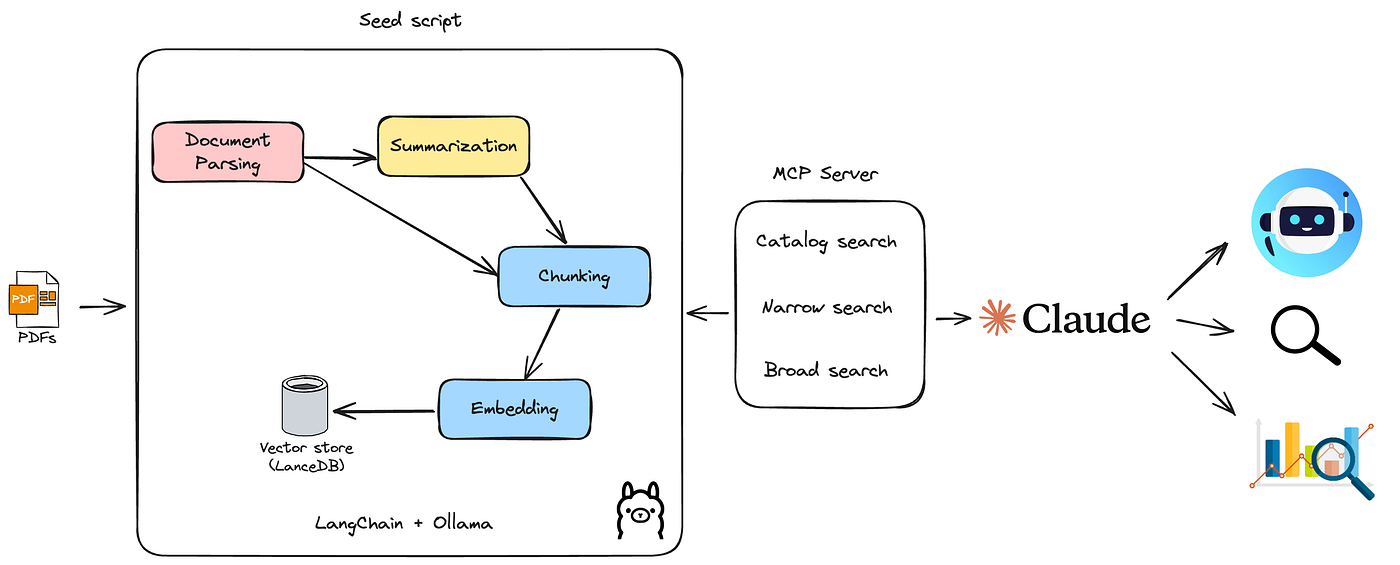
The MCP server becomes the standardized "query engine" for the knowledge base. Claude doesn't need to know if the backend is PostgreSQL with pgvector, LanceDB, or another vector database; it only needs to know how to call the search tool provided by the MCP server.

A Practical Walkthrough: Building a RAG MCP Server
Let's see this in action. The following video by Cole Medin demonstrates the creation of "Crawl for AI," an open-source RAG MCP server. This is an excellent, end-to-end example of the system we're discussing.
I Built the Ultimate RAG MCP Server for AI Coding (Better than Context7)
This video walks through building and using a complete RAG MCP server. It covers everything from scraping documentation to create a knowledge base, to querying it from an AI coding assistant. This will give you a strong practical foundation for the concepts in this lesson.
Please watch the following segments carefully: Introduction (00:00:00 - 00:03:36): Understand the motivation—the need for private, customizable knowledge bases for AI agents. Crawling and Populating the Vector Store (00:03:36 - 00:07:04): Observe how the /crawl tool is used to scrape documentation (Pydantic AI, MemZero) and populate a Supabase (PostgreSQL + pgvector) database. Querying the RAG Pipeline (00:07:48 - 00:12:01): See how the AI assistant uses the RAG tool to perform searches against the newly created knowledge base to generate code. The Exposed Tools (00:17:13 - 00:20:04): Pay close attention to the four main tools exposed by the MCP server: single_page_crawl, smart_crawl_url, get_available_sources, and the crucial rag tool.
As you saw, the MCP server elegantly abstracts the complexity of the RAG pipeline into a few simple tools. The AI agent doesn't need to manage embeddings or database connections; it just calls the rag tool with a natural language query.
Under the Hood: Implementing a RAG Tool
Now that you've seen the server in action, let's examine how such a tool is implemented. We'll look at a Python example that uses the pgai extension for PostgreSQL, which simplifies working with embeddings.
How to Build Autonomous AI Agents Using Anthropic MCP, Mistral ...
This blog post, 'How to Build Autonomous AI Agents', provides a clear Python implementation of an MCP tool for querying a vector database. It perfectly illustrates the core logic.
Please read the two sections detailing the implementation: Start with the section titled 'Fetch similar memories tool'. This shows the definition of the search_memories_simple function, decorated with @mcp.tool(). Analyze its logic: it receives a query, connects to the database, and executes a SQL query to perform a vector similarity search (embedding <=> ai.ollama_embed(...)). Then, review the section titled 'Query Memory Function' to see the raw SQL query in more detail. Notice how it uses ai.ollama_embed to generate the query vector on the fly and the <=> operator from pgvector to find the closest matches.
This Python code demonstrates the essential steps for an MCP RAG tool:
- Define a function that accepts a query string.
- Decorate it with
@mcp.tool()to expose it via the server. - Inside the function:
- Establish a database connection.
- Generate an embedding for the input query.
- Execute a SQL query using the
<=>vector distance operator to find the most similar documents. - Format and return the results as a string.
From Simple Search to Production-Grade Hybrid Search
Simple vector search is powerful, but for production systems, it often falls short. It can struggle with specific keywords, acronyms, or codes. A more robust approach is hybrid search, which combines keyword-based search (like BM25) with semantic vector search.
This is a professional-grade pattern that you can implement in your own projects.
Building Production-Grade AI Agents with MCP & A2A
This article, 'Building Production-Grade AI Agents with MCP & A2A', delves into the architectural considerations for building robust agentic systems. The section on hybrid search is particularly relevant.
Please focus on two key parts: Read the section '4. Hybrid Search'. Understand the table comparing BM25, Vector, and Hybrid search, and study the real-world example. Pay attention to the SQL query that uses Reciprocal Rank Fusion (RRF) to combine the scores from a full-text search (ts_rank_cd) and a vector search (<=>). Skim the section 'MCP Tool Implementation'. You don't need to understand the Go syntax in detail, but observe the structure of the Execute function. Notice the clear steps: authentication, parameter parsing, embedding generation, database query, and response formatting. This is a universal pattern for any MCP tool.
By implementing a hybrid search tool, your MCP server provides Claude with a much more powerful and nuanced way to query your RAG pipeline, leading to more accurate and relevant results. The use of Reciprocal Rank Fusion is a common technique in modern search systems to merge results from different ranking algorithms.
Putting It All Together: Querying from Claude Code
Finally, let's see how a client, like Claude Code or a custom agent, consumes this tool. The MCP client simply needs to know the name of the tool (rag, search_memories_simple, or hybrid_search) and its arguments.
The "How to Build Autonomous AI Agents" article provides a Python client class that demonstrates this. In the WikiMemoryMCPChat class, the memory_search method is an async function that simply runs a command for the agent:command = f"Search memory using search_memories_simple tool for: {query}"
The agent resolves this by calling the corresponding tool on the MCP server. This decoupling is the essence of MCP's power. Your agent's logic remains clean and declarative, while the complex data retrieval is handled by a specialized, external tool.
Conclusion
In this lesson, you've bridged the gap between your RAG expertise and your Claude Code skills. You now have a clear architectural pattern for giving Claude direct, interactive access to any RAG pipeline you build.
Key Takeaways:
- You can expose a RAG pipeline's vector store through a custom MCP server.
- The MCP server provides tools (e.g.,
/rag-search) that abstract away the database connection, embedding generation, and similarity search logic. - Claude Code can call these tools to perform natural language queries against your private knowledge bases.
- For production systems, a hybrid search tool that combines keyword (BM25) and vector search provides more robust and accurate retrieval than vector search alone.
- This pattern is highly modular, allowing you to swap out the vector database or search algorithm without changing the agent-side code, as long as the MCP tool interface remains consistent.
Next Up:
You have now completed the module on Advanced MCP Server Integration, covering custom servers, third-party integrations, and RAG pipelines. In the next module, we will shift gears to Test-Driven Development & Automated Debugging. You'll learn how to use Claude Code to generate tests first, then write the code to make them pass, fundamentally changing your development workflow.