Recommended resources
The freely available resources this lesson will direct you to.
Welcome back. In our last lesson, we established a framework for deciding when to use a quick browser-based tool versus when to invest in a local development setup. We concluded that while browser tools are fantastic for rapid prototyping, building a real, complex application requires moving the project to your own computer.
Today, we're going to demystify what that actually means. The goal of this lesson is to explain what "running code locally" is and how it fundamentally differs from the interactive previews, or "artifacts," you see in AI chats like Claude. Understanding this distinction is like knowing the difference between looking at an architectural rendering of a house and actually standing inside the constructed frame on the building site.
The Browser Artifact: An Interactive Sketch
When you ask an AI like Claude to "create a simple to-do list app," it often generates something you can immediately click and interact with, right there in the chat window. This is called an artifact.
Think of an artifact as a self-contained, interactive sketch. It's a brilliant way to quickly visualize an idea, but it lives in a highly controlled, isolated environment—a "sandbox" inside your browser. It's like a detailed 3D rendering of a drone you've designed; you can see what it looks like, but you can't connect a real battery or test its aerodynamics.
To understand the power and limitations of these artifacts, let's dive into an article that explains them in detail.
Claude Artifacts: Interactive Code, Docs, and Diagrams in Chat
This guide from AI Tool Briefing provides a clear, practical overview of what Claude Artifacts are, what they're good for, and, most importantly, what they can't do.
Please read the following sections: Start with the introduction to get a feel for what artifacts are. The line "ChatGPT gives you the recipe. Claude bakes the cake and hands it to you" is a great summary. Skim the section on the five types, paying particular attention to "React Components" and "HTML Pages," as these are the most common for app prototyping. Now, read the most critical section for our discussion: The Limitations Nobody Mentions. This part explains why you can't build a full application using only artifacts. Focus on the constraints like "No external data access" and "Browser-only." Finally, read the FAQ entry that directly addresses our topic: Can artifacts replace my development environment? The "sketch pad, not a workshop" analogy is the key takeaway.
As the article makes clear, artifacts are sandboxed for a reason. They have no access to your computer's files, they can't connect to external databases or APIs, and they can't remember information after you close the tab. For anything beyond a simple, self-contained tool, you need a real workshop.
Running Code Locally: Your Digital Workshop
So, what does it mean to move from the "sketch pad" to the "workshop"? It means running the code on your own computer, in what's called a local development environment.
A local environment is simply a setup on your personal computer that allows you to write, test, and run code. The video below offers a concise definition.
Development Environments and Why You Need One
This video from Cisco DevNet provides a clear, high-level overview of different types of development environments.
Watch the short segment that defines a local development environment. The key idea is that all the software and tools are installed and configured directly on your own machine, giving you full control and customization.
In this "workshop," your project exists as a collection of actual files (e.g., index.html, style.css) inside a folder on your hard drive. But unlike a simple document, you can't just double-click a modern web app's file to run it. Instead, you use a special program called a local web server.
This server's job is to "serve" your project's files to your web browser when requested, simulating how a real website works. When you run a command like npm run dev (which we'll cover soon), you are starting this local server.
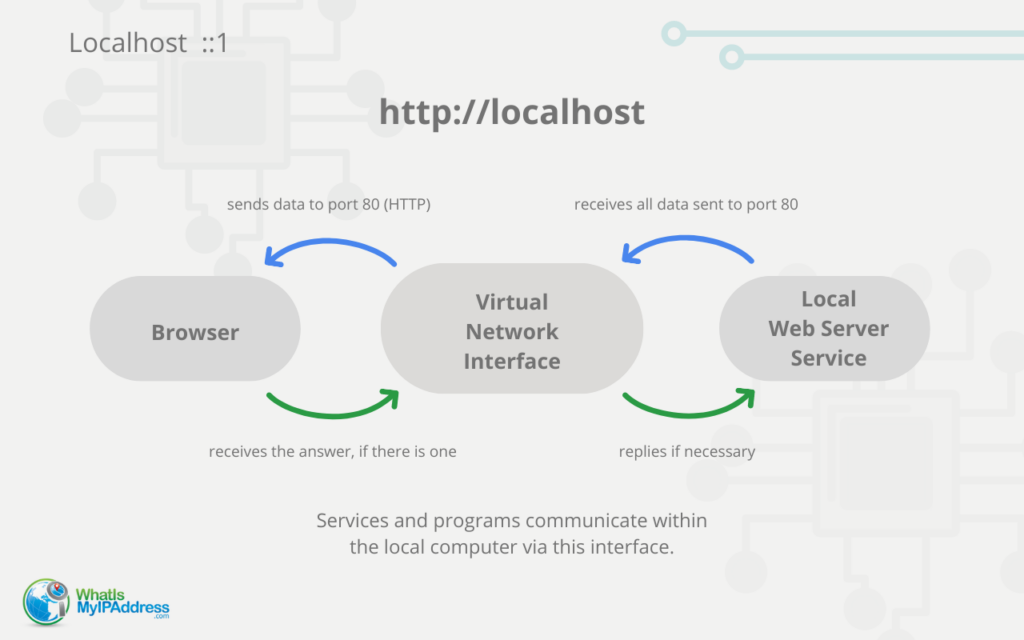
Your browser then accesses this server using a special address: http://localhost.
localhostis a universal hostname that always points back to your own computer.- Often, you'll see a number after it, like
localhost:5173. This number is a port, which acts like a specific gate or channel on your computer. Your local server "listens" on this port for requests from your browser.
This internal communication loop is what "running locally" is all about.
When you put all these pieces together, it looks something like this in practice.
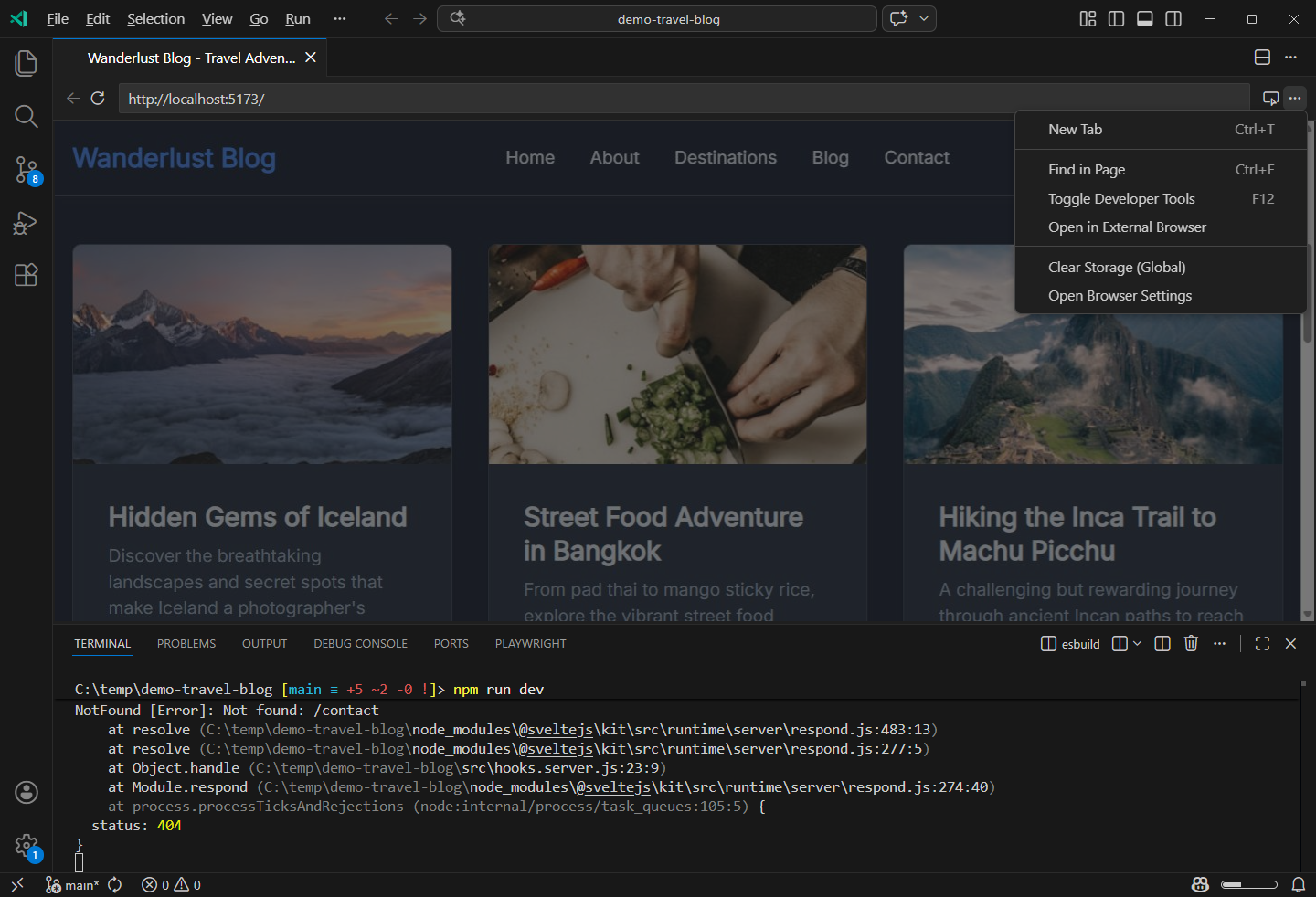
This setup is your workshop. You have the raw materials (the code files), the power tools (the code editor and terminal), and a testing bench (the browser viewing localhost). Here, you have complete control to build, modify, and connect your project to anything on the internet, which is impossible in a sandboxed artifact.
Bridging the Gap: AI in Your Local Workshop
The great thing about modern "vibe coding" is that you don't have to leave the AI assistant behind when you move to your local workshop. Tools like the Claude Code extension for VS Code allow the AI to work directly with the files on your computer.
The following video demonstrates this workflow perfectly. It shows how an AI can analyze a project that exists on a local machine, make changes to the code files, and how the developer can instantly see those changes reflected in their local browser window.
How I Use Claude Code with VS Code (and Local Models)
The creator of "How I Use Claude Code with VS Code" shows the seamless integration between an AI assistant and a local development environment.
Watch these two key segments to see the workflow in action: AI Accessing Local Files: From this point, you can see the user asking Claude to analyze the project files stored on their computer. The AI reads the files and then asks for permission to edit index.html directly. Verifying Changes Locally: Now watch from here. After the AI makes its changes, the user simply refreshes the browser tab pointed at their localhost address to test the new functionality (completing tasks, deleting tasks, etc.). This immediate feedback loop is the core of local development.
This is the workflow you'll be using. You'll have your project running locally, and you'll use an AI as a collaborator that can read and write code directly in your workshop, giving you the best of both worlds: the power of AI generation and the full control of a local environment.
Conclusion
Let's summarize the core concepts of this lesson. Understanding this difference is crucial as you begin to build your own applications.
Key Takeaways:
- Browser Artifacts are self-contained, interactive previews that run in a sandboxed environment within an AI chat. They are your "sketch pad"—perfect for quick visualization but limited.
- Running Code Locally means your project's files live on your computer and are run using a local development environment (editor, terminal, local server). It is your "workshop"—offering full control and the ability to build complex, production-ready applications.
- You access your local application in a browser via the
localhostaddress, which always points to your own computer. - Modern tools allow you to use AI assistants directly within your local environment, letting them read and modify your local code files.
Now that you understand the conceptual difference between a preview and a real, locally running application, we're ready to get practical. In our next lessons, we will set up your own digital workshop by installing the VS Code editor and its essential tools, and then we'll run your very first HTML file locally.