Recommended resources
The freely available resources this lesson will direct you to.
Hello! In our previous lessons, you successfully deployed LLMs using both vLLM and Text Generation Inference (TGI), establishing a solid foundation in setting up production-grade inference servers. You've seen how to get a model up and running, but a running server is just the start.
In this lesson, we'll dive into the crucial task of configuring that server. We will explore the core parameters that allow you as an LLM Ops engineer to tune the trade-offs between performance, cost, and the quality of the model's output. You'll learn how to control generation length, creativity, the number of concurrent users, and the batching strategy, which are the primary levers for managing a service's SLOs and operational costs.
1. The Engineer's Control Panel: Serving vs. Generation Parameters
When running an LLM inference service, you have two main categories of parameters at your disposal. Your SRE background in tuning application performance will be very useful here, as the concepts of managing resources and throughput are directly applicable.
- Generation Parameters: These are typically set per request and control the behavior and content of the model's output. They influence what the user sees.
- Serving Parameters: These are usually set at server startup and control resource allocation and performance. They determine how many users the service can handle and at what speed.
Let's start with the generation parameters, as they are more straightforward.
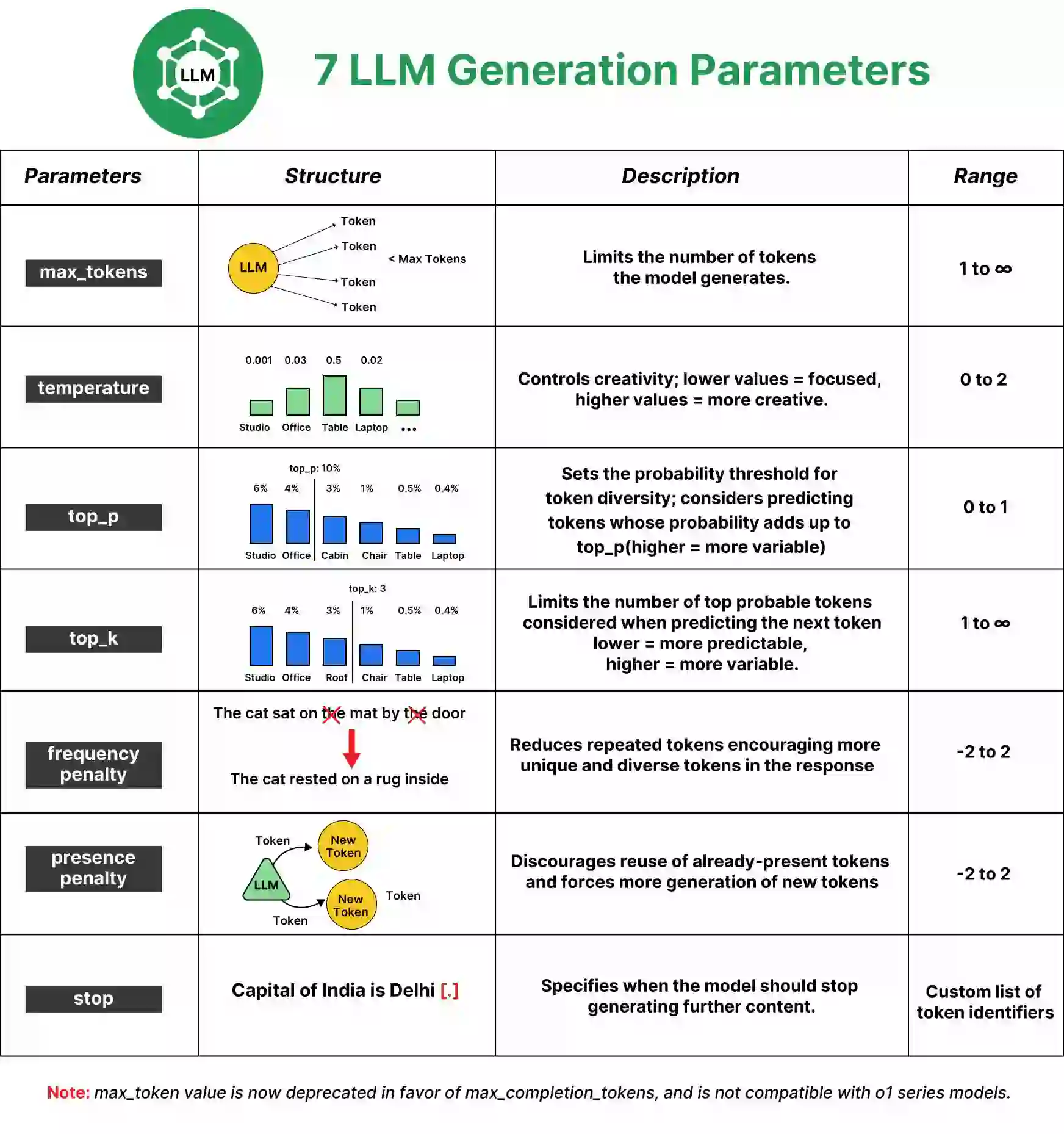
max_tokens(ormax_new_tokens): This is a hard limit on the length of the generated response. It's a critical parameter for resource control. A user asking for a 4000-token summary consumes significantly more GPU time and memory than one asking for a 100-token answer.temperature: This parameter controls the randomness of the output.- A low temperature (e.g., 0.1) makes the model more deterministic and focused. It will pick the most likely next token. This is good for factual Q&A or code generation.
- A high temperature (e.g., 0.9) increases randomness, leading to more "creative" or diverse outputs. This is useful for brainstorming or story writing.
These parameters are passed within the JSON payload of an API request, as you saw in the curl examples from the last lesson. For instance, in this snippet, we're asking for a response of up to 100 tokens with a temperature of 0.7.
"parameters":{"max_new_tokens":100, "temperature": 0.7, "top_p": 0.9}
2. The Core Challenge: Managing GPU Memory and Throughput
Now, let's move to the serving parameters, which are central to your role as an LLM Ops engineer. The primary challenge in LLM serving is managing the finite GPU memory. The two main consumers of this memory are:
- Model Weights: The billions of parameters that constitute the model. For a given model, this is a fixed size.
- KV Cache: A dynamic, per-request memory allocation that stores the attention keys (K) and values (V) for all tokens in the sequence (prompt + generation). The model needs this cache to generate subsequent tokens without reprocessing the entire sequence from scratch.
The size of the KV cache for a single request is proportional to the sequence length. Therefore, total GPU memory usage is dominated by (Model Size) + (Sum of all active KV Caches).
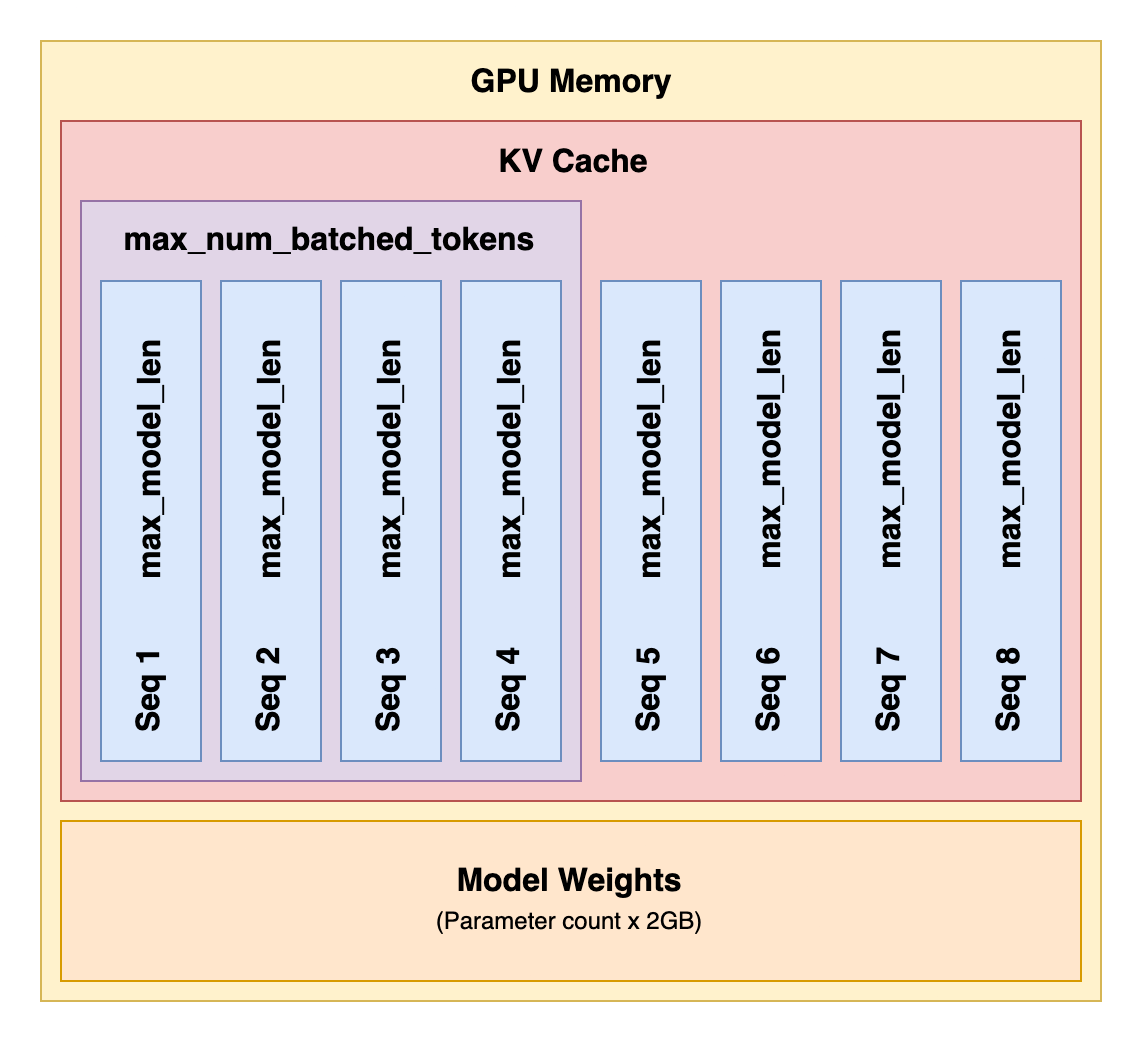
Maximizing throughput means maximizing the utilization of the GPU's compute units. This is achieved by batching—processing multiple requests together. However, you can only batch as many requests as you have memory for their KV Caches. This creates the fundamental trade-off:
- Longer sequences (
max_total_tokens) consume more memory per request, reducing the number of concurrent requests you can handle. - Higher concurrency (
max_num_seqs) improves throughput but requires more total memory for all the KV caches.
Understanding your workload's characteristics is critical. Are users sending long documents for summarization (long input, short output) or short questions for a chatbot (short input, medium output)?
Mastering LLM Inference Optimization From Theory to Cost Effective Deployment: Mark Moyou
To better understand how different request patterns impact resource consumption, watch this segment from the "Mastering LLM Inference Optimization" talk by Mark Moyou.
Watch the section on querying patterns. Pay close attention to the four patterns described (long/short input/output) and how they affect GPU memory usage. This directly informs how you would set serving parameters for different applications.
3. Configuring Performance Parameters in vLLM and TGI
Serving frameworks like vLLM and TGI provide command-line arguments to manage this memory-throughput trade-off. Let's look at the key "knobs" for each.
vLLM Parameters
vLLM offers fine-grained control over memory and batching. The following article provides an excellent reference.
vLLM Throughput Optimization-1: Basic of vLLM Parameters
This article by Kaige Yang breaks down the most important vLLM parameters for performance tuning.
Please read the sections for the following four parameters: max_model_len: Defines the maximum sequence length (prompt + generated tokens). max_num_seqs: Sets the maximum number of concurrent sequences the server can handle. This is your primary concurrency limit. max_num_batched_tokens: Controls the maximum total number of tokens processed in a single prefill batch. This is your primary batch size control. max_concurrency: Read this short section to understand a key concept—that maximum concurrency isn't set directly but is an emergent property of the other settings.
As the article explains, these parameters are deeply interrelated. If you increase max_model_len, you will likely need to decrease max_num_seqs to avoid running out of memory. Tuning these is an empirical process of benchmarking against your expected workload.
TGI Parameters
TGI provides similar controls, though with slightly different naming conventions. These are also set as command-line arguments when you launch the Docker container.
Deploying Quantized LLMs with TGI
The ApX Machine Learning guide on deploying with TGI lists the key performance tuning flags.
Focus on the subsection titled "Configuration and Performance Tuning." Note the parameters listed, which are the TGI equivalents of the vLLM parameters we just discussed.
Here's a mapping to help you connect the concepts:
| Concept | vLLM Parameter | TGI Parameter | Description |
|---|---|---|---|
| Max Sequence Length | --max-model-len |
--max-total-tokens |
The upper limit for prompt_tokens + new_tokens. |
| Concurrency Limit | --max-num-seqs |
--max-concurrent-requests |
The maximum number of requests processed in parallel. |
| Batch Size (Prefill) | --max-num-batched-tokens |
--max-batch-prefill-tokens |
Maximum tokens in the compute-intensive prefill step. |
| Batch Size (Total) | Implicit | --max-batch-total-tokens |
Maximum total tokens across all requests in a batch. |
4. Hands-On: Tuning a TGI Server
Let's apply this knowledge. In the last lesson, you ran a TGI server with default settings. Now, let's launch it with specific configurations tailored for a hypothetical chatbot application, which typically involves shorter interactions.
-
Open your terminal. Stop any previously running TGI container.
-
Launch TGI with custom parameters. We will set a lower max sequence length (
1024) to save memory, allowing us to increase the concurrency limit (128).docker run --rm --gpus all --shm-size 1g -p 8080:80 \ -v $HOME/.cache/huggingface:/data \ ghcr.io/huggingface/text-generation-inference:2.0 \ --model-id mistralai/Mistral-7B-Instruct-v0.2 \ --max-total-tokens 1024 \ --max-concurrent-requests 128 -
Wait for the model to load. Once the server is ready, open a new terminal.
-
Send a request with generation parameters. This time, we'll ask for a creative response by setting
temperatureto0.9and limit the output withmax_new_tokens.curl http://localhost:8080/generate \ -X POST \ -H "Content-Type: application/json" \ -d '{ "inputs":"Write a short, futuristic dialogue between a human and their home AI.", "parameters":{ "max_new_tokens": 200, "temperature": 0.9, "do_sample": true } }'Note:
do_sample: trueis often required to enable sampling withtemperature.
By running this, you've controlled both the server's capacity (at startup) and the model's output (at runtime).
For Your Consideration:
Imagine your service SLO requires support for long-form document summarization up to 4096 tokens. What would be the immediate impact on your server if you changed --max-total-tokens to 4096? Based on the memory trade-offs, you would almost certainly need to decrease --max-concurrent-requests to prevent out-of-memory errors, reducing the number of simultaneous users you can serve.
Conclusion
Today you've learned to wield the essential parameters for controlling an LLM inference service. These are the fundamental tools for balancing the often-competing demands of performance, cost, and output quality.
Key takeaways from this lesson include:
- Two Levels of Control: Serving parameters (like concurrency and batch limits) are set at startup to manage resources, while generation parameters (like
temperatureandmax_tokens) are set per-request to shape the output. - The Primacy of GPU Memory: The KV cache is the main dynamic consumer of GPU memory, and its size is proportional to sequence length and batch size.
- The Core Trade-Off: There is an inherent trade-off between the maximum sequence length you can support and the number of concurrent users you can serve.
- Framework-Specific Knobs: Serving frameworks like vLLM and TGI provide specific flags (
--max-num-seqs,--max-concurrent-requests, etc.) to manage these trade-offs.
In our next lesson, we will introduce a powerful technique for dramatically improving performance and reducing memory usage: quantization. You'll learn how to load and serve models that use less memory, which in turn allows you to increase batch sizes and concurrency, directly impacting your service's throughput and cost-efficiency.