Recommended resources
The freely available resources this lesson will direct you to.
Welcome back! In our last lesson, you gained control over the performance of LLM serving by configuring core parameters like concurrency and token limits. We saw how these settings are fundamentally constrained by GPU memory, especially when running models in their default 16-bit precision (FP16).
This lesson introduces quantization, a powerful optimization technique that directly addresses this memory bottleneck. You will learn how to load and serve models whose weights have been converted to a lower precision, such as 4-bit integers. For your role as an LLM Ops engineer, this is a critical skill. Mastering quantization allows you to significantly reduce operational costs by using smaller GPUs or increase throughput by serving more users on the same hardware.
We will explore what quantization is, examine popular methods like GPTQ and AWQ, and then get hands-on with loading these compact models into the serving frameworks you're now familiar with, vLLM and TGI.
1. What is Quantization?
At its core, quantization is the process of reducing the numerical precision of a model's weights. Most LLMs are trained using 32-bit or 16-bit floating-point numbers (FP32 or FP16/BF16), which offer high precision but consume a lot of memory. For a 7-billion parameter model, the weights alone in FP16 require about 14 GB of GPU RAM.
Quantization converts these weights to lower-precision formats, most commonly 8-bit or 4-bit integers (INT8 or INT4). This has two major benefits:
- Reduced Memory Footprint: A 4-bit model uses approximately 4 times less memory for its weights than a 16-bit model. That 7B model now only needs about 3.5 GB.
- Faster Computation (Potentially): Modern GPUs have specialized hardware that can perform integer math much faster than floating-point math, which can lead to higher inference speeds.
Of course, there is a trade-off: reducing precision can lead to a loss in model accuracy. The goal of sophisticated quantization techniques is to minimize this quality degradation.
How to pick a GPU and Inference Engine?
To build a solid mental model of how different numerical formats work, watch the first part of this video from Trelis Research. It provides an excellent, non-mathematical explanation of the trade-offs.
Watch from the beginning until the end of the speed section. Pay close attention to: The breakdown of floating-point numbers into mantissa (precision) and exponent (range). The difference between formats like FP16, BF16, FP8, and INT4. The concepts of "compute-bound" vs. "bandwidth-bound" and how quantization helps with the latter. The nuance that older GPUs might not see a speedup from quantization because they have to "de-quantize" back to FP16 for computation.
2. An Overview of Popular Quantization Methods: GPTQ and AWQ
While simple quantization can harm model quality, several advanced algorithms have been developed to perform this conversion more intelligently. For an Ops role, you don't need to implement these algorithms, but you do need to know what they are and which ones your serving frameworks support. GPTQ and AWQ are two of the most widely used.
- GPTQ (Post-Training Quantization): This method quantizes a model after it has been trained. It uses a small calibration dataset to analyze the weight distributions and iteratively quantizes the model layer by layer, making adjustments to minimize the impact on accuracy.
- AWQ (Activation-aware Weight Quantization): AWQ improves upon GPTQ by recognizing that not all weights are equally important. It measures the model's activations (the outputs of neurons) to identify the 1% or so of "salient" weights that are most critical for performance and protects them from quantization. This often results in better accuracy for the same level of compression.
Which Quantization Method is Right for You? (GPTQ vs. GGUF vs. AWQ)
This video by Maarten Grootendorst offers a clear, practical comparison of the most common quantization formats you'll encounter.
Please watch the following two segments: GPTQ explained: This covers the basics of the GPTQ method. AWQ explained: This introduces AWQ and highlights how it differs from GPTQ. Notice that the demonstration for AWQ uses the vLLM framework, which we will use shortly.
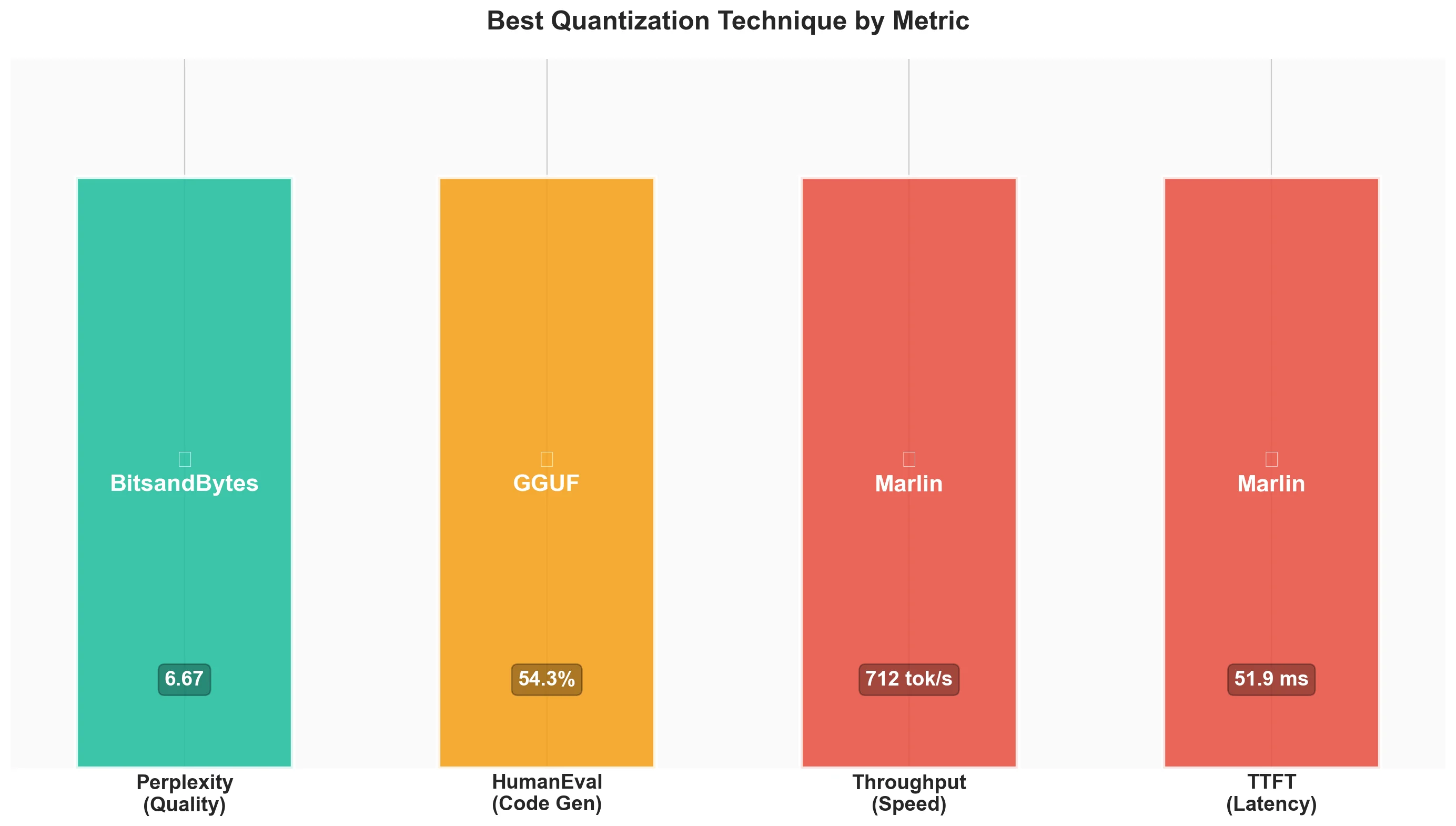
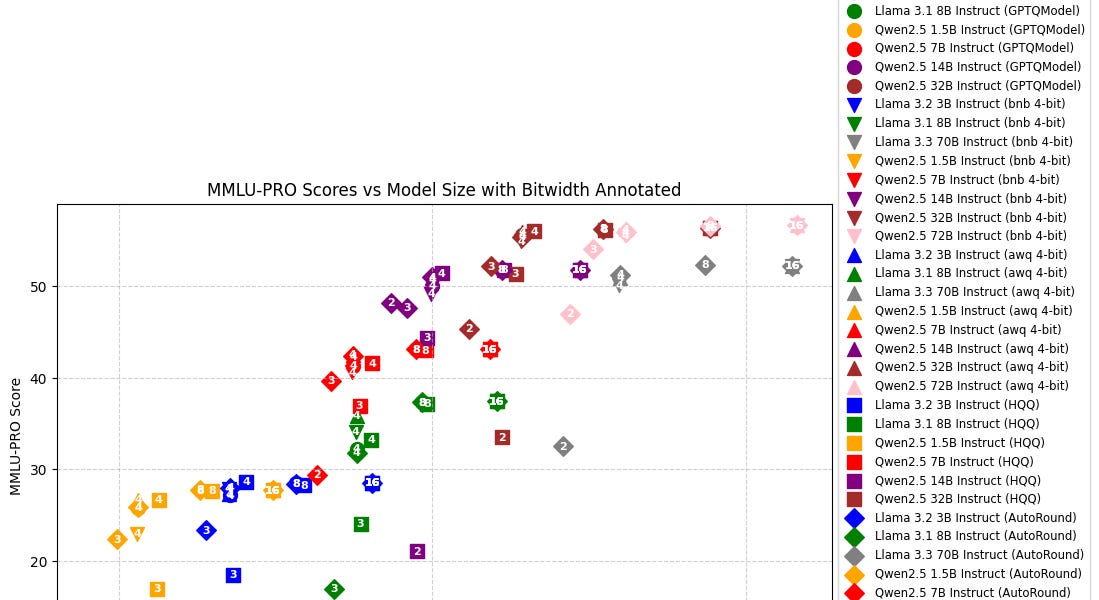
The performance differences between these methods can be seen in benchmarks. Different techniques excel at different things.
3. Hands-On: Serving Quantized Models
Now, let's put this into practice. We'll use pre-quantized models from the Hugging Face Hub. A popular contributor, "TheBloke," provides high-quality quantized versions of most open-source LLMs.
Serving a GPTQ Model with Text Generation Inference (TGI)
TGI has built-in support for various quantization schemes, which you can enable with a simple command-line flag.
Quantization - text-generation-inference
The official TGI documentation explains how it handles different quantization formats.
Read the introduction to see the list of supported methods. Then, focus on the section "Quantization with GPTQ" to understand how TGI loads pre-quantized models.
Now, let's launch a TGI container with a GPTQ model.
-
Stop any running containers.
-
Run the TGI Docker command. We are pointing to a GPTQ version of
Mistral-7B-Instruct-v0.2and telling TGI to use its GPTQ engine via--quantize gptq.docker run --rm --gpus all --shm-size 1g -p 8080:80 \ -v $HOME/.cache/huggingface:/data \ ghcr.io/huggingface/text-generation-inference:2.0 \ --model-id TheBloke/Mistral-7B-Instruct-v0.2-GPTQ \ --quantize gptq -
Wait for the server to be ready. Once you see the "Connected" message, you can send a request from another terminal, just as you did in previous lessons.
curl http://localhost:8080/generate \
    -X POST \
    -H "Content-Type: application/json" \
    -d '{"inputs":"What is model quantization?","parameters":{"max_new_tokens":100}}'
You've just served a 4-bit model! Notice the startup command was nearly identical to before; the only changes were the model ID and the --quantize flag.
Serving Quantized Models with vLLM
vLLM makes serving quantized models even simpler, as it often automatically detects the quantization format from the model's configuration files. It supports GPTQ, AWQ, and others.
This vLLM documentation page shows how to run GPTQ models. The process is very straightforward.
Skim the sections "Running a quantized model with vLLM" and "Using GPTQModel with vLLM's Python API" to see how little code or configuration is needed.
Let's try serving both an AWQ and a GPTQ model with vLLM's OpenAI-compatible server.
-
Stop any running TGI container.
-
Launch the vLLM server with an AWQ model. We'll use an AWQ version of
zephyr-7B-beta.# Ensure you have vllm installed: pip install vllm python -m vllm.entrypoints.openai.api_server \ --model TheBloke/zephyr-7B-beta-AWQvLLM will download the model and start a server on
localhost:8000. -
From a new terminal, send a request.
curl http://localhost:8000/v1/completions \ -H "Content-Type: application/json" \ -d '{ "model": "TheBloke/zephyr-7B-beta-AWQ", "prompt": "Explain the benefit of AWQ quantization in one sentence.", "max_tokens": 50 }' -
Now, stop the server (Ctrl+C) and repeat for GPTQ. The command is identical, just with a different model ID.
python -m vllm.entrypoints.openai.api_server \
    --model TheBloke/Mistral-7B-Instruct-v0.2-GPTQ
You can test it with a similar
curlrequest, updating the"model"field.
The key takeaway is that modern serving frameworks make using these optimized models incredibly simple from an operational standpoint. The main task is selecting the right pre-quantized model from the Hub.
4. The Real-World Impact: Cost and Throughput
Why is this so important? Serving a 4-bit 7B model requires less than 5GB of VRAM. This means you can:
- Run it on consumer-grade GPUs (like an RTX 3060 with 12GB VRAM), which are far cheaper than datacenter GPUs.
- On a large datacenter GPU (like an A100 with 40GB VRAM), you could fit multiple quantized models, or, more likely, dramatically increase the concurrency (
--max-num-seqs) for a single model, boosting your service's throughput.
How to pick a GPU and Inference Engine?
Let's revisit the Trelis Research video to see a concrete analysis of cost-performance across different GPUs and quantization levels.
Watch the final sections of the video: Cost comparison: This part walks through benchmarks on different GPUs (A40, A100, H100) using different model sizes and quantization (FP8, INT4). It directly calculates the cost per million tokens. Final recommendations: This summary provides excellent rules of thumb for when to choose certain formats and GPUs.
This analysis directly ties into your goal of mastering cost modeling and capacity planning. By using a quantized model, you change the fundamental performance and cost characteristics of your service.
Conclusion
In this lesson, we demystified model quantization and demonstrated its practical application. You've learned how converting models to lower-precision formats is a key strategy for optimizing LLM inference.
Here are the key takeaways:
- Quantization reduces model memory and can increase inference speed by using lower-precision data types like
INT4orINT8for model weights. - GPTQ and AWQ are advanced methods that quantize models post-training while seeking to minimize accuracy loss. AWQ is generally considered to have a slight edge in quality by protecting the most important weights.
- Serving frameworks make it easy to deploy quantized models. Both TGI and vLLM can load pre-quantized models with minimal configuration changes—often just a flag or by simple auto-detection.
- The operational benefit is significant: Quantization enables running models on cheaper hardware or achieving higher throughput on existing hardware, directly improving the cost-efficiency of your service.
In our next lesson, we will explore another powerful optimization technique: prompt caching. You will learn how to configure serving frameworks to reuse computations for common prompt prefixes, further reducing latency and improving server efficiency.