Recommended resources
The freely available resources this lesson will direct you to.
Hello! Welcome back to your course on mastering the LLM system layer.
In our last lesson, you learned how to standardize interactions with different serving frameworks by exposing an OpenAI-compatible API. This was a crucial step in abstracting away the underlying infrastructure. Now, we're going to leverage that standardization for a core task in LLM Operations: performance benchmarking.
Today's learning outcome is to run and interpret load tests comparing the throughput and latency of different serving frameworks. As an LLM Ops engineer, you'll constantly be asked "Which setup is faster?" or "Can our system handle the expected load?". This lesson will give you the foundational knowledge and practical skills to answer those questions with data.
1. The Language of Performance: Core LLM Metrics
Before we run any tests, we need to agree on what we're measuring. In your SRE work, you're familiar with standard metrics like latency and requests per second. For LLMs, we use more specific variations of these.
The three most important latency metrics are:
- Time to First Token (TTFT): The time from when a user sends a prompt to when they receive the very first token of the response. This is a critical measure of perceived responsiveness, especially in interactive chat applications. A low TTFT makes the application feel fast.
- Inter-Token Latency (ITL): The time between the generation of each subsequent token. This measures the ongoing generation speed. Inconsistent or high ITL can make the response appear jerky.
- Time per Output Token (TPOT): A related metric that averages the generation time across all output tokens, excluding the prefill stage. It's calculated as
(Total Generation Time - TTFT) / Number of Output Tokens.
Throughput is also measured in two key ways:
- Requests per second (req/s): The classic measure of how many user requests the system can handle per second.
- Output tokens per second (tok/s): The total number of tokens the system generates per second across all concurrent requests. This is often a more accurate measure of the system's "workload capacity" than req/s, as different requests can have vastly different output lengths.
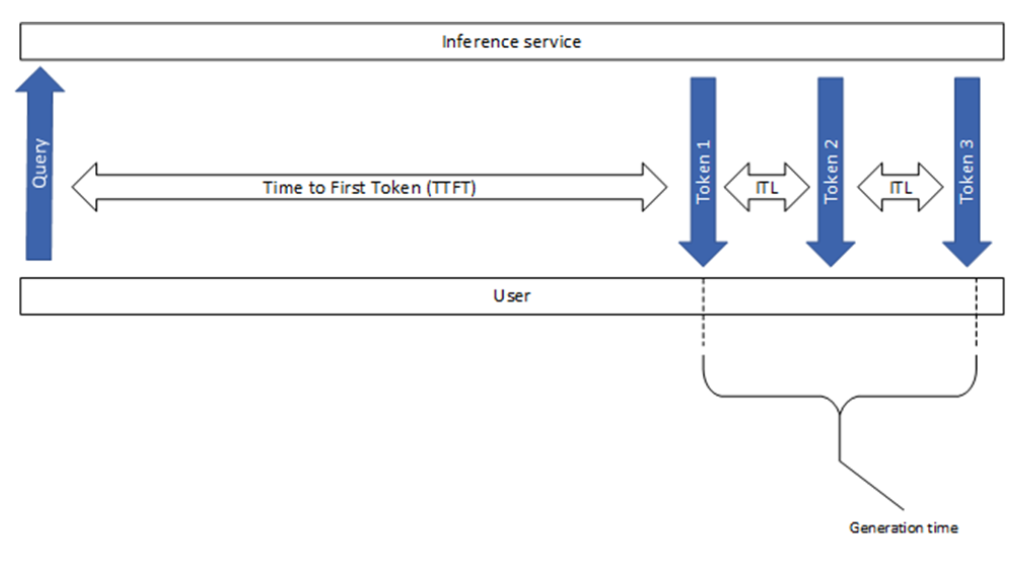
To deepen your understanding of what these metrics reveal about the underlying system, watch this short clip.
Mastering LLM Inference Optimization From Theory to Cost Effective Deployment: Mark Moyou
The video "Mastering LLM Inference Optimization" provides a concise explanation of these core metrics.
Watch the section from Metrics introduction. The speaker explains what TTFT, inter-token latency, and total generation time measure and how they can help you diagnose performance issues under load.
2. Tools for Load Testing LLMs
Several tools are available for benchmarking LLM endpoints. Given your background, you might be familiar with general-purpose load testers like k6 or JMeter. While these work, specialized tools have emerged that are tailored for LLM workloads.
ai-perf(from NVIDIA): A powerful, standalone tool designed for comprehensive benchmarking of generative AI models. It supports sophisticated features like trace-based benchmarking using real-world traffic patterns.vllm/benchmarks/benchmark_serving.py: A Python script included directly in the vLLM repository. It's convenient and well-suited for testing vLLM and other frameworks that expose an OpenAI-compatible API.k6(from Grafana Labs): A modern, developer-centric load testing tool. It's excellent for testing any API and is often used by companies like Hugging Face for their own internal benchmarking.
For today's hands-on exercise, we'll use the benchmark_serving.py script from vLLM, as it's readily available and provides a clear introduction to the process.
3. Hands-On: Running Your First Load Test
Let's put theory into practice. You'll start a vLLM server and then use the benchmarking script to generate load against it.
Step 1: Start the vLLM Server
In your first terminal, start the vLLM server with an OpenAI-compatible endpoint, just as you did in the last lesson. We'll use a small, fast model for this exercise.
# Ensure you are in an environment where vllm is installed
python -m vllm.entrypoints.openai.api_server \
    --model mistralai/Mistral-7B-Instruct-v0.2
Wait for the model to load. The server will be ready when you see the Uvicorn startup messages indicating it's listening on http://0.0.0.0:8000.
Step 2: Prepare for the Benchmark
The benchmarking script is part of the vLLM GitHub repository. If you don't have it cloned, do so now in a new terminal.
git clone https://github.com/vllm-project/vllm.git
cd vllm
Step 3: Run the Benchmark Script
Now, run the benchmark_serving.py script. We'll configure it to send 200 prompts with a maximum concurrency of 10 simultaneous requests. The script will use a built-in dataset of sample prompts.
python benchmarks/benchmark_serving.py \
    --backend openai \
    --model mistralai/Mistral-7B-Instruct-v0.2 \
    --tokenizer mistralai/Mistral-7B-Instruct-v0.2 \
    --endpoint "/v1/chat/completions" \
    --dataset-name sharegpt \
    --dataset-path ShareGPT_V3_unfiltered_cleaned_split.json \
    --num-prompts 200 \
    --max-concurrency 10 \
    --save-result
Note: If the sharegpt dataset is not found, the script will prompt you to download it. Follow the instructions it provides.
This command instructs the script to act as an openai client, connect to your server, and send 200 chat completion requests from the ShareGPT dataset. Let's break down the key parameters:
Benchmarking LLM Serving Performance
This article provides a great reference for the vLLM benchmarking script.
Read the "Key Arguments Explained" section to understand what parameters like --backend, --max-concurrency, --num-prompts, and --request-rate control. Then review the "Example Command" section, which is similar to what you just ran.
4. Interpreting the Results: Throughput vs. Latency
After the script finishes, it will print a summary table. It will look something like this (your numbers will vary):
============ Serving Benchmark Result ============
Successful requests:                     200
Benchmark duration (s):                  35.12
Total input tokens:                      54321
Total generated tokens:                  45890
Request throughput (req/s):              5.69
Input token throughput (tok/s):          1546.75
Output token throughput (tok/s):         1306.66
---------------Time to First Token----------------
Mean TTFT (ms):                          450.32
Median TTFT (ms):                        430.11
P99 TTFT (ms):                           890.56
-----Time per Output Token (excl. 1st token)------
Mean TPOT (ms):                          15.80
Median TPOT (ms):                        15.50
P99 TPOT (ms):                           25.10
---------------Inter-token Latency----------------
Mean ITL (ms):                           16.20
Median ITL (ms):                         15.90
P99 ITL (ms):                            26.43
==================================================
Here's how to interpret this:
- Request throughput: The server handled about 5.7 requests per second.
- Output token throughput: It generated over 1300 tokens per second across all concurrent requests. This shows the aggregate generative capacity.
- Mean TTFT: The average user waited about 450ms for the first token.
- Mean TPOT: After the first token, each subsequent token took an average of 15.8ms to generate. This corresponds to a generation speed of about 63 tokens/second per user (
1000ms / 15.8ms).
The Fundamental Trade-off
A key concept in performance tuning is the trade-off between throughput and latency. If you increase the concurrency (more simultaneous users), the total throughput will usually go up, but the latency for each individual user will also increase as they compete for the same GPU resources.
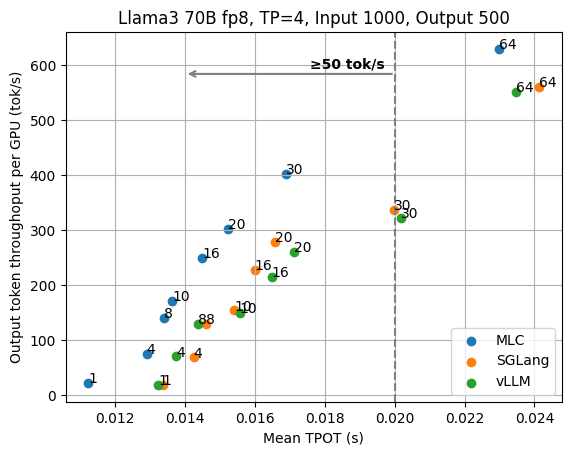
Your job as an LLM Ops engineer is to find the right balance for your application's SLOs. A chatbot needs low latency, while an offline document summarization service might prioritize high throughput.
AI Perf benchmarking - Dynamo and other LLM endpoints
This video from NVIDIA provides an excellent deep dive into systematic benchmarking.
Watch these two segments: Interpreting output: The speaker walks through the output of the ai-perf tool, explaining metrics like TTFT, request latency, and total system throughput. The concepts are identical to what you just saw. Finding the sweet spot: This section explains how to run benchmarks at different concurrency levels to create a performance curve (a "Pareto chart"), allowing you to find the optimal operating point that balances efficiency (cost) and user experience (latency). This is a crucial technique for capacity planning.
5. Case Study: Comparing TGI and vLLM
Now that you can run a test and interpret its results, let's look at how to apply this to compare two frameworks. The Hugging Face team published a detailed comparison between their Text Generation Inference (TGI) framework and vLLM. You don't need to replicate this, but analyzing their methodology is highly instructive.
TGI v3 overview - Hugging Face
This post from Hugging Face announces a new version of their serving framework and provides a detailed benchmark against vLLM.
Read the following sections: "Methodology": Pay attention to how they address "boundary effects" to ensure fair and stable results. This is a subtle but important aspect of rigorous benchmarking. "Scenarios": Note that they test two distinct workloads: a "Small scenario" (short, conversational prompts) and a "Long scenario" (long prompts for summarization). This is critical because frameworks can have different performance characteristics depending on the use case. "Results": Look at the table and the bar chart. Try to answer: Which framework is faster for the "Small test" on 4xL4 GPUs? Which framework shows a more significant advantage on the "Long test" with the 8xH100 setup? What does this tell you about which framework you might choose for a RAG application (long context) vs. a simple chatbot?
This case study demonstrates that there's often no single "best" framework. The winner depends on the specific hardware, model, and, most importantly, the workload pattern. Your role is to benchmark for the patterns you expect in production.
Conclusion
In this lesson, you took a major step into the world of LLM performance engineering. You learned how to quantify and measure the performance of serving systems, a skill that is fundamental to building reliable and cost-effective AI platforms.
Here are the key takeaways:
- Core Metrics: Performance is measured by a combination of latency (TTFT, TPOT, ITL) and throughput (req/s, tok/s).
- Benchmarking Tools: Specialized tools like vLLM's
benchmark_serving.pyand NVIDIA'sai-perfprovide robust ways to load test LLM APIs. - The Throughput-Latency Trade-off: Increasing concurrency generally improves total throughput but degrades per-request latency. Finding the right balance is key.
- Workload-Dependent Performance: The best serving framework often depends on the specific use case (e.g., short chat vs. long-context summarization). Always benchmark with a workload that mirrors your production traffic.
You now know how to measure performance. In our next module, "Inference Performance Optimization," we'll dive into how to improve it. We will start by applying techniques like quantization and using the benchmarking skills you've developed today to measure their impact.