Recommended resources
The freely available resources this lesson will direct you to.
Welcome to the next lesson in our journey to master the LLM system layer. In our previous session, we explored prompt caching, a powerful technique for optimizing inference performance by reusing the results of the computationally expensive prefill stage. You learned how to enable this feature in vLLM to reduce latency and improve throughput.
Today, we'll shift our focus from internal optimization to external standardization. Your goal is to learn how to expose an OpenAI-compatible API endpoint from a serving framework. This might seem like a simple configuration detail, but for an LLM Ops engineer, it's a foundational principle for building scalable, maintainable, and interoperable AI platforms. You have already interacted with these endpoints using curl in previous lessons; now, we will formalize this concept and explore how to leverage it programmatically.
1. The Power of a Standardized API
In your experience as an SRE and platform engineer, you've seen how standardization simplifies complex systems. Think of the S3 API for object storage or the Kubernetes API for container orchestration. These standards create a common language that allows tools and applications to work together seamlessly, regardless of the underlying implementation.
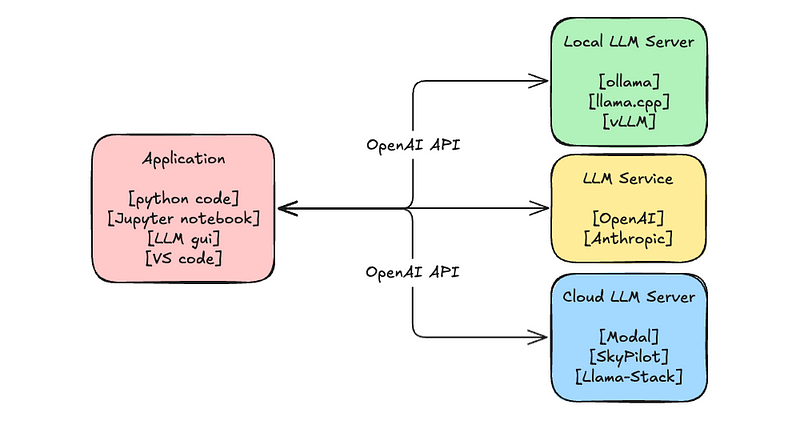
The same principle applies to LLM inference. The API provided by OpenAI has become the de facto standard for programmatic interaction with large language models. By having self-hosted serving frameworks like vLLM and TGI expose an API that mimics OpenAI's, we gain several critical advantages:
- Interoperability: Applications can switch between different model providers (e.g., OpenAI, Anthropic) and self-hosted models with minimal code changes.
- Ecosystem Integration: A vast ecosystem of tools, including clients like LangChain and LlamaIndex, is built around the OpenAI API. Adhering to this standard provides instant compatibility.
- Decoupling: Application developers can build against a stable, well-documented API without needing to know the specifics of the underlying serving infrastructure. This allows the platform team (i.e., you) to optimize, upgrade, or even replace the serving framework without breaking client applications.
2. Exposing the API with vLLM
Fortunately, modern serving frameworks make this easy. vLLM, for example, has a built-in entrypoint specifically for launching an OpenAI-compatible server.
You can start the server by running a Python module. The key is to use the vllm.entrypoints.openai.api_server module.
python -m vllm.entrypoints.openai.api_server --model <your-model-name>
When you run this command, vLLM starts a web server (using FastAPI and Uvicorn) that listens for HTTP requests and implements key OpenAI API endpoints, such as:
/v1/models: Lists the available models./v1/completions: For text completion (legacy)./v1/chat/completions: For conversational chat.
vLLM on Kubernetes in Production
This video from Kubesimplify provides a great overview of vLLM and demonstrates how to launch it and interact with its OpenAI-compatible API.
Watch the first part of the video covering what vLLM is and the demonstration of running vLLM locally. Pay close attention to how the docker run command exposes port 8000, and how a curl request is then made to the v1/completions endpoint. Notice how the JSON payload in the curl request (model, prompt, max_tokens) directly mirrors the structure of an OpenAI API call.
3. Hands-On: Programmatic Interaction with the API
While curl is useful for testing, real-world applications interact with APIs programmatically. Let's build a simple Python client to talk to our local vLLM server using the official openai Python library.
First, let's get the server running. If you have a server running from a previous lesson, stop it with Ctrl+C. Then, start the vLLM OpenAI server.
# In your first terminal
python -m vllm.entrypoints.openai.api_server \
    --model mistralai/Mistral-7B-Instruct-v0.2
The server will take a minute to load the model and will then be ready to accept requests at http://localhost:8000.
Next, let's write the Python client.
The vLLM quickstart documentation provides excellent, copy-paste-ready examples for this.
Read through the guide, focusing on these sections: "OpenAI-Compatible Server": Confirms the command to start the server. "OpenAI Completions API with vLLM": Shows a curl example and the Python client for the completions endpoint. "OpenAI Chat Completions API with vLLM": Provides examples for the more common chat endpoint. Pay close attention to the Python examples. The key insight is how the OpenAI client is configured to point to the local server instead of OpenAI's official API servers.
Now, in a new terminal, create a Python file (e.g., client.py) and use the following code, which is adapted from the documentation you just read. This script will connect to your local vLLM server and make a request to the chat completions endpoint.
# client.py
from openai import OpenAI


# Point the client to the local server
client = OpenAI(
    base_url="http://localhost:8000/v1",
    api_key="not-needed"  # An API key is not required for local server
)

print("Sending request to local vLLM server...")

try:
    chat_response = client.chat.completions.create(
        model="mistralai/Mistral-7B-Instruct-v0.2",
        messages=[
            {"role": "system", "content": "You are a helpful assistant."},
            {"role": "user", "content": "What is the role of an SRE?"},
        ],
        stream=True  # Optional: for streaming responses
    )

    print("\nAssistant's Response:")
    for chunk in chat_response:
        content = chunk.choices[0].delta.content
        if content:
            print(content, end='', flush=True)
    print("\n")

except Exception as e:
    print(f"An error occurred: {e}")
Before running, ensure you have the openai library installed (pip install openai). Then, run the script:
python client.py
You should see the LLM's response streamed to your console. You have successfully used the standard openai library to communicate with your self-hosted model, simply by changing the base_url. This demonstrates the power and flexibility of API standardization.
4. Integration with the Broader Ecosystem
This compatibility is what allows tools like LangChain to treat a local vLLM instance just like it would the official OpenAI service.
How to Deploy LLMs | LLMOps Stack with vLLM, Docker, Grafana & MLflow
This video demonstrates a complete LLMOps stack, including how LangChain integrates with vLLM.
Watch the short segment from API similarity where the presenter explicitly mentions that vLLM's API is similar to OpenAI's, enabling hooks with tools like LangChain. Then, jump to the code demonstration from LangChain initialization. Notice how the ChatOpenAI object is initialized by passing the local server's base_url and a dummy API key—exactly as we did in our script.
5. Deployment in a Kubernetes Environment
This API standardization is especially powerful in a production environment like Kubernetes. You can deploy vLLM pods and expose them through a single internal Kubernetes Service. All other microservices in your cluster can then interact with the LLM by simply sending requests to the stable DNS name of that service (e.g., http://vllm-service.llm-namespace.svc.cluster.local/v1/chat/completions).
This abstracts the entire deployment—how many replicas are running, on which nodes they are scheduled, etc.—behind a single, standard API endpoint.
vLLM on Kubernetes in Production
The same "vLLM on Kubernetes" video you watched earlier also shows exactly how this works in practice.
Watch the final segment starting from Kubernetes deployment. The speaker walks through: Deploying vLLM as a DaemonSet on GPU nodes. Creating a Kubernetes Service to provide a single, load-balanced endpoint for those pods. Shelling into a test pod and using curl to hit the internal service endpoint (vllm-service.vlm-ns). This is a direct application of your existing Kubernetes and networking skills to the LLM serving domain.
Conclusion
In this lesson, we established the critical importance of API standardization in LLM operations. By exposing an OpenAI-compatible API, you can build a flexible, maintainable, and highly interoperable serving layer.
Key takeaways include:
- De Facto Standard: The OpenAI API is the "lingua franca" for LLM interaction, and supporting it is a key feature of modern serving frameworks like vLLM.
- Seamless Integration: Adhering to this standard allows you to use a rich ecosystem of tools, like the
openaiPython library and LangChain, with your self-hosted models by simply changing the base URL. - Infrastructure Abstraction: In a production setting like Kubernetes, a standardized API allows you to abstract the underlying serving infrastructure behind a stable service endpoint, decoupling client applications from deployment details.
- Practical Implementation: You can launch vLLM's OpenAI-compatible server with a simple command and interact with it using standard client libraries.
In our next lesson, we'll put this standardization to practical use. Now that we can communicate with different servers using the same API, we are perfectly positioned to run and interpret load tests comparing the throughput and latency of different serving frameworks. This will be our first step into quantitative performance analysis.