Recommended resources
The freely available resources this lesson will direct you to.
- What is Indexing? Indexing Methods for Vector Retrievalwww.youtube.com
- Chroma - Vector Database for LLM Applications | OpenAI integrationwww.youtube.com
- HNSW Index: Architecture for Fast Vector Search - Interactive | Michael Brenndoerfer | Michael Brenndoerfermbrenndoerfer.com
- Storing Embeddings in A Vector Database | RAG | Mastra Docsmastra.ai
Hello! In our last lesson, we successfully transformed our text chunks into numerical vector embeddings. We now have the raw material for semantic search, but a pile of vectors is not a searchable knowledge base. Storing and searching through millions of vectors one-by-one is computationally infeasible for any real-world application.
This brings us to the focus of today's lesson: indexing vector embeddings into a vector database for efficient retrieval. As an engineer, you'll appreciate that this is where clever data structures and algorithms come into play to make the magic of instant semantic search possible. We will explore the "why" behind vector indexing by understanding the core principles of the dominant algorithms, and then move to the "how" by implementing a solution with a popular vector database.
The Problem: Why Brute-Force Search Fails
Imagine you have a million document chunks, each represented by a 1536-dimensional vector. When a user asks a question, we convert that query into a vector as well. To find the most relevant chunks, a "brute-force" or "exact" search would require you to calculate the distance (e.g., cosine similarity) between the query vector and all one million document vectors, then sort them to find the top matches.
This approach has a time complexity of , where is the number of vectors and is their dimension. For a production system requiring millisecond responses, this is simply too slow. This is the exact problem vector databases are designed to solve using a technique called Approximate Nearest Neighbor (ANN) search. ANN algorithms trade a tiny, often negligible, amount of accuracy for a massive gain in search speed, often achieving logarithmic time complexity, .
An Overview of Indexing Strategies
Vector databases use various indexing algorithms to organize vectors in a way that avoids a full scan. These algorithms pre-process the vectors to create a data structure that allows for rapid navigation to the most relevant region of the vector space.
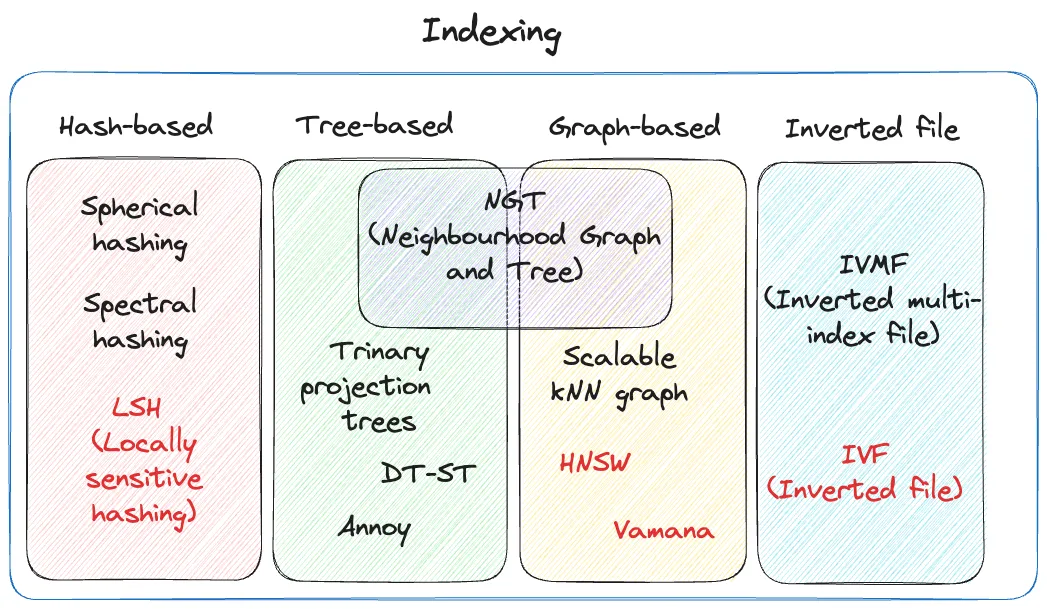
To get a high-level conceptual overview of these methods, the following video provides an excellent, non-mathematical introduction.
What is Indexing? Indexing Methods for Vector Retrieval
This video, "What is Indexing? Indexing Methods for Vector Retrieval," by Louis-François Bouchard, explains the necessity of indexing and briefly covers several popular techniques.
Watch from the beginning until the overview of HNSW. As you watch, focus on the core idea behind each method: FLAT Index (explanation): The brute-force baseline. Accurate but slow. Locality Sensitive Hashing (LSH) (explanation): Grouping similar vectors into "buckets" using hash functions. Inverted File (IVF) (explanation): Grouping vectors into clusters and only searching the most relevant clusters. Hierarchical Navigable Small World (HNSW) (explanation): Building a multi-layered graph to navigate from coarse to fine-grained results.
While several methods exist, one has emerged as the de facto industry standard for in-memory vector search due to its exceptional performance: HNSW.
Deep Dive: HNSW for the AI Engineer
As an AI Engineer designing a RAG system, HNSW is the most important indexing algorithm for you to understand. It's at the heart of most modern vector databases like Pinecone, Qdrant, Weaviate, and Chroma.
The article "HNSW Index: Architecture for Fast Vector Search" is a masterclass on the topic. It's comprehensive, so we will focus on the sections most relevant to you as a system builder: the core intuition and the tunable parameters that govern the speed/accuracy trade-off.
This article explains the HNSW algorithm from an engineering perspective. We'll focus on the conceptual model and the practical parameters you'll need to tune.
Please read the following sections: Start with the introduction to understand why HNSW is so dominant. Next, read the section on The Hierarchical Insight. This explains the core idea of using a multi-layered graph, which is the key to HNSW's efficiency. Think of it like a highway system: you use expressways (upper layers) for long distances and local roads (lower layers) for the final destination. Then, carefully study the section on HNSW Parameters. This is the most critical part for an engineer. Understand the roles of M, ef_construction, and ef_search. These are the knobs you will turn to optimize your RAG system's retrieval performance. Finally, read the section Why HNSW Dominates for a summary of why HNSW is generally preferred over alternatives like KD-Trees and LSH for the high-dimensional vectors used in NLP.
To summarize the key engineering takeaways from that reading:
- HNSW is a graph-based index. Nodes are vectors, and edges connect similar vectors.
- It's hierarchical. Searches start on a sparse top layer for fast, long-distance navigation and descend to denser lower layers for precision.
- You control its behavior with three main parameters:
M(Max Connections): Defines graph density. HigherMimproves recall but increases memory usage and build time. A good default is 16 or 32.ef_construction: Search depth during index build time. Higher values create a better-quality index at the cost of a slower build process. You set this once.ef_search: Search depth at query time. This is your primary knob for tuning the trade-off between speed and accuracy. It can be adjusted for each query.
This flowchart provides a simple mental model for when to choose which index type.

The "How": Indexing with Chroma DB
Now let's move from theory to practice. We will use Chroma DB, an open-source, in-memory vector database that's very easy to get started with. It's perfect for local development and building portfolio projects.
The following video from BugBytes gives a great practical walkthrough of setting up Chroma, adding data, and ensuring it's persisted to disk.
Chroma - Vector Database for LLM Applications | OpenAI integration
This tutorial, "Chroma - Vector Database for LLM Applications," provides a hands-on guide to using Chroma with Python.
Watch these key segments to understand the workflow: Installation and Setup (watch): See how to install chromadb and initialize a client to create a collection. Adding Documents (watch): Observe how Chroma can automatically handle embedding for you if you just provide text. Providing Your Own Embeddings (watch): This is the pattern we will use. Notice how you can pass an embeddings argument to the add method, which builds on what we learned in the last lesson. Persisting the Database (watch): This is a crucial engineering detail. See how to use the PersistentClient to save your index to disk so your data isn't lost when your application restarts.
Hands-On Implementation
Let's put everything together in Python. We'll reuse the embedding generation logic from our last lesson and index the results into a persistent Chroma database.
First, make sure you have Chroma DB installed:pip install chromadb
Now, let's write the script. This code assumes you have a list of text_chunks and a corresponding list of embeddings that you generated previously.
import chromadb
import numpy as np
from openai import OpenAI


# --- Assume this part is from the previous lesson ---
# You have your text chunks and generated embeddings
client = OpenAI() # Assumes OPENAI_API_KEY is set

text_chunks = [
    "The first rule of RAG is to have good chunks.",
    "The second rule of RAG is to use a good embedding model.",
    "Vector databases use indexing for fast retrieval.",
    "HNSW is a popular graph-based indexing algorithm."
]

def get_openai_embeddings(texts: list[str], model: str = "text-embedding-3-small") -> list[list[float]]:
    response = client.embeddings.create(model=model, input=texts)
    sorted_data = sorted(response.data, key=lambda x: x.index)
    return [item.embedding for item in sorted_data]

embeddings = get_openai_embeddings(text_chunks)


# --- End of previous lesson's logic ---


# 1. Initialize a persistent Chroma client
# This will store the database files in a directory named 'my_vector_db'
chroma_client = chromadb.PersistentClient(path="./my_vector_db")


# 2. Create or get a collection
# A collection is where you'll store your embeddings, documents, and metadata.
# It's good practice to name it something descriptive.
collection_name = "rag_system_docs"
collection = chroma_client.get_or_create_collection(name=collection_name)


# 3. Prepare documents, metadata, and IDs for indexing
# It's crucial to store the original text in the metadata.
# Each item MUST have a unique ID.
documents_to_add = text_chunks
metadatas_to_add = [{"source": f"doc_{i}"} for i in range(len(text_chunks))]
ids_to_add = [f"id_{i}" for i in range(len(text_chunks))]


# 4. Index the data into Chroma
# We use collection.add() to store our vectors.
# Note: Chroma also supports `upsert()` to add or update items.
collection.add(
    embeddings=embeddings,
    documents=documents_to_add,
    metadatas=metadatas_to_add,
    ids=ids_to_add
)


# 5. Verify the number of items in the collection
count = collection.count()
print(f"Successfully indexed {count} items into the '{collection_name}' collection.")


# After running, you will see a 'my_vector_db' folder in your directory.
In this code, notice a few key engineering practices:
- Persistence: We use
PersistentClientto ensure our index is saved. For production, you'd run Chroma as a server, but this is perfect for development. - Unique IDs: Every item needs a unique ID. This allows you to update or delete specific items later.
- Metadata: We are storing the original text (
documents) and additionalmetadatas(like a source ID). Without this, retrieving a vector would be useless—you need the associated text to show the user or feed to an LLM. This is a critical concept often overlooked in basic tutorials.
Conclusion
Today, we bridged the gap between having vector embeddings and having a fast, searchable knowledge base. You learned that brute-force search is not scalable and that Approximate Nearest Neighbor (ANN) algorithms are the solution.
Key Takeaways:
- Indexing is essential for performance. It avoids the O(n) complexity of brute-force search.
- HNSW is the dominant ANN algorithm for in-memory vector search. As an engineer, you should be familiar with its core hierarchical graph concept.
- The most important HNSW parameters to know are
M(connections),ef_construction(build quality), andef_search(query speed/accuracy trade-off). - Vector databases like Chroma abstract away the complexity of these algorithms, providing a simple API to
addorupsertyour vectors. - Always store metadata and unique IDs alongside your vectors. The retrieved vector is useless without the content and context it represents.
We have successfully chunked our documents, generated embeddings, and now indexed them. Our knowledge base is officially ready to be queried. In the next lesson, we will do exactly that: perform similarity search and vector retrieval using our vector database.