Recommended resources
The freely available resources this lesson will direct you to.
Welcome to the next step in building our RAG system. In our last lesson, you successfully indexed document chunks into a persistent Chroma vector database. You now have a searchable knowledge base, but the crucial step of actually searching it remains. This lesson is all about that "Retrieval" component in Retrieval-Augmented Generation.
Our goal today is to perform similarity search and vector retrieval using a vector database. We'll take a user's question, transform it into a vector, and use it to pull the most relevant document chunks from the database you just built. This is the core mechanism that allows an LLM to answer questions using your specific data, moving beyond its general pre-trained knowledge.
The Heart of Retrieval: Similarity Search
The entire process of finding relevant information in a vector database is called similarity search or vector search. The goal is to find the vectors in your database that are "closest" to your query vector in the high-dimensional space. The closer two vectors are, the more semantically similar their original text is.
This process is visualized perfectly in the diagram below. The left side ("Embedding Indexing") is what we completed in the last lesson. Today, we focus on the right side: "Nearest Neighbour Search".
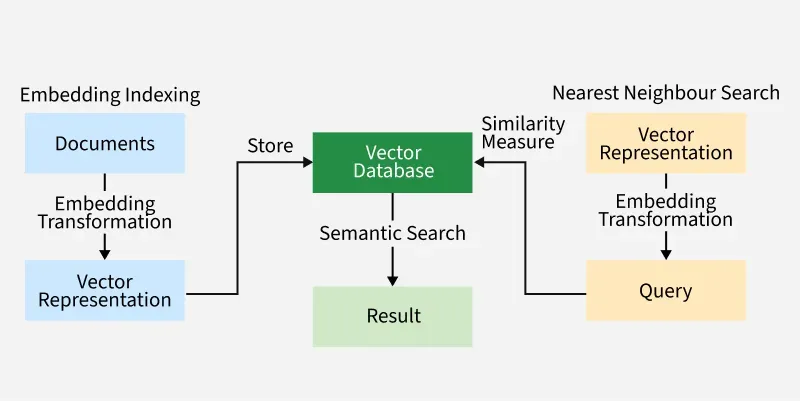
But how do we measure "closeness" or "similarity"? This is done using a mathematical distance metric. While you don't need to implement the formulas, as an engineer, it's important to know the main types and which one to use.
Vector Similarity Search with Redis and Node.js: KNN Tutorial
This article from the Redis documentation provides a clear, concise explanation of the most common distance metrics used in vector search.
In the article, find the section titled How is vector similarity calculated. Read the three subsections to understand: Euclidean Distance (L2 norm): The straight-line "ruler" distance between two vectors. Cosine Similarity: The angle between two vectors. This is the most common metric for text embeddings. Inner Product: A related measure that is computationally fast. Focus on the conceptual difference. For text, we almost always care more about the direction of the vectors (the concepts they point to) than their magnitude, which makes Cosine Similarity the ideal choice. Modern embedding models, including OpenAI's, are specifically optimized to be used with this metric.
The Query Workflow: A Two-Step Process
To retrieve documents relevant to a user's question, you must follow a strict two-step process:
- Embed the Query: The user's query (e.g., "What is the HNSW algorithm?") must be converted into a vector embedding using the exact same embedding model you used to create the embeddings for your documents (e.g.,
text-embedding-3-small). If the models don't match, the two vectors exist in different "semantic spaces," and the comparison will be meaningless. - Search the Index: The resulting query vector is sent to the vector database. The database uses its index (like the HNSW graph we discussed) to efficiently find the
kvectors from your documents that are closest to the query vector, according to the chosen distance metric.
The following video provides an excellent walkthrough of this process using Chroma DB. It demonstrates both a simplified approach where Chroma handles embedding implicitly and the explicit, more robust pattern we will be using.
Chroma - Vector Database for LLM Applications | OpenAI integration
This video from BugBytes, which we used in the last lesson, also shows how to query a Chroma collection.
Please watch these two key segments: First, see the simple approach in the segment on basic querying. Here, query_texts are passed, and Chroma uses a default model to create embeddings behind the scenes. This is convenient for quick tests but not suitable for production systems where you need control over the embedding model. Next, watch the more relevant segment on querying with custom embeddings. This is the correct pattern for our RAG system. Notice the explicit two-step process: the code first generates an embedding for the query text and then passes this embedding vector to the query_embeddings parameter.
Hands-On: Querying Your Chroma Database
Now, let's put this into practice. We will write a Python script to load the database we created in the last lesson and perform a similarity search.
This script assumes you have the my_vector_db directory from the previous lesson in the same folder.
import chromadb
import os
from openai import OpenAI
import pprint # For pretty-printing the results


# Ensure your OpenAI API key is set as an environment variable
# client = OpenAI(api_key=os.environ.get("OPENAI_API_KEY"))
client = OpenAI() # Assumes OPENAI_API_KEY is set in your environment


# --- Utility function from previous lesson ---
def get_openai_embeddings(texts: list[str], model: str = "text-embedding-3-small") -> list[list[float]]:
    """Generates embeddings for a list of texts using a specified OpenAI model."""
    if not texts:
        return []
    response = client.embeddings.create(model=model, input=texts)


    # Sort the embeddings to match the original order of texts
    sorted_data = sorted(response.data, key=lambda x: x.index)
    return [item.embedding for item in sorted_data]


# 1. Initialize the Chroma client and load the persistent collection
chroma_client = chromadb.PersistentClient(path="./my_vector_db")
collection_name = "rag_system_docs"
collection = chroma_client.get_collection(name=collection_name)


# 2. Define the user query
user_query = "What is a fast algorithm for vector search?"


# 3. Embed the user query using the SAME embedding model
query_embedding = get_openai_embeddings([user_query])[0]


# 4. Perform the similarity search (query) on the collection
# We are asking for the top 2 most similar documents.
results = collection.query(
    query_embeddings=[query_embedding],
    n_results=2
)


# 5. Print the results
print("User Query:")
print(user_query)
print("\n--- Retrieval Results ---\n")
pprint.pprint(results)
When you run this code, you will get a dictionary as the output. Let's break down what it contains:
ids: The unique IDs of the retrieved documents. This is why we assignedid_0,id_1, etc., during indexing.documents: The original text content of the retrieved chunks. This is the "context" you'll eventually pass to an LLM.metadatas: Any extra metadata you stored with each document.distances: The calculated distance (using the collection's default, which is L2/Euclidean for Chroma) between the query vector and each result vector. The smaller the distance, the more similar the document. If you configure the collection for Cosine Similarity, this would be1 - cosine_similarity, so smaller is still better.
The document Vector databases use indexing for fast retrieval. should appear as a top result, as its meaning is very close to the query.
System Design & Optimization
As an AI Engineer building a production system, just getting results isn't enough. You need to consider performance and flexibility.
Tuning the Speed-vs-Accuracy Tradeoff
In the last lesson, we discussed the ef_search parameter for HNSW, which controls how deeply the index is searched at query time. A higher value increases accuracy (recall) at the cost of higher latency. This is a classic engineering tradeoff. While Chroma's simple query() API doesn't expose this per-query, the concept is fundamental to vector databases. In many production-grade systems (like Weaviate, Qdrant, or using hnswlib directly), you can tune this parameter on the fly.
Metadata Filtering
What if you need to retrieve documents that are not only semantically similar but also meet certain criteria? For example:
- "Find me information on RAG
where source = 'internal_wiki.pdf'" - "Search for agentic workflows
where author = 'sandra_d'"
This is where metadata filtering comes in. Vector databases allow you to combine a vector search with a traditional filter on the metadata fields. This is incredibly powerful and a standard requirement for real-world applications.
Vector Databases Guide: RAG Applications 2025
This article section explains the practical considerations of query processing in a production environment.
Please read the section Query Processing and Retrieval Optimization. Focus on the role of parameters like ef_search and the importance of metadata filtering. The article describes this as a key capability for production systems.
With Chroma, you can apply a where filter directly in your query. Let's modify our previous query to only search within a specific source.
# Example of a query with a metadata filter
filtered_results = collection.query(
    query_embeddings=[query_embedding],
    n_results=2,
    where={"source": "doc_3"} # Only search documents where metadata['source'] is 'doc_3'
)

print("\n--- Filtered Retrieval Results ---\n")
pprint.pprint(filtered_results)
This query would only return results from the document with id_3, demonstrating how you can narrow the search space.
Conclusion
You have now mastered the retrieval step of a RAG pipeline. You took a user's natural language query, found the most semantically relevant information from your custom knowledge base, and have the context ready for an LLM.
Key Takeaways:
- Similarity search finds documents that are "closest" to a query in vector space, typically using Cosine Similarity for text.
- The query workflow is a two-step process: embed the query with the same model used for documents, then search the index.
- In Chroma DB, you use
collection.query()with thequery_embeddingsparameter to perform the search. - The results contain the retrieved documents, their metadata, and a distance score indicating similarity.
- For production systems, metadata filtering is a critical feature for combining semantic search with structured queries.
Our retrieval system is now functional, but it relies purely on semantic meaning. What happens when specific keywords, names, or product codes are essential? In our next lesson, we will enhance our system by implementing hybrid search, combining the power of dense vector retrieval with traditional keyword-based search to get the best of both worlds.