Recommended resources
The freely available resources this lesson will direct you to.
- Solve Cursor debugging issues with this promptwww.youtube.com
- Your AI Agents can SELF-CORRECT: Using Assistants API to AUTO FIX SQL Database Errorswww.youtube.com
- How to Debug with AI: 5 Tips for Better Results - LinkedInwww.linkedin.com
- The Prompt Engineering Playbook for Programmersaddyo.substack.com
Introduction
In our last lesson, you successfully prompted your AI assistant to generate a Python function for fetching historical Forex data, turning API documentation into a working piece of code. This was a major step in building the data connector for your trading bot. However, as any developer knows, the first draft of code—whether written by a human or an AI—is rarely perfect.
This lesson confronts that reality head-on. We'll focus on the essential skill of debugging the code your AI generates. You will learn how to interpret common API error messages and, more importantly, how to craft precise follow-up prompts that guide your AI assistant to help you find and fix the problems. Mastering this interactive debugging loop is what transforms an AI assistant from a simple code generator into a powerful development partner.
The Inevitable Bug: Why AI-Generated Code Needs Debugging
It's a common and often frustrating experience: you get a block of code from your AI assistant, run it, and it immediately fails.
Solve Cursor debugging issues with this prompt
This short video from Alex Christou perfectly captures the feeling of getting stuck in a debugging loop with an AI.
Watch the first 22 seconds, which highlight this shared frustration. This is the exact problem we're learning to solve systematically today.
This doesn't mean the AI is useless; it simply means it's working with incomplete information. API-related code is particularly prone to issues for a few reasons:
- API Drift: The API may have been updated since the AI's training data was collected, or even since you copied the documentation. Endpoints, parameters, or authentication methods might have changed.
- Misinterpretation: The AI might misread a subtle requirement from the documentation. For example, it might send an API key as a URL parameter when the API expects it in a request header.
- Transient Network Errors: Sometimes the problem isn't your code or the API's design, but a temporary server issue or a network glitch.
The goal is not to achieve perfection on the first prompt, but to establish a tight, efficient feedback loop for correcting errors. This iterative process of generating, testing, and refining is the core of modern, AI-assisted development.
A Systematic Approach to Debugging
Instead of getting stuck in a loop of telling the AI "it doesn't work," we will adopt a structured, three-step process inspired by how automated AI agents self-correct.
Your AI Agents can SELF-CORRECT: Using Assistants API to AUTO FIX SQL Database Errors
This video from IndyDevDan, while demonstrating an advanced self-correcting agent, introduces a simple but powerful mental model for debugging that we can apply manually.
Watch the clip from the three-step pattern where the presenter outlines the core loop: diagnose, generate solution, and execute. This is precisely the framework we'll use to guide our interaction with the AI.
Our manual version of this loop will be:
- Diagnose: Interpret the error message.
- Generate Solution: Craft a specific debugging prompt for the AI.
- Execute: Implement and test the AI's suggested fix.
Step 1: Diagnose the Error
When your Python script fails, it produces a traceback. This is not a sign of failure; it is your single most valuable piece of data. Your first job is to read it carefully. For API-related code, errors often manifest as HTTP status codes.
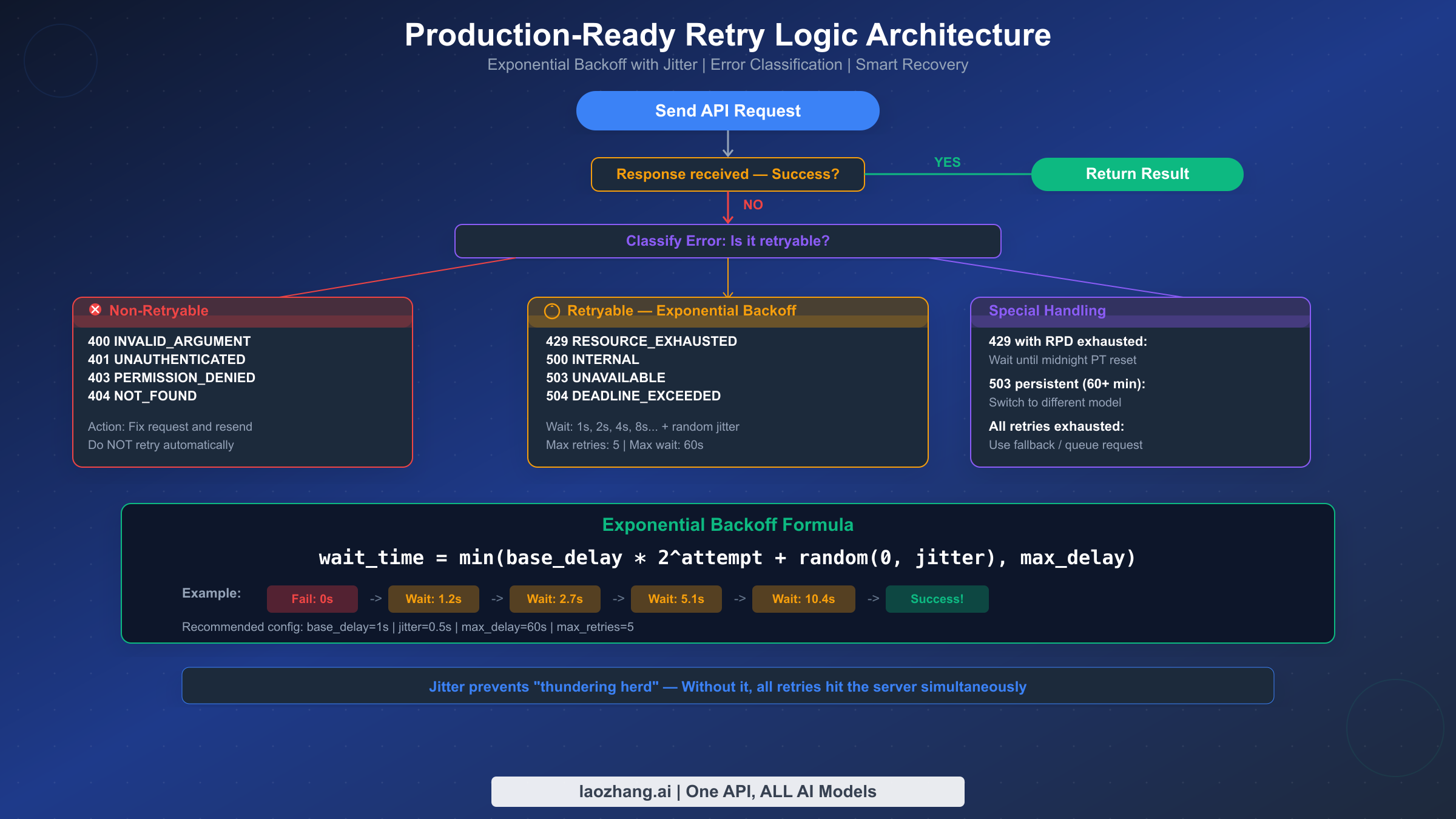
As the diagram shows, errors generally fall into two camps:
- Client-Side Errors (4xx range): This means the request you sent is flawed. The problem is in your code or configuration.
400 Bad Request: You might have sent malformed data or a missing parameter.401 Unauthorized: Your API key is likely invalid, expired, or missing.403 Forbidden: You have a valid key, but you don't have permission to access this specific resource.404 Not Found: You are trying to access an endpoint URL that doesn't exist. You might have a typo in the URL.
- Server-Side & Rate Limit Errors (5xx range, 429): This means the problem is on the API provider's end.
500 Internal Server Error: The server had an unexpected problem.503 Service Unavailable: The server is overloaded or down for maintenance.429 Too Many Requests: You've exceeded the number of allowed requests in a given time frame (e.g., per minute or per day).
This initial diagnosis is critical. If you get a 503 Service Unavailable error, no amount of code fixing will help; you simply need to wait and retry. If you get a 401 Unauthorized error, you know the problem lies with your authentication logic.
Step 2: Generate a High-Fidelity Debugging Prompt
Once you have a hypothesis from the error message, you can engage your AI assistant. A vague prompt will yield a vague, unhelpful answer. A precise, context-rich prompt will lead to a targeted solution.
The following reading provides an excellent playbook for crafting effective prompts, especially for debugging.
The Prompt Engineering Playbook for Programmers
This article by Addy Osmani is a masterclass in programmer-focused prompt engineering. We will focus on the section dedicated to debugging.
Please read the section Prompt patterns for debugging code. Pay close attention to the "poor vs. improved prompt" example. It perfectly demonstrates how providing the code, the exact error, and the intended behavior leads to a dramatically better AI response.
To summarize and expand on these principles, a powerful debugging prompt includes these key ingredients:
- Set the Scene: Briefly state the goal of the code.
- Provide the Code: Paste the exact function or snippet that is failing.
- Provide the Evidence: Paste the full, unaltered error traceback. This is non-negotiable.
- State Expected vs. Actual Behavior: "I expected it to return a pandas DataFrame, but instead it crashed with a
KeyError." - Share What You've Tried: "I already verified my API key is correct." This prevents the AI from suggesting things you've already done.
- Ask a Diagnostic Question: Instead of "Fix it," ask a question that guides the AI's analysis.
This final point is crucial. Here are some powerful diagnostic questions you can ask:
- "Based on the error message, what are three likely hypotheses for what is wrong?"
- "Walk me through this code line-by-line and explain the value of each variable, especially around the line where the error occurs."
- "Can you modify the code to print the raw response from the API before it tries to parse it? This will help me see the actual data structure being returned."
- "Please review the way my code handles authentication and compare it against the provided API documentation snippet for any inconsistencies."
How to Debug with AI: 5 Tips for Better Results - LinkedIn
This short post by Santiago Valdarrama offers five concise, powerful strategies for AI-assisted debugging that align perfectly with our systematic approach.
Read the entire post. Notice how his tips—like asking for hypotheses, asking for a reason, and pasting full error logs—reinforce the principles of crafting a diagnostic prompt.
Step 3: Execute and Iterate
Finally, you apply the AI's suggestion. If it works, great. If not, you haven't failed; you've simply gathered more data. You now have a new piece of information (e.g., the raw JSON response you printed) that you can add to your context in the next prompt, creating an even more informed follow-up question. This iterative refinement is the fastest way to a solution.
Practical Example: Debugging the Data Fetcher
Let's imagine the fetch_historical_data function you generated in the last lesson produces a KeyError: 'candles' when you run it.
-
Step 1: Diagnose. A
KeyErrormeans your code is trying to access a dictionary key that doesn't exist. In this case,response.json()['candles']failed. This tells you the JSON object returned by the API does not contain a top-level key named"candles". This could be because the request failed and the API returned an error message (e.g.,{"status": "error", "message": "Invalid API key"}), or the data key is named something else (e.g.,"data"or"results"). -
Step 2: Generate Prompt. You can now craft a specific prompt to investigate.
Improved Prompt:
"My Python function
fetch_historical_datais failing with aKeyError: 'candles'. It's supposed to fetch data from a Forex API and parse thecandleslist into a DataFrame. The error suggests the API response doesn't have the 'candles' key I'm expecting.Here is my code:
# (Paste your full function code here)Here is the full traceback:
# (Paste the complete error traceback here)Could you please modify the function to do two things?
- Before it tries to access
response.json()['candles'], add a line to print the entire raw text of the response (response.text). This will let me see exactly what the API is sending back.- Add a check to ensure the HTTP status code of the response is 200 (OK) before attempting to parse the JSON. If it's not, it should print an informative error message with the status code and the response text."
- Step 3: Execute. You run the modified code. Now, instead of crashing, it might print
Status Code: 401followed by{"message": "Authentication failed"}. You've successfully used the AI to turn an opaqueKeyErrorinto a clear401 Unauthorizederror. With this new information, you can start a new debugging loop focused on fixing the authentication.
Conclusion
You have now learned how to move beyond simple code generation and engage your AI assistant in a collaborative debugging process. This skill is fundamental to leveraging AI effectively in real-world development, where errors are not an exception but a constant.
Key Takeaways:
- Debugging is a systematic loop: Diagnose the error, craft a specific prompt, and execute the suggested fix.
- Error messages are your guide: Learn to read tracebacks and classify HTTP status codes to form a strong initial hypothesis.
- Context is everything in a debugging prompt: Always provide the code, the full error message, and a specific, diagnostic question.
- Use the AI to investigate: Prompt the AI to add logging, explain code execution, or hypothesize about causes to turn unknown errors into known problems.
With the ability to both generate and debug your data connector, you now have a robust foundation. In our next lesson, we will build upon this by prompting the AI to implement the core trading strategy logic that will analyze the data you are now able to reliably fetch.