Recommended resources
The freely available resources this lesson will direct you to.
Hello! In our last lesson, we explored how to pass pointers to functions to modify their arguments, a technique known as simulating pass-by-reference. You saw how passing the address of an int allowed a swap function to alter the original variables.
Today, we'll apply these powerful pointer concepts to one of C's most common data types: strings. You've already worked with strings as character arrays. Now, you'll learn how to manipulate them directly and efficiently using character pointers (char *). This approach is not just a different way of doing things; it's fundamental to how C's standard library works and is key to writing high-performance code that processes text.
By the end of this lesson, you will be able to use character pointers to traverse, read, and modify strings, solidifying your understanding of the deep relationship between pointers and arrays in C.
1. How Pointers and Strings Connect
Let's start by reinforcing a core concept. In C, a "string" is not a built-in type. It's a convention: a null-terminated character array. This means it's an array of characters where the end is marked by a special null character, '\0'.
This structure makes strings a perfect match for pointers. A pointer of type char * can store the memory address of the first character in the array. Since the characters of a string are stored contiguously in memory, we can then use pointer arithmetic to move from one character to the next.
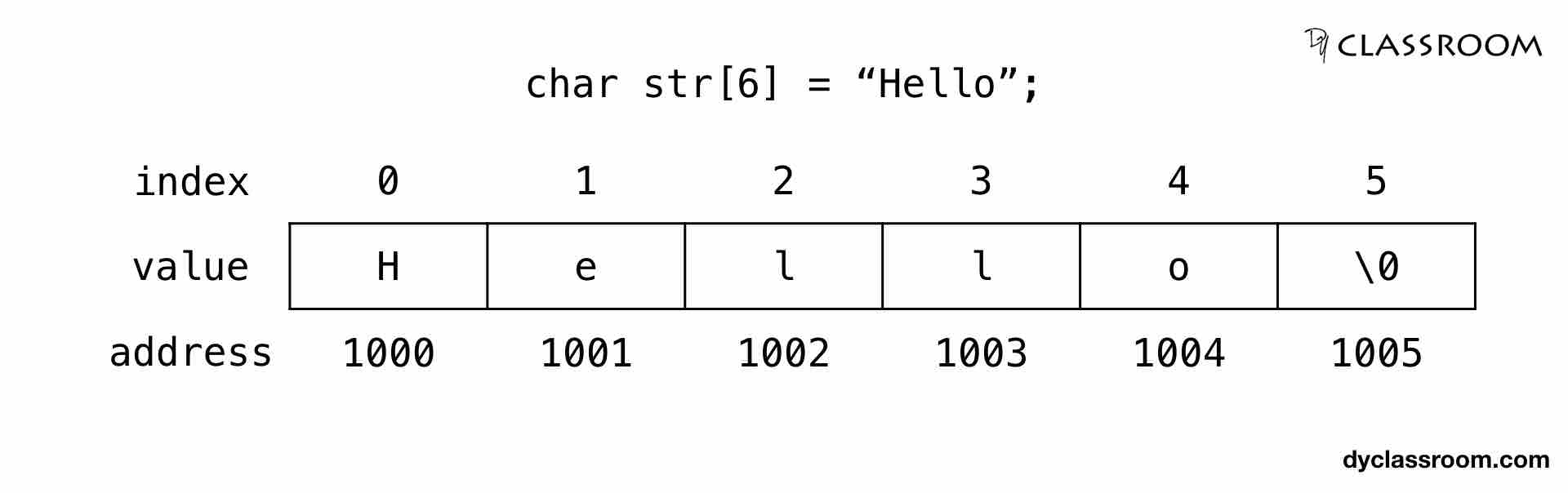
We can create a pointer that "points to" this string.
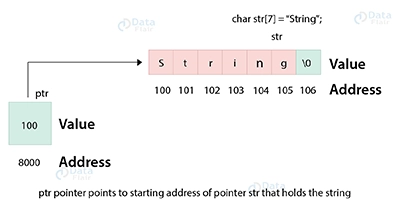
This gives us a powerful way to access the string's content.
2. Traversing a String with a Pointer
The two fundamental pointer operations we've learned—dereferencing (*) and arithmetic (++)—are all we need to iterate through a string.
*p: Dereferences the pointerpto give us thecharvalue at the memory address it's currently pointing to.p++: Increments the pointerpto point to the memory address of the next character in the string.
Let's see this in action. The following video provides a step-by-step guide on how to loop through a string using a pointer.
Iterate Through A String Using A Pointer | C Programming Example
This video from Portfolio Courses, "Iterate Through A String Using A Pointer," will walk you through the entire process, from setting up the pointer to building the loop.
Please watch the following segments: First, get a quick refresher on strings and the null terminator in the introduction. Next, see how to declare a char * pointer and make it point to the beginning of a string in the segment on initializing a pointer. Then, learn how pointer arithmetic (p++) and dereferencing (*p) work together in the section on accessing characters. Finally, see how this is all combined in a while loop to iterate through the string.
The core logic you just saw can be summarized in this common C idiom:
#include <stdio.h>

int main(void) {
    char message[] = "Jump";
    char *p = message; // p points to the first character, 'J'

    // Loop until the pointer p points to the null terminator '\0'
    while (*p != '\0') {
        printf("%c", *p); // Print the character p is pointing to
        p++;              // Move p to point to the next character
    }
    printf("\n"); // Output: Jump

    return 0;
}
A More Concise Loop
As the video also explains, C's boolean logic allows for a more compact loop. The null character '\0' has an integer value of 0. In a while condition, a value of 0 is treated as false, and any non-zero value is true. Since all printable characters have non-zero values, the loop condition while (*p != '\0') can be shortened to just while (*p).
Iterate Through A String Using A Pointer | C Programming Example
Let's revisit the same video to understand this C idiom.
Watch the short segment explaining how the null terminator evaluates to false, which simplifies the loop condition.
This leads to the more common and idiomatic way of writing the loop:
// Idiomatic C loop for string traversal
while (*p) {
    printf("%c", *p++); // The post-increment p++ happens after *p is evaluated
}
This version combines the print and the increment into a single, efficient line.
3. Modifying Strings with Pointers: Reversing a String
Now, let's tackle a more complex task that combines what you've learned about string traversal with the pass-by-reference technique from the previous lesson. We will write a function that reverses a string in place.
The algorithm uses two pointers:
- A
startpointer, initialized to the beginning of the string. - An
endpointer, initialized to the last character of the string (just before the null terminator).
We then loop, swapping the characters pointed to by start and end, and moving the pointers towards each other (start++, end--). The loop stops when the pointers meet or cross in the middle.
This process is a fantastic practical application of pointer manipulation.
Reverse A String Using Pointers | C Programming Example
The video "Reverse A String Using Pointers" by Portfolio Courses provides a complete implementation of this algorithm.
Watch the video from the function signature explanation through the discussion of the loop condition. Pay close attention to these key steps: The reverse_string(char *string) function signature. How two pointers, start and end, are initialized. The loop that finds the end of the string. The swap logic using a temporary variable, which should look very familiar! The while (start < end) condition that controls the main loop.
After watching, try to write the reverse_string function yourself. This is an excellent exercise to test your understanding.
4. A Critical Pitfall: Character Arrays vs. String Literals
When using pointers with strings, there is a crucial distinction you must understand to avoid program crashes.
-
char message[] = "Hello";
This creates a mutable character array on the stack. You are free to change its contents. The variablemessageis the array itself. -
char *message = "Hello";
This creates a pointer to a string literal. String literals are often stored in a read-only section of memory. The variablemessageis a pointer that holds the address of the literal"Hello". Attempting to modify the string through this pointer results in undefined behavior, which usually means a crash.
String Pointer in C: Complete Beginner Guide - upGrad
The "upGrad" article on string pointers has a great section on common mistakes.
Read the section titled "Common Pitfalls to Avoid When Using String Pointers in C". Focus on item #1, "Trying to Modify a String Literal," which explains this exact problem.
Here is a code example illustrating the difference:
#include <stdio.h>

int main(void) {
    // This is an array, stored in writable memory (usually the stack).
    // It is safe to modify.
    char str_array[] = "Writable";
    printf("Original array: %s\n", str_array);
    str_array[0] = 'w'; // OK!
    printf("Modified array: %s\n", str_array);

    // This is a pointer to a string literal, which is often in read-only memory.
    // It is UNSAFE to modify.
    char *str_literal = "Read-Only";
    printf("Original literal: %s\n", str_literal);

    // The following line will likely cause a segmentation fault (crash).
    // str_literal[0] = 'r'; // DANGER: Undefined Behavior!

    return 0;
}
Rule of thumb: If you need to modify a string, declare it as a character array (char name[]). If you only need to read it, using a pointer (const char *name) is efficient and signals your intent. The const keyword tells the compiler that the function promises not to change the string, which is good practice.
Conclusion
In this lesson, you've taken a significant step forward by applying your knowledge of pointers to string manipulation. This is a cornerstone of effective C programming.
Key Takeaways:
- Strings in C are null-terminated character arrays.
- A
char *pointer can be used to efficiently traverse a string by using pointer arithmetic (p++) and dereferencing (*p). - A common loop condition for string traversal is
while (*p), which continues until the pointer reaches the null terminator (\0). - Passing a
char *to a function is the standard, efficient way to work with strings, as it avoids copying the entire string. - You must be careful about the distinction between a mutable character array (
char s[]) and a pointer to an immutable string literal (char *s), as trying to modify a literal leads to undefined behavior.
Preview of the Next Lesson:
So far, we've worked with pointers to fundamental types (int, char) and arrays. But what if you need to group different types of data together—like a student's name, ID, and GPA? In the next lesson, we will introduce structs, which allow you to define your own custom data types. You will then learn how to combine structs with pointers, opening the door to creating powerful and complex dynamic data structures.