Recommended resources
The freely available resources this lesson will direct you to.
Welcome to our next lesson! In our journey so far, we've worked with fundamental data types like int and char, and we've seen how to group items of the same type using arrays and pointers, especially for handling strings. But what happens when we need to represent a single object that has several related properties of different types? For instance, how would you represent a "user" with a name (string), an age (integer), and an active status (maybe another integer)?
This lesson introduces a powerful C feature designed for exactly this purpose: structures, or structs. Structures allow you to create your own custom, composite data types by bundling different variables together under one name. This is a fundamental concept that moves us from working with simple variables to modeling more complex, real-world entities.
By the end of this lesson, you will be able to define your own custom data types using struct and use them to create and manage structured data in your programs.
1. The Need for Custom Data Types
Imagine you're building a program to manage a list of books. Each book has a title, an author, a publication year, and a price. Using what we know so far, you might try this:
char book1_title[] = "The C Programming Language";
char book1_author[] = "Kernighan & Ritchie";
int book1_year = 1978;
float book1_price = 29.99;

char book2_title[] = "Dune";
char book2_author[] = "Frank Herbert";
int book2_year = 1965;
float book2_price = 18.50;
This works, but it's clumsy. The variables for a single book are not logically connected, and managing a large collection would be a nightmare. A struct solves this by letting us define a Book type that holds all this information together.
The following video provides an excellent introduction to this idea using a student example, which is very similar.
struct Basics | C Programming Tutorial
Watch this first part of "struct Basics | C Programming Tutorial" from Portfolio Courses to understand the "why" behind structs.
Focus on the introduction (what is a struct?), where the presenter explains how structs help model real-world concepts like a student, which has multiple pieces of information associated with it.
2. Defining a Struct and Accessing Its Members
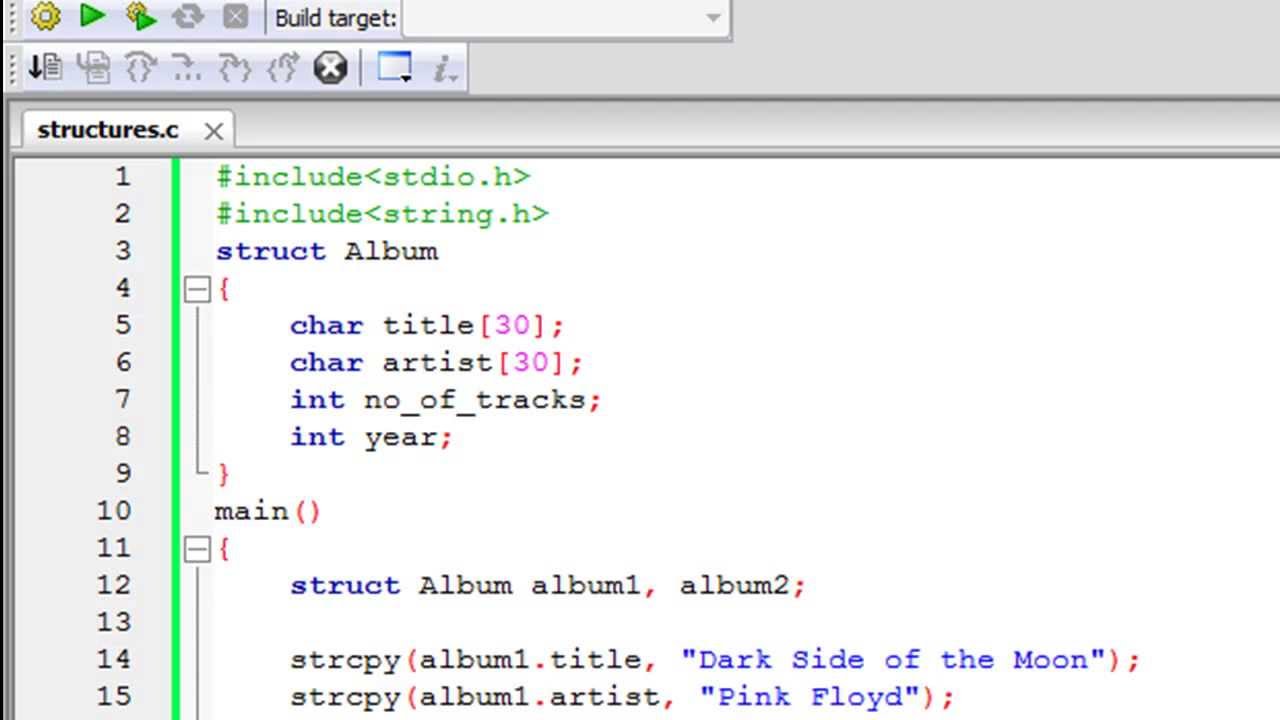
A struct is a template for a new data type. You define it using the struct keyword, followed by a name for your new type, and then a list of its members inside curly braces.
Here’s how we could define a struct for our book example:
// This defines a new type called "struct Book".
// It doesn't create any variables or allocate memory yet.
struct Book {
    char title[100];
    char author[50];
    int year;
    float price;
}; // Don't forget the semicolon at the end!
Once defined, you can create variables (or instances) of this type. To access the individual parts of a struct variable, you use the dot operator (.).
Let's see this in practice. The video you just started explains this process clearly.
struct Basics | C Programming Tutorial
Continue with the "struct Basics" video to learn the syntax for creating and using struct variables.
Watch the segment from accessing members. Pay close attention to: How a struct student variable is declared. How the dot operator (.) is used to assign values to members like age. The use of strcpy() to assign a value to a string member (name), which reinforces what we know about handling strings. How to access members of an array that is itself a member of the struct (e.g., kevin.grades[i]).
As the video demonstrates, you must use strcpy() to assign a value to a string member after the variable has been declared. This is because C arrays do not support the assignment operator (=) for copying.
Here is a complete example using our Book struct:
#include <stdio.h>
#include <string.h>

// Define the Book struct template
struct Book {
    char title[100];
    char author[50];
    int year;
    float price;
};

int main() {
    // Declare a variable of type 'struct Book'
    struct Book book1;

    // Assign values to its members using the dot operator
    // Use strcpy for string members
    strcpy(book1.title, "The C Programming Language");
    strcpy(book1.author, "Kernighan & Ritchie");
    book1.year = 1978;
    book1.price = 29.99;

    // Access and print the members
    printf("Title: %s\n", book1.title);
    printf("Author: %s\n", book1.author);
    printf("Year: %d\n", book1.year);
    printf("Price: $%.2f\n", book1.price);

    return 0;
}
3. Initializing Structs at Declaration
Assigning members one-by-one works, but C provides a more concise way to initialize a struct when you declare it, using a syntax similar to array initialization.
struct Book book2 = {"Dune", "Frank Herbert", 1965, 18.50};
When you use this method:
- The values must be listed in the same order as the members in the
structdefinition. - You can provide string literals directly—no need for
strcpy()!
The video you've been watching also introduces another powerful technique called designated initializers, which allows you to initialize members by name and in any order.
struct Basics | C Programming Tutorial
Let's look at these cleaner initialization methods in the "struct Basics" video.
Watch the section on initialization methods. The video uses a Point struct, but the concepts are universal. Notice both the ordered initialization {5, 10} and the designated initializers {.x = 2, .y = 8}.
Designated initializers are especially useful for large structs, as they make your code more readable by explicitly naming which member is being set.
// Using designated initializers for our Book struct
struct Book book3 = {
    .title = "2001: A Space Odyssey",
    .year = 1968,
    .author = "Arthur C. Clarke"
    // .price is not specified, so it will be zero-initialized.
};
4. Simplifying with typedef
You may have noticed that declaring a struct variable requires you to type struct Book every time. It's a bit verbose. C provides the typedef keyword to create a shorter alias for a data type. It is very commonly used with structs to make code cleaner.
// Define the struct AND create a type alias "Book" for "struct Book"
typedef struct {
    char title[100];
    char author[50];
    int year;
    float price;
} Book;

int main() {
    // Now we can just use "Book" instead of "struct Book"
    Book my_book;
    strcpy(my_book.title, "A Brief History of Time");
    // ...
    return 0;
}
This pattern is so common that you will see it in most professional C code.
struct Basics | C Programming Tutorial
The "struct Basics" video also has a quick and clear explanation of this practice.
Watch the segment on using typedef to see how it simplifies struct declarations.
Your Turn: A Practical Exercise
Now it's time to put this into practice.
- Open your C development environment.
- Define a
structnamedRectanglethat has twofloatmembers:widthandheight. Usetypedefto create an aliasRectangle. - In your
mainfunction, declare aRectanglevariable namedrect. - Initialize
rectwith a width of5.5and a height of10.0using the direct initialization method ({...}). - Calculate the area of the rectangle by multiplying its width and height. Store this in a
floatvariable calledarea. - Print the width, height, and calculated area of the rectangle to the console.
Feel free to experiment with both direct and designated initializers.
Conclusion
In this lesson, you've learned how to create your own custom data types with struct. This is a significant leap forward, allowing you to organize complex data in a logical and manageable way.
Key Takeaways:
- A
structis a user-defined data type that groups related variables (members) of different types. - You define a
structwith thestructkeyword, and create instances (variables) of it. - The dot operator (
.) is used to access the members of astructvariable. strcpy()must be used to assign values to string members after declaration, but string literals can be used for initialization at declaration time.structscan be initialized concisely using curly braces{}at declaration.typedefis a common and useful tool for creating a simpler alias for astructtype, improving code readability.
Preview of the Next Lesson:
We've now worked with struct variables directly. But the real power of structs is unlocked when they are combined with pointers. In the next lesson, we will explore how to create pointers to structs. You'll learn about a special new operator—the arrow operator (->)—and see how pointers to structs are essential for dynamic memory allocation and building the advanced data structures that are central to algorithm design.