Recommended resources
The freely available resources this lesson will direct you to.
Hello! Last lesson, you stored calculations and comparisons in typed bindings. For example, processed < request_limit produced a Boolean that could be bound to within_targets. This lesson looks more closely at that idea: which pieces of Rust code produce values, and which perform an action without producing a value you can use? The distinction explains both how to initialize a binding from a block and why a single semicolon can change what a function returns. Allow about 35–40 minutes, including the short video and time to run the code.
A statement can contain an expression
An expression evaluates to a value. The literal 75, the calculation 20 + 25, and the comparison 75 < 100 are all expressions. A statement is an instruction that does not itself supply a value for another expression to use. A let binding is a statement:
let processed = 20 + 25;
Here, 20 + 25 is an expression whose value initializes processed; the whole line is a let statement. This nesting matters. Rust cannot use a let statement as though it were a value:
// Does not compile:
let result = (let processed = 45);
Read the official Rust Programming Language book’s explanation before going further.
Functions - The Rust Programming Language
The official Rust book introduces statements and expressions using small examples, including a block whose value initializes a binding.
In “Statements and Expressions,” begin at the paragraph starting “Function bodies are made up of a series of statements optionally ending in an expression.” Read through the block example, ending just before “Functions with Return Values.” Focus on why let y = 6; is a statement even though 6 is an expression, and on the semicolon after x + 1 in the block example.
Calling a function is also an expression because the call has a result. That result might be useful data, or it might be the unit value, written (), when there is no useful value to return. For example, you have used println! on its own line for its printing effect, not to obtain a number from it.
A block can supply a value
Braces do more than group code. A block can contain statements and then finish with an expression. The value of that final, tail expression becomes the value of the block:
let processed = {
    let first_hour = 20;
    let second_hour = 25;
    first_hour + second_hour
};
The block evaluates to 45, so processed is bound to 45. Notice the two different semicolons: the bindings inside the block end with semicolons, while first_hour + second_hour has none. The semicolon after } ends the outer let statement; it does not discard the value before processed receives it. The two hourly bindings are local to the block and cannot be used afterward.
Watch a short demonstration of that exact distinction.
Rust Tutorial #8 - Functions, Expressions & Statements
In “Rust Tutorial #8 - Functions, Expressions & Statements,” Tech With Tim builds a block that initializes a variable, then adds a semicolon to its final calculation to show what changes.
Watch the block demonstration. Track the boundary between the let statement surrounding the block and the expression at the block’s end. When the final calculation gains a semicolon, focus on why the block no longer supplies the number the program expected.
A useful precision: adding that inner semicolon does not make the calculation cease to contain an expression. It makes first_hour + second_hour; an expression statement that discards the calculation’s value. With no remaining tail expression, the block evaluates to ():
// Does not compile: the block produces (), not i32.
let processed: i32 = {
    let first_hour = 20;
    let second_hour = 25;
    first_hour + second_hour;
};
The type annotation makes the conflict visible: processed requires an i32, but the block supplies ().
A function body uses the same rule
A function body is a block, so its final expression can supply the function’s return value. First, read the book’s function example and its deliberate semicolon error.
Functions - The Rust Programming Language
Continue the official Rust book to connect block values with function return values and compiler diagnostics.
In “Functions with Return Values,” start at “Functions can return values to the code that calls them.” Read through the plus_one error at the end of that subsection. Compare x + 1 with x + 1;, and notice the compiler’s “expected i32, found ()” message.
For now, read -> u32 as a promise that a function will return a u32; the next lesson will examine function signatures in detail. This function fulfills that promise with its tail expression:
fn add_counts(first: u32, second: u32) -> u32 {
    let sum = first + second;
    sum
}
first + second initializes sum. Then the final sum, without a semicolon, supplies the function’s result. A call to add_counts(20, 25) is itself an expression with the value 45, so it can initialize another binding.
There is also an explicit form, return sum;. The image shows it in an add function: the caller binds the returned result of add(3, 5).
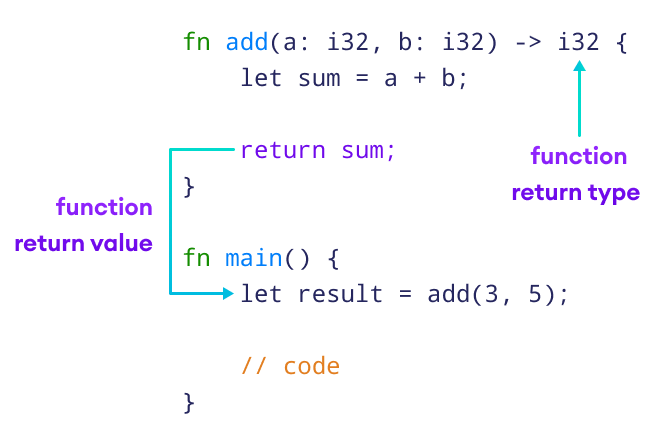
For a result at the end of a function, the tail-expression form is usually simpler. return is particularly useful when a function must finish before reaching its end; you will see that use alongside conditional behavior in a later lesson. Crucially, return sum; and a bare sum both return the value here, whereas sum; alone discards it.
See both kinds of value flow in one program
Replace src/main.rs in your Cargo project with the following:
fn add_counts(first: u32, second: u32) -> u32 {
    let sum = first + second;
    sum
}

fn main() {
    let earlier = {
        let first_hour = 20u32;
        let second_hour = 25u32;
        first_hour + second_hour
    };

    let processed = add_counts(earlier, 30);
    let under_limit = processed < 100;

    println!("processed: {processed}; under limit: {under_limit}");
}
Run cargo check, then cargo run. The output should report processed: 75; under limit: true. Follow the values through the program: a block supplies 45 to earlier; the function call supplies 75 to processed; a comparison supplies true to under_limit. Each of those expressions appears inside a let statement.
To inspect a common mistake, temporarily change the final sum in add_counts to sum; and run cargo check again. The function still promises a u32, but its body now ends without a value-producing tail, so the compiler reports a mismatch involving (). Remove the semicolon to restore the program. This is a useful diagnostic habit: when a return-type error mentions (), inspect the final expression of the relevant block.
What to carry forward
Expressions produce values; let statements bind values but are not themselves values. A block can supply its final expression’s value to an assignment, and a function body can supply its final expression’s value to its caller. A semicolon on that final expression discards its value, leaving the block with () instead.
Next, you’ll work directly with functions: typed parameters, declared return types, calls, and the choice between a final expression and an explicit return.