Recommended resources
The freely available resources this lesson will direct you to.
Hello! In the previous lesson, you used let and let mut to create bindings, and saw that Rust can infer a type without making it changeable. Now you’ll put values of several types into a small program. The goal is to know what each type can represent, how to group values, and which operations Rust will—and will not—accept. Allow about 40 minutes, including time to run the example.
Numbers: representation affects behavior
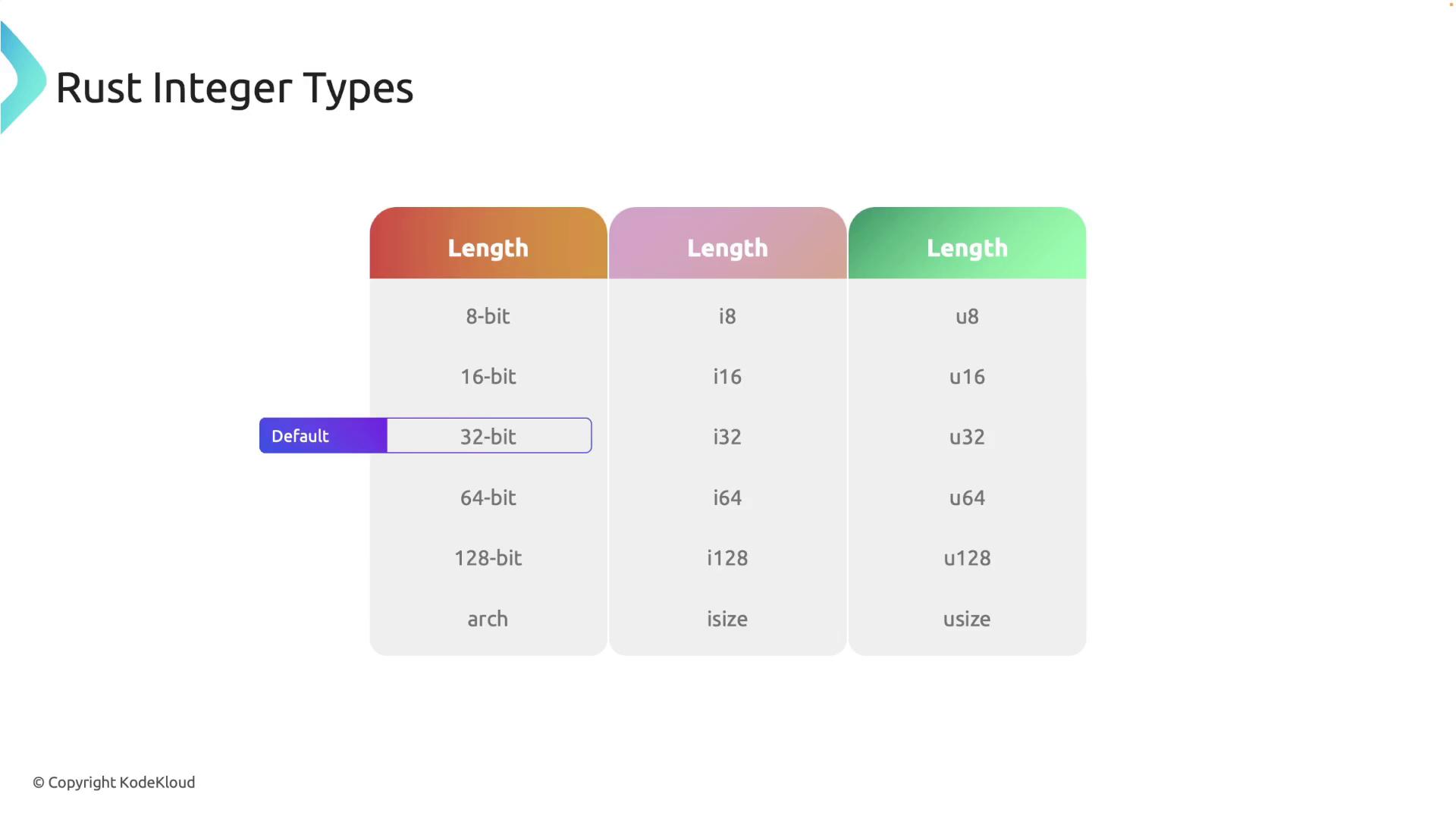
Rust’s integer types have two choices built into their names: signed or unsigned, and bit width. An i32 can represent negative values; a u32 cannot. Both use 32 bits. Other fixed widths include 8, 16, 64, and 128 bits. The isize and usize widths depend on the machine’s architecture; usize is commonly used for collection indexes.
Continue with Rust Course for Beginners – Lesson 3 – Basic Data Types by Federico Terzi. The integer and floating-point demonstrations show why choosing a numeric type is more than choosing a label.
Rust Course for Beginners - Lesson 3 - Basic Data Types - Tutorial Rust lang - Rustlang
Watch the integer and floating-point portions for their type declarations and arithmetic examples.
Watch integer types for signedness, widths, and explicit conversion, then floating-point types for f32, f64, and operations involving different types. The portions overlap slightly; watching straight through is fine.
If nothing else constrains it, an integer literal such as 5 defaults to i32. An annotation can select another type, as can a suffix:
let balance_change: i32 = -5;
let request_count: u32 = 75;
let byte_count = 255u8;
let position: usize = 1;
Width determines range. A u8 holds 0 through 255, whereas an i8 holds −128 through 127. That makes the type part of a program’s correctness: a count that might exceed 255 should not be stored in a u8 merely because today’s example is small.
The official Rust Programming Language book explains what happens when arithmetic exceeds an integer type’s range.
Data Types - The Rust Programming Language
Read the book’s explanation of integer overflow to understand why a successful type check does not guarantee every arithmetic result fits.
In Scalar Types → Integer Types → Integer Overflow, find the u8 example that begins with a value range of 0 to 255. Read the overflow explanation, stopping after its examples of wrapping. Focus on the distinction between a debug build’s runtime check and a release build’s behavior.
In an ordinary debug build, overflowing integer arithmetic panics at runtime; a release build normally wraps instead. Neither behavior is a reason to assume an undersized type will be safe for your data.
Rust has two floating-point types, f32 and f64; an unconstrained literal such as 12.5 defaults to f64. Use floating point for measurements where approximation is acceptable. For exact monetary quantities, integer minor units are generally a better starting representation than f64.
Arithmetic follows the operand types. Integer division discards the fractional part and truncates toward zero: -5 / 3 evaluates to -1. Rust also does not silently mix an integer variable with a floating-point variable. When a conversion is appropriate, make it explicit:
let completed: u32 = 75;
let total: u32 = 100;
let fraction: f64 = completed as f64 / total as f64; // 0.75
An as conversion deserves thought: converting to a lower-precision type can lose information. Here, converting the counts to f64 lets the division retain a fractional result.
Booleans and characters
The remaining scalar types answer different questions. A bool is either true or false; comparisons produce Boolean values that you can store without using an if yet. A char represents one Unicode scalar value and uses single quotes.
Rust Course for Beginners - Lesson 3 - Basic Data Types - Tutorial Rust lang - Rustlang
Continue the same video for its Boolean and character examples.
Watch bool and char. Notice the single quotes around a char and the explanation that Rust’s char is not an ASCII byte.
For example:
let under_limit: bool = completed < total;
let marker: char = '✓';
'✓' is a char; "✓" is a string literal, a different kind of value. A Rust char occupies four bytes and can represent far more than ASCII, but it does not necessarily correspond to everything a reader perceives as one visible character. We’ll deal with strings in detail later.
Group values with tuples and arrays
A tuple holds a fixed number of values, and its positions may have different types. An array also has a fixed length, but all its elements have the same type. That difference is useful: a snapshot containing a count, a measurement, and a status is naturally a tuple; three hourly counts are naturally an array.
Rust Course for Beginners - Lesson 3 - Basic Data Types - Tutorial Rust lang - Rustlang
Finish the video with its tuple and array demonstrations.
Watch tuples for grouping, destructuring, and debug printing. Then watch arrays for fixed lengths and indexing. Pay particular attention to the out-of-bounds example: an index whose value is known only at runtime is still checked when the program runs.
Here the types are written out so you can see what Rust would otherwise infer:
let snapshot: (u32, f64, bool) = (75, 12.5, true);
let count = snapshot.0; // Tuple positions start at 0.
let (processed, latency, within_target) = snapshot; // Destructuring.

let hourly: [u32; 3] = [20, 25, 30];
let second_hour = hourly[1]; // Array indexes also start at 0.
In (u32, f64, bool), each position has its own type. In [u32; 3], the 3 is part of the array type: it says there are exactly three u32 elements. You can also initialize repeated values with syntax such as [0u32; 3].
An array’s length cannot change, but its elements can be reassigned if the binding is mutable:
let mut hourly: [u32; 3] = [20, 24, 30];
hourly[1] = 25;
Indexing must stay within the array. In the book’s array discussion, read the explanation beneath its example of an index supplied at runtime; you do not need to study the input-reading code yet.
Data Types - The Rust Programming Language
Read the book’s account of what happens when an array index is out of bounds.
In Compound Types → The Array Type → Invalid Array Element Access, move past the input-reading example and the displayed panic message. Read the safety explanation. Focus on why an index known only when the program runs requires a runtime check.
If an index is visibly invalid at compile time, Rust may reject the program then. If its value is known only at runtime, an out-of-bounds access panics instead of reading unrelated memory.
Put all six types into one program
Replace src/main.rs in your Cargo project with this small request snapshot. It uses an integer array for hourly counts, floating point for a measured latency and a fraction, a Boolean for a combined status, and a character for a display marker.
fn main() {
    let mut per_hour: [u32; 3] = [20, 24, 30];
    per_hour[1] = 25;

    let processed: u32 = per_hour[0] + per_hour[1] + per_hour[2];
    let request_limit: u32 = 100;
    let fraction: f64 = processed as f64 / request_limit as f64;

    let average_latency_ms: f64 = 12.5;
    let within_targets: bool =
        processed < request_limit && average_latency_ms < 20.0;
    let marker: char = '✓';

    let snapshot: (u32, f64, bool, char) =
        (processed, average_latency_ms, within_targets, marker);

    println!("count from tuple: {}", snapshot.0);

    let (count, latency, on_target, symbol) = snapshot;
    println!("{count} requests; {latency} ms; within targets: {on_target}; {symbol}");
    println!("hourly counts: {per_hour:?}; second hour: {}", per_hour[1]);
    println!("fraction of limit used: {fraction}");
}
Run cargo check, then cargo run. The hourly counts total 75, so the fraction is 0.75 and within_targets is true. The :? in {per_hour:?} requests debug formatting for the whole array; the other placeholders print individual values.
There are two separate boundaries to notice. The compiler checks that each array element and tuple position has the required type. An array index whose value is determined while the program runs is additionally checked against the array’s length at runtime.
Where this leaves you
You can now choose integer and floating-point types deliberately; store comparisons as Booleans; distinguish a Unicode char from a string; and use a tuple for mixed values or an array for a fixed-length sequence of one type. Numeric width, integer division, and array bounds all affect what a small program actually does—not just how its declarations look.
Next, you’ll examine statements and expressions. You’ve already used expressions such as processed < request_limit to produce values; the next lesson will make that distinction explicit and show how expression values participate in assignments and returns.