Recommended resources
The freely available resources this lesson will direct you to.
Hello! Welcome back to our capstone module on building a reusable AI project template.
In our previous lessons, we've systematically constructed the core components of our template:
- The "brain" (
CLAUDE.md) that provides project context. - The "hands" (slash commands) for scaffolding new features.
- The "reflexes" (hooks) for automated quality control.
Today, we'll address another critical aspect of any application template: database schema management. Our goal is to use Claude Code to take a set of requirements and generate a complete database schema, the necessary Alembic migration scripts to apply it, and the seed data to populate it for development.
By the end of this lesson, you will have mastered a repeatable, AI-assisted workflow for evolving your database schema, a fundamental skill for rapidly developing and maintaining your full-stack projects.
The Role of Migrations in Your FastAPI Project
Before we dive in, let's situate today's topic within our project's architecture. As a developer using FastAPI and a relational database like PostgreSQL, you're familiar with the separation of concerns between your API logic and your data layer. Tools like SQLAlchemy (as the ORM) and Alembic (for migrations) are the bridges between these layers.
This diagram illustrates the relationship perfectly:
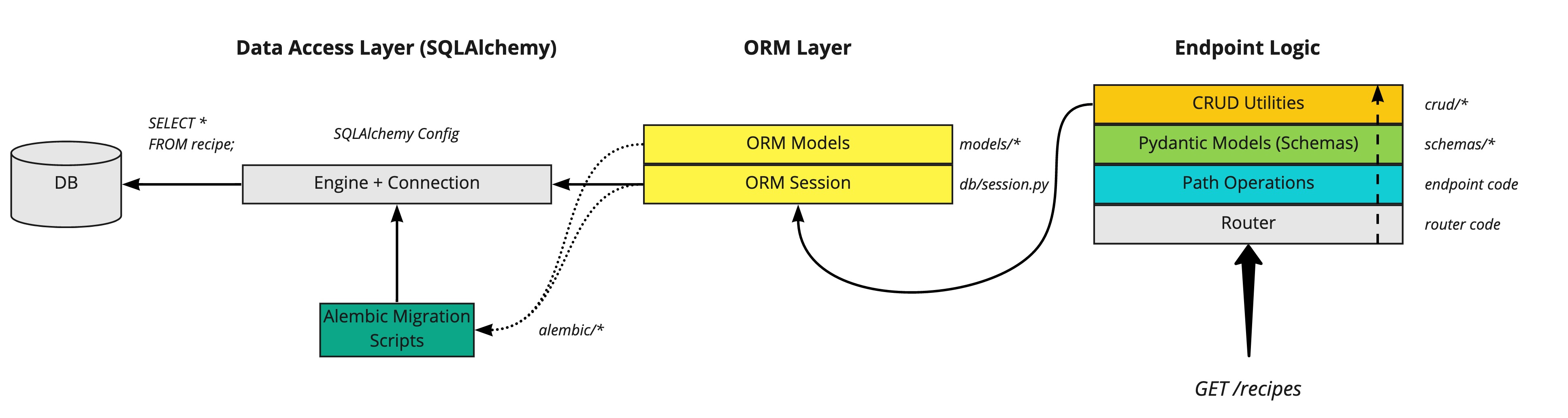
Our focus today is on automating the creation and management of those Alembic Migration Scripts and the underlying ORM Models using Claude Code.
Step 1: From Requirements to SQLAlchemy Models
The first step in any database design is translating product requirements into a data model. Instead of writing the SQLAlchemy models by hand, we can delegate this task to Claude.
A best practice, which we touched on in a previous lesson, is to maintain project documentation that Claude can reference. Rather than cluttering the root CLAUDE.md, we can create a dedicated file for database specifications.
Let's assume we have a file docs/DATABASE_SCHEMA.md with the following requirements for our project management application:
# Database Schema Requirements


## User Model
- `id`: UUID, primary key
- `email`: String, unique, indexed
- `hashed_password`: String
- `created_at`: Datetime, with timezone


## Project Model
- `id`: UUID, primary key
- `name`: String
- `description`: Text
- `owner_id`: UUID, foreign key to `users.id`
- `created_at`: Datetime, with timezone


## Relationships
- A User can own multiple Projects (one-to-many).
With this context available, we can prompt Claude to generate the corresponding Python code.
Your Prompt to Claude:
Based on the requirements in
@docs/DATABASE_SCHEMA.md, generate the SQLAlchemy ORM models in@backend/app/models/using our project's conventions (e.g., aBasemodel, UUID primary keys). Create separate files foruser.pyandproject.pyand update__init__.pyto expose the models.
Claude will then generate the necessary Python files, defining the tables, columns, and relationships as specified. This is where your CLAUDE.md's instructions on coding standards and file structure pay off, as Claude will adhere to them automatically.
Step 2: Generating Alembic Migration Scripts
Once the SQLAlchemy models—our desired state—are defined in the code, we need to generate a migration script that translates these definitions into SQL DDL statements. This is where Alembic's autogenerate feature comes in.
The workflow is straightforward and can be directed by you, with Claude executing the commands.
- Tell Claude to generate a revision:
"Now that the new models are in place, generate an Alembic migration. The command is
alembic revision --autogenerate -m 'Initial database schema'." - Review the output: Claude will run the command and a new migration file will appear in your
backend/alembic/versions/directory. This file containsupgrade()anddowngrade()functions. It is crucial to review this file.autogenerateis powerful but not infallible; it sometimes misses complex constraints or data type changes. - Apply the migration:
"The migration script looks good. Apply it to the development database by running
alembic upgrade head."
To see this process in action from start to finish, the following video provides a complete demonstration of using Claude Code to build a FastAPI project, including the database migration phase.
Build a PROFESSIONAL FastAPI project ONLY using Claude Code
The video 'Build a PROFESSIONAL FastAPI project ONLY using Claude Code' by Eric Roby demonstrates the end-to-end process. We'll focus on the part where Claude plans and executes the database setup.
Watch the segment from 09:01 to 16:34. Pay close attention to how Claude first generates a multi-phase plan, and then specifically executes Phase 3, which involves setting up SQLAlchemy models and Alembic migrations. This is a real-world demonstration of the workflow we're discussing.
Step 3: A Structured Workflow for Schema Changes
The real power comes from having a repeatable process for every subsequent schema change. Drawing inspiration from professional DevOps practices, we can define a clear, step-by-step workflow.
While tools like Atlas formalize this, we can adopt the same mental model for our Alembic-based workflow:
- Define Change: Clearly state the new requirement (e.g., "Add a
statuscolumn to theprojectstable"). - Update Source of Truth: Prompt Claude to edit the relevant SQLAlchemy model file (e.g.,
backend/app/models/project.py) to add the new column. - Generate Migration: Instruct Claude to run
alembic revision --autogenerate -m "Add status to projects". - Lint & Review: Open the newly generated migration file and review the
upgrade()anddowngrade()functions for correctness. - Apply Migration: Instruct Claude to run
alembic upgrade head.
This structured process, where you direct the strategy and Claude handles the execution, is the essence of advanced AI-assisted development. You're not just asking for code; you're orchestrating a professional engineering workflow.
For a deeper dive into codifying such workflows, the guide on integrating Atlas with Claude Code is an excellent read. Even though we are using Alembic, the principles for teaching an AI about database workflows are universal.
Claude Code with Atlas | Atlas Guides
The 'Claude Code with Atlas' guide shows how to teach an AI about database management using skills and structured workflows. The concepts are directly transferable to our Alembic setup.
Read 'Option 2: Agent Skill (Recommended)' and the 'Workflows' subsections within it. Focus on the 'Example' flow and the 'Standard Workflow' list. Notice how it breaks down a complex task into a series of simple, verifiable CLI commands. This is the pattern we want to replicate.
Step 4: Generating Seed Data
An empty database isn't very useful for development. The final step is to populate our new schema with realistic sample data. This is another task where Claude can be a massive time-saver.
We can create a dedicated script for this, for instance, backend/scripts/seed.py.
Your Prompt to Claude:
Create a script at
@backend/scripts/seed.pythat populates the database with sample data.
- It should use our existing SQLAlchemy session factory to interact with the database.
- Use the
fakerlibrary to generate realistic data.- Create 3 users.
- For each user, create 5 projects.
- Make the script runnable from the command line.
Claude will generate the script, including the logic for creating and committing the objects in the correct order to satisfy foreign key constraints. You can then run this script anytime you need to reset your development database to a known state.
Your Turn: Putting It All Together
Now, let's apply this entire workflow to add a new feature to our project template.
Your Goal: Add a "Tasks" feature to the application.
Requirements:
- A
taskstable is needed. - It should have the following fields:
id(UUID),title(String),description(Text),status(String, e.g., 'todo', 'in_progress', 'done'), andproject_id(a foreign key to theprojectstable). - A Project can have many Tasks.
Follow this workflow using Claude Code:
- Update Models: Prompt Claude to create a new
Taskmodel inbackend/app/models/task.pyand add thetasksrelationship to theProjectmodel. Don't forget to update the__init__.pyfiles. - Generate Migration: Instruct Claude to generate the Alembic migration for this change. Give it a descriptive message like "Add tasks table".
- Review: Open the generated migration file and verify its contents.
- Update Seed Data: Prompt Claude to modify the
seed.pyscript to also create 5-10 sample tasks for each project it generates. - Apply (Optional): If your development database is running, ask Claude to apply the migration with
alembic upgrade headand then run the seed script to see the results.
This exercise consolidates everything we've covered, taking you from a high-level requirement to a fully migrated and populated database schema.
Conclusion
You have now integrated a robust, AI-assisted database management workflow into your project template. This is a significant step, as it automates one of the most common and error-prone aspects of backend development.
Key Takeaways:
- Structured Workflow is King: Follow a clear process (Define -> Update Models -> Generate Migration -> Review -> Seed) for all database changes.
- Claude as the Executor: Use your expertise to direct the workflow, and leverage Claude's speed to execute the individual steps like writing models, running commands, and generating scripts.
- Review is Non-Negotiable: Always review AI-generated code, especially critical pieces like database migration scripts.
- Context is Key: A well-documented schema (
docs/DATABASE_SCHEMA.md) and a properly configuredCLAUDE.mdhelps Claude generate code that is consistent with your project's standards.
Next Up:
This was the final implementation-heavy lesson for our capstone project. In our next and final lesson, we will put the finishing touches on our work: "Package the template components (CLAUDE.md, commands, hooks, boilerplate code) into a version-controlled repository for bootstrapping new projects." We'll organize everything you've built into a clean, reusable, and shareable GitHub template.